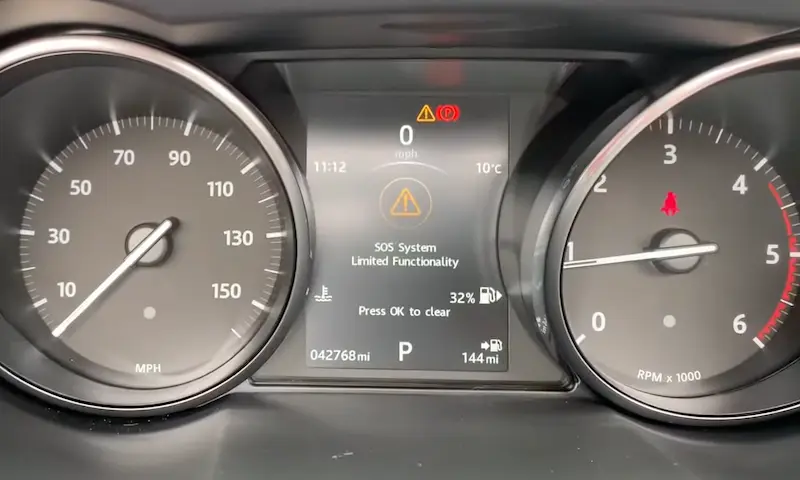
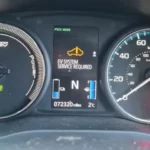
Is your Range Rover displaying the frustrating “SOS System Limited Functionality” warning? You’re dealing with one of the most common issues affecting modern Range Rover models. This warning isn’t just an annoying dashboard light—it indicates a potential problem with a critical safety system. Let’s dive into what’s causing this issue and how you can fix it without breaking the bank.
What Is the Range Rover SOS System?
The SOS system in your Range Rover is a sophisticated emergency response feature designed to keep you safe in crisis situations. It works in two ways:
- Automatic activation: Detects serious collisions and automatically calls emergency services
- Manual activation: Press the SOS button in your overhead console during an emergency
When functioning properly, this system sends your vehicle’s location and critical data to emergency responders while establishing a two-way communication channel. What makes this system unique is that it operates independently using its own SIM card and backup battery, ensuring it works even if your main vehicle battery fails.
Why You’re Seeing “SOS Limited Functionality” Warnings
In about 90% of cases, this warning appears for one simple reason: a failed backup battery in the Telematics Control Unit (TCU). These small lithium batteries typically last 5-8 years before they need replacement.
Why do these batteries fail? Several reasons:
- Infrequent driving: If you mostly make short trips or leave your vehicle sitting for weeks, the battery management system prioritizes charging your main 12V battery over auxiliary systems
- Age-related degradation: Even rechargeable lithium batteries have a limited lifespan
- Poor charging cycles: Insufficient charging during normal operation
The warning often appears intermittently at first, especially in warmer weather when the failing battery temporarily recovers some capacity.
Locating Your TCU Module (It’s Different For Every Model)
Before you can fix the problem, you need to find the TCU module—and this is where it gets tricky. Land Rover has placed this component in wildly different locations depending on your specific model and year:
| Range Rover Model | TCU Location | Difficulty to Access |
|---|---|---|
| Range Rover Sport 2014-2016 | Below steering wheel on dash support bar | Moderate |
| Range Rover Sport 2017+ | Behind left rear door panel | Difficult |
| Range Rover Evoque | Behind rear seat base or right boot panel | Difficult |
| Full-size Range Rover L405 | Behind left C-pillar lower section | Difficult |
| Discovery Sport | Behind rear seat or in boot area | Moderate |
This variation makes DIY repair challenging but not impossible if you’re determined.
DIY Repair: Step-by-Step Battery Replacement
If you’re handy with basic tools and want to save several hundred dollars, here’s how to tackle this repair yourself:
1. Gather Your Tools and Parts
You’ll need:
- New TCU battery (JLR part number LR089861 in most cases)
- Basic screwdrivers (Phillips and flathead)
- Trim removal tools if accessing interior panels
- Work gloves and safety glasses
2. Locate and Access Your TCU
Using the location guide above, remove the appropriate panels or trim pieces to reach your TCU module. This may require:
- Removing carpet sections
- Taking out seat bases
- Removing dashboard panels
Take your time here—rushing can lead to broken trim clips or scratched panels.
3. Remove the TCU Unit
Once you’ve located the TCU:
- Remove the two screws securing it to the vehicle
- Carefully disconnect any electrical connections
- Gently pull the unit free from its mounting position
4. Replace the Battery
The TCU uses special lithium batteries available from Land Rover parts departments:
- Use a small flathead screwdriver to carefully remove the old battery
- Install the new battery ensuring proper polarity
- Close up the TCU unit
5. Critical Step: System Reset
This is where many DIYers go wrong. Simply replacing the battery is often not enough—you need to reset the system:
- For some models, press and hold the SOS button until the flashing pattern changes
- Many vehicles require a system reset using professional JLR diagnostic software
6. Reinstall Everything
Once the battery is replaced and system reset (if possible):
- Reconnect all electrical connections
- Secure the TCU back in its mounting position
- Reinstall all panels and trim pieces you removed
Professional vs. DIY Repair: Cost Comparison
Before deciding whether to tackle this yourself, consider the costs:
| Repair Approach | Parts Cost | Labor Cost | Total Cost | Time Required |
|---|---|---|---|---|
| Dealership Service | $100-150 | $300-450 | $400-600 | 1-3 days |
| Independent Specialist | $100-150 | $200-300 | $300-450 | 1-2 days |
| DIY Repair | $60-100 | $0 | $60-100 | 30-90 minutes |
The DIY approach clearly saves money, but remember that professional service includes proper diagnostic reset using the manufacturer’s software.
Potential Complications to Be Aware Of
While battery replacement often resolves the issue, be aware of these potential complications:
Warning Light Persists After Battery Replacement
If the warning continues after battery replacement, you likely need a professional diagnostic reset using JLR software. The system needs to recognize the new battery and reset various fault codes.
Multiple Fault Codes
In some cases, the SOS limited functionality warning may be accompanied by other errors. This could indicate a more complex issue involving the cellular module, antenna, or wiring harness.
Warranty Considerations
If your Range Rover is still under warranty, attempting DIY repair could potentially affect your coverage. Always check your warranty terms before proceeding.
Real-World Success Stories
Many Range Rover owners have successfully resolved this issue themselves. One Range Rover Sport owner reported: “After struggling with intermittent SOS warnings for months, I finally replaced the TCU battery myself. Total cost was under $75 and took about 20 minutes once I found the module. The warning disappeared immediately.”
Another Evoque owner shared: “Dealer wanted £400 for this repair. I did it myself for £60 and haven’t seen the warning in six months.”
Important Safety Considerations
Remember that this system exists for your safety. While the warning might seem like just another annoying dashboard light, a non-functioning SOS system means your vehicle can’t automatically call for help in a serious accident.
If you’re not confident in your ability to properly repair this system, investing in professional service is worth considering—especially if you regularly travel in remote areas where emergency assistance might be critical.
The Future of Range Rover Emergency Systems
Land Rover continues to evolve their emergency response systems. Newer models feature more integrated telematics systems with improved reliability and additional features like theft tracking and remote diagnostics. However, these systems still rely on backup batteries that will eventually require replacement.
For 2023 models and beyond, Land Rover has improved battery management to reduce premature failure, but owners of these vehicles should still expect to address this issue eventually—likely after 6-8 years of ownership.
By understanding what causes the “SOS System Limited Functionality” warning and knowing how to address it, you can maintain this important safety feature without unnecessary dealer expenses. Whether you choose the DIY approach or professional service, addressing this issue promptly ensures your Range Rover’s emergency systems remain ready when you might need them most.