That “Service Required” message popping up on your Kia dash? It’s not a crisis. But ignoring it can cost you. This guide breaks down what the message means, why it shows up, and exactly how to clear it on any Kia model. Stick around—there’s even a warranty tip at the end that could save you thousands.
What the Kia Service Required Message Actually Means
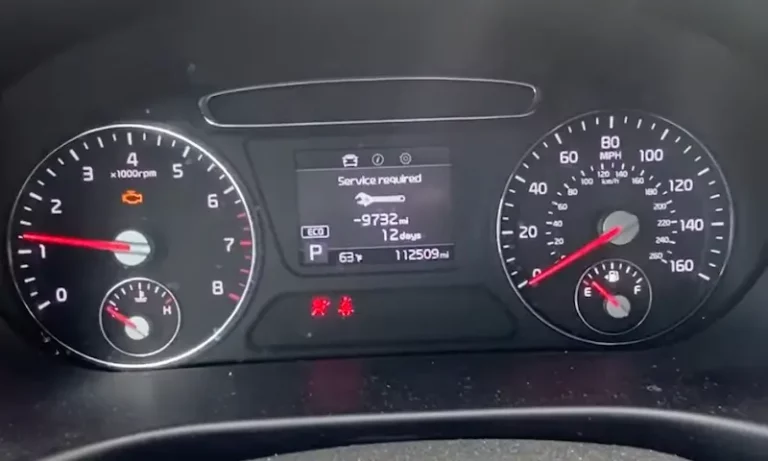
The Kia Service Required message is a reminder, not an alarm. Think of it as a digital sticky note from your car.
Your Kia tracks two things: how many miles you’ve driven and how many days have passed. When either hits a preset target, the message pops up. That’s it. It’s telling you regular maintenance is due—usually an oil change or tire rotation.
Here’s the key thing to remember. This is not the same as your check engine light. The check engine light flags an actual fault detected by your car’s diagnostic system. The Service Required message just means your calendar or odometer hit a milestone. No mechanical failure. No safety hazard. Just a nudge.
How the Reminder System Works
Your Kia’s service interval system pulls data straight from the engine control module. It runs in two stages.
First, you get a heads-up. When you’re within 900 miles (1,500 km) or 30 days of the target, the cluster flashes a quick “Service in” message when you turn the ignition on. It only shows for a few seconds.
Then comes the real reminder. Cross the threshold without resetting, and the display switches to a steady “Service required” warning. Keep ignoring it? The system starts showing negative mileage—the exact distance you’re overdue. That’s an electronic record nobody wants on file.
Why Your Message Might Be Wrong
This whole system runs on a steady trickle of power from your 12-volt battery. Cut that power, and things get messy.
If your battery dies completely or a tech disconnects the cable during repairs, the trip computer’s memory can scramble. You might see incorrect mileage or dates afterward. It’s annoying but fixable—you’ll just need to reset and reconfigure.
Some trip data resets on its own, too. “Since Refueling” data clears automatically when you add more than 1.6 gallons of fuel and drive off. “Drive Info” resets if you open the driver’s door after shutting off the engine, or after three minutes between ignition cycles.
How to Reset the Kia Service Required Message
Here’s where most people get stuck. Independent shops often change your oil but skip the electronic reset. So you drive off with fresh oil and a nagging warning light.
The fix depends on your Kia’s interface. Let’s walk through each type.
Reset on Models with Tactile Cluster Buttons
This covers most pre-2022 Sportage, Sorento, Soul, and Seltos models.
- Turn the ignition to ON (don’t start the engine).
- Press the “Mode” or menu button on your steering wheel.
- Scroll until “User Settings” or “Service” is highlighted.
- Select “Service Interval.”
- Press and hold “OK” for one to five seconds.
- When it prompts “Hold OK to reset,” press “OK” again to confirm.
On older Sportage and Soul models, you might need to hold OK for up to five seconds. The system then recalibrates to the default—usually 10,000 miles or 365 days.
No “OK” button? Some early models use the “TRIP” and “RESET” buttons or the down-arrow toggle instead. Same scroll-and-hold idea.
Reset on Standard Infotainment Screens
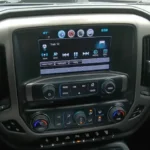
Got a center touchscreen? This applies to the K5, Telluride, and newer Sorento models.
- Power the vehicle to accessory mode.
- Tap “Setup” on the home screen.
- Select “Vehicle.”
- Choose “Convenience” or “Cluster.”
- Select “Service Interval.”
- Tap “Reset” and confirm with “Yes.”
Heads up: many newer Kias split the general “Service Interval” from the “Oil Change Reminder”. The oil reminder tracks your actual oil life percentage based on how you drive. You’ll need to reset that one separately back to 100%. Don’t skip it—running on depleted oil is exactly what wrecks engines.
Reset on Connected Car Navigation Systems
This is for the EV6, EV3, and modern Seltos (post-2024).
- Press Service Maintenance on the home screen.
- Review your current service data.
- Press “Reset Maintenance Notification.”
- Want to book a visit? Tap “Schedule Service.”
These systems even show QR codes for the digital owner’s manual and live scheduling. Fancy.
Reset on Legacy Models (2010–2015)
Older Kias keep it simple with a pedal trick.
- Turn the ignition key to ON (engine off).
- Fully press and release the accelerator pedal four times in quick succession.
- Turn the ignition OFF.
That’s it. No customization here—it just recalibrates the oil life indicator to factory defaults.
Quick Reference: Reset Methods by Model
| Interface Type | Example Models | Quick Reset Path |
|---|---|---|
| Cluster buttons | Pre-2022 Sportage, Sorento, Soul, Seltos | Menu button → Service Interval → hold OK 1–5 sec → confirm |
| Standard touchscreen | K5, Telluride, newer Sorento | Setup → Vehicle → Convenience/Cluster → Service Interval → Reset |
| Connected navigation | EV6, EV3, Seltos (post-2024) | Service Maintenance → Reset Maintenance Notification |
| Legacy pedal method | 2010–2015 models | Ignition ON → pump accelerator 4x → ignition OFF |
Reminder Grayed Out? Here’s the Fix
If the Service Interval option looks grayed out, it’s been disabled. Head into your cluster settings and check the “Enable Service Interval” box first.
Once it’s on, you can set custom mileage and time limits. Use the up and down arrows to change the digits, then press “OK” to move to the next field. Prefer tracking by miles only? Set the day count to zero. That kills the calendar reminder entirely.
Your Kia Maintenance Schedule (U.S.)
Resetting the message is half the job. Knowing when service is actually due is the other half. Here’s the standard U.S. schedule.
The core cycle runs every 7,500 miles or six months, whichever comes first. That baseline visit covers an oil and filter change, tire rotation, and a multi-point safety check.
Bigger jobs get layered in as miles add up:
- 15,000 miles: Replace engine air filter and cabin filter.
- 30,000 miles: Flush coolant, replace brake fluid and transmission fluid.
- 37,500 miles: Inspect drive belts and pulleys.
- 60,000 miles: New spark plugs, timing belt check, power steering flush.
Full Maintenance Milestone Table
| Mileage | Time Window | Main Service | Key Inspections |
|---|---|---|---|
| 7,500 | 6 months | Oil + filter, tire rotation | Lights, wipers, fluid levels |
| 15,000 | 12 months | Air + cabin filters, oil service | Brakes, suspension, driveshaft boots |
| 22,500 | 18 months | Oil + filter, tire rotation | Brake pad wear, tire tread depth |
| 30,000 | 24 months | Filters, coolant, brake + trans fluid | Belts, hoses, steering, exhaust |
| 37,500 | 30 months | Oil + filter, tire rotation | Belts, tensioners, pulleys |
| 60,000 | 48 months | Spark plugs, timing belt, power steering flush | Full module scan, fuel + emission lines |
When You Need to Service More Often
Think your daily commute is “normal”? It might actually count as severe driving.
Severe conditions aren’t just off-roading. Stop-and-go city traffic counts. So does long idling, frequent trips under five miles, extreme heat or cold, and hauling heavy loads.
Live up north or in the Midwest? Freezing temps, short commutes, and road salt all pile on the stress. Under these conditions, oil breaks down faster from fuel dilution and condensation. You’ll want to shrink your oil change interval to 5,000 miles or less. Transmission fluid that normally lasts 100,000 miles should be swapped every 30,000 to 60,000 miles instead.
Want to skip the guesswork? The Kia Care Maintenance Plans come in three tiers and structure visits at 3,750 or 7,500-mile intervals to match standard or severe driving.
When the Message Won’t Go Away
Sometimes you reset everything and the message stubbornly returns. Software is usually the culprit.
Your Kia connects to cloud services through the Kia Connect telematics platform. That’s how remote start, vehicle tracking, and auto-scheduling work. But it also creates a weak spot.
Back on February 9, 2025, a major Kia Connect outage hit vehicles across the U.S. After service came back, lots of cars had sync lag. Owners reset the service message on the dash, but it failed to sync with the server—so the warning kept reappearing.
Try a Soft Reset
If your screen freezes, lags, or goes black, a soft reset often fixes it. The best part? It keeps all your driver profiles, presets, and Bluetooth pairings intact. It’s not a destructive factory reset.
Here’s how:
- Find the small pinhole reset button near the volume dial or tuning knob.
- Use a paperclip or SIM tool to press and hold it.
- Hold for five to ten seconds.
- Release when the screen goes black.
The Kia logo will pop up within a few seconds as the system reboots. This clears temporary telematics errors and restores your screen’s speed.
Why Resetting Matters for Your Warranty
Here’s the part nobody tells you. That reset isn’t just about clearing an annoying light—it protects your warranty.
Kia offers one of the best coverage packages around: a 10-year/100,000-mile powertrain warranty and a 5-year/60,000-mile basic warranty. But there’s a catch. That coverage only holds if you follow the scheduled maintenance.
When you bring your Kia in for a big repair, technicians scan the computer modules. Those modules log every service interval reset—and every period you drove with the warning active or showing negative overdue mileage.
If the log shows a pattern of ignored prompts, Kia can deny the warranty claim. They’ll chalk the failure up to neglect, not a defect. Ouch.
So build the habit. Reset the message right after every service. That way your electronic history matches your paper invoices, giving you rock-solid proof you held up your end of the deal.