
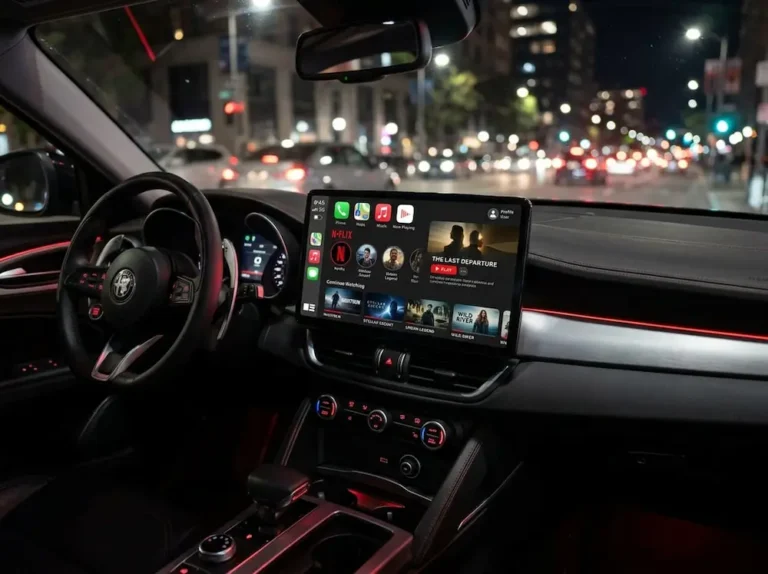
Want to watch videos on CarPlay but hitting a wall? You’re probably getting a black screen, blurry quality, or finding out it’s just… not allowed by default. This guide breaks down every real option, from Apple’s official approach to aftermarket hardware, plus the legal stuff you genuinely need to know before you try anything.
What Apple Actually Allows for CarPlay Video
Apple doesn’t just let any app show video on your dashboard. The CarPlay ecosystem follows strict Human Interface Guidelines designed to keep your eyes on the road.
Here’s what Apple officially supports:
- Audio apps
- Navigation and GPS
- Messaging via Siri
- EV charging, parking, and food ordering apps
That’s it — until now. With iOS 27, Apple formally added “Video” as a supported CarPlay app category. But there’s a catch.
The Parked-Only Rule
Apple only allows video playback when your car is physically parked with the parking brake engaged. Your car’s infotainment system must constantly communicate its transmission state back to your iPhone. No parking signal, no video.
Even trickier? Your automaker has to explicitly support and certify this feature through Apple’s MFi program. Most don’t. Automakers are terrified of liability lawsuits, so they simply don’t enable it, even when the iOS software supports it.
The result? You’ve got the software but not the hardware cooperation — so most drivers end up looking at third-party options.
Aftermarket Hardware: The Two Main Options
Because the official route is gated by automaker compliance, a whole industry has popped up to fill the gap. Two types of devices dominate the market.
CarPlay AI Boxes
Brands like Ottocast, Carlinkit, Linkifun, and Magic Box make small Android-powered devices that plug into your car’s USB port. Here’s how they work:
- The box plugs in and spoofs your car into thinking it’s a regular iPhone
- Once the CarPlay handshake completes, the box hijacks the display
- Your dashboard now runs a full Android interface
- You download Netflix, YouTube, or Prime Video from the Google Play Store
Your phone just provides a Wi-Fi hotspot — or the box uses its own SIM card. Either way, your streaming apps run independently of your phone’s CarPlay restrictions.
HDMI Multimedia Adapters
Devices like the Carlinkit CPC200-HD2CP or Ottocast Car TV Mate Pro take a different approach. Instead of running their own Android OS, they act as a bridge between an external device and your CarPlay screen.
You plug the adapter into your car’s USB port, tap the CarPlay icon, and then connect whatever you want via HDMI input — a Fire Stick, a Nintendo Switch, a laptop, even a PS5. The adapter passes that signal straight to your dashboard.
The advantage? Because the streaming stick is already certified for HD playback, you sidestep a lot of the DRM headaches that plague AI boxes. Resolution support goes up to 1080p at 60fps, and in some cases 2K.
| Hardware Method | CarPlay AI Box | HDMI Multimedia Adapter |
|---|---|---|
| How It Works | Spoofs CarPlay with its own Android OS | Passes HDMI signal from external device |
| Internet Source | Phone hotspot or built-in SIM | External device handles it |
| App Ecosystem | Google Play Store | Fully depends on connected device |
| Biggest Weakness | DRM limits resolution to SD | Needs cables and external power |
| Max Resolution | Usually capped at 480p–720p | Up to 1080p or 2K passthrough |
The Video Quality Problem: Widevine DRM Explained
Here’s why your Netflix looks terrible on a CarPlay AI Box even when you’ve got a fast connection.
The Three Widevine Tiers
Streaming services use Google’s Widevine DRM system to prevent piracy. It has three certification levels:
- L1 — Decryption happens inside a secure hardware enclave. Required for HD and 4K streaming.
- L2 — Partial hardware security. Rare in consumer devices.
- L3 — Software-based decryption with no secure hardware. Deliberately capped at 480p–720p.
Most AI boxes run uncertified Android builds. That means automatic Widevine L3 status — and Netflix or Disney+ will hard-lock your video to standard definition regardless of your internet speed or the box’s processor capabilities.
Even if an AI Box has hardware capable of L1 decryption, streaming platforms maintain their own manual whitelists of certified devices. If your specific box model isn’t on that list, you get downgraded. AI box manufacturers constantly try to spoof certified device IDs, and streaming services constantly block them. It’s a never-ending arms race.
Why You’re Getting a Black Screen
If you try to mirror your phone screen or use a browser on an AI box to watch protected video, you’ll often hear audio perfectly but see a completely black video area. This isn’t a bug — it’s intentional.
When a Chromium-based browser plays DRM-protected video, it renders the video on a separate hardware overlay that screen-mirroring software can’t capture. The screen mirror only reads the standard canvas — and sees nothing where the secure video overlay sits.
The common workaround is to disable hardware acceleration in your browser settings. This forces the video to render via software CPU instead of the GPU pipeline, which puts the pixels into the regular canvas. You can now see the video on your car screen.
The downside: disabling hardware acceleration triggers Widevine L3, so your resolution stays at standard definition. You see the video, but it won’t look great.
Fixing Audio Lag
Audio sync issues are common with AI boxes because the CarPlay protocol wasn’t designed to carry high-bandwidth video. The audio often arrives before the video finishes decoding.
Most AI box manufacturers let you manually adjust the media delay buffer through a local admin panel — usually accessed by typing a specific IP address into a browser while connected to the box’s network. You dial in a delay offset until audio and video line up. It works, but it can make the overall interface feel slightly sluggish.
Is It Legal to Watch Videos on CarPlay While Driving?
Short answer: No. Not in motion. Here’s what the law actually says.
Federal Safety Guidelines
The NHTSA has established clear guidelines around driver distraction. The key thresholds:
- No single glance away from the road should exceed 2 seconds
- No task should take more than 12 seconds total to complete
Watching a video blows past both limits immediately. The NHTSA’s guidelines strongly recommend automatic lockouts for video entertainment and manual text entry whenever a vehicle is in motion. These are voluntary guidelines for manufacturers — but they’re what shield automakers from liability, which is exactly why your car doesn’t enable this by default.
California Law (CVC 27602)
California’s Vehicle Code Section 27602 makes it explicitly illegal to drive with a video monitor displaying entertainment visible to the driver. GPS, vehicle telemetry, and rear-view cameras are exempt. Streaming Netflix is not.
If your screen can display entertainment, the law requires a mandatory interlock that automatically disables it while driving. Using an AI box specifically defeats that interlock.
Texas Law (Transportation Code 547.611)
Texas Transportation Code Section 547.611 prohibits any video equipment visible from the driver’s seat unless the car is parked or the parking brake is on. GPS navigation is exempt. Entertainment video is not.
Texas also has strict laws against electronic messaging while driving — and being stopped at a red light doesn’t count as “stopped.” You must be fully out of the travel lane.
| Legal Issue | California | Texas |
|---|---|---|
| Video While Driving | Illegal if entertainment and visible to driver (CVC 27602) | Illegal unless parked or parking brake engaged (547.611) |
| Exemptions | GPS, vehicle info, rear cameras, utility monitors | GPS navigation, commercial data, law enforcement |
| Device Interaction | Strict hands-free requirements | Illegal to read/send messages unless fully stopped |
| If You Cause an Injury | Fines, DMV points, possible jail time | Up to $4,000 fine and 1 year in jail (Class A misdemeanor) |
The Legal Risk If Something Goes Wrong
Traffic tickets are the least of your worries. If you cause an accident while a video plays on your dashboard, the legal fallout is serious.
Negligence Per Se
In both California and Texas, violating the video screen statute while driving can trigger negligence per se in civil court. This means you don’t just get cited — you’re automatically presumed legally at fault for the collision. The victim doesn’t have to argue what a “reasonable person” would have done. You broke the law, the law was specifically designed to prevent this type of harm, and someone got hurt.
Personal injury attorneys routinely subpoena vehicle telemetry, cell data, and streaming service logs to prove distraction. Modern cars log USB device activity and touch inputs. Your streaming service logs your viewing session down to the millisecond. That data doesn’t disappear after a crash.
If your employer’s vehicle had an AI box installed and you caused an accident on company time, your employer can be held vicariously liable for the full scope of damages — medical bills, lost income, pain and suffering, and potentially punitive damages.
FAQs: How to Watch Videos on CarPlay
What’s Apple’s official policy on CarPlay video?
Apple now supports a Video app category with iOS 27, but it’s parked-only. The vehicle must actively communicate its parked state to your iPhone, and the automaker must certify AirPlay video support through Apple’s MFi program. Most automakers haven’t done this, so it’s unavailable in most cars even with the latest iOS.
How do CarPlay AI boxes bypass Apple’s restrictions?
They plug into your USB port and spoof your car into thinking they’re a certified iPhone. Once the CarPlay handshake completes, the box displays its own Android interface with full access to the Google Play Store — including Netflix, YouTube, and Prime Video. Your phone just provides the internet connection.
Why does video look blurry on a CarPlay AI box?
It’s a Widevine DRM issue. Most AI boxes aren’t certified, so streaming services force them into Widevine L3 mode, which caps video at 480p or 720p regardless of your internet speed or the box’s hardware.
Why do I get a black screen when mirroring video?
DRM-protected video renders on a secure hardware overlay that screen-mirroring can’t capture. Disabling hardware acceleration in your browser forces software rendering, making the video visible — but locks you into standard definition.
Is it legal to watch videos on CarPlay while driving?
No. In California and Texas (and most other states), displaying entertainment video visible to a driver while the vehicle is in motion violates state traffic law. Exemptions exist for GPS and vehicle information only.
What happens if I cause an accident while a video plays on my dashboard?
You face civil liability through negligence per se, meaning you’re automatically presumed at fault. Forensic investigators can pull vehicle telemetry, streaming logs, and cell data to prove distraction. In Texas, if the distraction causes serious injury or death, you’re looking at a Class A misdemeanor — up to $4,000 and a year in jail.