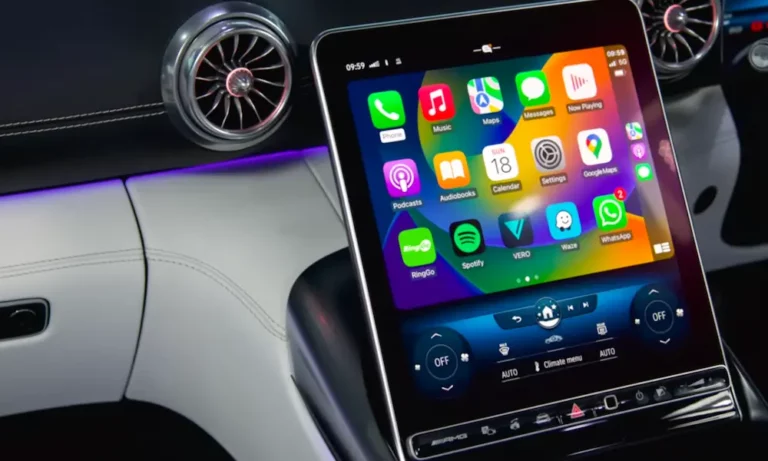
Tired of fumbling with cables every time you start your car? You’re dealing with a fixable problem. Going wireless with Apple CarPlay isn’t complicated, and you’ve got three solid routes to choose from. We’ll walk through each option, what they cost, and which one actually works for your situation.
Why Bother Going Wireless?
Let’s be real: the cable’s annoying. You pull your phone out, hunt for the Lightning cord, plug it in—and that’s before you’ve even backed out of the driveway. Plus, those ports wear out. You’ve probably noticed your cable doesn’t click in like it used to.
Wireless CarPlay eliminates all of that. Your phone connects automatically when you start the car. No cables cluttering your console, no wear on your charging port, and you can keep your phone in your pocket or bag.
The catch? Most cars built before 2020 only have wired CarPlay. Even some newer models skip the wireless feature to save costs. But here’s the good news: upgrading isn’t expensive or difficult.
The Three Ways to Get Wireless CarPlay
You’ve got three paths forward, and they’re not all equal. Your choice depends on your budget, how much time you want to invest, and whether you’re comfortable with basic tech setup.
Option 1: Wireless CarPlay Adapters (The Easy Win)
This is the route most people take, and for good reason. A wireless adapter plugs into your car’s USB port and acts as a translator between your phone and head unit.
How it works: The adapter connects to your iPhone via Bluetooth to initiate the handshake, then switches to a dedicated Wi-Fi network for the heavy data transfer. To your car’s system, it looks like you’ve plugged in a phone. To your iPhone, it looks like a wireless CarPlay receiver.
Best Adapters Worth Your Money
Carlinkit 5.0 (2air) – The reliable workhorse
This adapter’s built a reputation for stability. It supports both CarPlay and Android Auto natively, which matters because older adapters wrapped Android Auto inside a CarPlay container and caused weird display issues.
Boot time runs 18-25 seconds. Not the fastest, but it connects consistently. What sets it apart is the configuration backend you can access at 192.168.50.2. You can tweak Wi-Fi channels, GPS source, and media buffering—crucial for troubleshooting vehicle-specific quirks.

- Technical Support: If you encounter any problems in the process of use, we will provide you with assistance. Note:Incompatible For B-MW, For Nissan, For Tesla【Attention:The product does not support the conversion of wired Android auto to wireless carplay, nor does it support the conversion of wired carplay to wireless Android auto】
Ottocast U2-Air Pro – The speed demon
If waiting drives you nuts, the U2-Air Pro connects in 15-18 seconds. It’s noticeably faster than competitors, achieved through aggressive Bluetooth optimization and high-performance 5GHz Wi-Fi modules.
The Pro model includes a physical button to disconnect your phone, making it easier to switch between drivers. The downside? Less configurable than Carlinkit. You get fewer user-accessible settings, which can be frustrating if you run into compatibility issues.

- 【So Small, So Smart – Does Size Really Matter?】Absolutely. The Ottocast Mini Slim Wireless CarPlay Adapter is just nail-sized—50% smaller than our last version. Worried about handling such a tiny device? Don’t be. Its textured grooves give you the grip you need for quick plug-in and pull-out.
Budget options: Jemluse and Teeran
Don’t sleep on cheaper adapters in the $40-50 range. Brands like Jemluse use newer Bluetooth 5.3 chips that improve pairing reliability. They’re not as fast or configurable as premium options, but they work fine for straightforward setups.

- The Ultimate Smarter Copilot: Stay on Top of Your Driving- The 3A magic link CarPlay box control everything with a word, Or a touch, Or a twist. Save your 40% of time by quick auto conn and seamless operation, such as navigation, music playing, Siri assistant, phone calls, radio etc(Our Carplay Only Compatible with wired Apple CarPlay Car systems)
The trade-off? Support’s minimal. Firmware updates are rare or nonexistent.
Understanding Adapter Performance
Not all adapters are created equal. Here’s what separates the good from the garbage:
Chipset quality
The processor inside matters. High-end adapters use Rockchip chips (like the RK3328), which handle video decoding and multitasking better than budget Allwinner chips. Rockchip processors manage heat better too, which matters in a hot car.
Wi-Fi frequency
This is critical. Your car’s interior is an electromagnetic nightmare—interference from the engine control unit, telematics, and passengers’ devices all compete for airspace.
Premium adapters use 5.8GHz Wi-Fi modules. This band offers wider channels and way less interference than the crowded 2.4GHz spectrum that Bluetooth and old Wi-Fi devices share. If you’ve experienced random disconnects or screen glitches, Wi-Fi interference is probably why.
What About AI Boxes?
You’ll see “AI Boxes” like the Magic Box 2.0 marketed heavily. These aren’t simple adapters—they run a full Android operating system.
The appeal? You can run any Android app on your dashboard: Netflix, YouTube, stuff that CarPlay blocks for safety reasons.
The reality? They’re slow. Booting a complete Android OS takes 45-60 seconds. The interface feels sluggish compared to a lightweight adapter. And they cost $300+.
Unless you’re determined to watch shows in your parked car, skip these. They’re overkill for most drivers.
Option 2: Replace Your Head Unit (The Premium Route)
Replacing your entire head unit is the nuclear option. It’s more expensive and invasive, but it delivers the best performance and audio quality.
Why it’s better: Adapters add a translation layer—they convert wireless signals to wired USB signals for your factory radio. That conversion introduces latency. Native wireless head units handle the wireless session directly at the processor level, giving you near-zero lag and better responsiveness.
Plus, modern aftermarket units use capacitive touchscreens (like your iPhone) instead of the pressure-based resistive screens in older cars. The difference is night and day.
Top Head Units for 2025
Sony XAV-AX6000 – Best overall
Sony’s dominated this space with ridiculous boot speeds. The XAV-AX6000’s “Quick Wake” feature boots almost instantly when you turn the ignition. It runs a simplified Linux OS instead of bloated Android, keeping everything fluid.
The 6.95-inch bezel-less screen looks sharp, and it includes HDMI input. Audio quality’s excellent with 4-volt pre-outs and a quality DAC.

- Bezel-less capacitive touchscreen with anti-glare
- Compact rear chassis for easy installation
- Built in Rear Camera Input; Camera sold separately
- 5V Front, rear and subwoofer gold-plated pre-amp outputs
- SiriusXM ready
Pioneer DMH-W3050NEX – The customization king
Pioneer’s NEX series gives you deep audio control. We’re talking 13-band graphic equalizers and time alignment settings. It supports wireless CarPlay, Android Auto, and Amazon Alexa.
Pioneer also makes modular units where the screen and chassis separate, perfect for cars with limited dashboard depth.
Alpine iLX-W650 – For difficult installs
The iLX-W650’s ultra-shallow chassis fits where other units can’t. If your car has restricted space behind the dash, this is your solution.
Alpine’s “Halo” series brings massive 9-11 inch floating screens to cars that originally fit only standard double-DIN units.
Installation Reality Check
Swapping a head unit isn’t plug-and-play. In modern cars, the factory radio controls more than music—it manages door locks, lights, climate displays.
iDataLink Maestro modules interface between your new radio and the car’s CAN bus network. They retain factory features and can even display OBDII data like tire pressure and check engine codes on your new screen.
You’ll also need to install:
- A dedicated GPS antenna (maintains location accuracy without draining your phone)
- An external microphone for Siri and calls
- Possibly new mounting brackets and wiring harnesses
Professional installation runs $150-300 on top of the unit cost. DIY is possible if you’re handy, but budget several hours and watch model-specific install videos first.
Option 3: DIY Solutions (The Tinkerer’s Path)
If you enjoy projects and want maximum control, building your own wireless adapter is possible.
Raspberry Pi Wireless Bridge
You can build a high-performance adapter using a Raspberry Pi, offering control that exceeds commercial dongles.
What you need:
- Raspberry Pi 4 (or Zero 2 W for compact size)
- MicroSD card
- Wired CarPlay dongle (typically Carlinkit CPC200-AutoKit)
Two approaches:
- Full Android emulation – Install LineageOS (a custom Android build) on the Pi. It becomes an Android computer where you install the AutoKit app. This mimics AI Box functionality with unlimited customization potential.
- Lightweight approach – Use open-source libraries like react-carplay that run on basic Linux. These scripts handle the Wi-Fi/Bluetooth handshake and pipe the video stream without Android’s overhead. You can potentially get 60fps on a Pi 4.
Android Tablet Dashboard
Another route: replace your head unit with a consumer Android tablet.
The Headunit Reloaded app enables a tablet to act as a CarPlay receiver. Connect a wireless dongle to the tablet via OTG cable, and the tablet hosts a wireless CarPlay session.
The challenge: Power management. Consumer tablets aren’t designed for extreme car temperatures or the charge-while-in-use power cycle. Batteries can swell in heat. You’ll need automation apps like Tasker and careful wiring to manage sleep/wake triggers.
Fixing Common Problems
Success depends heavily on your specific car’s electronics. Here’s how to handle the most common issues.
Mazda: The Hub Retrofit
Mazda’s rotary commander system (that control knob) creates unique challenges.
For 2014-2020 models, Mazda offers an official retrofit kit (TK78-66-9U0C) that upgrades the USB hub to support wired CarPlay first. You need this before any wireless adapter will work.
Older CX-5 USB ports output low power. Wireless adapters brownout and reboot during data transfer. The fix? Use a Y-cable to inject extra power from a 12V adapter while maintaining the data connection to the head unit.
Carlinkit 5.0 handles the rotary knob mapping better than Android-emulating dongles.
BMW iDrive: Connection Drops
BMWs use a dedicated Wi-Fi antenna separate from the head unit. If this antenna’s loose or damaged, connections drop intermittently. That’s hardware failure often blamed on software.
When CarPlay crashes on iDrive, hard reboot the head unit by holding the volume knob 20-30 seconds until the screen blacks out.
iDrive’s native Bluetooth is aggressive. For stable adapter use, delete your phone completely from iDrive’s “Mobile Devices” list. Otherwise, the car and dongle fight for connection.
Ford Sync 3: The Always-On Problem
Ford USB ports stay powered 10-15 minutes after ignition off. This keeps wireless dongles active. If you’re near the vehicle—say, in an attached garage—your phone stays connected to the car, draining battery and missing calls.
When installing a new adapter, Sync 3 caches the previous device ID. A “Master Reset” in Sync 3 settings clears these caches so the new dongle can handshake correctly.
Subaru Starlink: The Bluetooth Battle
Starlink aggressively maintains Bluetooth for phone calls, conflicting with wireless CarPlay’s protocol that requires Bluetooth to disconnect after Wi-Fi handoff.
The only reliable fix? “Forget” the Subaru Bluetooth connection on your iPhone entirely. Rely solely on the adapter.
Honda Accord: Random Disconnects
10th Gen Accords randomly disconnect CarPlay. The root cause is usually a corrupted device cache in the head unit.
Fix it with a “Factory Data Reset” (Settings > System > Factory Data Reset) to clear Bluetooth handshake tokens.
Dealing With Lag and Latency
Wireless transmission requires buffering to prevent packet loss. You can’t entirely eliminate lag, but you can optimize it.
Two Types of Lag
Don’t confuse these:
- Control lag – Time between tapping “Next Track” and the screen updating. On quality 5GHz adapters, this should be under 200ms (barely noticeable).
- Audio lag – Time between seeing lips move and hearing voice in videos. This comes from media buffering. Standard CarPlay buffers audio 1-2 seconds to ensure smooth playback during Wi-Fi fluctuations.
Tuning the Buffer
Advanced users can adjust this via the adapter’s configuration page.
Access it: Connect to the adapter’s Wi-Fi network. Open a browser to 192.168.50.2 (Carlinkit) or 192.168.1.101 (Ottocast).
Media Delay Setting: Default’s usually 1000ms.
- Lower it (300-500ms): Reduces lag, syncs video better. Risk: audio might stutter or skip with Wi-Fi interference.
- Increase it (2000ms+): Use this if audio’s choppy. It increases delay but ensures smooth playback.
Wi-Fi Channel Selection
Wireless CarPlay operates in unlicensed 5GHz spectrum. Some channels are shared with weather radar (DFS channels). If the adapter detects radar (common near airports), it’s legally required to silence its radio and switch channels, causing connection drops.
In the configuration backend, force a specific non-DFS channel (like 36, 40, 44, or 48) to prevent random disconnects in specific geographic areas.
Which Option Should You Choose?
Here’s the honest breakdown:
Get a wireless adapter if:
- You want the simplest, cheapest solution ($40-120)
- Your factory head unit works fine otherwise
- You don’t want to mess with installation
Replace your head unit if:
- You value absolute best performance and zero lag
- Your factory screen is outdated or resistive
- You’re upgrading other audio components anyway
- Budget allows $600-900 (unit + installation)
Go DIY if:
- You enjoy tinkering and customization
- You want learning experience
- You have time to troubleshoot
For most people? Start with a Carlinkit 5.0. It’s the sweet spot of price, reliability, and configurability. Boot time’s acceptable, and the backend settings let you fix almost any compatibility issue.
If boot speed’s your priority and you don’t mind less configurability, grab the Ottocast U2-Air Pro.
Only consider head unit replacement if you’re already planning audio upgrades or your factory system’s genuinely terrible.
The wired cable’s annoyance is solvable. Pick the route that matches your budget and patience level, and you’ll be connecting wirelessly within days.