Is your Mercedes-Benz infotainment system giving you trouble? You’re dealing with a sophisticated piece of technology that can sometimes be finicky. When your COMAND system fails, it’s more than just an inconvenience – it affects your navigation, entertainment, and vehicle controls. Let’s dive into why these systems fail and the most effective ways to get yours working again.
What Is the Mercedes COMAND System?
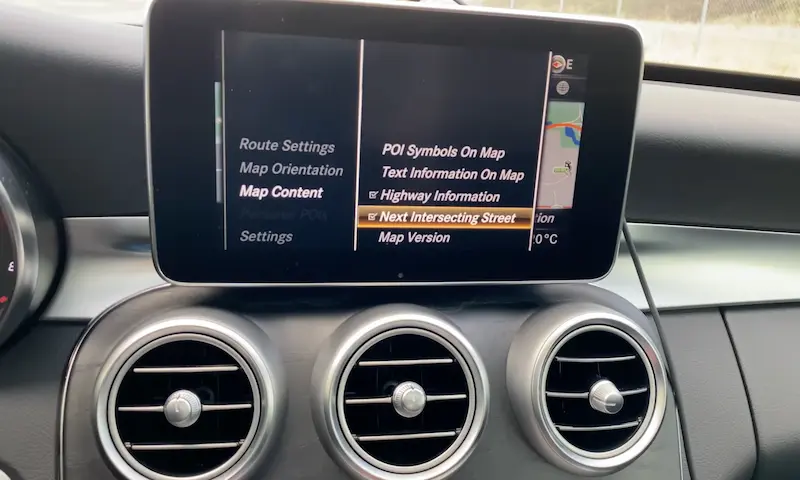
The COMAND (COckpit MANagement and Data) system is Mercedes-Benz’s integrated infotainment platform. It controls everything from navigation and radio to climate settings and vehicle diagnostics through a central screen and controller. When it stops working, you lose access to crucial features that make your luxury car experience complete.
Common Mercedes COMAND System Problems
Screen Issues
- Black or blank screen – Nothing displays despite the car running normally
- Frozen display – Screen shows the Mercedes logo but doesn’t progress
- Flickering screen – Display turns on and off unpredictably
- Distorted images – Graphics appear stretched or discolored
Control Problems
- Unresponsive buttons – Pressing buttons produces no response
- Wrong functions – Buttons trigger unexpected actions (like pressing NAV but getting radio)
- Controller knob failure – The rotary knob doesn’t turn or select properly
- Touch sensitivity issues – Touchscreen models don’t register your touches
These symptoms can appear in any Mercedes model with COMAND, from C-Class sedans to GLE SUVs, but are particularly common in models from 2015-2019.
Quick Fixes for COMAND System Issues
Before taking your car to the dealership, try these simple reset procedures that solve about 70% of COMAND problems.
Soft Reset Methods
CD Eject Button Reset
- Press and hold the CD eject button for 10 seconds
- The system should restart automatically
- Works best on 2015+ models
Telephone + Favorites Button Reset
- Simultaneously press and hold both the telephone and favorites buttons
- Keep holding for 10 seconds until restart
- Effective for most modern Mercedes
Power Button Reset
- Find the power button on your COMAND unit
- Press and hold for 10 seconds
- Wait for the system to restart completely
Engineering Mode Reset (Older Models)
- With COMAND powered on, press these buttons in sequence:
- Mute → Phone → Service
- This specific sequence activates a system reset
- With COMAND powered on, press these buttons in sequence:
Hard Reset Methods
If soft resets don’t work, try these more drastic approaches:
Battery Disconnect Reset
- Turn off the vehicle completely
- Disconnect the negative battery terminal
- Wait at least 2 minutes (allows capacitors to discharge)
- Reconnect the battery
- This resets all vehicle computers including COMAND
Factory Reset Through Settings
- Navigate to System → Settings → Reset
- Select “Restore Factory Settings”
- Confirm the reset when prompted
- Note: This will erase all personal data (addresses, phone contacts, radio presets)
Hardware Troubleshooting for COMAND Systems
When software resets don’t fix the problem, hardware issues may be to blame.
Check Power Supply
Many Mercedes models have a separate power button for the COMAND system, often located near the center armrest. Make sure it hasn’t been accidentally switched off, which can disable the entire infotainment system even when the car is running.
Inspect and Replace Fuses
| Location | Typical Fuse Number | Function | Amperage |
|---|---|---|---|
| Engine compartment | #11 | Audio/COMAND display | 7.5A |
| Engine compartment | #26 | Radio and controller | 20A |
Even fuses that look intact may have internal breaks. If you suspect a fuse issue:
- Locate the fuse box in the engine compartment (usually on the driver’s side)
- Check the diagram on the fuse box cover to identify COMAND-related fuses
- Remove and inspect suspected fuses, or test with a multimeter
- Replace any blown fuses with identical amperage ratings
Check Fiber Optic Connections
Mercedes COMAND systems use fiber optic cables for data transmission. These can cause intermittent issues when loose:
- Look behind the driver’s seat for orange fiber optic connections
- Gently tap or disconnect/reconnect these cables
- Loose connections can cause COMAND problems without showing obvious damage
Control Knob Repair
The COMAND controller knob often develops rotation problems when its internal plastic mechanism breaks:
- The knob may still push down but won’t rotate
- This requires disassembly and replacement of the internal encoder shaft
- Parts typically cost under $20, making it much cheaper than dealer repair
Temperature-Related COMAND Problems
Your Mercedes COMAND system is sensitive to temperature extremes:
Hot Weather Issues
- System may shut down automatically to prevent damage
- More common in southern climates and summer months
- Allow the system to cool before attempting resets
Cold Weather Problems
- Delayed startup is common in freezing temperatures
- System may take 3-4 minutes to initialize
- This is normal behavior and not necessarily a malfunction
Software and Configuration Fixes
Check Region Settings
Incorrect region settings (US vs European) can cause button mapping problems:
- Access engineering mode to verify region settings
- This explains why buttons might perform incorrect functions
- May require dealer assistance to correct
Software Updates
Outdated software can cause various malfunctions:
- Visit a Mercedes dealership for the latest software version
- Some newer models can receive over-the-air updates
- Updates can resolve screen freezing, slow performance, and feature bugs
Advanced DIY Repairs
For the mechanically inclined, these repairs can save substantial money:
Button Cleaning
Individual buttons can often be removed for cleaning:
- Use plastic trim tools to carefully pry up buttons
- Clean contacts with electronic contact cleaner
- Remove any debris or dried liquid that could cause sticking
Amplifier Inspection
The audio amplifier affects COMAND performance:
- Typically located under a seat (model dependent)
- Check for loose connections or overheating issues
- Listen for unusual clicking or buzzing sounds when the system tries to operate
COMAND Repair Costs and Options
If DIY methods fail, here’s what to expect for professional repairs:
| Repair Type | Estimated Cost | Notes |
|---|---|---|
| Diagnostic Fee | $100-200 | Often credited toward repairs if performed at same shop |
| Software Update | $150-300 | May resolve most intermittent issues |
| Control Knob Repair | $200-500 | Much cheaper than full unit replacement |
| Screen Replacement | $800-1,500 | Depends on model year and screen type |
| Complete COMAND Replacement | $2,000-4,000 | Last resort when all else fails |
Independent specialists often charge 30-50% less than dealerships for the same repairs, and many will offer warranty coverage on their work.
Preventing Future COMAND System Problems
These preventive measures can extend the life of your COMAND system:
- Avoid temperature extremes when possible (use garage parking)
- Keep the system updated with the latest software
- Never spray cleaning products directly onto the screen or controls
- Avoid pressing buttons with excessive force
- Clean fiber optic connections annually with compressed air
- Have the system inspected during regular maintenance intervals
When To Call a Professional
While many COMAND issues can be resolved DIY, seek professional help when:
- Multiple reset attempts have failed
- The system displays specific error codes
- Physical damage is visible (cracked screen, broken buttons)
- You suspect water or liquid damage
- Your vehicle is under warranty (don’t void it!)
For warranty-covered vehicles, always start with your dealership. For out-of-warranty repairs, research independent Mercedes specialists in your area who have experience with COMAND systems.
Most Mercedes owners can resolve common COMAND issues with the reset procedures outlined above. For persistent problems, start with the simplest fixes and work toward more complex solutions. Remember that your luxury vehicle deserves proper care, and sometimes that means investing in professional repair when needed.