
Choosing a dash cam feels overwhelming — dozens of brands, confusing specs, and zero idea if the footage actually holds up in court. This Wolfbox dash cam review cuts through all that noise. You’ll get the real picture on video quality, installation, parking mode, and which model fits your driving life. Stick around — the model comparison table alone will save you hours of research.
What Makes Wolfbox Different From Other Dash Cam Brands?
Wolfbox doesn’t try to do everything. The brand focuses hard on digital rearview mirror dash cameras and multi-channel systems — and that focus shows in the product quality.
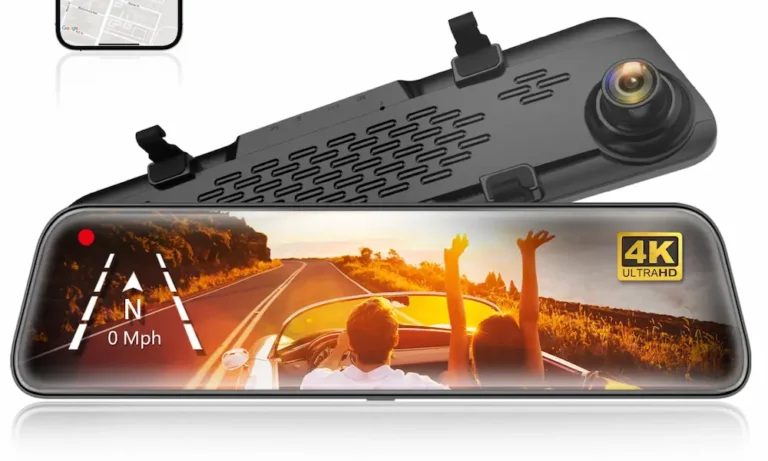
Traditional dash cams stick to your windshield. Wolfbox mirror cams strap directly over your factory rearview mirror. That one design decision solves a big problem for American drivers.
Here’s why it matters:
- Legal compliance: The NHTSA advises that windshield-mounted devices must not block your forward view. States like California and New York restrict mounts to the lower corners of the glass. A mirror dash cam sits where your mirror already lives — no legal gray area.
- Better visibility: SUVs, trucks, and vans with blocked rear windows get a live, unobstructed digital feed instead of a useless glass reflection.
- Cleaner install: No suction cups, no adhesive residue, no cord dangling across your windshield.
Wolfbox Dash Cam Video Quality: What the Sensors Actually Do
Resolution and Why 4K Actually Matters
Every Wolfbox model leads with a 4K front camera. That’s not just a marketing number.
At 4K resolution, you can read a license plate 30 to 40 feet away while moving. That distance is the threshold US insurance adjusters and police need to process a hit-and-run claim. Lower resolution footage often fails that test entirely.
Night Vision and Low-Light Performance
Wolfbox flagship models use the Sony STARVIS 2 sensor (specifically the IMX678) on the front camera. This sensor uses a back-illuminated pixel design that pulls in more light with less grain in near-dark conditions.
The G900 Pro pairs this sensor with an OmniVision OS04J10 rear sensor for genuinely impressive low-light rear footage. For night driving on unlit rural roads or dim parking structures, this combo delivers.
One honest caveat: the G900 Pro lacks full HDR processing despite having the hardware for it. Reviewers on DashCamTalk note that headlight glare on license plates at night is still a weakness. A future firmware update could fix this — but right now, it’s a real limitation worth knowing.
Wolfbox Model Breakdown: Which One Should You Buy?
Here’s how the core lineup stacks up:
| Model | Front Res | Rear Res | Third Channel | Front Sensor | Wi-Fi | Voice Control |
|---|---|---|---|---|---|---|
| G840S | 4K | 1080p | None | Standard | None | No |
| G850 Pro | 4K | 2.5K | None | STARVIS | 2.4 GHz | No |
| G900 Pro | 4K | 2.5K | None | STARVIS 2 | 5.8 GHz | Yes |
| G900 TriPro | 4K | 2.5K | 1080p (cabin or bumper) | STARVIS 2 | 5.8 GHz | Yes |
G840S: The Smart Budget Pick
The G840S gives you a 12-inch IPS touchscreen and 4K front footage at a mid-range price. It’s perfect if your main goal is restoring rear visibility in a packed SUV or old truck.
The trade-offs are real though:
- The 1080p rear camera struggles in dark environments beyond basic collision documentation
- Zero wireless connectivity — you pull the card manually every time
- No parking mode connectivity without a hardwire kit upgrade
If you drive a newer vehicle in daylight-heavy conditions and just want solid front footage, the G840S delivers strong value.
G850 Pro: The Sweet Spot
The G850 Pro bumps the rear camera to 2.5K and adds 2.4 GHz Wi-Fi. That wireless connection lets you download footage to your phone without touching the memory card. After a fender bender, that speed matters.
Better dynamic range processing across both lenses also means more balanced footage in mixed lighting — think shaded streets with bright sun patches.
G900 Pro: The Enthusiast’s Choice
This is the model most serious drivers land on. The Sony STARVIS 2 sensor front camera, 5.8 GHz Wi-Fi, and voice control make it the most capable daily-driver option in the lineup.
The 5.8 GHz bandwidth is a real-world upgrade — multi-gigabyte 4K files transfer to your phone in seconds rather than minutes while you’re standing at the side of the road.
Voice commands let you lock footage or snap a photo without touching the screen. Useful during active driving, though the microphone occasionally triggers from radio audio or passenger conversation — a known quirk users manage by toggling voice control off.
G900 TriPro: Built for Trucks, Rideshare, and Off-Road
The TriPro adds a third camera channel with two variations:
Cabin-facing camera: Records your interior. Rideshare drivers and fleet operators use this for liability documentation and dispute resolution. Critical note — check your state’s audio recording laws before using this. California, Florida, and Illinois are all-party consent states.
Front bumper camera: Mounts low on the bumper for a live ground-level feed. Lifted trucks, tow vehicles, and off-road rigs use this to spot obstacles, curbs, and trail hazards completely invisible from the driver’s seat. Autoguide calls it a transformation from reactive evidence tool to proactive driving asset — and that description is accurate.
Installing Your Wolfbox Dash Cam: Three Real Options
Cigarette Lighter (Quickest Setup)
Plug into the 12V outlet and you’re recording in minutes. The camera powers on with the ignition and shuts off when you park. Simple, reversible, and works immediately.
The limitation: no parking surveillance once the engine’s off. Someone keys your door in a parking lot — you get nothing.
Hardwire Kit (Full Parking Mode)
This is the installation that unlocks 24-hour parking surveillance. You wire directly into the fuse box using three connections:
- Constant power: Stays live when the car’s off (powers standby mode)
- Accessory power: Only active when the engine runs (tells the camera to switch modes)
- Ground: Bolts to bare metal chassis
With this setup, the camera’s G-sensor detects physical impacts while parked and automatically wakes to record and lock the footage.
Battery protection is non-negotiable here. The hardwire kit’s low-voltage cutoff shuts the camera off before it drains your battery dead. Default cutoff is 11.8V — that’s nearly fully depleted. Automotive experts recommend setting it to 12.2V or 12.4V to protect your battery from premature sulfation. You get fewer hours of parking surveillance, but your battery lasts years longer. Worth the trade-off.
Dongar Mirror Adapter (Cleanest Install for Modern Vehicles)
Dongar Technologies makes vehicle-specific adapters that tap your factory rearview mirror’s existing power connector. You unplug the factory mirror, insert the adapter inline, and plug a short USB cable into your dash cam.
This is the favorite install method in Toyota Tacoma, 4Runner, Ford Bronco, and Ranger communities because it avoids running cables down A-pillars near airbag deployment zones entirely. The install is clean, fast, and reversible.
The limitation: most factory mirror circuits cut power with the ignition, so parking mode isn’t available unless your specific vehicle keeps that circuit live when parked.
Memory Cards: Don’t Cheap Out Here
Your camera records constantly — the memory card takes a brutal beating. Wolfbox mandates Class 10, U3 microSD cards with high endurance ratings. Standard cards from camera or phone bundles fail fast under constant rewrite cycles.
How much card do you actually need?
| Card Size | Single-Channel 1080p | Dual-Channel 4K + 1080p |
|---|---|---|
| 32GB | 3–5 hours | Not recommended |
| 64GB | 6–10 hours | 1.5–2 hours |
| 128GB | 12–20 hours | 4–6 hours |
| 256GB | 24–40 hours | 8–12 hours |
| 512GB | 48–80 hours | 16–24 hours |
For a modern dual-channel system, 128GB is the minimum sensible starting point. Format the card directly in the camera’s menu every two to four weeks — not on your computer. This clears fragmentation and prevents corrupted files.
Mac users get a specific warning: Some Wolfbox models require FAT32 formatting even on large cards. macOS can’t handle large FAT32 cards out of the box. Users report needing third-party tools like DiskGenius on a Windows machine to force-format at 64KB allocation size. Know this before you buy if you’re an Apple household.
The Wolfbox App and GPS Player
The Wolfbox Auto app (iOS and Android) connects to the camera’s Wi-Fi network. Use it to:
- Stream live video for lens alignment during installation
- Adjust camera settings without tapping the mirror
- Download locked footage directly to your phone
After an accident, pulling video to your phone and showing it to a responding officer or insurance agent on the spot eliminates liability disputes immediately.
For deeper analysis, the WOLFBOX GPS Player desktop app syncs your front and rear footage side by side while plotting your exact route, speed, and coordinates on a Google Maps overlay. That combination — video plus telemetry — carries serious weight in insurance claims and legal proceedings. Your computer needs at least a 7th-gen Intel quad-core processor and 8GB of RAM to play dual 4K feeds without stuttering.
Daily Usability: The Digital Mirror Learning Curve
Switching from optical glass to a digital screen takes adjustment. A few things to know upfront:
- Eye refocus: Traditional mirrors reflect light — your eyes stay focused on the distance. A digital screen requires your eyes to refocus close. Most drivers adapt quickly, but some experience initial eye fatigue.
- Sunroof glare: Direct overhead sunlight can wash out the screen entirely. Close the sunroof shade.
- Polarized sunglasses: IPS screens emit polarized light. Polarized lenses can make the screen appear black or distorted from certain angles. Switch to non-polarized tinted lenses for daytime driving with a digital mirror.
The wide field of view practically eliminates C-pillar blind spots that plague large American trucks and SUVs. For most drivers, that benefit vastly outweighs the adjustment period.
Warranty and Support
- Standard warranty: 12 months for all models
- Buy direct: Automatically extends to 18 months
- Third-party purchase: Register your serial number for a 6-month extension
- Dead on arrival: Free replacement or full refund if the unit arrives damaged or won’t power on
Support runs via email ticketing and phone on Eastern Standard Time — solid coverage for the North American market.
Frequently Asked Questions
Does heavy window tint hurt the rear camera image quality?
Yes, significantly. Dark tint acts like a neutral density filter, forcing the sensor to raise its ISO — which introduces grain and color distortion. If your vehicle has heavy limo tint, mount the waterproof rear camera externally above the license plate instead of inside looking through the glass.
Do polarized sunglasses interfere with the digital mirror screen?
Yes, they often do. IPS displays emit polarized light. Your polarized lenses can clash with the screen’s polarization angle, causing the screen to appear black or heavily distorted from the driver’s seat. Switch to standard non-polarized tinted lenses if this affects you.
Can I move a Wolfbox mirror cam between rental cars?
Absolutely. The mirror cam secures with rubber straps — no adhesive, no residue. Powered through the cigarette lighter with the rear cable draped to the back seat, you can deploy or remove the full system in under five minutes. No evidence you were ever there.
Will a hardwired dash cam drain my electric vehicle’s battery?
It won’t touch the main traction battery — the hardwire kit only connects to the 12V auxiliary system. But draining that small auxiliary battery can prevent the EV’s computers from booting, leaving you stranded. Proper voltage cutoff configuration matters just as much in an EV as a gas vehicle.
Does the built-in GPS provide turn-by-turn navigation?
No. The GPS module is strictly a passive telemetry recorder. It logs your coordinates and speed into the video file for evidence purposes. Navigation still requires your phone, Apple CarPlay, Android Auto, or your vehicle’s infotainment system.
Do US audio privacy laws apply to cabin recording?
Critically, yes. One-party consent states let the driver record cabin audio freely. All-party consent states (California, Florida, Illinois, and others) require passenger consent or visible notification signage. Rideshare drivers using the TriPro’s cabin camera should post clear notification inside the vehicle — or disable the microphone in settings to avoid civil liability.