Dead battery, empty parking lot, and zero help in sight. Sound familiar? The NOCO Boost HD GB70 can get your engine running in minutes — but only if you use it correctly. This guide walks you through everything: setup, connections, error lights, and advanced tricks. Stick around, because the manual override section alone could save your vehicle’s electronics.
What Makes the GB70 Worth Your Attention
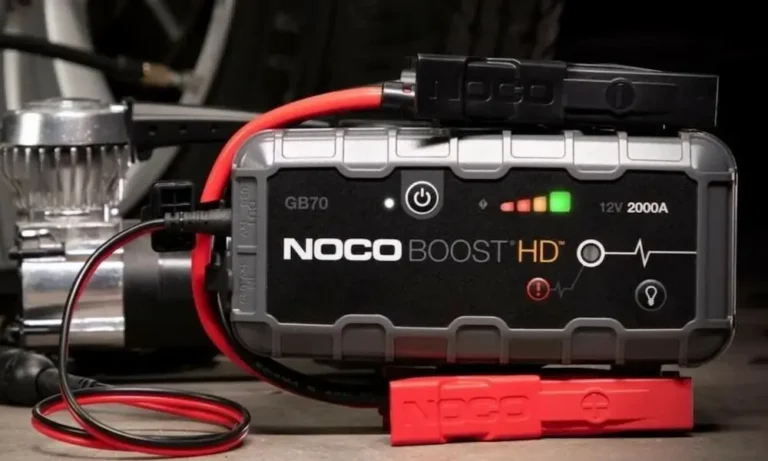
The GB70 isn’t your grandfather’s jump box. It’s a 2,000-amp lithium-ion jump starter that weighs just five pounds and fits under your seat. Here’s what you’re working with:
| Specification | Details |
|---|---|
| Peak Current | 2,000 Amps |
| Energy Capacity | 56 Watt-Hours |
| Max Jump Starts Per Charge | Up to 40 |
| Weight (with clamps) | 5 lbs |
| Weather Protection | IP65 (dust and water resistant) |
| Dimensions | 8.6″ x 6.0″ x 2.5″ |
| Engine Coverage (Gas) | Up to 8.0L |
| Engine Coverage (Diesel) | Up to 6.0L |
It handles gas engines up to 8.0 liters and diesel engines up to 6.0 liters. That covers almost every consumer truck, SUV, and car on US roads today. The IP65 housing means you can use it in rain, dust, and messy engine bays without worry — as long as the port covers stay shut.
No internal fans either. Fewer moving parts means fewer things that can break.
What Vehicles and Batteries It Works With
The GB70 only works with 12-volt lead-acid battery systems. That includes:
- Wet cell (flooded) batteries
- Gel cell batteries
- Maintenance-free batteries
- Enhanced flooded batteries (EFB)
- Absorbent glass mat batteries (AGM)
It does not work with 6-volt systems, 24-volt commercial trucks, or vehicles equipped with lithium-ion starter batteries. Connect it to the wrong voltage system and you risk frying your vehicle’s electronics instantly.
Diesel engines need more cranking power than gasoline engines because they use compression ignition instead of spark plugs. Higher compression = more mechanical resistance = more demand on the starter motor. That’s why the diesel limit (6.0L) is lower than the gasoline limit (8.0L).
How to Use NOCO Boost HD GB70: Step-by-Step
Step 1: Turn Off Everything in the Vehicle
Before you touch the clamps, kill every electrical load in the vehicle:
- Headlights and fog lights
- Climate control and AC fans
- Radio and infotainment screens
- Phone chargers plugged into 12V ports
- Close all doors (turns off dome lights)
Every powered accessory steals current from the starter motor. Eliminate these draws and you give the GB70’s full 2,000 amps a clear path to where it’s needed.
Step 2: Connect the Clamps in the Right Order
Find your battery terminals. The positive terminal usually has a + sign and a red cover. The negative terminal has a − sign and often connects directly to the metal chassis.
Connect in this exact order:
- Red clamp → positive (+) battery terminal
- Black clamp → negative (−) battery terminal (or unpainted metal on the engine block)
The GB70’s UltraSafe spark-proof technology means the clamps carry zero current until the device detects a safe connection. You won’t get sparks if the clamps accidentally touch each other before you connect them. That’s a major safety win over traditional jumper cables.
If your vehicle has a positive-ground electrical system (rare — mostly vintage or agricultural equipment), reverse the sequence: black clamp first, then red.
Step 3: Power On the GB70
Press the Power button. All LED indicators flash briefly as the internal computer runs its self-diagnostic. It’s checking for correct polarity and detecting the battery’s voltage.
If everything checks out, you’ll see a solid white Boost light. That’s your green light to crank the engine.
Step 4: Start the Engine
Turn the key or press the start button. Most vehicles fire up immediately. For stubborn cases — extreme cold weather, deeply discharged batteries, or engines sitting idle for months — the vehicle’s computer may need up to 30 seconds to allow the starter motor to engage while the GB70 supplies voltage.
If it doesn’t start on the first try: Stop cranking. Let the GB70 sit connected for 20–30 seconds. This lets the device transfer a small surface charge into the battery, warming its internal chemistry and raising its voltage slightly. Then try again.
Critical rule: Never attempt more than five consecutive jump-start tries within a 15-minute window. After five failed attempts, something mechanical or electrical needs professional attention. Exceeding five attempts also risks overheating the GB70’s internal cells.
Step 5: Disconnect Immediately After Starting
Once the engine runs, press the Power button to shut the GB70 off. Then disconnect in reverse order:
- Black clamp off first
- Red clamp off second
Always disconnect in reverse. This breaks the circuit safely and protects both the device and your vehicle.
Understanding the LED Indicators
The GB70 communicates entirely through LED lights. Learn these and you’ll troubleshoot any issue in seconds.
| LED State | What It Means | What to Do |
|---|---|---|
| Solid white Power light | Unit is on and ready | Proceed with connection |
| Solid white Boost light | Safe connection verified | Start the engine |
| Flashing white Boost light | Manual Override is active | Proceed carefully — all safety features are OFF |
| Solid red Error light | Reverse polarity detected | Swap the clamps immediately |
| Flashing red Error light | Thermal overload | Move to shade, let it cool down |
Charge level lights show your remaining battery in 25% increments:
- Red (25%) — Critically low, charge soon
- Red (50%) — Below half capacity
- Yellow (75%) — Healthy charge
- Green (100%) — Fully charged and ready
Keep the GB70 as close to full as possible. A half-charged unit may not deliver enough peak amperage for a tough start.
How to Use Manual Override for a Completely Dead Battery
Here’s where most people get confused — and where expensive mistakes happen.
The GB70 requires a minimum of 2 volts from the vehicle’s battery before it activates automatically. If your battery is completely drained below that threshold, the white Boost light won’t come on. The device isn’t broken. It’s protecting you.
To handle a totally dead battery, you use Manual Override.
How to activate it:
- Connect the clamps correctly (double-check polarity)
- Find the button marked with a red exclamation point inside a red circle
- Press and hold it for 3 full seconds
- Watch for the flashing white Boost light — that confirms Manual Override is active
Now attempt to start the engine as normal.
Critical warnings for Manual Override:
- The spark-proof protection is completely disabled
- The reverse polarity protection is completely disabled
- The clamps are now live — touching them together creates dangerous sparks
- A wrong connection in this mode can instantly destroy your vehicle’s electrical system
Manual Override doesn’t give you more power. It simply forces the relay open when the diagnostic software would normally hold it shut. Same amps, same voltage — just no safety net.
Power the GB70 off before removing the clamps after a Manual Override jump start.
Charging the GB70: How Long It Actually Takes
The GB70 charges two ways — slow and fast.
| Power Source | Charging Method | Time (Empty to Full) |
|---|---|---|
| 0.5A USB port | Micro-USB | 28 hours |
| 1.0A USB adapter | Micro-USB | 14 hours |
| 2.0–2.1A USB adapter | Micro-USB | 7 hours |
| 3.0A at 12V (36W) | XGC Fast Charge | 2–3 hours |
For fastest results, use the XGC input port with the included cable plugged into your vehicle’s 12V outlet while driving. Two to three hours and you’re back to full capacity.
Don’t charge and discharge simultaneously. Using the GB70 to charge your phone while also charging the internal battery stresses the power management circuits and generates extra heat.
Extra Features You’ll Actually Use
USB output port — Charges phones, tablets, and GPS units at 5V/2.1A. With 56 watt-hours onboard, you can fully charge a smartphone several times over during a power outage.
12V XGC output port — Delivers up to 15 amps continuously. Use it for:
- Portable tire inflators
- DC-to-AC power inverters
- 12V heated blankets in winter emergencies
- High-lumen spotlights for roadside repairs
Built-in 400-lumen flashlight — Controlled by the light bulb button, it cycles through seven modes:
- 100% brightness
- 50% brightness
- 10% low-power mode
- SOS Morse code pattern
- Steady rhythmic blink
- High-frequency strobe
- Off
If you hold any mode for more than 3 seconds, the software locks into that mode. Your next button press simply turns it off. No frustrated cycling through strobe at 2am.
Storage and Maintenance Tips
Lithium-ion cells are sensitive to temperature extremes. Follow these rules and your GB70 will last for years.
Operating temperature: −4°F to +122°F
Charging temperature: 32°F to 104°F only
Never charge a unit that’s been sitting in a frozen car overnight. Bring it indoors first and let it reach room temperature.
Don’t leave it baking in a hot trunk all summer. Consistent heat above 122°F permanently degrades the cell capacity and reduces peak amperage. The ideal daily storage temperature is around 77°F.
For routine maintenance:
- Check the charge level every 3–6 months
- Recharge if it’s dropped to 50% or below
- Fully recharge after every single use, no matter how brief
- Keep all rubber port covers closed when not in use
The GB70 holds its charge for months thanks to lithium-ion’s low self-discharge rate. But don’t assume it’s full just because you haven’t used it recently.
Frequently Asked Questions
Can I use the GB70 as a trickle charger to maintain a vehicle in storage?
No. The GB70 is a high-discharge jump starter, not a battery maintainer. It doesn’t have the multi-stage charging software required to safely maintain a battery over time. Leaving it permanently connected will just drain the GB70 through the vehicle’s parasitic loads until both are dead.
Can I replace the internal battery myself?
No. The battery is permanently sealed inside and hardwired to the main circuit boards. Opening the housing risks electrical shock and fire. At end of life, take the whole unit to a certified electronics recycling facility — lithium-ion batteries can’t go in household trash under federal environmental law.
What happens if I connect it to a 6-volt or 24-volt system?
Connecting to a 6-volt system sends too much voltage to the vehicle and immediately destroys its wiring and electronics. Connecting to a 24-volt commercial system means the GB70 can’t supply enough voltage to crank the engine, and the voltage mismatch can damage the jump starter itself. Only use it on 12-volt systems.
Can I fly with the GB70?
Generally yes, in carry-on luggage only. The GB70’s internal capacity is 56 watt-hours, which falls below the FAA and DOT carry-on threshold of 100 watt-hours. Never pack it in checked baggage. Always confirm current rules with your airline before you travel.
Does Manual Override give me extra power?
No. Manual Override only forces the safety relay open when the device can’t detect the battery’s voltage. It doesn’t increase amps, voltage, or any other output. You get exactly the same power as a standard jump start — just without the safety protections active.