Picking between Android Auto vs Apple CarPlay feels simple until you’re standing at a car dealership getting asked which one you want. Spoiler: the “right” answer depends entirely on the phone in your pocket. But there’s a lot more to unpack here. Stick around — by the end, you’ll know exactly which system fits your driving life.
What Each System Actually Does
Both systems turn your car’s dashboard screen into a smarter version of your phone. They handle navigation, music, calls, and voice commands — all without you having to fumble with your device while driving.
Apple CarPlay launched in 2014. Android Auto followed in 2015. Since then, both have become standard features across hundreds of car models from Ford, Toyota, Honda, Hyundai, and more.
Here’s a quick look at where each platform stands today:
| Feature | Apple CarPlay | Android Auto |
|---|---|---|
| Launch Year | 2014 | 2015 |
| Compatible Vehicles | 800+ models | 500+ models |
| US Satisfaction Score | 840/1,000 | 832/1,000 |
| Phone Requirement | iPhone 5 / iOS 7.1+ | Android 5.0+ |
About one-third of American drivers already have one of these systems in their primary vehicle. Over 80% of those drivers use it regularly. This isn’t a novelty feature anymore — it’s a baseline expectation.
How They Actually Work Under the Hood
This is where Android Auto vs Apple CarPlay starts to get genuinely interesting.
CarPlay: Your iPhone Does the Heavy Lifting
CarPlay is essentially a screen-mirroring protocol. Your iPhone handles 100% of the processing — the graphics, GPS, audio, everything. Your car’s screen just displays what the iPhone renders.
The upside? Consistent performance no matter what car you’re in. A budget hatchback feels just as snappy as a luxury SUV. The downside? Long drives with wireless CarPlay can drain your battery fast and push your phone’s temperature into thermal throttling territory.
Android Auto: The Car Shares the Load
Android Auto uses a distributed processing model. Your phone provides the data and app logic, but the car’s onboard computer helps render parts of the interface. This saves some battery, but it also means your experience depends on your car’s hardware quality.
Drive an older vehicle with a sluggish infotainment processor? You might notice lag that has nothing to do with your phone.
Wired vs. Wireless: The Real Trade-Off
Both systems now support wireless connections, but wired remains the gold standard for stability. Here’s the honest breakdown:
| Connection Type | Stability | Battery Impact | Audio Quality |
|---|---|---|---|
| Wired | High — minimal interference | Charges while connected | Superior |
| Wireless | Moderate — environment-dependent | Significant drain | Good but can buffer |
Wireless uses Bluetooth to initiate the connection, then switches to 5GHz Wi-Fi for data. Convenient? Yes. Perfect? Not quite yet.
Interface Design: Simple vs. Flexible
CarPlay Keeps It Clean
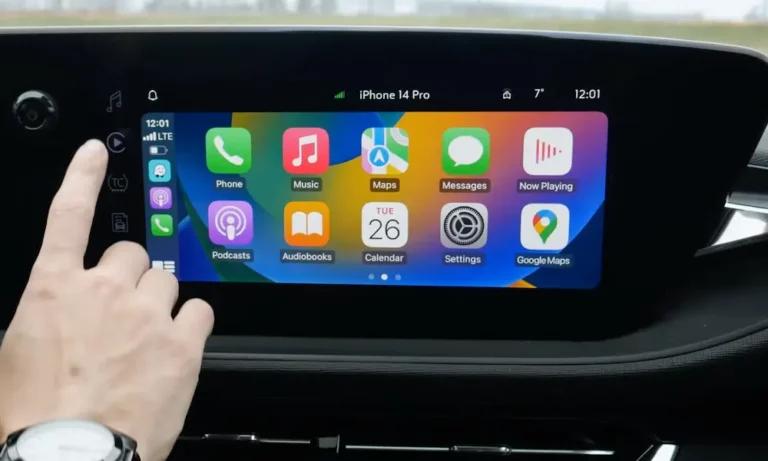
CarPlay’s layout looks like a giant iPhone home screen — large icons, horizontal swiping, a dashboard view that shows your map, media, and calendar at once. You can rearrange icons, but Apple controls the overall structure. No custom widgets, no layout overhauls.
That rigidity is actually a feature for many drivers. Less clutter means fewer split-second decisions while driving.
Android Auto Gives You More to Work With
Android Auto’s Coolwalk interface offers a split-screen layout you can adjust based on your screen size. You can keep navigation running in the main view while media controls and messages sit alongside it. There’s also a persistent media bar — no need to switch apps just to skip a song.
| UI Feature | Apple CarPlay | Android Auto |
|---|---|---|
| Navigation Style | Horizontal swipe | Vertical scroll |
| Layout Control | Fixed grid | Dynamic split-screen |
| Media Access | Requires app switch | Persistent control bar |
| Map Interaction | Arrow-based panning | Pinch and zoom |
Navigation: Which One Actually Gets You There Faster?
Google Maps on Android Auto Is Hard to Beat
Google Maps is the navigation backbone of Android Auto, and its real-time traffic data is genuinely exceptional. It reroutes faster, pulls from a massive database of business listings, and supports EV route planning with real-time battery data on compatible vehicles.
Touch gestures work naturally too — pinch to zoom, tap to adjust a route. It feels like using a tablet, not a 2008 GPS unit.
Apple Maps Has Come a Long Way
Apple Maps isn’t the embarrassment it was at launch. It now features detailed 3D landmarks, high-contrast visuals, and lane guidance that’s genuinely easy to read at a glance. In many modern vehicles, Apple Maps can push turn-by-turn directions directly to the instrument cluster or head-up display — something third-party apps often can’t do.
Apple Maps also has an adaptive zoom feature that automatically adjusts as you approach complex intersections. Handy when you’d rather not touch the screen at all.
Waze Works on Both — But Better on One
Waze still has the best community-driven hazard and speed trap alerts. It works on both platforms, but Android Auto integrates Waze more cleanly into its multi-pane dashboard. On CarPlay, Waze still functions well — it just doesn’t sit as naturally inside the overall layout.
| Navigation Feature | Apple Maps (CarPlay) | Google Maps (Android Auto) |
|---|---|---|
| Traffic Accuracy | Strong | Exceptional — real-time |
| EV Route Planning | Select models | Deep integration with battery data |
| Offline Maps | Limited | Robust offline support |
| Map Interaction | Arrow panning | Pinch and zoom |
Voice Assistants: Siri vs. Google Assistant
Google Assistant (Now with Gemini)
Google Assistant handles complex, conversational requests better than Siri. Ask it a follow-up question and it remembers context. It’s also more reliable with regional accents and noisy cabin environments.
In late 2024, Google started rolling out Gemini AI into Android Auto. Gemini can summarize long text threads while you drive — so instead of hearing 14 individual messages read aloud, you get a quick summary. That’s genuinely useful.
Siri Gets the Simple Stuff Done Fast
Siri’s strength is speed and ecosystem integration. For calls, texts, and Apple Music — it’s quick and reliable. It also connects deeply with Apple HomeKit, letting you trigger home scenes from the car. Siri does more processing on-device too, which appeals to privacy-focused drivers.
| Voice Feature | Siri (CarPlay) | Google Assistant (Android Auto) |
|---|---|---|
| Contextual Queries | Basic follow-ups | Conversational and accurate |
| AI Message Summarization | Limited | Gemini integration |
| Third-Party App Commands | Restricted | Broad support |
| Privacy Approach | On-device focus | Cloud-dependent |
App Ecosystems: Quality vs. Quantity
Android Auto supports more than three times as many third-party apps as CarPlay. Telegram, Skype, Facebook Messenger, niche podcast players — if you rely on those, Android Auto is your platform.
CarPlay’s library is smaller, but Apple’s strict vetting process means the apps that make the cut are well-optimized for driving. CarPlay also lets you browse your music library by artist or album directly on screen. Android Auto typically limits you to playlists to reduce distraction.
One notable difference: Android Auto supports video streaming and light gaming when parked — useful during EV charging stops. CarPlay doesn’t offer this yet.
Smart Home Integration from Your Car
Both platforms let you control your home while driving — a genuinely handy feature for busy commuters.
CarPlay with HomeKit lets you trigger scenes (“I’m heading home”), control individual devices, and even get proactive suggestions — like a dashboard button to open the garage when GPS detects you’re almost home.
Android Auto with Google Home handles similar commands through the Google ecosystem. You can check if doors are locked, adjust the thermostat, or turn off forgotten lights — all hands-free with natural language commands.
Reliability: Which One Drops the Connection Less?
According to J.D. Power’s 2026 Vehicle Dependability Study, smartphone integration is one of the most-reported infotainment problems for new car owners. Connection drops, Bluetooth failures, and software-update bugs affect both platforms.
That said, CarPlay generally connects faster and more consistently because the iPhone controls the entire process. Android Auto’s performance varies more across car brands due to its distributed architecture.
| Satisfaction Metric | Apple CarPlay | Android Auto |
|---|---|---|
| UI Satisfaction | 57% very satisfied | 44% very satisfied |
| Voice Call Quality | 70% satisfied | 64% satisfied |
| Voice-to-Text | 65% satisfied | 55% satisfied |
| General Consistency | Higher | Varies by vehicle |
The Industry Battle Nobody’s Talking About
General Motors is phasing out CarPlay and Android Auto from future vehicles in favor of a built-in Google-powered system. Their logic: native systems can access deeper vehicle data like battery thermals and tire pressure.
The problem? Nearly 50% of drivers say no CarPlay is a dealbreaker when buying a car. Ford noticed and doubled down — noting that 70% of its customers are iPhone users who consider these features mandatory.
Tesla and Rivian have never supported either platform. They built their own software from scratch, which allows deep integration with charging infrastructure and driver assistance features that phone-mirroring simply can’t match.
Looking ahead, both Apple and Google are evolving their platforms:
- CarPlay Ultra plans to take over every screen in the vehicle — including the speedometer
- Android Automotive OS runs directly on the car without needing a connected phone, and manufacturers are already adopting it
So Which One Should You Pick?
Honestly? This decision is mostly already made for you.
Choose Apple CarPlay if you:
- Own an iPhone — it’s a hard requirement
- Want consistent performance across any car you get into
- Care about privacy and on-device data processing
- Use Apple HomeKit at home
- Prefer clean, distraction-free visuals while driving
Choose Android Auto if you:
- Use a Samsung, Pixel, or any Android phone
- Want your map, media, and messages visible simultaneously
- Rely on third-party apps like Telegram, Skype, or niche streaming services
- Drive frequently in heavy traffic where Google Maps’ rerouting shines
- Like customizing your interface layout
The research is clear: match the platform to the phone you already use. Switching ecosystems just to get a marginally better car experience isn’t worth the headache. Both systems are excellent. Both have real weaknesses. The one that works best is the one that fits the device already in your pocket.