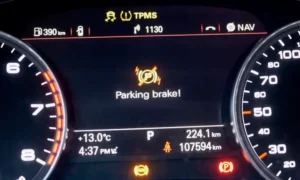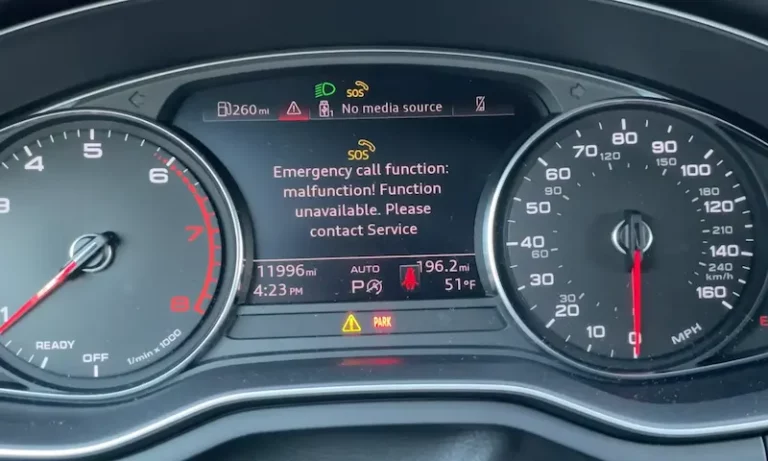
Seeing “Emergency call function: malfunction!” flash across your Audi’s dash is unsettling. You’re wondering if it’s serious, expensive, or something you can tackle yourself. Here’s the truth: most Audi SOS malfunctions trace back to three fixable issues—a dying backup battery, water sneaking into your antenna, or outdated cellular tech. Let’s break down what’s happening and how you can solve it without emptying your wallet.
Understanding Your Audi’s Emergency Call System
Your Audi’s SOS system isn’t just a fancy button. It’s a legally mandated safety network designed to automatically contact emergency services if you’re in a serious crash. The system broadcasts your GPS coordinates, VIN, and opens a voice channel to first responders—all powered independently from your main car battery.
The brains of this operation is the J949 Telematics Control Unit. Think of it as a dedicated cell phone built into your car. It has its own backup battery, antenna, and microphone routing. When something goes wrong with any of these components, you’ll see that dreaded warning light.
Here’s where it gets tricky: the J949 doesn’t just handle emergencies. It also routes your hands-free microphone audio. That’s why many drivers notice their Bluetooth calls suddenly have no outgoing audio when the SOS malfunction appears.
The Three Main Culprits Behind Your SOS Warning
The Backup Battery Dies (Most Common)
If your Audi is 4-6 years old, the backup battery inside your J949 module is probably shot. This isn’t your main 12V car battery—it’s a small Lithium Iron Phosphate cell that keeps the emergency system alive even if your main battery gets severed in a crash.
The module constantly tests this battery. When the internal resistance climbs too high or voltage drops below 2.8V under load, it throws fault code B191604 and lights up your dash.
Why it fails:
- Extreme temperature swings in your cabin cook the battery chemistry
- The J949’s self-testing gradually wears it down
- It’s just a wear item nobody tells you about
The battery itself costs $60-120. Dealers charge $600-900 because they bury the module under seats or in trunk panels, requiring 2-4 hours of labor. But if you’re handy, this is a straightforward DIY fix that’ll save you hundreds.
Water Leaking Through Your Shark Fin Antenna
This one’s sneaky and dangerous, especially in Q5 and Q7 models. The roof-mounted “shark fin” antenna has a rubber seal that UV rays and thermal expansion slowly destroy. Once compromised, rainwater drips down the antenna cables straight to your electronics.
Early symptoms include GPS showing you in the ocean or miles off the actual road. Then the SOS warning appears as water shorts the cellular antenna connections.
The real danger: In 2021 Audi Q5 and SQ5 models, water can drip onto the Gateway Control Module under the rear seat, potentially shutting down your engine, steering assist, and brakes while you’re driving. Audi issued Recall 90S9 to install protective covers, but the antenna leak still needs fixing.
Your Car’s 3G Modem Is Obsolete
If you drive a 2012-2018 Audi A3, A4, A5, Q5, or Q7, your SOS malfunction might not be a “failure” at all. AT&T shut down its 3G network in February 2022, and your car’s modem can’t connect to anything newer.
The J949 enters an endless search loop looking for a network that no longer exists. After enough failed attempts, it assumes something’s broken and triggers the warning.
Audi’s solution? Service Action 91CD—a software update that basically tells your car to stop looking and disables the SOS features entirely. The warning light goes away, but you permanently lose emergency call capability and remote services.
How to Actually Diagnose the Problem
Guessing costs money. Before you replace anything, plug in a diagnostic scanner. You need either VCDS (Ross-Tech) or the dealer’s ODIS system.
The diagnostic process:
- Run an auto-scan of all modules
- Navigate to Address 75 (Telematics Control Unit)
- Check the stored fault codes
Here’s what the codes tell you:
| Fault Code | What It Means | Your Next Step |
|---|---|---|
| B191604 | Backup battery resistance too high | Replace the backup battery |
| U153E00 | Can’t connect to mobile network | Check if 3G is dead or antenna damaged |
| B105113 | GSM antenna circuit open | Inspect antenna connections for water damage |
| U142100 | No communication with module | Try the hard reset procedure first |
| B200000 | Control unit internally faulty | Module replacement needed |
If you see U142100 (no communication), don’t buy a new module yet. There’s a reset trick that works surprisingly often.
The Hard Reset Trick Dealers Don’t Always Try First
Sometimes the J949 module just freezes—like your computer locking up. The problem? Disconnecting your car’s 12V battery doesn’t reset it because the module instantly switches to its backup battery to stay alive.
The proper reset procedure:
- Find and remove the specific fuse for the telematics unit (check your owner’s manual)
- Physically access the J949 module (locations vary by model)
- Unplug the main wiring harness connector
- Unplug the small backup battery connector
- Wait 20 full minutes to let capacitors discharge
- Reconnect backup battery first, then main harness
- Check if communication returns
This clears the module’s volatile memory and forces a fresh boot. Many frozen modules come back to life with this procedure, avoiding a $2,000 replacement.
DIY Battery Replacement: Model-by-Model Guide
The backup battery swap is mechanically simple. The challenge is just getting to the module without breaking plastic clips.
Audi A4, S4, A5, S5 (2017-2023 B9 Platform)
Module location: Trunk area, behind side trim panels or under rear deck
Access steps:
- Disconnect negative terminal of main battery in trunk
- Remove cargo floor and side storage bins
- Pull back trunk liner near wheel well arch
- Some models require lifting rear seat bottom cushion
Battery part number: 4K0915989A
Audi Q5, SQ5 (2018-2023 FY Platform)
Module location: Under rear bench seat, driver’s side
Access steps:
- Pull sharply upward on front of rear seat bottom to release clips
- Critical: Immediately check for any water or dampness on floor
- Unbolt module bracket, flip to access battery compartment
- While you’re there, verify the Gateway module has its protective cover (Recall 90S9)
Warning: If you find water, fix the leak source before replacing the battery or you’ll be doing this again in six months.
Audi Q7, Q8 (2017+ 4M Platform)
Module location: Front passenger footwell or near A-pillar (most labor-intensive)
Access steps:
- Unbolt front passenger seat (requires triple-square bits)
- Disconnect seat connectors carefully
- Pull back heavy carpeting
- Module is in recessed floor box
Dealers quote 4-6 hours of labor for this one. Some techs can reach it by removing door sill trim without pulling the seat, but it’s tight work.
Audi A3, S3, RS3 (2015-2020)
Module location: Under front passenger seat
Access steps:
- Unbolt seat using triple-square bits
- Tilt seat back without disconnecting wires
- Lift carpet flap to access floor recess
The connector here gets kicked by rear passengers sometimes, causing intermittent faults.
After You Replace the Battery
You’ll need to tell the module it has a fresh battery. Connect your VCDS scanner:
- Select Module 75 (Telematics)
- Navigate to Adaptation
- Find “Battery Adaptation” or “Reset Battery Values”
- If it asks for a serial number, changing one digit of the old number usually works
Some folks report just clearing the B191604 fault code works fine—the module tests the new battery, sees healthy voltage, and moves on. But proper adaptation ensures accurate lifespan tracking.
Fixing Water Leaks: The Practical Approach
Replacing the shark fin antenna “properly” means dropping the entire headliner—a $1,500+ dealer job requiring 6-8 hours of labor. There’s a workaround that independent shops use.
The top-down seal method:
- Clean roof area around antenna with isopropyl alcohol
- Mask off paint with painter’s tape, leaving 2mm gap
- Apply neutral cure silicone or automotive windshield urethane
- Use Dow Corning 795 or 3M Window-Weld
- Never use bathroom silicone—the acid eats your clear coat
- Smooth with gloved finger
- Remove tape immediately, cure 24 hours
This creates a waterproof barrier over the failed factory seal. It’s not factory-approved, but it stops the leak and protects your expensive electronics.
If water already got in: You’ll likely need to replace the antenna cables (Fakra connectors) because corrosion causes permanent damage. The antenna unit itself is around $300.
What About the 3G Sunset Issue?
If your Audi was built before 2019, the cellular modem is likely 3G-only. AT&T’s network shutdown left these cars unable to connect.
Your options:
Option 1: Get Service Action 91CD applied (free software update that disables SOS and turns off the warning light)
Option 2: Install an aftermarket 4G dongle in your OBD-II port to restore some remote features
Option 3: Ignore it if you don’t use Audi Connect services anyway
The honest truth? If you don’t care about remote locking or vehicle tracking through the myAudi app, just get the software update and move on. The system worked fine before smartphones existed—you’ll survive without it.
Cost Breakdown: What You’ll Actually Pay
| Repair Type | Part Cost | DIY Time | Dealer Cost |
|---|---|---|---|
| Software reset (frozen module) | $0 | 30 minutes | $180-350 (diagnostic fee) |
| Backup battery replacement | $60-120 | 1-2 hours | $600-900 |
| Antenna seal (DIY fix) | $20 | 1 hour | Not offered |
| Antenna replacement | $300 | 6-8 hours | $1,500-2,500 |
| J949 module replacement | $600-1,000 | Requires ODIS coding | $1,800-3,000 |
The massive price gap between DIY and dealer work on the battery is why this repair generates so much frustration. You’re paying $700 in labor to access a $80 part.
What Actually Needs Immediate Attention
Not all SOS malfunctions are urgent. Here’s how to prioritize:
Fix immediately if:
- You see any water staining on headliner or carpets
- You drive a 2018-2022 Q5/SQ5 (Gateway water risk)
- Your GPS shows wildly incorrect location
- You have no outgoing audio on Bluetooth calls
Can wait for convenient scheduling:
- Warning appeared gradually over days
- All other functions work normally
- Car is 4+ years old (likely just battery aging)
Might ignore entirely:
- You have a 2012-2018 model and confirmed 3G sunset is the cause
- You don’t use Audi Connect services
- You’re comfortable without the automatic crash notification
Common Mistakes That Waste Money
Mistake 1: Replacing the entire J949 module when only the $80 battery failed
Dealers sometimes follow diagnostic trees that lead straight to module replacement. If they see communication errors alongside the battery fault, they might condemn the whole unit. Always ask them to try the battery first.
Mistake 2: Ignoring water leaks in Q5/Q7 models
An SOS malfunction in these models deserves immediate inspection. The Gateway module failure can leave you stranded in traffic with no engine power.
Mistake 3: Paying for “diagnostics” at multiple shops
The fault codes are standardized. One VCDS scan tells you everything. Don’t pay three shops $150 each to read the same B191604 code.
The Bottom Line on Audi SOS Malfunctions
For most owners with 4-6 year old Audis, you’re looking at a backup battery replacement. It’s a predictable maintenance item that Audi doesn’t advertise. Budget $100 for parts and decide whether your mechanical skills and patience justify saving $500-800 in labor.
If you own a Q5 or Q7, treat any SOS warning as a water leak investigation first. The system malfunction might be the least of your problems if your Gateway module is next.
And if you’re driving an older model with 3G hardware? The cellular network moved on without you. Get the software update, save yourself the headache, and remember that people drove cars safely for decades before emergency call systems existed.
The Audi SOS malfunction is annoying, sometimes expensive, but rarely mysterious once you understand what you’re dealing with. Armed with the right diagnostic approach, you can fix it smart instead of just throwing parts at it.