Thinking about adding a remote starter to your vehicle? You’ve probably come across Compustar in your research. These systems let you start your car from a distance, but with prices ranging from $269 to over $1,000, you’ll want to be sure you’re making a smart investment. Let’s dive into what makes Compustar systems stand out, what real users think, and whether the features justify the cost.
What Sets Compustar Remote Starters Apart
Industry-Leading Range Capabilities
Forget the limited 65-foot range of factory-installed starters. Compustar’s Pro T13 model delivers an impressive three-mile range under ideal conditions. This means you can fire up your car from inside your office building, across a shopping mall, or from your apartment several floors up.
The extended range isn’t just about convenience—it’s practical for extreme weather conditions. Starting your car from inside during a freezing winter morning or cooling it down during summer heat makes a genuine difference in comfort when you finally get in.
Two-Way Communication That Actually Works
One of Compustar’s most praised features is their two-way communication system. Unlike basic remote starters that leave you guessing whether your command worked, Compustar remotes provide instant feedback.
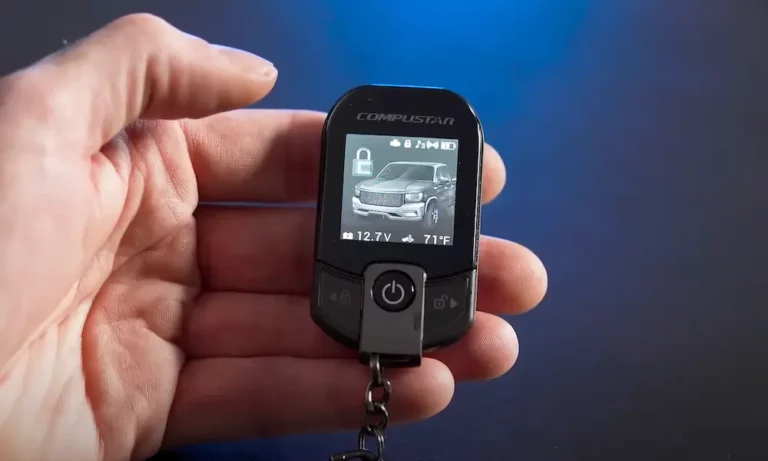
When you press the button, the remote confirms your car has started with visual indicators on the LCD screen and audible alerts. Higher-end models like the Pro T13 even display additional information like interior temperature and battery voltage on a color screen.
Smart Integration Options
Compustar has embraced modern technology with their DroneMobile smartphone integration. The RFX-2WQ9-FM kit pairs their Q9 remote with the DroneMobile X1-LTE module, letting you control your vehicle through an app.
This setup effectively removes distance limitations altogether—you can start your car from anywhere with cellular service. The app also adds features like:
- GPS tracking
- Geofencing alerts
- Trip history logging
- Remote temperature monitoring
Real User Experiences with Compustar Systems
What Customers Love
Best Buy reviews show high satisfaction with Compustar’s performance. Users frequently praise the CS4905S-KIT’s 3,000-foot range, noting how reliably it starts vehicles even through obstacles like metal buildings.
Professional installation also receives consistently positive feedback. Reviewers often mention technicians by name, highlighting their clear communication and clean installations. This suggests that the installation experience is an important part of customer satisfaction.
The proximity unlocking feature available in Pro Series models is another favorite. The system automatically unlocks doors when the remote is within six feet—perfect when your hands are full with groceries or children.
Common Complaints and Concerns
Despite the praise, Compustar systems aren’t without issues. The most frequently reported problem is battery drain. Some users report their vehicle batteries depleting within days after installation, particularly with systems using LTE modules or security add-ons.
For example, one 2010 Honda CR-V owner noticed rapid battery discharge after adding a Compustar system. The constant power draw for features like LED indicators and alarm sensors was identified as the culprit.
Other criticisms include:
- Occasional remote firmware glitches
- App latency in areas with weak cellular signals
- Lack of temperature-based automation in some integrations
Installation Considerations: DIY vs. Professional
Why Professional Installation Matters
Compustar systems are designed for professional installation—and for good reason. Modern vehicles have complex electronics that require specific integration approaches.
Professional installers use specialized T-harness adapters to simplify integration and reduce the risk of wiring errors. They can also customize settings based on your specific vehicle model and preferences.
The CSX9900-DC bundle, which combines remote start functionality with a 120-decibel alarm system, requires meticulous configuration to align with a vehicle’s CAN bus system. This process demands expertise in automotive diagnostics that most DIYers simply don’t have.
Installation Costs and What to Expect
Professional installation typically adds $100-200 to the system cost, but most reviewers consider this money well-spent. The installation process usually takes 2-3 hours, depending on your vehicle’s complexity.
Before installation, it’s worth discussing:
- Vehicle-specific limitations (especially for push-to-start ignitions)
- Options for disabling non-essential features to minimize battery drain
- Warranty details for both the system and the installation work
Comparing Popular Compustar Models
Pro T13: The Premium Option
The Pro T13 represents Compustar’s flagship model, incorporating:
- USB-rechargeable battery
- IPX-7 waterproofing for durability
- Three-mile range capability
- Color LCD screen with detailed feedback
- Proximity unlocking feature
- Compatible with LTE module for smartphone control
Long-term users praise its durability, though some note minor screen oxidation after three years of use. At around $700-1,200 (including installation), it’s a premium investment.
Q9 with LTE: The Mid-Range Sweet Spot
The Q9 remote paired with DroneMobile LTE offers an excellent balance of affordability and advanced features:
- Five-button layout for controlling multiple functions
- Smartphone app integration
- Trip analytics and geofencing
- More affordable than the T13 (typically $400-700 installed)
Users in snowy regions particularly appreciate the ability to pre-warm engines and cabins remotely, making this a popular choice in colder climates.
CS4905S-KIT: The Budget-Friendly Option
For those seeking basic remote start functionality at a lower price point, the CS4905S-KIT delivers:
- 3,000-foot range
- Essential start/stop functions
- Lower price tag (around $269-400 installed)
While lacking the advanced features of premium models, this kit still outperforms factory remote starters and provides reliable service according to user reviews.
| Model | Approximate Range | Key Features | Price Range (Installed) |
|---|---|---|---|
| Pro T13 | Up to 3 miles | Color LCD, waterproof, proximity unlock, LTE compatible | $700-1,200 |
| Q9 with LTE | 3,000+ feet | Smartphone control, 5-button layout, geofencing | $400-700 |
| CS4905S-KIT | 3,000 feet | Basic remote start/stop functions, reliable range | $269-400 |
Compustar vs. Factory Remote Starters
Why Aftermarket Often Beats Factory Options
Factory remote starters have one advantage: they’re integrated by the manufacturer. However, Compustar systems outperform them in several key areas:
- Range: Factory systems typically max out at 65 feet vs. Compustar’s 3,000+ feet
- Features: Aftermarket systems offer two-way confirmation, smartphone integration, and security options factory systems lack
- Upgradability: Compustar supports modular upgrades like LTE connectivity and expanded sensor arrays
- Customization: Get exactly the features you want rather than a one-size-fits-all factory package
The Warranty Question
One concern with aftermarket systems is potential warranty implications. However, Compustar’s use of T-harnesses and CAN bus-compatible modules minimizes invasive wiring, generally preserving factory warranty coverage for the vehicle’s other systems.
The National Highway Traffic Safety Administration (NHTSA) regulations prohibit manufacturers from voiding warranties simply because aftermarket products are installed, unless they can prove the aftermarket equipment caused a specific problem.
Solving the Battery Drain Issue
Battery drain remains the most common complaint with Compustar systems. Here’s how to address it:
Prevention During Installation
When having your system installed, discuss these options:
- Disable non-essential features like antenna LEDs
- Adjust shock sensor sensitivity to minimize power consumption
- Request the FT-DC3-LC bypass module (compatible with select models) to optimize power draw
- Ask for programming adjustments to reduce idle current consumption
Maintenance Tips for Compustar Users
If you already have a system installed:
- Consider a trickle charger for vehicles with infrequent use
- Monitor your battery’s voltage regularly during the first month
- Have the installer check the system if you notice faster battery depletion
- For vehicles stored long-term, disconnect the battery or use a battery maintenance device
These measures can dramatically reduce or eliminate battery drain issues while preserving all the convenience of your remote starter.
Is a Compustar Remote Starter Worth It?
After reviewing features, user experiences, and common concerns, Compustar remote starters deliver excellent value for most users—especially those in extreme climates who benefit most from pre-conditioning their vehicles.
The ideal buyer will:
- Live in an area with very hot summers or cold winters
- Need to start their vehicle from inside buildings or over long distances
- Appreciate advanced features like smartphone control
- Be willing to invest in professional installation
Despite the battery drain concerns, proper installation and occasional maintenance can mitigate these issues, making Compustar systems a worthy investment that enhances both comfort and convenience for years to come.
If you’re ready to take the next step, scheduling a consultation with a certified installer can help you identify the perfect model for your specific vehicle and needs.