That “Service Emission System” message on your Duramax dash isn’t just an annoying light. It’s a countdown to limp mode — and it won’t go away with a simple battery disconnect. This guide covers exactly what’s causing it, how to diagnose it, and how to clear it properly. Stick around because skipping any step here means it comes right back.
What the Service Emission System Warning Actually Means
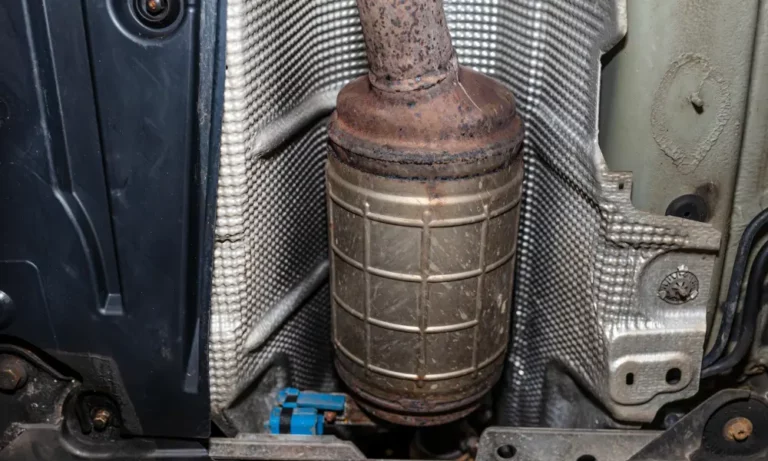
Your Duramax’s Engine Control Module (ECM) watches your exhaust aftertreatment system constantly. When something’s off — whether it’s bad DEF fluid, a clogged injector, or a shorted heater — it triggers the “Service Emission System” alert on your dash.
Here’s the part that really stings: it starts a speed derate countdown.
The sequence looks like this:
- Warning stage: “175 Miles to 65 MPH” appears on the dash
- Stage 1 derate: Top speed locked at 65 MPH
- Stage 2 derate: Speed drops to 55 MPH
- Final stage: Vehicle crawls at 4 MPH — basically a rolling paperweight
Battery disconnects won’t stop it. Cheap code readers won’t clear it. You need to find the root cause and run a specific electronic reset. More on that below.
The Three Main Causes of This Warning
Before you clear anything, you need to know why it triggered. The ECM tracks three main problem areas.
1. Bad DEF Fluid or Crystallization
This is the most common reason Duramax owners see this warning. DEF (Diesel Exhaust Fluid) is a precise mix of 32.5% urea and 67.5% deionized water. When that ratio shifts — from heat, evaporation, or contamination — the whole system falls apart.
What goes wrong:
- Storage above 85°F breaks down the urea content
- Evaporation makes the solution too concentrated, which causes solid urea crystals to form
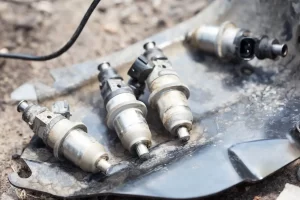
- Those crystals clog the supply lines, filter screens, and injector nozzle
- A clogged nozzle looks like bad fluid to the ECM — it throws a “Reductant Fluid Quality Poor” message even when the real problem is a mechanical blockage
What contaminates DEF instantly:
- Tap water
- Diesel fuel
- Windshield washer fluid
- Dust from open containers or dirty public pumps
Buy DEF from high-turnover stores in sealed containers. Avoid public DEF pumps — they’re cross-contamination traps.
2. Shorted DEF Tank Heater
DEF freezes at 12°F, so your Duramax has electrical heating mats inside the tank to thaw the fluid on cold starts. On 2020-2021 L5P and LM2 models, these heaters are known to fail in a specific and expensive way.
The heating mat’s protective sheathing breaks down over time. DEF fluid soaks into the electrical circuits and creates a short to ground. This kills the entire reductant control module network and drops the truck into limp mode.
How to test it:
With the tank at least half full, use a digital multimeter on the main pump connector:
- Measure resistance between Pin 9 and Pin 14
- Measure resistance between Pin 10 and Pin 14
Abnormal readings confirm fluid intrusion. The fix is a full reservoir and pump assembly replacement.
3. Fouled Intake Sensors Faking an Emission Problem
This one surprises most people. The ECM calculates expected NOx output based on intake airflow data. If that data is wrong, the emissions math is wrong from the start.
On 2017-2019 L5P models, the hood scoop can overwhelm the air filter during heavy rain. A saturated air filter lets debris bypass straight to the MAF sensor and MAP sensor. A fouled MAP sensor misreads boost pressure, skews the combustion calculation, and triggers downstream emission codes — even though your DEF system is perfectly fine.
Diagnostic Trouble Codes: What You’re Actually Looking At
Pulling codes is step one. But you need to read them in the right order. Fix electrical and communication codes first. Chemical efficiency codes like P20EE mean nothing if the sensor reporting them can’t talk to the ECM reliably.
| DTC Code | What It Means | Most Likely Cause |
|---|---|---|
| P20EE | NOx catalyst efficiency below threshold | Crystallized DEF, clogged injector, degraded catalyst |
| P207F | Wrong reductant composition | Diluted or contaminated DEF fluid |
| P204F | Reductant system performance | Failing pump, restricted lines, leaking fittings |
| P20BB | Heater 1 circuit low voltage | DEF fluid intrusion into heating element |
| P20C3 | Heater 3 circuit low voltage | Secondary heater or supply line trace heater short |
| P1098 | Coolant flow control valve (LZ0 only) | Failed coolant valve on 3.0L Duramax |
| P143C | Reductant module high temperature | Overheating at harness connector |
| P0106 | MAP sensor performance | Fouled sensor from water/debris bypass |
Physical Fixes Before You Touch a Scanner
Don’t grab a scan tool yet. Running the electronic reset before fixing the physical problem is a waste of time — the warning comes straight back.
Test the DEF Injector Flow
A bi-directional scanner lets you command a Reductant Injection Quantity Test. Here’s how it works:
- Unbolt the injector from the exhaust pipe — keep the fluid lines and harness connected
- Suspend it over a graduated measuring cylinder
- Command the test on your scanner (2-minute cycle at 70-75 PSI)
Results guide:
- 40-55 mL collected = injector is healthy
- Below 40 mL = nozzle is clogged or pump is weak
- Above 55 mL = internal pintle is stuck open (ammonia slip risk)
For low-flow injectors, high-temperature steam applied to the nozzle tip can dissolve crystallized urea without damaging the solenoid. Try this before buying a new injector.
Clean the MAP Sensor
On intake-related codes, remove the MAP sensor (single 8mm bolt) and inspect it carefully. Look for thick carbon and oil sludge bridging the internal thermistors.
Cleaning steps:
- Use electronics cleaner — it evaporates clean and leaves zero residue
- Lube the O-ring with silicone compound before reinstalling
- Torque to 96 inch-pounds — over-tightening distorts the housing
- Run a Barometric Pressure reset on your scanner after reinstalling
Torque Specs for Emission Hardware
Get these wrong and you’ll create new problems — exhaust leaks, fractured sensor elements, boost leaks.
| Component | Torque Spec | Notes |
|---|---|---|
| Upstream NOx Sensor | 33 ft-lbs | No impact tools — hand wrench only |
| Downstream NOx Sensor | 33 ft-lbs | Route harness away from exhaust pipe |
| MAP Sensor bolt | 96 in-lbs | Silicone lube on O-ring |
| Exhaust Fluid Injector | 18 ft-lbs | Confirm gasket seats flush |
| EGT Sensor | 33 ft-lbs | Light coat of high-temp anti-seize on threads |
How to Clear the Duramax Service Emission System Warning
Now you’re ready for the electronic reset. This is the Reductant Fluid Quality Test — and it’s the only procedure that actually satisfies the ECM and clears the countdown timer.
Step 1: Drain and Refill the DEF Tank
Completely drain the old fluid. Flush the tank with distilled water to break up sediment. Then fill it to capacity with fresh, in-date DEF from a sealed container.
Step 2: Meet the Preconditions
The ECM is picky. If these aren’t met, the scanner will immediately reject the test command with a “Limits Exceeded” or “Command Rejected” error.
Required conditions:
- No active DTCs in any module across the network
- Ambient temp above 20°F (cold = ECM assumes DEF is frozen)
- Engine fully up to operating temperature
- Exhaust system not overheating (secondary EGT sensor within range)
- Drive at highway speed for 25 minutes before testing to purge old fluid from the catalyst
Check the NHTSA bulletin PIP5007B for the full list of enabling conditions.
Step 3: Run the Fluid Quality Test
Connect your bi-directional scanner to the OBD2 port. Navigate to output controls and command the Reductant Fluid Quality Test.
What happens next:
- The ECM takes over engine speed and injection timing
- The DEF pump pressurizes and begins dosing
- Upstream and downstream NOx sensors monitor efficiency in real time
- The test runs 30 to 70 minutes — don’t touch the pedals, don’t adjust the climate controls
If it passes, the Service Emission System message and derate countdown vanish immediately.
If the test times out or fails: Turn the ignition off, remove the key, unplug the scanner, and wait two full minutes. Then try again. A timeout means exhaust temps drifted out of range. A failure means a physical problem still exists.
Step 4: Force a DPF Regen If the Test Keeps Failing
Heavy soot buildup in the Diesel Particulate Filter masks catalyst efficiency and causes the fluid quality test to fail repeatedly. You need to burn that soot out first.
Before you start a forced regeneration:
- Park on concrete or asphalt — exhaust temps exceed 1,000°F
- Keep the hood closed
- Transmission in Park, parking brake on
- At least a quarter tank of fuel
The ECM ramps engine speed to ~2,000 RPM and dumps raw diesel into the exhaust stream to burn off soot. The process takes 20-40 minutes. Watch soot mass on your scanner — when it drops to near zero, it’s done.
After a successful regen, immediately run the Reductant Fluid Quality Test. A clean DPF plus fresh DEF fluid almost always produces a passing result.
Completing the OBD2 Drive Cycle After the Repair
Clearing the warning is great. But it doesn’t mean your truck is ready to pass an emissions inspection. When you clear codes, all OBD2 readiness monitors reset to “Not Ready.”
To get those monitors back to “Ready”, you need to run a specific GM drive cycle. It’s more involved than most people expect.
Key requirements for the GM drive cycle:
- Cold soak: Park the truck for 8-10 hours with the ignition off. Coolant temp and intake air temp must equalize to within 10.8°F of each other
- Startup temp: Ambient air between 39°F and 86°F
- Fuel level: Keep it between 15% and 85% for accurate evap testing
- Steady cruise: Drive at 55 MPH for 3-5 minutes with smooth throttle — no braking, no shifting
- Coast-down: Release the throttle completely from 55 MPH down to 20 MPH. Don’t touch the brake or clutch
If the truck kicks into a passive or active DPF regen during this process, all monitor testing pauses until it’s done. Some monitors take multiple drive cycles over several days to set — that’s normal.
Check If GM Owes You a Free Repair
Before you spend thousands on parts, check these GM special coverage bulletins. They extend warranty protection well beyond standard terms for known failures.
- 2013-2016 LML/LGH trucks: Special Coverage N192210260 covers DEF tank reservoir failures up to 10 years or 120,000 miles
- 2020-2021 L5P/LM2 trucks: Service Update N212342980 covers overheating and arcing at the DEF tank harness connector
- 2023 LZ0 3.0L trucks: Special Coverage N252508340 covers the coolant flow control valve up to an incredible 15 years or 150,000 miles — GM even reimburses owners who already paid out of pocket
Check your VIN at your dealership before opening your wallet. These bulletins apply regardless of who currently owns the truck.