
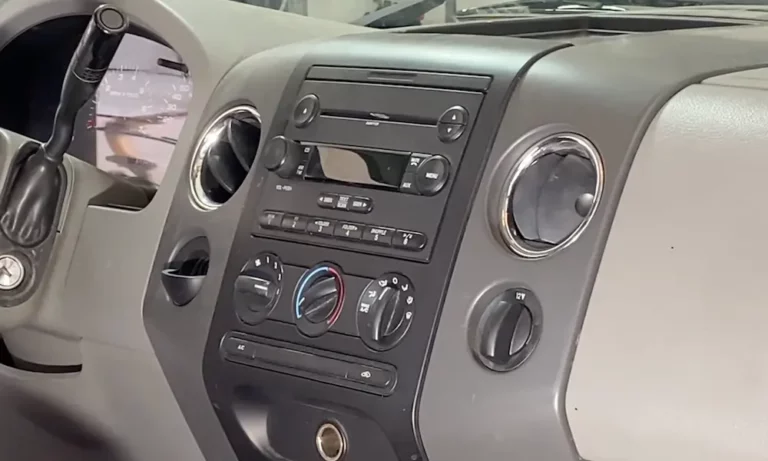
Thinking about swapping out your factory head unit? Whether you’re upgrading to Apple CarPlay or fixing a busted screen, knowing how to remove a car stereo correctly saves you money — and prevents a costly mistake. This guide walks you through every step, from disconnecting the battery to pulling the last wire. Stick around — there’s a section on hidden fasteners that trips up even experienced DIYers.
What You’ll Need Before You Start
Don’t grab a flathead screwdriver and start prying. That’s how dashboards crack.
Here’s your tool checklist:
- Trim removal kit (glass-infused nylon pry tools — not metal)
- Torx driver set (T10 to T30)
- Metric socket set (7mm, 8mm, 10mm)
- DIN removal keys (for older aftermarket head units)
- 10mm wrench (for the battery terminal)
- Digital camera or phone (to photograph wiring before you disconnect anything)
Crutchfield’s tool guide breaks down exactly which tools earn their place in your kit. The trim removal set alone will pay for itself the first time you avoid cracking a $200 dashboard bezel.
Step 1: Disconnect the Battery First — No Exceptions
Skipping this step is how people fry their electronics or trigger an airbag. Always disconnect the battery before you touch anything inside the dash.
Here’s the correct sequence:
- Open the hood and locate the battery
- Loosen the negative terminal (minus symbol, black cable) first using a 10mm wrench
- Move the cable clear so it can’t spring back and touch the terminal
- Then loosen the positive terminal (plus symbol, red cable)
Why negative first? Your car’s entire metal frame acts as the common ground. If you touch the positive terminal with a wrench and it contacts any metal nearby, you’ve got an instant short circuit. That means sparks, potential damage to your engine control module, or worse.
After disconnecting, wait 10 to 15 minutes before touching the stereo. Capacitors inside the unit and control modules hold a residual charge. This buffer period also lets your car’s computers save their state data properly — skipping it can corrupt memory or lock you out of certain features.
Driving a Hybrid or EV?
There’s an extra layer of caution here. Hybrids and EVs run high-voltage systems alongside the standard 12V sub-system that powers the stereo. Look for bright orange cables under the hood — those carry dangerous voltage.
Before working on any interior components, locate and remove the manual service disconnect, usually found in the trunk or under a rear seat. Then wait up to 15 minutes for the high-capacity capacitors in the power inverters to discharge.
Step 2: Check for Airbag Components Near the Dash
The airbag system sits very close to where your stereo lives. Accidentally triggering one is a life-threatening risk — not an exaggeration.
Scan the area for yellow or orange wires and connectors. These are the universal markers for SRS (Supplemental Restraint System) components. Follow these rules with them:
- Never probe them with a multimeter — even the small current used to test resistance can trigger deployment
- Ground yourself by touching a metal part of the car’s frame before handling any interior connector
- Use plastic pry tools only — a sharp blow from a metal tool near an impact sensor can, in rare cases, mimic a collision event
Step 3: Remove the Trim Panels Around the Stereo
This is where most DIY jobs go sideways. Every manufacturer hides fasteners differently, and forcing a panel that’s still clipped in will snap it.
How Different Car Brands Approach This
Your removal strategy depends on where your car was made. Here’s a quick reference:
| Origin | Common Fasteners | Where to Start | Clip Strength |
|---|---|---|---|
| Japanese (Toyota, Honda, Nissan) | Phillips screws, snap clips | Center console / Knee bolster | Moderate / Flexible |
| German (VW, BMW, Mercedes) | Torx screws, precision tabs | Shifter trim / Ash tray | High / Can be brittle |
| American (Ford, GM, Chrysler) | 7mm hex bolts, large clips | Dash pad / Bezel perimeter | Very High / Robust |
| Korean (Hyundai, Kia) | Phillips screws, twist-lock | Vent assemblies / Console | Moderate / Elastic |
Japanese vehicles typically use lots of small snap clips. Start at the bottom of the center console and work upward. The climate control panel usually pulls straight toward the rear of the car first.
German vehicles use a “daisy-chain” approach — one panel hides fasteners for the next. You might need to remove the gear shifter trim to find the ash tray screw, which hides the climate control screw, and so on. It’s counter-intuitive but intentional, so there are no visible screws from the driver’s seat.
American vehicles combine large clips with 7mm or 8mm bolts. Many trucks and SUVs let you remove the entire dash pad as one piece, giving you top-down access to everything.
Don’t Miss These Hidden Fasteners
The single most common mistake in stereo removal: applying force to a panel that still has a screw in it.
Check these spots before you pull anything:
- Inside air vents — Pop the louvers out with a hook tool. Screws are often hiding inside the duct
- Blank button plugs — On lower-trim vehicles, unused button spaces often cover a mounting bolt
- Cubby liners — The rubber or felt mat at the bottom of the storage pocket below the stereo frequently hides screws
- Instrument cluster overlap — If the cluster bezel overlaps the stereo bezel, you need to loosen the cluster trim first or the corner will snap off
Step 4: Extract the Head Unit
Once all trim is off and every screw is out, the unit should slide forward. If it doesn’t budge, don’t force it — it’s likely snagged on the wiring or a rear support bracket.
Bracket and Bolt Mounting (Most Common in the US)
Most American cars use side brackets bolted to the dash frame. Once the 7mm or Phillips screws come out, the unit slides straight out. Pull it gently — the wire harness behind it has very little slack.
DIN Sleeve Systems
Some vehicles (and most older aftermarket installs) use a metal cage with spring-loaded tabs. You need DIN removal keys for these. Insert the keys until you hear a click, then use them as handles to pull the unit out. Don’t improvise with metal files here — you’ll likely damage the locking mechanism.
Modern Integrated Infotainment Screens
Post-2015 vehicles often have the stereo integrated into a floating touchscreen or built into the dash pad itself. These require significantly more disassembly. Systems like the Cadillac CUE involve removing console side panels, upper console trim, and lower trim plates before you can even see the mounting bolts. The screen connects via ribbon cables — support the unit’s weight while disconnecting them so the cables don’t tear.
Step 5: Disconnect the Wiring Harness
Pull the unit far enough out of the dash to access the connectors. Here’s what you’ll find:
Standard Wire Color Guide (CEA-2006)
| Wire Color | Purpose |
|---|---|
| Yellow | Constant 12V (memory/clock) |
| Red | Switched 12V (ignition) |
| Black | Ground |
| Blue | Power antenna trigger |
| Blue / White | Amplifier turn-on |
| Orange | Dimmer / illumination |
| White / White-Black | Left front speaker +/- |
| Gray / Gray-Black | Right front speaker +/- |
| Green / Green-Black | Left rear speaker +/- |
| Purple / Purple-Black | Right rear speaker +/- |
To release a connector, press the locking tab and pull — don’t yank the wires. Newer vehicles may have Quadlock or FAKRA connectors with secondary locking mechanisms (a sliding lever or rotating ring). Move those first before pulling.
Important: Many modern vehicles run digital signals (CAN-bus data) through the stereo harness to manage steering wheel controls and door chimes. A bent pin in one of these connectors can trigger a check engine light or knock out your instrument cluster. Handle them carefully.
Step 6: Disconnect the Antenna Cable
Behind the unit, you’ll find a separate coaxial cable for the radio signal. Two main types exist in US vehicles:
Motorola (DIN) plug — The traditional North American standard. It’s a friction-fit connection with a long center pin. Pull it straight out.
FAKRA connector — Increasingly common, especially on European brands. These have a plastic housing with a locking clip and are color-coded by function (white for FM/AM, blue for GPS). Press the clip and pull.
Step 7: Handle the Anti-Theft Lock
Once you disconnect the power, many head units will lock themselves. Here’s how the two main systems work:
PIN code systems (common on Honda, many European brands) — The radio displays “CODE” when you reconnect power. Find your PIN on a card in the owner’s manual, a glove box sticker, or retrieve it from a dealer using your VIN and the stereo’s serial number.
VIN-locking / Theftlock (common on GM and Chrysler vehicles) — The stereo is electronically “married” to your car’s Body Control Module. It checks the VIN over the CAN-bus on every startup. Moving this unit to another car requires a specialized scan tool to “divorce” it from the old vehicle first.
Quick Troubleshooting Guide
| Problem | Likely Cause | Fix |
|---|---|---|
| Panel won’t budge | Hidden fastener still in place | Check vents, cubbies, blank buttons |
| Clip snapped during removal | Brittle plastic from heat cycles | Replace clip before reassembly |
| Previous messy wiring | Prior owner modified the harness | Photograph everything, map wires before cutting |
| Stripped mounting screw | Corrosion or overtightening | Use a screw extractor bit or cut a new slot |
| Unit slides out but won’t come free | Rear support bracket still attached | Look for a bracket at the back of the unit inside the dash |
One Last Thing Before You Start
Photograph the wiring harness and connector positions before you disconnect anything. Seriously — take five photos from different angles. If the stereo you’re removing was installed by a previous owner, there’s a real chance the wiring doesn’t match the standard color codes. That documentation saves you hours of guesswork during reinstallation.


