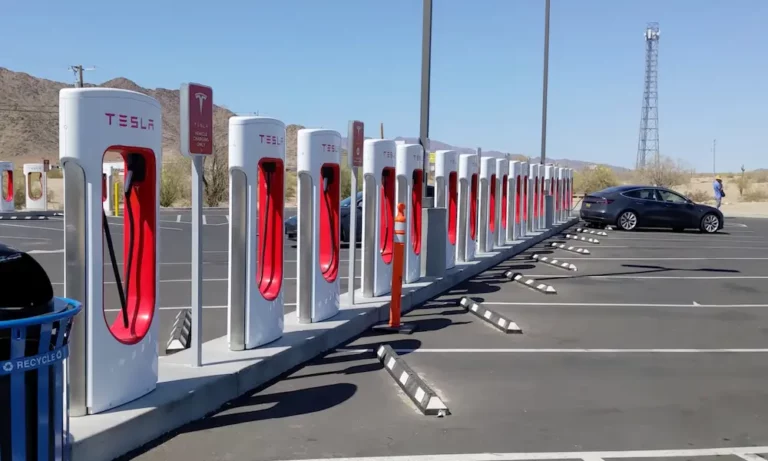
Owning a Rivian just got easier. You’re no longer limited to traditional EV charging networks—you can now tap into Tesla’s massive Supercharger network. With access to over 15,000 locations across North America, road trips and daily charging become way less stressful. Here’s everything you need to know about charging your Rivian at Tesla Superchargers.
What Makes Tesla Superchargers Compatible with Rivian?
Not every Tesla Supercharger works with your Rivian. You’ll need to find V3 or V4 generation Superchargers—the older V1 and V2 models won’t work, even with an adapter.
Here’s the breakdown:
V1 and V2 Superchargers: Skip these entirely. They’re incompatible with Rivian vehicles, regardless of what adapter you’re using.
V3 Superchargers: These work great with your NACS adapter and deliver up to 250kW of charging power. You’ll find these at most recently updated Tesla locations.
V4 Superchargers: The newest generation offers maximum 500kW charging capability—though your Rivian won’t quite hit those speeds yet. These stations often have longer cables that reach your charge port more easily.
Right now, about 46% of Tesla’s Supercharger network supports non-Tesla EVs. Tesla keeps adding more compatible locations, so that number keeps growing.
Getting the Right Adapter for Your Rivian
You’ll need a NACS-to-CCS1 adapter to connect your Rivian’s charging port to Tesla’s NACS connector. Good news—Rivian gives you this adapter free.
Adapter Availability by Model Year
2025 Models: Your NACS adapter comes standard in the box. No waiting, no hassle.
Current Owners: If you bought before 2025, Rivian committed to sending free adapters to all owners by January 2025. Some folks waited months, but deliveries have ramped up significantly.
2026+ Models: You won’t need an adapter at all. Rivian’s switching to native NACS ports, which means you’ll plug directly into Tesla Superchargers just like Tesla owners do.
Keep that adapter in your vehicle at all times. You don’t want to arrive at a Supercharger only to realize you left it in your garage.
Finding Compatible Tesla Superchargers
You can’t just roll up to any Tesla Supercharger and plug in. You need to know which stations allow non-Tesla vehicles.
Best Apps for Locating Compatible Stations
Rivian App: This shows only Tesla Superchargers that work with your vehicle. It’s the safest bet because it filters out incompatible stations automatically.
Rivian In-Vehicle Navigation: Your truck’s built-in nav system displays compatible Superchargers when you search for charging stations. Use this for trip planning—it’ll also precondition your battery for faster charging.
Tesla App: Download it and select “Charge Your Other EV” to see which stations accept non-Tesla vehicles. This updates faster than third-party apps when Tesla opens new locations.
PlugShare: Helpful for community feedback, but make sure you filter to hide Tesla-only locations. Some newer V3/V4 stations might not show up yet in Rivian’s system but are accessible according to Tesla’s network.
| App | Pros | Cons |
|---|---|---|
| Rivian App | Shows only compatible stations, accurate | Sometimes slower to update new locations |
| Rivian Navigation | Battery preconditioning, route planning | Can’t use when not in vehicle |
| Tesla App | Most up-to-date availability | Requires separate account setup |
| PlugShare | Community reviews, real-time issues | Must manually filter Tesla-only stations |
Step-by-Step Charging Process
Using Plug-and-Charge (Standard Rates)
This method bills directly to your Rivian account. It’s simple but costs more per kilowatt-hour.
Step 1: Park so the charging cable reaches your Rivian’s charge port on the front left corner. Some older Supercharger stalls have short cables that barely reach.
Step 2: Attach your NACS adapter to the Tesla charging handle. Make sure it clicks securely into place.
Step 3: Insert the adapter assembly into your Rivian’s charge port. You’ll hear a satisfying click when it locks.
Step 4: Wait 10-15 seconds. The charging handshake takes a moment to complete. Don’t panic if nothing happens immediately—this delay is normal.
Step 5: Charging begins automatically. Your Rivian’s display shows charging status, and you’ll get billed through your Rivian account at non-member rates.
Using Tesla Membership (Discounted Rates)
Want cheaper charging? Sign up for Tesla’s membership program at $12.99 per month. You’ll save roughly 30% per session, but there’s an extra step.
Step 1: Subscribe to Tesla’s charging membership through the Tesla app. You can cancel anytime without penalty.
Step 2: Note the stall number before plugging in. It’s usually on the charging pedestal or on a small sign nearby. Some stalls don’t have clear numbers—look at neighboring stalls and deduce your location.
Step 3: Open the Tesla app and start the charging session before you plug in. This is critical—if you plug in first, you’ll get charged standard rates instead of member rates.
Step 4: Connect your adapter and plug in following the same physical steps as the plug-and-charge method.
Step 5: Payment processes through your Tesla account at the discounted member rate. Your receipt shows up in the Tesla app.
The membership typically pays for itself if you charge more than 100 kWh monthly at Tesla Superchargers. For occasional road trips, the convenience of plug-and-charge might outweigh the savings.
What You’ll Pay at Tesla Superchargers
Pricing varies significantly based on whether you’re a Tesla member and where you’re charging.
Rate Breakdown
Tesla Members: Around $0.47 per kWh on average. This fluctuates by location and time of day.
Non-Members: Approximately $0.60 per kWh—up to 30% higher than member rates.
Membership Fee: $12.99 monthly, cancel whenever you want.
Regional Price Variations
Charging costs swing wildly depending on where you plug in:
- Low-cost areas: Some locations charge as little as $0.21/kWh
- High-cost areas: Peak times at expensive locations hit $0.58/kWh
- Highway locations: These typically cost more than urban stations because they know you don’t have many alternatives
| Charging Method | Average Cost per kWh | Monthly Fee | Best For |
|---|---|---|---|
| Plug-and-Charge | $0.60 | $0 | Occasional users, emergency charging |
| Tesla Membership | $0.47 | $12.99 | Road trippers, frequent Supercharger users |
Do the math for your usage. If you’re charging 100 kWh monthly at Superchargers, the membership saves you about $13—exactly covering the monthly fee. Anything beyond that is pure savings.
Charging Speed and Performance
How fast will your Rivian actually charge at a Tesla Supercharger? Pretty damn fast, actually.
Real-World Charging Speeds
Testing shows Rivian vehicles hitting up to 206kW at Tesla Superchargers. That’s not quite the maximum 250kW that V3 Superchargers offer, but it’s still incredibly quick.
Typical charging session: Add about 150 miles of range in 20-30 minutes. Perfect for a coffee break on a road trip.
Peak power delivery: Expect 150-206kW during the fastest part of your charging session, usually between 10-60% battery state of charge.
Temperature effects: Hot weather can reduce charging speeds because your Rivian’s thermal management system protects the battery. On scorching summer days, you might see slightly slower speeds.
Here’s a pro tip: use your Rivian’s in-vehicle navigation to route to Superchargers. This automatically preconditions your battery to the optimal temperature for fast charging. You’ll arrive ready to accept maximum power immediately.
Troubleshooting Common Issues
Payment Method Problems
Your charging session won’t start if your payment method is expired in the Rivian app. Keep your credit card info current—this is the most common reason for failed charging attempts.
Can’t Find Stall Numbers
Some Supercharger stalls lack clear numbering, making it tough to start a session through the Tesla app. Look for nearby stalls with visible numbers and count from there. Or just use plug-and-charge and skip the hassle.
Confusion About Which Stations Work
Some V3 chargers might not be available despite being technically compatible. Tesla’s gradually opening stations to non-Tesla vehicles, but not all at once. When in doubt, check the official Rivian or Tesla apps rather than third-party sources like PlugShare.
What’s Coming Next for Rivian Charging
Native NACS Ports Arriving Soon
Starting with the 2026 model year, all R1T and R1S vehicles will feature built-in NACS ports. No adapter needed—just plug directly into Tesla Superchargers like you would any other charging station.
The Rivian R2 has already been spotted testing at Superchargers with its native NACS port. This smaller, more affordable Rivian will launch in 2026 with seamless Supercharger access from day one.
Native ports eliminate the fumbling with adapters and enable true plug-and-charge functionality. You’ll simply pull up, plug in, and go.
Expanding Network Access
Tesla continues expanding Supercharger access for non-Tesla vehicles. More V3 and V4 stations get enabled every month, and newer V4 stations feature longer cables that better accommodate different vehicle charging port locations.
Integration between Rivian’s navigation system and Tesla’s billing improves constantly. What feels a bit clunky today will become seamless as both companies refine the experience.
Smart Charging Practices
Plan ahead: Always verify station compatibility before hitting the road. Don’t assume every Tesla Supercharger along your route accepts Rivian vehicles.
Carry your adapter: Keep the NACS adapter in your vehicle permanently. Toss it in the center console or frunk.
Monitor pricing: If you’re a frequent Supercharger user, run the numbers on Tesla membership. For occasional use, the standard plug-and-charge rates might make more sense.
Use official apps: Third-party apps lag behind on updates. Stick with Rivian and Tesla apps for the most accurate station information.
Be patient: That 10-15 second charging handshake feels longer than it is. Don’t unplug and retry—just wait for the connection to establish.
The integration of Rivian vehicles with Tesla’s Supercharger network dramatically expands your charging options. You’re no longer limited to smaller networks with spotty coverage. Combined with Rivian’s Adventure Network and other CCS charging options, you’ve got plenty of ways to keep your truck or SUV powered up for whatever adventure comes next.