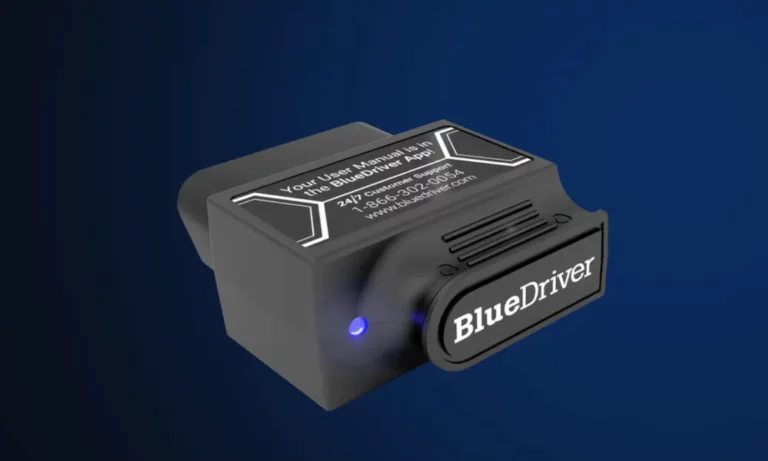
That little check engine light just came on, and now you’re staring at a $150 diagnostic fee before anyone even touches your car. BlueDriver promises to change that game completely. But is it actually worth the money, or just another gadget collecting dust in your glovebox? Read to the end — the answer depends entirely on who you are.
What Is BlueDriver, Really?
BlueDriver is a Bluetooth OBD2 scanner built by professional engineers in North America. You plug the LSB2 sensor into your car’s OBD2 port, pair it with your phone, and suddenly you’ve got access to the same diagnostic data your mechanic sees — minus the $150 “just to look at it” fee.
The key difference between BlueDriver and the $20 dongle on Amazon? BlueDriver doesn’t just spit out a code like “P0420.” It tells you what that code means on your specific car, what likely caused it, and what other real mechanics fixed on the exact same year, make, and model. That’s a massive upgrade in usefulness.
Who Should Actually Buy BlueDriver?
Not everyone needs this tool. Here’s a quick breakdown of who gets the most value:
| User Type | Best Tool | Why |
|---|---|---|
| Novice owner, occasional use | FIXD | Simple green/red health checks, low entry price |
| Serious DIYer or multi-car household | BlueDriver Pro | Deep diagnostics, no subscription, covers all systems |
| Project car builder needing component tests | Topdon TopScan | Bidirectional control for hands-on troubleshooting |
| VW/Audi/BMW specialist | OBDeleven | Deep coding and one-click mods for VAG/BMW |
| Professional shop mechanic | Autel MaxiSys | Speed, ECU coding, built for daily shop use |
If you own one car, rarely touch it yourself, and just want to know why the light’s on — a simpler tool works fine. But if you own multiple vehicles, do your own maintenance, or just hate being overcharged at the shop, BlueDriver hits a sweet spot no other tool quite reaches.
The Repair Report Feature Changes Everything
Here’s where BlueDriver pulls ahead of the pack. When you run a scan, the app generates a detailed Repair Report that shows:
- The exact code definition in plain English
- A ranked list of possible causes based on your specific vehicle
- “Reported Fixes” — real repairs verified by ASE-certified mechanics
That last point is the game-changer. Instead of blindly replacing parts hoping something sticks (mechanics call this “parts cannon” repairs), you see what actually fixed the problem on thousands of similar vehicles. The database updates continuously, so newer cars stay covered.
For a beginner, this feature alone pays for the tool. One avoided misdiagnosis at a shop typically runs $100–$180 just for the initial scan — and that’s before any repairs.
Which Cars Does BlueDriver Actually Work On?
BlueDriver works on any car built after 1996 with an OBD2 port. Enhanced diagnostics — the deeper system scans beyond basic engine codes — cover a wide range of makes:
| Manufacturer | Enhanced Coverage | Notes |
|---|---|---|
| GM (Chevy, GMC, Cadillac) | Full system access | Global |
| Ford (Lincoln, Mercury) | Full system access | North America |
| Toyota (Lexus, Scion) | Full system access | Global |
| Honda (Acura) | Full system access | 2003+ North America |
| BMW (Mini) | Full system access | 2005+ North America |
| Mercedes-Benz (Smart) | Full system access | 2005+ Global |
| Hyundai/Kia | Full system access | 2011+ models |
| Volkswagen (Audi) | Full system access | North America |
“Enhanced diagnostics” means BlueDriver reads more than just engine codes. It digs into ABS, airbag (SRS), transmission, TPMS, and climate control systems that basic scanners completely ignore. Getting an airbag or ABS diagnosis at a dealership typically costs $100–$180. BlueDriver can flag those issues in your driveway before you spend a dime.
What Can BlueDriver Actually Do? (Beyond Reading Codes)
Live Data Streaming
BlueDriver streams real-time data from your engine and displays it as gauges, text, or interactive graphs. This matters more than people realize. Take oxygen sensors — a healthy O2 sensor oscillates rapidly between voltage ranges. By graphing that live data, you can spot a lazy sensor before it triggers a hard code or fails an emissions test.
You can also monitor diesel particulate filter pressure, exhaust gas temperature, hybrid battery state of charge, and individual module voltages on EVs.
Mode 6 Data (The Hidden Gem)
Mode 6 shows the results of non-continuous self-tests your vehicle runs in the background. On Ford vehicles, for example, you can see the exact number of misfire events per cylinder — even if the number is too low to trigger a check engine light. That kind of early warning can save you from a roadside breakdown.
Freeze Frame Data
When a fault triggers, your car takes a snapshot of exactly what was happening at that moment — RPM, coolant temperature, fuel trim, engine load. BlueDriver surfaces all of this. Instead of guessing, you recreate the exact conditions that caused the fault.
Smog Check Readiness
This one saves people serious money. If you clear a check engine light right before an emissions test, all readiness monitors reset to “Incomplete,” and you’ll fail automatically. BlueDriver lets you check which monitors are complete before you drive to the testing station — so you only go when you’re guaranteed to pass.
Battery Registration
On BMW, Volkswagen, Ford, and others, the battery management system needs to know when you install a new battery. If you skip this step, the alternator overcharges the new battery and kills it prematurely. BlueDriver handles this as an active command — it sends the reset directly to the ECU, not just a tutorial on how to do it manually.
History Codes
Planning a long road trip? BlueDriver shows codes that fired in the past but aren’t currently active. Intermittent transmission or cooling faults often appear here before they become full breakdowns. It’s the closest thing to a pre-trip checkup you can do yourself.
The Real Cost Comparison
This is where BlueDriver’s value becomes obvious. No subscription. Ever.
| Cost Component | BlueDriver Pro | FIXD Premium | Topdon TopScan |
|---|---|---|---|
| Initial hardware | ~$99.95 | ~$40–$60 | ~$54–$80 |
| Annual subscription | $0.00 | ~$69.99/year | ~$49/year after Year 1 |
| 5-year total cost | $99.95 | ~$389.95 | ~$250.00 |
FIXD looks cheaper upfront, but its repair database, professional insights, and mechanic hotline all sit behind a paywall that adds up fast. The Autel AP200 charges per vehicle manufacturer annually. Topdon’s app requires a constant internet connection and gets mixed reviews on reliability.
BlueDriver’s “buy it once, own it forever” model is genuinely rare in the current software landscape.
The Honest Downsides
BlueDriver isn’t perfect. Here’s what to know before you buy:
It’s not bidirectional. BlueDriver reads data and performs a handful of active commands like battery registration. It can’t activate individual components — you can’t cycle an ABS pump, command a cooling fan on, or bleed brakes electronically. For that level of control, you’d need something like the Topdon TopScan, which starts higher in price and requires internet connectivity to function.
The Version 8 account drama. In late 2025, BlueDriver pushed an update requiring users to log into an account before scanning. The community pushed back hard — privacy concerns, no cellular in parking garages, the general feeling of a bait-and-switch. The good news: by versions 8.4–8.7, the developers made account creation optional again. You can jump straight into scanning without signing up for anything.
Physical fitment issues. The sensor is slightly wider than some budget dongles. In a few compact vehicles with recessed OBD2 ports, it can sit loosely and disconnect during a drive. Some users tape it in place during long monitoring sessions.
Battery drain. Don’t leave it plugged in if your car sits for more than 48 hours. The Bluetooth radio draws a small parasitic current. On older vehicles or ones that don’t move daily, that’s enough to drain a battery.
Live data refresh rate. BlueDriver refreshes certain data points roughly every 5 seconds — a touch slower than dedicated professional handhelds. For general diagnostics and monitoring, it’s completely fine. For precise real-time component testing, it shows its limits.
BlueDriver vs. Cheap Scanners: What You’re Actually Missing
A $20 generic OBD2 dongle reads generic powertrain codes. That’s it. No ABS codes. No airbag codes. No transmission data. No repair suggestions. No Mode 6. No Freeze Frame interpretation. No smog readiness check.
You might find out you have a “P0300,” but you’ll have no idea if that means spark plugs, coils, or something more serious. BlueDriver turns that random code into a ranked list of verified fixes specific to your car. That’s not a small upgrade — it’s a completely different class of tool.
Is BlueDriver Worth It?
If you own a vehicle made after 1996, do any of your own maintenance, or simply want to avoid being overcharged at a shop — yes, BlueDriver is worth it.
The no-subscription model alone makes it a smarter long-term buy than most of its competitors. The Repair Report feature gives you mechanic-level insight without the mechanic-level bill. And the enhanced diagnostics for ABS, airbags, transmission, and TPMS put systems in your hands that most basic scanners won’t even acknowledge exist.
It’s not a professional bidirectional scanner. It won’t program ECUs or replace a dedicated shop tool. But for the serious DIYer and anyone who wants an informed conversation with their mechanic, BlueDriver sits right at that sweet spot where functionality, ease of use, and cost actually line up.