
Picking the wrong stereo size is an expensive mistake. Whether you’re upgrading an old truck or modernizing a daily driver, the single DIN vs double DIN decision shapes everything — your budget, your features, and how clean your dash looks. Read to the end, and you’ll know exactly which one belongs in your car.
What Does DIN Actually Mean?
DIN stands for Deutsches Institut für Normung — Germany’s national standards body. Back in the early 1980s, car radios were a total mess of proprietary sizes. Every manufacturer did their own thing, which made upgrades a nightmare.
The Germans fixed that. They introduced the DIN 75490 standard, which later became the global ISO 7736 standard. Now a Pioneer unit built in Japan fits a Ford truck built in Michigan. That’s the power of a good standard.
Here’s a quick size breakdown:
| DIN Size | Metric | Imperial | Notes |
|---|---|---|---|
| Single DIN | 180mm × 50mm | 7″ × 2″ | Slim, classic form factor |
| Double DIN | 180mm × 100mm | 7″ × 4″ | Double the height, same width |
| 1.5 DIN | 180mm × 75mm | 7″ × 3″ | Legacy size, mostly US vehicles |
The width stays the same. The height is what changes everything.
Single DIN vs Double DIN: The Core Differences
The single DIN vs double DIN debate comes down to three things: screen size, features, and how much dashboard space you have.
Single DIN — The Slim Classic
A single DIN unit stands just two inches tall. That slim profile was the gold standard for decades, and it’s still the right call for plenty of drivers.
What you actually get:
- Bluetooth for hands-free calls and wireless audio
- USB and aux ports for connecting devices
- A small LCD or OLED display for song info
- A detachable faceplate — pull it off, and thieves have no reason to smash your window
- Smartphone app control (your phone’s big screen handles the settings)
The biggest engineering win for single DIN recently? Mechless units. Ditch the CD player, and the chassis shrinks from six inches deep to as little as two or three inches. That matters a lot in modern cars where the space behind the dash is packed with air ducts and structural supports.
Single DIN also dominates the car audio competition world. Some of the most respected head units on the market are single DIN “audio-first” devices — no color screen, just premium capacitors and clean power supplies for serious sound.
Double DIN — The Feature-First Choice
Double DIN units match the single DIN width but stand four inches tall. That extra height changes the whole game.
Most double DIN units feature a six to seven-inch touchscreen, a dedicated graphics processor, and more powerful built-in amplification. The larger chassis also means better heat management — bigger heat sinks, sometimes small cooling fans, and better separation between power and audio circuits for cleaner sound.
What you actually get:
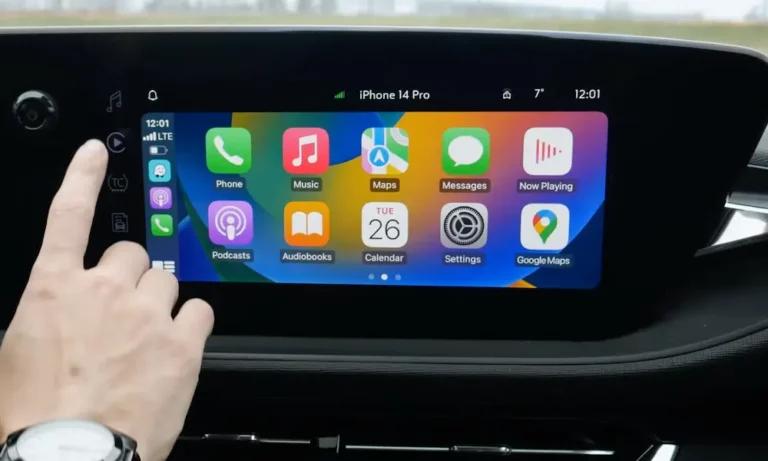
- Apple CarPlay and Android Auto for Google Maps, Spotify, and voice messaging
- Rearview camera input — the screen switches automatically when you reverse
- Built-in GPS navigation for areas without cell service
- DVD playback when parked (popular in family SUVs and minivans)
- Multiple preamp outputs and expansion inputs for building out a full audio system
The safety angle is real. A backup camera integrated into your head unit gives you a clear view of what’s behind you every time you reverse.
Side-by-Side Feature Comparison
| Feature | Single DIN | Double DIN |
|---|---|---|
| Display | Small LED/LCD | 6–7″ Touchscreen |
| Interface | Knobs and buttons | Touch menus |
| Smartphone link | Bluetooth only | CarPlay / Android Auto |
| Rearview camera | No | Yes |
| Audio expansion | Basic pre-outs | Multiple pre-outs and inputs |
| Theft deterrence | Detachable faceplate | Screen stays with the unit |
The Floating Screen: When Your Dash Has a Single DIN Slot But You Want a Big Screen
Here’s where things get interesting. A lot of older vehicles — especially trucks and classics — only have a single DIN opening. But you still want a 10-inch screen with wireless CarPlay.
That’s exactly the problem floating screen units solve.
The chassis mounts in your single DIN slot. The screen extends out on an adjustable bracket, floating in front of the dash. No permanent modifications. No cutting. A 2000-era F-150 with a single DIN slot can run a 10.1-inch screen with wireless Apple CarPlay, towing cameras, and full navigation.
The brackets adjust up, down, and tilt — so you won’t block your hazard button or air vents.
Top floating screen models worth knowing:
| Model | Screen | Resolution | Key Strength |
|---|---|---|---|
| Alpine Halo11 iLX-F511 | 11 inches | 720p HD | Largest display for single DIN |
| Pioneer DMH-WT8600NEX | 10.1 inches | 1080p HD | Flagship video quality |
| Sony XAV-9500ES | 10.1 inches | 720p HD | Audiophile-grade internals |
| Jensen CAR140MW | 10.1 inches | 600p | Budget-friendly large screen |
The trade-offs are real though. Because the screen sits outside the dash, glare and vibration on rough roads are genuine concerns. Some drivers also find the look less integrated than a flush-mounted unit. If you drive a lot of washboard gravel, make sure the mounting bracket on your chosen model is genuinely robust before you buy.
Audio Quality: Does the Size Actually Matter for Sound?
For audiophiles, the single DIN vs double DIN debate isn’t really about screens. It’s about signal quality.
Digital Signal Processing and Tuning
Cars are acoustically terrible environments. You’re never sitting in the center of the speakers, and glass and hard plastic reflect sound everywhere. Premium head units — in both sizes — tackle this with DSP.
- Time Alignment: Delays the signal from the closest speakers by milliseconds. The result? All the sound reaches your ears at once, and your music feels like it’s coming from right in front of you.
- Equalization: Premium units pack 13-band or 31-band graphic EQs. You can dial in your exact interior acoustics instead of fighting them.
Preamp Outputs — What to Check Before You Buy
If you’re building a system with external amps and a subwoofer, the preamp outputs on the back of your head unit matter enormously. You want:
- Higher voltage — 4V or 5V preamp outputs resist picking up electrical noise as the signal travels through your car’s wiring
- Three pairs minimum — front, rear, and subwoofer outputs give you full system flexibility
- Enough physical outputs — double DIN units often carry micro-HDMI ports and multiple USB inputs for high-resolution audio
How Installation Works (And What It Actually Costs)
Mechanical Mounting: Two Methods
Cage (Sleeve) Mounting is standard for most single DIN units. A metal sleeve slides into your dash opening. You bend small tabs outward to lock it in place. The radio clicks in and pops out with flat removal keys. Simple, quick, DIY-friendly.
ISO Mounting is standard for double DIN units and floating screens. Brackets bolt directly to the radio chassis and screw into your vehicle’s dash frame. It’s far more secure — and necessary, given the weight of a large touchscreen unit. This is the method you want for anything heavy.
Dash Kits — Don’t Skip This Step
A standard DIN radio is a rectangle. Your dashboard is sculpted and curved. That gap needs a vehicle-specific dash kit to look right.
When you install a single DIN unit into a double DIN opening, the dash kit includes a storage pocket to fill the extra two inches of space. It looks clean and gives you somewhere to toss your phone or sunglasses.
Key installation components:
| Component | What It Does | Pro Tip |
|---|---|---|
| Mounting cage | Holds single DIN units via tension | Bend tabs tight to prevent rattles |
| ISO brackets | Bolts unit to vehicle frame | Use screws included with the radio |
| Dash kit | Fills gaps in the dashboard | Test-fit before wiring |
| Wiring harness | Connects to factory plug | Solder and heat-shrink for reliability |
| Interface module | Retains steering wheel controls | Update firmware before installing |
What Does It Actually Cost?
| Upgrade Type | Hardware Cost | Accessory Cost | DIY Difficulty |
|---|---|---|---|
| Basic Single DIN | $100–$150 | $30–$50 | Low — beginner friendly |
| High-End Single DIN | $200–$350 | $50–$150 | Medium |
| Double DIN with CarPlay | $400–$700 | $100–$300 | High — professional recommended |
| Floating Screen Unit | $800–$1,500 | $150–$400 | High |
Professional installation rates typically run $75 to $150 per hour. A simple single DIN swap might take an hour. A double DIN install with a backup camera and steering wheel integration can take three to four hours. Budget accordingly.
Trucks, Classic Cars, and the 1.5 DIN Problem
The US market has some unique quirks worth knowing.
Pickup trucks like older F-Series and Silverado models from the late 90s often came with single DIN or 1.5 DIN slots. Floating screen units have become the go-to upgrade for these drivers — a big screen for towing cameras and hands-free calling without touching the dash structure.
Classic car owners face the 1.5 DIN problem constantly. Drop a standard single DIN unit in, and you’re left with an ugly plastic gap. Companies like RetroSound build modern radios in the exact 1.5 DIN size — Bluetooth and USB inside, period-correct look outside.
Protecting Your Screen: Heat, Glare, and Ghost Touch
Car interiors are brutal for electronics. Parked cars in southern summers can hit 150°F inside. Northern winters drop below zero.
Double DIN units run large touchscreens and powerful processors, so heat management is a genuine concern. If a unit can’t shed heat fast enough, thermal throttling kicks in — the system slows itself down to cool off, or eventually fails.
One common issue with older or budget screens is ghost touch — phantom inputs that fire on their own. The culprit is usually delamination: heat and UV exposure cause the screen’s layers to separate. Modern capacitive touchscreens (glass, reacts to finger charge) are much more durable than older resistive designs.
Keep your screen healthy:
- Use a windshield sunshade whenever you park in direct sun
- Clean with a microfiber cloth — harsh chemicals strip the protective coating
- Route wiring neatly behind the unit to keep airflow around the chassis clear
Which One Should You Actually Buy?
Choose single DIN if:
- Your dash only has a two-inch opening
- Sound quality matters more to you than screen size
- You want a clean, simple interface with minimal distraction
- Budget is tight and you’re not fussed about CarPlay
Choose double DIN if:
- Your dash has a four-inch opening
- You rely on your phone for navigation and streaming
- You want a backup camera integrated into your head unit
- The touchscreen interface genuinely improves how you use your car daily
Choose a floating screen if:
- You have a single DIN slot but want big-screen functionality
- You drive an older truck or classic car
- You’re willing to spend more for maximum screen real estate without cutting your dash
The right answer is almost always the one your dashboard actually supports. Check your opening first, then pick the best unit that fits it — rather than the other way around.


