Is your Toyota’s Lane Departure Alert suddenly acting up? You might notice warning lights on your dashboard or find that the system isn’t warning you when you drift out of your lane. This critical safety feature helps prevent accidents, but it’s not uncommon for it to experience hiccups.
Let’s dive into why your Toyota LDA might not be working and how you can get it back in action—often without an expensive trip to the dealer.
What Causes Toyota LDA to Stop Working?
When your Toyota’s Lane Departure Alert fails, the culprit is usually one of these common problems:
Dirty or Obstructed Camera
The most frequent cause of LDA failure is a dirty sensor or camera. The system relies on a camera attached to the windshield to detect lane markings, and anything blocking its view can trigger a malfunction.
Common obstructions include:
- Dirt and road grime on the windshield
- Water spots or streaks
- Snow or ice in winter months
- Condensation or fog
- Stickers near the camera area
Weather and Environmental Conditions
Your LDA system might temporarily stop working during:
- Heavy rain or snow
- Intense sunlight or glare
- Extreme temperatures (either hot or cold)
- Foggy conditions
- Roads with poor or faded lane markings
The system intentionally deactivates when it can’t reliably detect lane markings to prevent false alerts.
Battery and Electrical Issues
Power-related problems can knock your LDA offline:
- Recent battery disconnection or replacement
- Weak or failing battery
- Blown fuses
- Electrical shorts
When the battery gets disconnected, many Toyota safety systems require recalibration before they’ll work properly again.
System Calibration Problems
Your LDA might need professional recalibration if:
- You’ve recently had windshield replacement
- Your vehicle was in a front-end collision
- The windshield-mounted camera was bumped or moved
- You’ve had suspension work done that changed the vehicle’s ride height
How to Fix Toyota LDA Not Working
Let’s get your Lane Departure Alert system back in action with these troubleshooting steps:
1. Clean the Windshield and Camera
Start with the simplest solution: thoroughly clean your windshield, especially in front of the camera located near the rear-view mirror.
Here’s how to do it right:
- Use a quality glass cleaner and microfiber cloth
- Clean both the inside and outside of the windshield
- Pay special attention to the area in front of the camera
- Remove any stickers or objects that might block the camera’s view
- Use your defogger to clear any condensation
Even a thin film of dirt or residue can confuse the camera sensors.
2. Check System Settings
Your LDA might be turned off in the vehicle settings. Toyota sometimes makes it easy to accidentally disable this feature.
To verify and enable your LDA system:
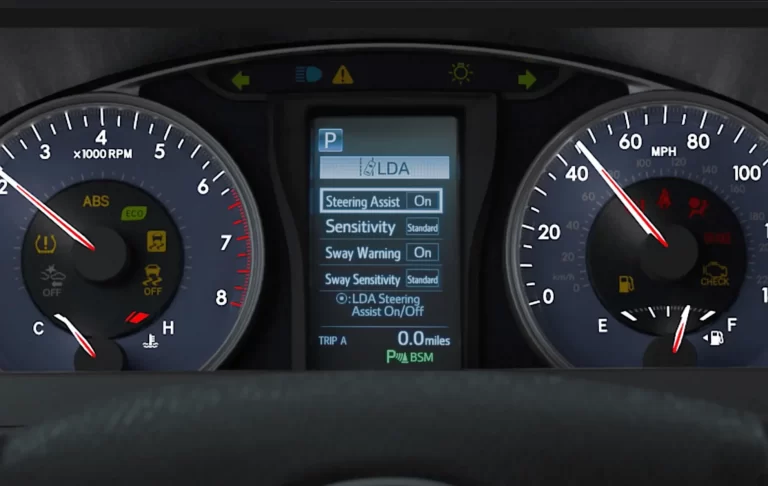
- Access the vehicle settings through your multi-information display
- Use the steering wheel controls to navigate to the LDA settings
- Make sure the system is switched ON
- Check and adjust the sensitivity settings if needed
- Verify that any related systems like Lane Tracing Assist are also enabled
Different Toyota models have slightly different menu systems, so check your owner’s manual if you’re having trouble finding these settings.
3. Perform a System Reset
When settings checks and cleaning don’t work, try resetting the system:
Method 1: Quick Reset
- Turn off the vehicle completely
- Wait at least 2 minutes (this allows the computer systems to fully power down)
- Restart the vehicle
- Check if the LDA system is now functioning
Method 2: Battery Reset
For more stubborn issues, try a battery disconnection reset:
- Disconnect the negative (black) battery terminal
- Wait 15-30 minutes to allow capacitors to discharge
- Reconnect the battery
- Start the vehicle and check the LDA function
Remember that disconnecting the battery will reset other systems too, like your clock and radio presets.
4. Address Temperature-Related Issues
If extreme temperatures are affecting your LDA system:
For Hot Weather:
- Park in the shade when possible
- Use a windshield sun shade when parked
- Run the AC to cool down the cabin and camera area
- Remove any accessories that might reflect heat onto the camera
For Cold Weather:
- Allow the vehicle to warm up before driving
- Use the defroster to clear any ice or condensation
- Keep the windshield clear of snow and ice
- Consider using a windshield washer fluid designed for extreme cold
5. Check for Electrical Issues
If your LDA and other safety systems are malfunctioning:
- Check the fuses related to driver assistance systems (consult your owner’s manual for locations)
- Look for blown fuses with a test light or multimeter
- Replace any blown fuses with ones of the identical rating
- Check for any aftermarket accessories that might be causing electrical interference
6. Test Drive After Repairs
After trying any of the fixes above:
- Take your vehicle for a test drive on roads with clear lane markings
- Drive at speeds above 32 mph (50 km/h) as the system only activates above this speed
- Check if the LDA indicator illuminates on your dashboard
- Test the system by slightly drifting over a lane marking (when safe to do so)
Professional Solutions for Toyota LDA Problems
When DIY fixes don’t work, it’s time to call in the professionals:
When to Visit the Dealer
Make an appointment with your Toyota dealer if:
- Warning messages persist after trying the above solutions
- Multiple safety systems are malfunctioning simultaneously
- The system worked properly but suddenly stopped
- You recently had your windshield replaced
- You’ve been in a collision that might have affected the camera alignment
What to Expect at the Dealership
The dealer will typically:
- Perform a diagnostic scan to identify error codes
- Inspect the camera and sensors for physical damage
- Test the electrical connections
- Recalibrate the system if needed
- Update the software if there are known issues
Professional camera calibration is critical after windshield replacement or collision repairs, as even minor misalignment can cause the system to malfunction.
Preventing Future Toyota LDA Problems
Keep your Lane Departure Alert system working properly with these preventive measures:
Regular Maintenance
- Clean your windshield thoroughly inside and out during regular car washes
- Inspect the area around the camera regularly for dirt or debris
- Replace worn wiper blades promptly to maintain a clear windshield
- Keep windshield washer fluid topped up
Proper Repairs
If you need windshield replacement:
- Use a qualified auto glass specialist familiar with Toyota safety systems
- Specify OEM or equivalent quality glass
- Ensure the installation includes proper camera calibration
- Ask about any warranties on the calibration work
Avoid Modifications
Some modifications can interfere with your LDA system:
- Don’t attach stickers or objects near the camera area
- Be cautious with aftermarket window tint, especially on the windshield
- Avoid suspension modifications that significantly change ride height
- Don’t use aftermarket windshield covers that obstruct the camera area
Understanding Toyota LDA System Limitations
Even when working perfectly, your Lane Departure Alert system has inherent limitations:
Speed Requirements
The system only activates above approximately 32 mph (50 km/h) on most Toyota models. Below this speed, it remains inactive.
Road Marking Dependencies
LDA requires visible lane markings to function. It may not work properly on:
- Roads without lane markings
- Roads with faded or unclear markings
- Construction zones with temporary markings
- Roads covered with snow, leaves, or debris
- Extremely narrow lanes
Environmental Constraints
Your Toyota’s LDA system may temporarily deactivate during:
- Heavy rain or snow
- Direct sunlight causing glare on the camera
- Nighttime driving on poorly lit roads
- Fog or mist that obscures lane markings
Road Feature Limitations
The system might struggle with:
- Sharp curves or winding roads
- Steep hills that affect camera angles
- Intersections and merging lanes
- Roads with multiple or complex lane markings
Toyota LDA Troubleshooting Table
| Problem | Possible Causes | DIY Solutions | Professional Fixes |
|---|---|---|---|
| LDA warning light on dash | Dirty camera, system turned off, electrical issue | Clean windshield, check settings, reset system | Diagnostic scan, system calibration |
| System deactivates intermittently | Environmental conditions, camera obstruction | Clean camera area, drive in better conditions | Camera inspection, software update |
| LDA doesn’t alert when crossing lanes | System disabled, sensitivity too low, speed too low | Check settings, increase sensitivity, drive above 32 mph | System testing, calibration |
| Multiple safety systems malfunctioning | Battery issues, electrical problems, sensor failure | Battery reset, fuse check | Comprehensive diagnostic, component replacement |
| System error after windshield replacement | Improper calibration, incorrect installation | None (requires professional help) | Professional camera calibration |
Toyota Models Commonly Affected by LDA Issues
Toyota’s Lane Departure Alert technology appears across their lineup, but some models seem to experience more frequent issues:
- RAV4 (especially 2019-2023 models)
- Camry (2018 and newer)
- Corolla (2019 and newer)
- Highlander (all versions with Toyota Safety Sense)
- Prius (with Toyota Safety Sense)
- Tacoma (equipped with Toyota Safety Sense)
These issues aren’t exclusive to Toyota—similar lane-keeping technologies in other brands experience comparable problems. The good news is that most LDA problems can be resolved with simple maintenance or resets, keeping this valuable safety system working to protect you and your passengers.
Remember that your Lane Departure Alert is a driver assistance system, not a replacement for attentive driving. Even with a perfectly functioning system, always stay focused on the road and treat the LDA as a helpful backup, not your primary means of staying safely in your lane.