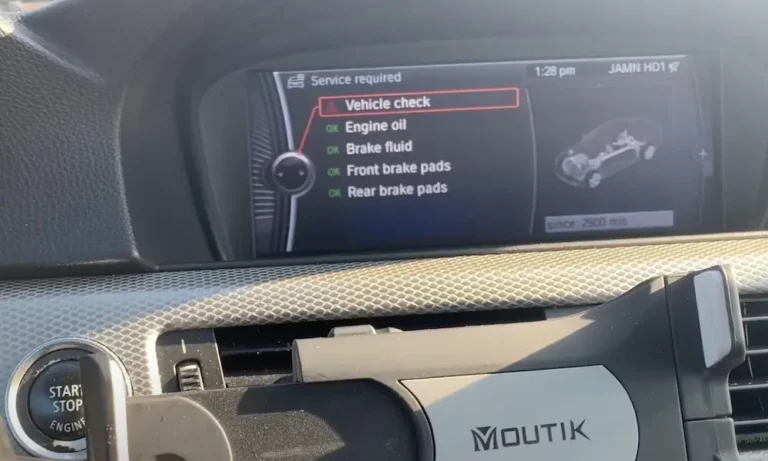
Ever glanced at your BMW dashboard to find that pesky “Vehicle Check” alert staring back at you? You’re not the first BMW owner to wonder how to make it disappear after completing the necessary maintenance. The good news? You can handle this yourself without an expensive trip to the dealership.
What Is the BMW Vehicle Check System?
The BMW Vehicle Check notification is part of the Condition Based Servicing (CBS) system that monitors your car’s vital components. Think of it as your BMW’s way of saying “Hey, it’s time for a thorough inspection.” This typically pops up every 30,000 miles or two years and covers everything from brake pads to filters and coolant levels.
The system doesn’t just randomly remind you—it actively tracks component wear and maintenance intervals to keep your ultimate driving machine in peak condition.
Why Reset After Service?
Resetting the Vehicle Check indicator is crucial after completing the recommended inspections. Without a reset, that warning light will continue to appear even after you’ve addressed all maintenance items. It’s like having an alarm clock that keeps ringing after you’re already up and dressed.
More importantly, resetting the system helps maintain an accurate service history and ensures future alerts trigger at the correct intervals.
Reset Methods by BMW Model Series
E-Series Models (E90, E91, E92, E93)
The older E-Series BMWs feature a straightforward reset process:
- Insert your key and press the start button without touching the brake pedal
- Wait until you see all the dashboard lights illuminate
- Press and hold the trip odometer reset button for 10-15 seconds until the service menu appears
- Use the trip button to scroll through options until you find “Vehicle Check”
- Hold the button until “Reset?” appears, then hold again to confirm
This method works reliably on models like the E90 3-Series and E92 coupes that were popular throughout the late 2000s and early 2010s.
F-Series Models (F30, F10)
For F-Series BMWs (like the 2012-2019 3-Series or 5-Series), follow these steps:
- Turn the ignition to position II by pressing the start button twice without pressing the brake
- Press and hold the trip reset button for approximately 10 seconds
- When the CBS menu appears, use short presses to scroll to “Vehicle Check”
- Hold the button again to initiate the reset process
- You’ll see “Reset successful” when it’s complete
The F-Series introduced more digital elements to BMW’s dash systems, but the reset process remains similar to earlier models.
G-Series Models (G20, G30)
The newest G-Series BMWs require a slightly different approach:
- Triple-press the start button without touching the brake pedal to enter diagnostic mode
- Locate the BC button on the turn signal stalk and hold it for 15 seconds
- When the service menu appears, navigate to “Vehicle Check”
- Follow the on-screen prompts to complete the reset
G-Series models like the current 3-Series (G20) and 5-Series (G30) feature the most sophisticated CBS systems, but the reset principles remain consistent.
Using iDrive to Reset Service Notifications
If your BMW has an iDrive system (especially version 7.0 or newer), you have additional reset options:
Soft Reset Method
- Locate the volume knob on your iDrive controller
- Press and hold it for 30 seconds
- The screen will restart, potentially clearing stuck notifications
Hard Reboot Method
- Press and hold the volume knob for approximately 70 seconds
- The system will cycle off twice during this process
- This more aggressive reset can solve software glitches preventing normal resets
The iDrive system manages many vehicle functions, and occasionally a simple reboot can fix notification issues that resist traditional reset methods.
Using Third-Party Tools for Easy Resets
Don’t feel like fumbling through dashboard menus? There’s another way:
OBD2 Adapters & Apps
Apps like BimmerLink paired with an OBD2 adapter can reset service notifications with just a few taps on your smartphone. Here’s how:
- Purchase a compatible OBD2 Bluetooth adapter (usually $15-30)
- Download and install the BimmerLink app on your smartphone
- Connect the adapter to your BMW’s OBD port (typically under the dashboard)
- Open the app and pair with the adapter
- Navigate to the service reset section
- Select “Vehicle Check” and confirm the reset
This method is particularly useful if you’re uncomfortable navigating your BMW’s built-in menus or have a model with a more complicated reset procedure.
Common Reset Challenges and Solutions
“Reset Impossible” Message
If you see this message, the CBS system is telling you that certain criteria haven’t been met. Possible solutions:
- Verify that you’ve actually completed all the required service items
- Wait until the system recognizes a higher wear percentage (sometimes resets aren’t allowed until components reach a certain threshold)
- Check for additional error codes that might be preventing the reset
Persistent Alerts After Reset
Sometimes the notification sticks around even after a seemingly successful reset. Try these fixes:
- Perform an iDrive reboot as described earlier
- Disconnect the car battery for 15 minutes (this will clear all temporary memory)
- Repeat the reset procedure after reconnecting the battery
Note: Disconnecting the battery will reset other systems like the clock and radio presets, so be prepared to reconfigure these settings.
Important Considerations Before Resetting
Complete the Actual Maintenance First
It might be tempting to just reset the light and move on, but that defeats the purpose of the alert system. The Vehicle Check notification is tied to important maintenance items that affect your BMW’s:
- Safety systems
- Performance capabilities
- Long-term reliability
- Resale value
Always complete the recommended inspections and maintenance before resetting the system.
Model-Specific Variations
This guide covers general procedures, but there may be slight variations between specific models and years. When in doubt:
- Check your owner’s manual for model-specific instructions
- Search for your exact model on BMW enthusiast forums like BimmerPost
- Watch model-specific tutorial videos online
Dealership Policies
Some BMW dealerships may refuse to reset service notifications if you haven’t had the work done at their facility. This is another reason why knowing how to perform the reset yourself is valuable—even if you choose to have maintenance performed elsewhere.
A Complete BMW Vehicle Check Reset Comparison Chart
| BMW Series | Primary Reset Method | Alternative Method | Tools Required | Difficulty Level |
|---|---|---|---|---|
| E-Series | Trip button hold | None | None | Easy |
| F-Series | Trip button + BC stalk | iDrive menu | None | Moderate |
| G-Series | BC stalk + Triple press | iDrive system | None | Moderate |
| All Models | OBD2 + BimmerLink | None | OBD2 adapter | Easy |
Maintaining Your BMW Between Vehicle Checks
While the Vehicle Check service typically comes up every two years or 30,000 miles, proper BMW maintenance extends beyond those intervals. Between formal inspections:
- Check and top off fluids monthly
- Inspect tire pressure and condition regularly
- Pay attention to any new dashboard warnings
- Address unusual noises or performance changes promptly
- Follow the oil service intervals (separate from Vehicle Check)
According to the National Highway Traffic Safety Administration, regular vehicle maintenance is essential for both safety and performance.
Benefits of DIY BMW Service Resets
Learning to reset your BMW’s service notifications yourself offers several advantages:
- Save money on dealership visits that might cost $50-150 just for a reset
- Gain better understanding of your vehicle’s maintenance system
- Reset at your convenience rather than scheduling an appointment
- Maintain service history even when using independent mechanics
With the technical knowledge in this guide, you can confidently manage your BMW’s maintenance schedule without relying on the dealership for simple resets.
Remember that the Vehicle Check system exists to maintain your BMW’s legendary performance and longevity. The reset process is simply a way to communicate to your vehicle that you’ve completed the necessary care it deserves.