Frustrated with your BMW’s wireless charging pad that’s supposed to make life easier but isn’t charging your phone? You’re dealing with a common issue that affects many BMW owners across different models. This guide breaks down why your BMW wireless charging isn’t working and provides practical solutions to get you back to cord-free convenience without a trip to the dealership.
Most Common Reasons Your BMW Wireless Charging Fails
When your BMW wireless charging pad stops performing, the problem typically falls into one of several categories. Let’s tackle each one.
Blown Fuses: The Silent Culprit
Often, the simplest explanation is the correct one. Your charging pad’s power supply depends on specific fuses that can blow due to voltage spikes or short circuits. Depending on your BMW model and year, you’ll need to check fuses 46, 66, or 69.
To check and replace the fuse:
- Find your fuse box (typically under the glovebox or in the engine bay)
- Locate the wireless charging fuse using your vehicle’s manual
- Remove the suspected fuse using a fuse puller
- Check if the filament inside is broken
- Replace with a new 20A mini-fuse if needed
This five-minute fix often solves the problem completely, saving you a costly dealer visit.
Overheating Issues: Too Hot to Handle
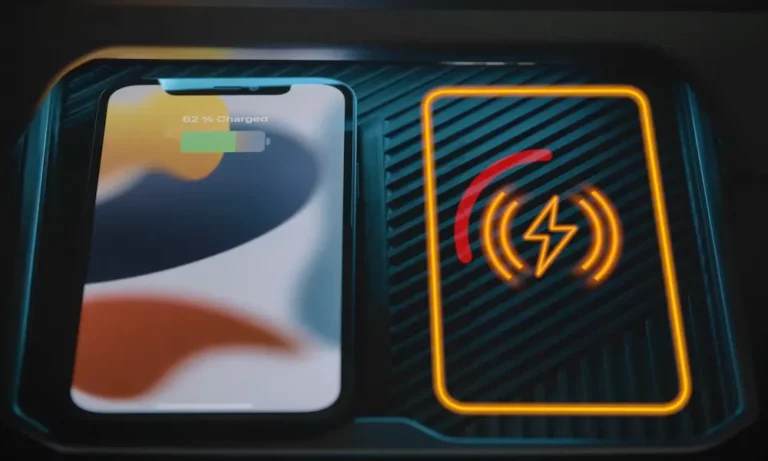
Your BMW’s charging system includes thermal protection that stops charging when things get too warm. If your phone charges for a few minutes before stopping with an orange LED warning, overheating is likely the culprit.
The QI standard wireless charging process naturally generates heat, especially when your phone is:
- Running navigation
- Using wireless CarPlay
- Covered by a thick case
iPhone users face this issue more frequently due to their aluminum chassis that doesn’t dissipate heat efficiently when charging wirelessly.
Try these heat management solutions:
- Remove thick phone cases (anything over 3mm)
- Position your phone with the screen facing up
- Avoid using wireless charging while simultaneously running GPS
- Switch to wired CarPlay connections during longer trips
Phone Positioning Problems: It’s All About Alignment
BMW’s single-coil charging design creates a surprisingly small “sweet spot” where charging works effectively. If your phone isn’t perfectly aligned with this area, charging either won’t start or will frequently stop.
Different BMW models have different optimal positions:
- G20 3 Series (upright trays): Center your phone vertically and close the retention bracket
- G05 X5 (horizontal trays): Align with the smartphone icon on the driver’s side
- G30 5 Series (console trays): Ensure full contact with the rubberized surface
Larger phones (like the iPhone 14 Pro Max) are particularly sensitive to positioning issues. Even 5mm of misalignment can prevent charging from working properly.
Device Compatibility Issues: Not All Phones Play Nice
Newer phones sometimes struggle with BMW’s charging systems. Most notably, iPhone 15 users have reported NFC chip damage when using some BMW wireless chargers, showing up as “Could Not Set Up Apple Pay” errors.
For iPhone 15 owners, consider:
- Temporarily disabling wireless charging (by removing fuse 79 or 214)
- Using a magnetic shielding plate between your phone and the tray
- Switching to USB-C wired charging until a permanent fix is available
Android phones with multi-coil receivers (like Samsung Galaxy models) typically work better with BMW’s system but can still face issues with thick cases or those containing credit cards or metal kickstands.
Software Settings You Might Have Missed
Sometimes the solution is hiding in plain sight within your iDrive system. Many BMW owners don’t realize the wireless charging feature needs to be activated.
To check this:
- Go to Main Menu → Vehicle Settings
- Look for “Wireless Charging Tray” settings
- Make sure charging is enabled
Also, ensure your vehicle’s software is updated through BMW’s Remote Software Upgrade system, as updates released after 2022 include:
- Better thermal management algorithms
- Expanded device compatibility
- Smarter power adjustment when NFC communication is detected
Diagnosing Hardware Failures
If you’ve tried everything above and your charging pad still shows a persistent red LED, you might be facing a hardware failure requiring professional attention.
Common hardware failure points include:
| Component | Symptoms |
|---|---|
| Induction Coil | Intermittent charging, works occasionally |
| Voltage Regulator | No power at all to the charging tray |
| LED Control Module | Incorrect or inconsistent light indicators |
In these cases, you’ll likely need dealer support, as they can access diagnostic trouble codes (DTCs) stored in your BMW’s computer system. These codes help technicians pinpoint exactly what’s wrong.
BMW Charging Systems: How They Differ By Model
Not all BMW wireless chargers are created equal. Knowing your specific system helps in troubleshooting:
| Model Series | Charging Power | Cooling System | Phone Retention |
|---|---|---|---|
| G20 3 Series | 5W | Passive cooling with vent slots | Spring-loaded bracket |
| G05 X5 | 15W | Active cooling with fan | Rubberized surface |
| iX | 15W | Liquid-cooled system | Magnetic alignment assistance |
The liquid-cooled system in the iX models shows far fewer thermal shutdown issues compared to other designs, making it the most reliable in BMW’s lineup.
Advanced DIY Fixes
For the mechanically inclined, these solutions might help with persistent issues:
Fuse Bypass Check
If you suspect intermittent power issues, you can test the charging system directly:
- Locate the charging module (usually behind the center console)
- Use a multimeter to check for 12V at the power input
- If voltage is present but the charger isn’t working, the internal circuit rather than the fuse might be the problem
Cooling Enhancement
Improve your charging pad’s cooling capacity by:
- Ensuring ventilation slots aren’t blocked by debris
- Adding aftermarket heat sinks to the charger’s circuit board (for advanced DIYers)
- Applying thermal interface material between the coil and tray for better heat dissipation
Upgrade Options
If you’re tired of dealing with wireless charging issues, consider these upgrades:
- BMW OEM upgraded charger with enhanced cooling capability
- Third-party multi-coil charging solutions that offer better phone positioning tolerance
- Magnetic alignment accessories that help position your phone perfectly every time
Is Your Phone Case the Problem?
Phone cases significantly impact wireless charging efficiency. Here’s what to consider:
Case Materials That Block Charging
These materials commonly cause wireless charging failures:
- Metal components (decorative or structural)
- Credit cards or RFID cards stored in the case
- Pop sockets or thick grips
- Cases over 3mm thick at the charging contact point
Case Compatibility Test
A simple test determines if your case is the problem:
- Remove your phone case entirely
- Place your naked phone on the charging pad
- If it charges normally, your case is the culprit
The best cases for wireless charging are thin silicone or plastic designs under 2mm thick with no metal components.
Quick Troubleshooting Checklist
When your BMW wireless charging stops working, work through this checklist:
- Remove your phone case and test charging
- Check for phone software updates
- Verify the charging pad is enabled in iDrive settings
- Experiment with different phone positions on the pad
- Check relevant fuses using your vehicle’s manual
- Look for charging indicator lights and note their color
- Clean the charging surface and back of phone
- Test with a different Qi-compatible phone if possible
- Verify battery health (both car and phone)
- Restart both your phone and car
This methodical approach resolves most wireless charging issues without a trip to the dealer.
Preventative Maintenance Tips
To keep your BMW wireless charging working reliably:
- Keep the charging surface clean and free of debris
- Use only low-profile silicone cases under 2mm thickness
- Avoid leaving your phone charging for extended periods in hot weather
- Don’t place foreign objects on the charging pad
- Update your iDrive system when new software is available
These simple habits dramatically improve your wireless charging experience and prevent common failures before they start.
Newer BMW Models and Wireless Charging Improvements
If you’re considering a new BMW or wondering if your recent model has improved charging, here’s what the newer systems offer:
The latest BMWs (2023+) feature significantly improved wireless charging with:
- Multi-coil charging surfaces that eliminate positioning problems
- Faster 15W charging (versus older 5W systems)
- Enhanced cooling systems that reduce thermal shutdowns
- Better compatibility with modern smartphone designs
The iX lineup particularly stands out with its liquid-cooled charging system that shows 23% fewer thermal shutdowns compared to air-cooled designs in other models.
By understanding these common issues and their solutions, you can get your BMW wireless charging working again and enjoy the convenience this feature was designed to provide. Most problems have straightforward fixes that don’t require expensive dealer intervention – just a little knowledge and patience.