Having your Lexus app suddenly stop working is frustrating, especially when you need remote access to your vehicle. Whether you’re trying to start your car on a cold morning or locate it in a crowded parking lot, app failures can disrupt your day. Let’s dive into why this happens and how to fix it.
Common Reasons Your Lexus App Isn’t Working
When the Lexus app refuses to cooperate, several issues could be at play:
Authentication Problems
One of the most common issues is simple login failures. Your app might display generic messages like “We are experiencing technical difficulties with all features” when you try to log in or use commands. This often happens when your session token expires after the app sits unused for a while.
Many users have reported being completely locked out of remote features despite multiple reinstallation attempts. A 2022 RX350 owner couldn’t use remote start for weeks until their dealership forced a credential refresh.
Connectivity Issues Between App and Vehicle
Your app and car need to communicate seamlessly. Common communication breakdowns include:
- Cellular Network Problems: Your vehicle needs good cellular reception to receive commands from the app
- Bluetooth Conflicts: Some Android users, especially those with Pixel devices, have reported that pending OS updates block the app’s Bluetooth Low Energy capabilities
- Outdated Software: Both the app and your car’s systems need to be running compatible versions
The Lexus API documentation specifies minimum requirements of Android 7.0 or iOS 15.0 for full functionality.
Subscription-Related Problems
Many app features require an active Lexus Connected Services subscription. If your subscription has:
- Expired
- Failed to renew
- Experienced a payment issue
- Not been properly activated
…your app features will be limited or completely unavailable.
Service Outages and Maintenance
Sometimes it’s not you—it’s Lexus. The company occasionally conducts server maintenance or experiences outages that affect all users. These issues are temporary but frustrating when they occur.
Step-by-Step Troubleshooting Solutions
Let’s fix your Lexus app issues with these practical steps:
Basic Fixes to Try First
- Force Close and Restart the App
Close the app completely (don’t just minimize it) and restart it. On iPhone, swipe up from the bottom (or double-tap home on older models) and swipe the Lexus app away. On Android, go to Recent Apps and swipe it away. - Check Your Internet Connection
Switch between Wi-Fi and mobile data to see if either resolves the issue. Poor connectivity is often the culprit. - Restart Your Phone
A simple device restart can clear temporary glitches affecting the app’s performance. - Update the Lexus App
Outdated apps can cause compatibility issues. Check your app store for any available updates for the Lexus app. - Verify Your Login Credentials
Ensure you’re using the correct username and password. If you’ve forgotten your password, use the password reset option.
Intermediate Troubleshooting Steps
- Clear App Cache and Data
On Android:- Go to Settings > Apps > Lexus > Storage
- Tap “Clear Cache” and then “Clear Data”
On iPhone:
- Uninstall and reinstall the app (iOS doesn’t allow clearing cache without uninstalling)
- Check Your Subscription Status
Verify your Lexus Enform or Connected Services subscription is active:- Log into your Lexus Drivers account
- Navigate to Connected Services or Enform section
- Check subscription status and expiration date
- Test Vehicle Connectivity
- Ensure your vehicle has adequate cellular signal where it’s parked
- Check if the SOS button status indicator shows green (indicating an active connection)
- Try using the app when standing next to your vehicle to eliminate distance as a factor
Advanced Solutions
- Reinstall the App Completely
Uninstall the app from your device, restart your phone, then download and install a fresh copy from the app store. - Reset Vehicle Systems
- Hold the power button on your vehicle’s infotainment system for at least 10 seconds to force a restart
- This clears temporary software faults in the vehicle’s multimedia system
- Sync Date and Time Settings
Ensure your phone’s date and time settings are set to “automatic.” Recent Android security updates (particularly December 2024 patches) have caused certificate conflicts with Lexus’ TLS configurations. - Check for Operating System Conflicts
If you recently updated your phone’s OS, this might be causing compatibility issues with the Lexus app. Check if others with your same phone model/OS version are experiencing similar problems on forums like Reddit.
Feature-Specific Issues and Solutions
Different features in the Lexus app can encounter unique problems:
Remote Climate Control Not Working
If you can’t remotely control your car’s climate system:
- Check Battery Level: EV models require at least 20% battery charge for remote climate functions
- Temperature Constraints: This feature disables automatically in extreme temperatures (below -10°C in plug-in hybrids)
- Activation Timeline: The system needs about 3-5 minutes to fully activate from a cold start
Vehicle Location Not Updating
When your car’s location seems stuck or inaccurate:
- GPS Data Latency: Location updates can be delayed up to 48 hours if your vehicle isn’t used frequently
- Parking Location: Underground garages or structures with thick concrete can block GPS signals
- Sleep Mode: The vehicle’s cellular module enters sleep protocols to conserve power when unused
Remote Start Failures
If remote start isn’t working:
- Start Attempts: The system allows a limited number of consecutive remote start attempts
- Engine Temperature: Extremely hot or cold engine temperatures can prevent remote start
- Safety Features: Certain conditions (hood open, low fuel) will block remote start for safety
- Check the troubleshooting guide for specific remote start issues
Network and Technical Considerations
Understanding the technical aspects can help diagnose deeper issues:
3G Network Sunsetting Impact
If you have an older Lexus (pre-2018), your vehicle might be affected by the 3G network shutdown. Many carriers have discontinued 3G service, rendering older Enform services inoperable. Check if your vehicle needs hardware upgrades to maintain connectivity.
API and Server Limitations
The Lexus app has built-in request limits (approximately 15 requests per minute) to their cloud endpoints. During peak usage times, this can cause command timeouts or delayed responses. If everyone in your area is remote-starting their cars on a cold morning, you might experience delays.
Firewall and Network Configuration Issues
If using your app through specific networks (workplace, public Wi-Fi, etc.), network restrictions might block the app’s communications:
- Ensure corporate firewalls aren’t blocking the app
- When using VPNs, app functionality might be restricted
- Some mesh networks require whitelisting for IoT-type connections
When All Else Fails: Dealership Solutions
If you’ve tried everything and your app still isn’t working:
- Contact Lexus Customer Support
Reach out through the official Lexus contact page to report your specific issue. - Schedule a Dealership Visit
Your local Lexus dealership can:- Reset the Data Communication Module (DCM) using proprietary diagnostic tools
- Update firmware in the vehicle’s telematics system
- Verify hardware functionality
- Re-provision your vehicle on the Lexus network
- Request a Telematics Module Reset
This requires dealership tools like SDL or Techstream diagnostic interfaces to reestablish carrier provisioning.
Alternative Control Methods While Troubleshooting
If you’re still working on fixing your app, you can try these alternatives:
Web Portal Access
The Lexus Drivers website provides similar remote command functionality through a browser interface with more robust session handling. Try accessing your vehicle features there instead of through the app.
Smartwatch Integration
If you have a compatible smartwatch, the Lexus smartwatch apps for Wear OS or watchOS can sometimes bypass authentication issues in the main app by using dedicated Bluetooth channels.
Maintaining Long-Term App Reliability
To prevent future issues, implement these maintenance practices:
Regular Connectivity Checks
Test remote commands monthly, even if you don’t need them. This keeps connections active and helps identify problems before you actually need the features.
Keep Everything Updated
- Always update the Lexus app when new versions are available
- Keep your phone’s operating system current
- Watch for notifications about vehicle software updates from Lexus
Subscription Management
Set calendar reminders for when your Lexus Connected Services subscription needs renewal to avoid unexpected service interruptions.
Comparison: Common Lexus App Issues by Vehicle Model
| Vehicle Model | Common App Issues | Typical Solutions |
|---|---|---|
| Lexus RX | Remote start connectivity, climate control timeouts | DCM reset, app reinstall |
| Lexus ES | Location tracking delays, door unlock failures | Clear cache, check cellular signal |
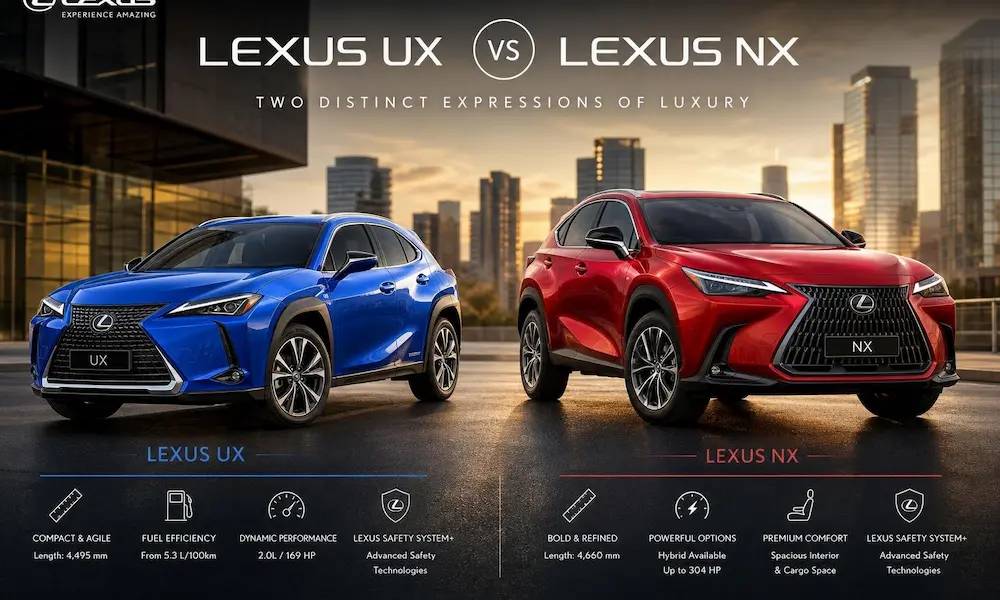
| Lexus NX | Authentication errors, feature unavailability | Subscription verification, password reset |
| Lexus IS | App freezing during commands, slow response times | Force close app, update OS |
| Lexus UX | EV charging status inaccuracies, climate control limitations | Battery level check, app update |
Technical Requirements for Optimal App Performance
| Component | Minimum Requirement | Recommended |
|---|---|---|
| iOS Version | iOS 15.0 | Latest iOS release |
| Android Version | Android 7.0 | Android 10 or newer |
| Network Connection | 4G LTE | 5G |
| Vehicle Firmware | Varies by model | Latest available update |
| App Version | Latest App Store/Play Store version | Enable auto-updates |
| Subscription | Active Connected Services/Remote Connect | Annual plan for consistent service |
The Lexus app can be an incredibly useful tool when it’s working properly. With these troubleshooting steps, you should be able to resolve most common issues and enjoy the convenience of remote vehicle access again. Remember that technology occasionally has hiccups, but most app issues have straightforward solutions if you follow the right steps.