Having trouble with your Toyota’s blind spot detection system? Those annoying warning lights and “BSM malfunction” messages can be frustrating, especially when you’ve come to rely on this important safety feature. The good news is that many Toyota Blind Spot Monitor issues can be fixed without an expensive trip to the dealership.
This guide walks you through every possible reset method – from simple DIY fixes to understanding when professional help is needed. Let’s get your blind spot monitor working properly again!
What Causes Toyota Blind Spot Monitor Malfunctions?
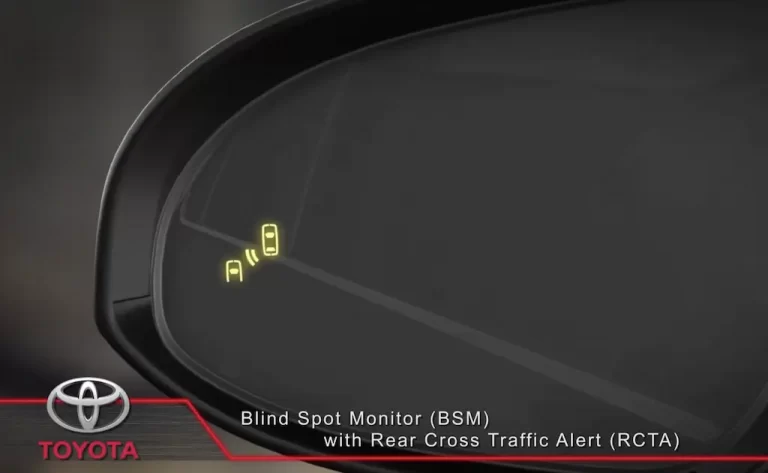
Your Toyota’s BSM system uses radar sensors to detect vehicles in your blind spots. When these sensors get confused, dirty, or experience electrical issues, the system can throw error messages or stop working entirely.
Common causes include:
- Dirt or debris covering the sensors
- Extreme weather conditions
- Low battery voltage
- Sensor misalignment after a collision
- Electrical gremlins in the system
Quick DIY Reset Methods for Toyota BSM
Soft Reset Procedure
The simplest fix is often the most effective. Try this first:
- Turn off your vehicle completely
- Wait 2-3 minutes (this allows the electrical systems to fully reset)
- Restart your car
- Check if the BSM warning light has disappeared
This basic reset procedure works surprisingly often for temporary glitches and can save you a trip to the mechanic.
Hard Reset Through Battery Disconnect
If the soft reset doesn’t work, you can try a more thorough reset:
- Turn off your vehicle completely
- Disconnect the negative terminal of your car battery
- Wait 15-20 minutes
- Reconnect the battery
- Start your vehicle
Remember that this will reset other systems too, including your clock, radio presets, and possibly other driver assistance features. Some 2021 and newer Toyota models might require professional recalibration after a battery disconnect.
Check and Clean Your BSM Sensors
Before going further with reset attempts, make sure your sensors aren’t simply blocked:
- Locate the BSM sensors (typically inside the left and right corners of the rear bumper)
- Inspect for any dirt, mud, snow, ice, or debris
- Clean the sensors with a soft microfiber cloth and mild soapy water
- Dry thoroughly
Even small obstructions like spider webs or lawn debris can interfere with proper sensor operation. After cleaning, restart your vehicle to see if the system recalibrates itself.
Weather-Related BSM Malfunctions
Extreme temperatures can temporarily affect your BSM system. The radar sensors might not operate correctly in:
- Very cold conditions (below freezing)
- Extremely hot weather
- Heavy rain or snow
- Dense fog
If you notice your BSM system acting up during unusual weather, the good news is it will typically return to normal once conditions improve. No reset needed – just patience!
Low Battery Issues and BSM Reset
A common but overlooked cause of BSM problems is low battery voltage. If you see “Blind spot monitor unavailable” warnings, check your 12V battery:
- Measure the voltage with a multimeter (should be around 12.6V when off, 14-14.7V when running)
- If voltage is low, charge or replace the battery
- After battery service, drive for about 15-30 minutes to help the system recalibrate
Some newer Toyota models (2021+) have a Battery Monitoring System (BMS) that might require professional reset after battery replacement or jump starting.
Manual BSM Reset Through Vehicle Controls
Many Toyota models allow you to reset the BSM system through the dashboard controls:
- Access the multi-information display using your steering wheel controls
- Navigate to “Vehicle Settings” or “Settings”
- Find “Blind Spot Monitor” or “BSM”
- Turn the system OFF
- Wait a few seconds
- Turn the system back ON
Some models may require you to hold the BSM button for 3 seconds to initiate a reset sequence. Consult your owner’s manual for the specific procedure for your model.
When Simple Resets Don’t Work: Common Toyota BSM Issues
Steering Angle Sensor Connection
Interestingly, BSM malfunctions can sometimes be related to steering angle sensor problems. If your vehicle shows diagnostic codes like C1433 (steering angle sensor internal circuit), this might be the root cause of your BSM issues.
Signs that your steering angle sensor might be affecting your BSM:
- BSM not working combined with steering-related diagnostic codes
- Stability control light is also illuminated
- The vehicle feels like it pulls slightly to one side
Mirror Wiring and Known TSBs
Toyota has issued Technical Service Bulletins (TSBs) for certain models with known BSM issues:
- TSB #039-13 addresses BSM malfunctions requiring wiring kit installation in exterior side view mirrors
- Faulty wiring connections in side mirrors can cause intermittent BSM system failures
- These issues typically require professional diagnosis with dealership scan tools
Professional Calibration Requirements
In some cases, particularly after body repairs or sensor replacement, professional calibration is necessary:
- Specialized Equipment: Toyota dealerships use Techstream diagnostic tools to properly reset and calibrate the BSM system
- Precise Calibration Process: Professional calibration involves exact positioning of reflector targets and specialized equipment to ensure proper sensor alignment, as shown in this Toyota calibration video
- Cost Considerations: Diagnostic fees typically range from $170-$225, with additional labor costs for recalibration
This table outlines when DIY vs. professional reset is appropriate:
| Issue Type | DIY Reset Possible | Professional Reset Required |
|---|---|---|
| Temporary glitch | ✓ | |
| Dirty sensors | ✓ | |
| Weather-related | ✓ | |
| After battery service | ✓ (most models) | ✓ (2021+ models) |
| After collision | ✓ | |
| Sensor replacement | ✓ | |
| Persistent error codes | ✓ | |
| “Beam axis misalignment” | ✓ |
BSM Reset for Different Toyota Models
While the basic reset procedures are similar across the Toyota lineup, some models have specific requirements:
RAV4 BSM Reset
RAV4 owners frequently report BSM issues, especially in 2019-2022 models. After trying the basic reset procedures, RAV4 World forum members suggest checking for:
- Software updates at the dealership
- Loose wiring connections at the rear bumper
- Power cycling the BSM fuse (located in the driver’s side kick panel)
Tundra BSM Reset
For Toyota Tundra owners experiencing BSM issues, Reddit users report that the system is particularly sensitive to:
- Aftermarket accessories near the rear bumper
- Trailer wiring issues
- Water intrusion in the rear bumper area
A comprehensive reset for Tundra often requires disconnecting the battery for 30+ minutes rather than the standard 15-20 minutes.
Lexus RC BSM Reset
If you own a Lexus RC with BSM issues, this specialized reset procedure might help:
- Turn the ignition on (don’t start the engine)
- Press and hold the BSM button for 5-7 seconds
- Watch for a confirmation beep or display message
- Turn the ignition off, wait 3 minutes, then restart
Understanding the Importance of BSM Calibration
The BSM system isn’t just about convenience—it’s a critical safety feature. When properly calibrated, it helps prevent dangerous lane changes and potential collisions.
After any bumper repair, sensor replacement, or significant electrical work, proper calibration ensures the radar beams are aimed correctly to detect vehicles in your blind spots. Skipping this step can result in:
- False warnings (annoying and distracting)
- Missed detections (dangerous)
- Persistent error messages
A proper professional calibration ensures your safety systems work correctly when you need them most.
Monitor Your BSM Performance After Reset
After performing any reset procedure, monitor your BSM system’s performance:
- Drive on a multi-lane road with moderate traffic
- Check that the BSM indicators illuminate appropriately when vehicles are in your blind spots
- Verify that warning alerts sound correctly when signaling a lane change with a vehicle detected
- Ensure no warning lights remain on the dashboard
If problems persist after trying these reset methods, it’s time to consult with a Toyota dealership or certified technician who can diagnose the specific issue affecting your BSM system.
Deciding Between DIY and Professional BSM Reset
To summarize when to handle BSM issues yourself versus seeking professional help:
Try DIY methods when:
- The issue appeared suddenly without any accident or impact
- Weather conditions recently changed dramatically
- You recently disconnected or replaced the battery
- There’s visible dirt or debris on the sensors
Seek professional help when:
- DIY reset methods don’t resolve the issue
- Specific diagnostic codes keep appearing
- The BSM malfunction occurred after a collision or bumper repair
- The system shows “beam axis misalignment” errors
With these comprehensive reset methods, your Toyota’s Blind Spot Monitor should be back to keeping you safe on the road. Remember that while DIY solutions work for many BSM issues, some situations require the precision and specialized equipment that only a Toyota service center can provide.