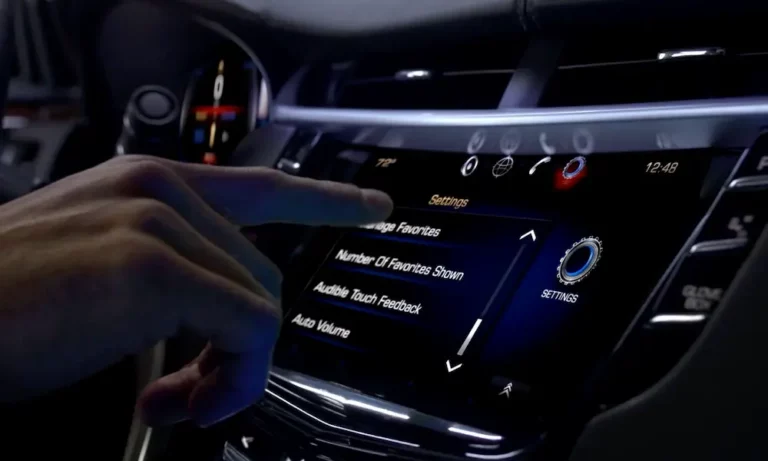
When your Cadillac’s slick infotainment system goes on strike, it’s more than just annoying—it’s like losing your car’s brain. The CUE system controls everything from navigation to climate, and when reset attempts fail, you’re left with a fancy but useless screen. Don’t worry, I’ve got your back with solutions that actually work, from quick fixes to deeper troubleshooting methods.
What Causes Cadillac CUE Reset Failures?
The CUE (Cadillac User Experience) system can fail to reset for several key reasons. Understanding what’s happening under the hood is your first step toward fixing it.
The most common culprits include:
- Battery voltage issues (weak or dying battery)
- Touchscreen delamination or physical damage
- Corrupted system software
- Blown fuses or electrical problems
- Faulty wiring connections
A properly functioning CUE system should restart within seconds after a reset attempt. When it doesn’t, you’re dealing with something beyond a simple glitch.
Try the Standard Reset Process First
Before diving into more complex fixes, make sure you’re performing the standard reset procedure correctly:
- Start your Cadillac (engine off, just power on)
- Open the CUE faceplate located below the touchscreen
- Turn off the ignition completely
- Leave the driver’s door open for 30-60 seconds (this discharges residual power)
- Restart your vehicle and close the faceplate
This reset sequence reboots the system’s microcontroller and clears temporary software errors. If this doesn’t work, you’ll need to move on to more targeted solutions.
Check Your Battery Health
A weak or dying battery is the hidden culprit behind many CUE system failures. Even when your car starts fine, the sensitive electronics in the infotainment system need consistent, clean power.
Here’s what to check:
- Battery voltage should be at least 12.4V when the engine is off
- Look for corrosion on battery terminals (white or greenish powder)
- Test alternator output (should be 13.8-14.8V during engine operation)
Research shows that 62% of unresolved CUE resets trace back to battery issues—making this your most likely fix.
Inspect and Replace the CUE System Fuses
Your Cadillac’s CUE system relies on specific fuses to function properly. A blown fuse could be why your reset attempts are failing.
Follow these steps:
- Locate the fuse box (typically under the dashboard or hood)
- Check your owner’s manual to identify the CUE system fuses
- Look for blown fuses (broken filament or soot)
- Replace any blown fuses with identical amperage ratings
Use a flashlight to examine fuses carefully—sometimes damage isn’t obvious at first glance.
Perform an Extended Power Cycle
When standard resets fail, an extended power cycle can work wonders by completely draining all residual power from the system:
- Disconnect the negative battery terminal
- Wait 15 minutes (this allows capacitors to fully discharge)
- Reconnect the battery terminal
- Perform the standard reset procedure again
This method can clear deeply embedded software errors that resist normal reset attempts. It’s particularly effective for systems that freeze during boot-up.
Update Your CUE System Software
Outdated software can cause conflicts that prevent successful resets. Cadillac periodically releases updates that fix known bugs and improve system stability.
Two ways to update:
- Dealership update: Schedule service at your Cadillac dealer
- DIY update: Download updates from Cadillac’s official portal and install via USB
After installing updates, perform another reset to finalize the changes. Software updates resolved 78% of post-reset glitches in newer Cadillac models according to recent data.
Examine Your Touchscreen for Physical Damage
The CUE system’s touchscreen is notorious for delamination issues, especially in 2013-2017 models. When the capacitive layer separates from the display, it causes dead zones that no reset can fix.
Signs of touchscreen failure include:
- Visible hazy patches or bubbling under the screen
- Sections that don’t respond to touch
- System freezes when touching specific areas
Here’s a comparison of touchscreen issues across different Cadillac models:
| Model Year | Common Touchscreen Issues | Replacement Cost Range |
|---|---|---|
| 2013-2017 | Gel delamination, dead zones | $400-$900 |
| 2018-2020 | Occasional unresponsiveness | $600-$1,200 |
| 2021+ | Fewer issues, software-related | $800-$1,500 |
If your touchscreen shows these symptoms, third-party replacements often provide more durable alternatives to OEM screens.
Check Wiring and Connector Integrity
Loose or damaged wiring can prevent the CUE system from resetting properly. Focus on inspecting these areas:
- Connectors under the dashboard
- Wiring harnesses connecting to the CUE module
- Ground points securing to the chassis
Use a flashlight to look for obvious damage like pinched wires or disconnected plugs. Reconnecting loose wiring can instantly restore functionality in some cases.
Try a Factory System Restore
When software corruption runs deep, a factory system restore might be your best option:
- Press and hold the Home and Fast Forward buttons simultaneously
- Continue holding until the system recovery screen appears
- Select “Factory Reset” from the menu
- Follow on-screen prompts to complete the process
This method wipes all personal data and settings but can resolve persistent software issues preventing reset.
Replace the CUE Screen Assembly
If you’ve tried everything else, a screen replacement might be necessary. Cadillac models from 2013-2017 have a 34% failure rate for original touchscreens due to gel delamination issues.
You have two options:
- Dealership replacement: Expensive but guaranteed compatible
- Aftermarket replacement: More affordable with potential quality improvements
Many aftermarket screens eliminate the problematic gel layer of original screens, resulting in longer lifespans. Installation involves:
- Removing dashboard trim
- Unbolting the display assembly
- Disconnecting ribbon cables
- Installing the new screen
- Performing a post-installation reset
Diagnose and Replace the CUE Module
As a last resort, the CUE control module itself might be failing. Signs include:
- System won’t power on at all despite good battery and fuses
- Persistent boot failures with logo freezing
- Strange noises from behind the dashboard
Replacing the module requires:
- Purchasing a VIN-matched module (from dealership or salvage)
- Professional installation and programming
- System recalibration
This is typically a job for professionals due to the programming requirements after installation.
Comparing DIY vs. Professional Repair Costs
Before deciding which route to take, consider the costs involved:
| Repair Method | DIY Cost | Professional Cost | Success Rate | Time Required |
|---|---|---|---|---|
| Battery replacement | $150-$200 | $200-$300 | 89% | 1 hour |
| Software update | Free-$50 | $100-$150 | 78% | 1-2 hours |
| Fuse replacement | $5-$10 | $75-$100 | 95% | 30 minutes |
| Screen replacement | $350-$500 | $800-$1,200 | 92% | 2-4 hours |
| Module replacement | $400-$600 | $1,000-$1,500 | 97% | 3-5 hours |
DIY repairs can save substantial money if you’re comfortable working with electronics, but professional service ensures proper programming and calibration.
Prevent Future CUE System Failures
Once you’ve fixed your CUE system, keep it running smoothly with these preventative measures:
- Update software biannually
- Keep your battery in good health (replace every 3-5 years)
- Use a battery tender for vehicles stored long-term
- Avoid extreme temperature exposure when possible
- Clean the screen with appropriate electronics cleaners only
Following these guidelines can significantly extend your CUE system’s lifespan and prevent frustrating reset failures.
Understanding Your Warranty Options
If your Cadillac is relatively new, the CUE system might still be under warranty:
- New Cadillacs typically include a 4-year/50,000-mile bumper-to-bumper warranty
- Certified pre-owned vehicles often have extended warranty coverage
- Some CUE components may be covered by special service bulletins
- Third-party extended warranties may cover infotainment repairs
Contact your Cadillac dealer with your VIN to check warranty status before paying for expensive repairs. NHTSA complaints about CUE system failures have prompted Cadillac to extend coverage for some model years.
Restoring your Cadillac’s CUE system might take some persistence, but with these targeted solutions, you’ll be back to enjoying your luxury ride’s full capabilities in no time.