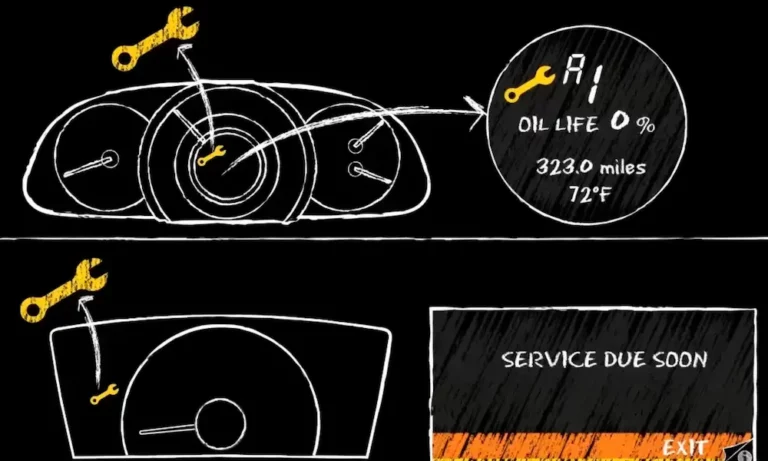
Ever glanced at your dashboard and noticed that persistent wrench icon or “Service Due Soon” message? Your Honda’s Maintenance Minder system is trying to tell you something. But after you’ve handled the required service, that reminder needs to be reset – and it’s not always obvious how to do it.
This guide walks you through exactly how to reset your Honda Maintenance Minder across different models. You’ll learn what those mysterious service codes mean and troubleshoot common issues that might pop up along the way.
What is the Honda Maintenance Minder System?
The Honda Maintenance Minder is smarter than your average maintenance reminder. Introduced in 2005, it replaced Honda’s traditional mileage-based service intervals with an intelligent system that tracks your actual driving habits.
Instead of simply counting miles, the system monitors:
- Engine operating conditions
- Ambient temperatures
- Trip lengths
- Speed patterns
- Idle time
This data determines when your Honda genuinely needs service – not just when it hits an arbitrary mileage marker. When service is needed, you’ll see a wrench icon illuminate on your dashboard along with specific service codes.
The system shows your remaining oil life as a percentage (100% being fresh oil), and when it reaches 15%, it’s telling you that service will be needed soon. When it hits 0%, it’s time to schedule that maintenance appointment.
How to Reset Honda Maintenance Minder: General Method
While specific steps vary by model year, most Honda vehicles follow a similar reset procedure:
- Turn the ignition to ON position (don’t start the engine)
- Locate and navigate to the oil life display screen
- Press and hold the appropriate button until the display blinks
- Select “Reset” and confirm
Let’s break this down by popular Honda models.
Honda Accord Maintenance Minder Reset (2003-2022)
For 2003-2007 Accord Models:
- Turn ignition to ON (don’t start engine)
- Press the trip reset knob until the oil life percentage appears
- Hold the same button for 10 seconds until the display blinks
- Release and press again to confirm the reset
For 2008-2016 Accord Models:
- Turn ignition to ON position
- Use the INFO button on the steering wheel to find the oil life screen
- Hold the SELECT/RESET knob for approximately 10 seconds
- When prompted, select “Reset” using the steering wheel controls
For 2017-2022 Accord Models:
- Press the HOME button on the steering wheel
- Scroll to the maintenance icon using the left selector wheel
- Press and hold the selector wheel for about 10 seconds
- Select “All Due Items” when prompted
- Choose “Yes” to confirm reset
Honda Civic Maintenance Minder Reset (2016-2021)
The newer Civic models have a slightly different procedure:
- Turn ignition to ON position
- Press HOME button on the steering wheel
- Scroll to Maintenance Minder using the left selector wheel
- Press and hold the selector wheel for 10 seconds
- Select “Reset All” and confirm
Honda CR-V Maintenance Minder Reset (2017-2022)
For the popular CR-V crossover:
- Turn ignition to ON position
- Press INFO button on steering wheel repeatedly until oil life appears
- Press and hold ENTER for 10 seconds
- Scroll to “All Due Items” option
- Select and confirm to complete reset
Hybrid Models: Insight and Clarity Plug-In Reset
Honda’s electrified vehicles follow this procedure:
- Turn the car to ON mode
- Navigate to Vehicle Settings in the infotainment system
- Select Maintenance Info
- Choose Maintenance Reset option
- Follow on-screen prompts to complete
Understanding Honda Maintenance Minder Codes
The system uses a combination of letters and numbers to communicate exactly what services your vehicle needs.
Main Codes:
| Code | Required Service |
|---|---|
| A | Oil change only |
| B | Oil and filter change, plus inspection of brakes, linkages, and fluids |
Sub-Codes:
| Code | Service Required |
|---|---|
| 1 | Tire rotation and pressure check |
| 2 | Air filter, cabin filter, and inspect drive belt |
| 3 | Transmission fluid replacement |
| 4 | Spark plugs, timing belt, water pump inspection |
| 5 | Engine coolant replacement |
| 6 | Differential fluid replacement |
| 7 | Valve adjustment inspection |
For example, if you see “B16” on your display, this means you need:
- Oil and filter change plus brake inspection (B)
- Tire rotation (1)
- Differential fluid replacement (6)
Troubleshooting Common Maintenance Minder Reset Issues
Display Won’t Reset to 100%
If your oil life indicator doesn’t return to 100% after attempting a reset:
- Ensure you’re holding the button long enough (full 10 seconds)
- Verify you’re in the correct menu screen
- Make sure the ignition is in ON position, not accessory mode
- Check that your battery has sufficient charge
Wrench Icon Still Shows After Reset
A persistent wrench icon might indicate:
- Only one service item was reset when multiple were due
- The reset procedure wasn’t completed correctly
- There’s another maintenance issue detected by the system
Try navigating to the detailed maintenance information screen to see if any specific codes remain active.
Reset Buttons Not Responding
If the dashboard controls seem unresponsive:
- Check your battery health – low voltage can affect dashboard electronics
- Ensure you’re pressing the correct button (consult your owner’s manual)
- Try turning the ignition off and back on, then attempt the procedure again
Why Regular Maintenance Matters
The Honda Maintenance Minder system isn’t just a reminder – it’s designed to optimize your vehicle’s performance and longevity. Following these service intervals means:
- Extended engine life and performance
- Better fuel economy
- Prevention of costly repairs
- Maintained resale value
- Continued warranty coverage (where applicable)
Ignoring these reminders might save money in the short term, but can lead to significant mechanical issues down the road.
Important Maintenance Tips Beyond the Minder System
While the Maintenance Minder tracks many crucial service items, don’t overlook these important checks between service appointments:
- Monthly tire pressure checks (especially with seasonal temperature changes)
- Regular visual inspections for fluid leaks
- Battery terminal cleanliness and connection
- Windshield wiper blade condition
- All exterior light function
According to NHTSA data, properly maintained tires can improve safety, boost fuel economy, and extend tire life significantly.
When Should You Reset the Maintenance Minder?
Always reset the system AFTER completing the indicated maintenance work – never before. Resetting without performing the service can lead to:
- Missed critical maintenance
- Potential engine or transmission damage
- Voided warranty coverage
- Compromised vehicle safety
The reset tells your Honda’s computer that maintenance has been completed, allowing it to properly calculate the next service interval based on your driving patterns.
Honda Models With Different Reset Procedures
While most Hondas follow similar reset patterns, a few models have unique procedures:
Honda Pilot (2016-2022): Uses the touchscreen interface. Navigate to “Settings” > “Vehicle” > “Maintenance Info” to access reset options.
Honda Odyssey (2018+): Features a dedicated TRIP button on newer models that must be used in the reset sequence.
Honda Ridgeline: Trucks from 2017 forward use steering wheel controls similar to the CR-V procedure.
The Evolution of Maintenance Minder
Honda has continuously refined this system over time:
| Generation | Years | Key Features |
|---|---|---|
| First Gen | 2005-2012 | Basic percentage display, limited codes |
| Second Gen | 2013-2017 | Enhanced algorithms, expanded service codes |
| Current Gen | 2018+ | Integrated with infotainment, more detailed service reports |
The latest systems provide more detailed information about upcoming maintenance needs and better integration with Honda’s service history records.
Maintaining Your Honda Between Service Intervals
The Maintenance Minder won’t track everything your Honda needs. Between service appointments, keep an eye on:
- Tire pressure and tread depth
- All exterior lights
- Windshield washer fluid
- Wiper blade condition
- Unusual noises or handling changes
Addressing small issues before they become major problems is the best way to maximize your Honda’s lifespan and maintain its value.
Benefits of Following Honda’s Maintenance Schedule
Adhering to your Honda’s recommended maintenance schedule offers several advantages:
- Optimized fuel economy
- Extended vehicle lifespan
- Higher resale value
- Reduced likelihood of breakdowns
- Preserved warranty coverage
According to Honda’s service department guidelines, properly maintained vehicles often last 100,000+ miles longer than those with inconsistent service histories.
Remember that resetting your Honda Maintenance Minder is just one part of responsible vehicle ownership. Completing the recommended services on time and addressing any developing issues promptly will keep your Honda running smoothly for years to come.