Ever pulled up to your garage in your Lexus RX 350 after a long day, only to realize you’ve forgotten your garage remote? Your car’s built-in HomeLink® system can solve this problem for good. With a few simple steps, you’ll be opening your garage door with the push of a button—no separate remote needed.
What is HomeLink® in Your Lexus RX 350?
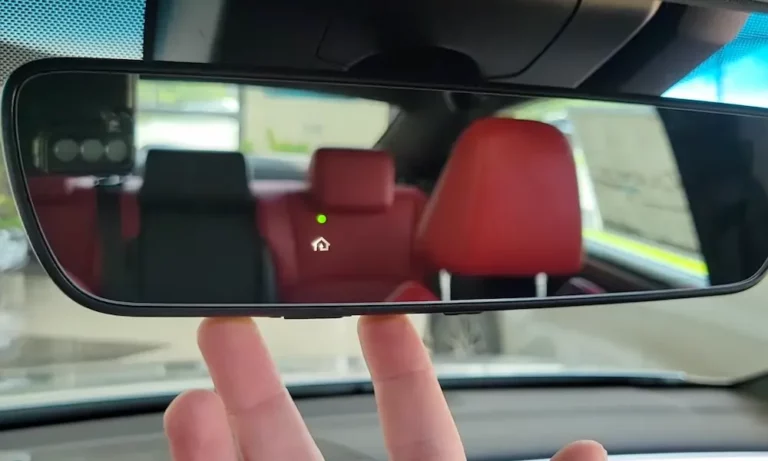
HomeLink® is a universal transceiver system built into your Lexus that can control garage doors, gates, and even some home automation systems. Look for the three programmable buttons, usually located on your rearview mirror or overhead console. These buttons work with devices operating between 288–433 MHz frequencies, including most modern garage door openers.
Before you start pressing buttons, park your vehicle within 10–30 feet of your garage door and grab your existing remote and garage door opener manual. You’ll need both for a smooth setup process.
Clearing Previous Codes: Start With a Clean Slate
If you’re setting up HomeLink® in a new-to-you Lexus or simply want to reprogram, always start by erasing any existing codes:
- Press and hold the first and third HomeLink® buttons simultaneously
- Watch the indicator light: it will slowly blink orange or green if codes are stored
- Keep holding for 20–30 seconds until the light changes to a rapid blink
- Release the buttons and test by pressing each HomeLink® button—a slow blink confirms successful reset
This step is crucial for security reasons. You don’t want previous owners potentially having access to your garage!
Programming Non-Rolling-Code Systems
Many older garage door openers (pre-1996) use fixed codes that remain the same each time you use them. Here’s how to program these simpler systems:
- Press and hold your chosen HomeLink® button until the light starts blinking slowly (about 20 seconds)
- Hold your handheld remote 1–3 inches from the HomeLink® buttons
- Press and hold both your handheld remote button and the HomeLink® button simultaneously
- Release when the indicator light changes to a rapid blink or stays solidly lit
- Test by pressing the programmed HomeLink® button—your garage door should respond within 1–2 seconds
If your door doesn’t respond, you might need to try again or switch to the rolling-code process.
Programming Rolling-Code Systems: The Two-Stage Process
Modern security-focused garage door openers use rolling codes that change each time you use them. This prevents code stealing but requires extra steps to program:
Stage 1: Sync with Your Remote
- Complete the same initial steps as with non-rolling code systems (steps 1-4 above)
- Look for the “Learn” or “Smart” button on your garage door motor unit (often behind a light cover)
- Press this button once—you’ll see a confirmation light that stays on for about 30 seconds
- Hurry back to your vehicle and press your programmed HomeLink® button for 2 seconds, release, then press again twice more (3 presses total)
- If successful, your garage door will activate
When Things Get Tricky: Rolling-Code Troubleshooting
If you see rapid green blinking on your HomeLink® button, your synchronization isn’t complete. Try pressing the HomeLink® button for 2 seconds, releasing, and repeating twice more within 30 seconds.
No response at all? Double-check that:
- Your car is close enough to the garage
- The “Learn” mode on your motor unit is active
- You may need to start over by erasing all codes and beginning again
Programming Multiple Doors or Gates
Have more than one garage door? No problem. Your Lexus RX 350’s HomeLink® system supports up to three different devices:
- Choose a different HomeLink® button for each door
- Follow the programming steps for each button separately
- Test each button to ensure it controls the correct door
Common Problems and Quick Fixes
| Problem | Likely Cause | Solution |
|---|---|---|
| No indicator light | Dead battery in key fob | Replace the CR2032 battery in your electronic key |
| Door only moves partially | Weak signal | Move your car closer to the garage during programming |
| Works sometimes, not others | Rolling code out of sync | Reprogram both HomeLink® and the garage door opener |
Keeping Your HomeLink® System Secure
Your garage door is an entry point to your home, so security matters:
- Always reset HomeLink® before selling your Lexus
- Consider using signal-blocking storage for your handheld remotes when not in use
- Check with your Lexus dealership about any available firmware updates for the HomeLink® system
Brand-Specific Programming Tips
Different garage door opener brands may have slightly different programming procedures:
For Chamberlain, LiftMaster, or Craftsman Openers
These popular brands typically have yellow “Learn” buttons and require the rolling-code programming method. They might need extra button presses during synchronization.
For Genie Openers
Genie openers often have red or purple “Learn” buttons located near the antenna wire hanging from the motor unit. Some newer Genie models require holding the “Learn” button until LEDs turn on.
For Sommer Systems
Sommer garage door openers use a unique programming process. You’ll need to press the “Learn” button on the opener’s control panel rather than on the motor unit itself.
Using HomeLink® to Enhance Your Lexus Experience
Beyond garage doors, your HomeLink® system can control:
- Electric gates
- Security systems
- Some exterior lighting
- Compatible smart home devices
The convenience factor increases when you integrate multiple systems. Imagine pulling into your driveway and with one button press opening your gate, then your garage, and even turning on your home’s entry lights.
Smart Integration with Your Lexus RX 350
The Lexus RX 350’s HomeLink® system is designed to seamlessly blend with your driving experience. Some models even remember which button you last pressed and can suggest it when you approach your home.
Located conveniently within reach, the buttons are subtly backlit for nighttime use, and the system’s memory remains intact even when your vehicle’s battery is disconnected.
When Factory Settings Need Attention
If you’ve tried every troubleshooting step without success, it may be time to consult your Lexus owner’s manual for model-specific details. You can also find video guides on the official Lexus YouTube channel demonstrating the exact process.
For persistent issues, your local Lexus service center can diagnose potential hardware problems with your HomeLink® system. Sometimes, a simple firmware update from the dealership is all you need.
Looking Ahead: Future HomeLink® Capabilities
The HomeLink® system continues to evolve with each new Lexus model. Recent updates include better compatibility with smart home systems and improved signal range. Some newer versions can even connect to your smartphone, allowing you to check if you left the garage door open after driving away.
Once you’ve mastered programming your Lexus RX 350’s garage door opener, you’ll wonder how you ever lived without this convenient feature. No more digging through your console or sun visor for that elusive remote—just the simple press of a button built right into your luxury vehicle.