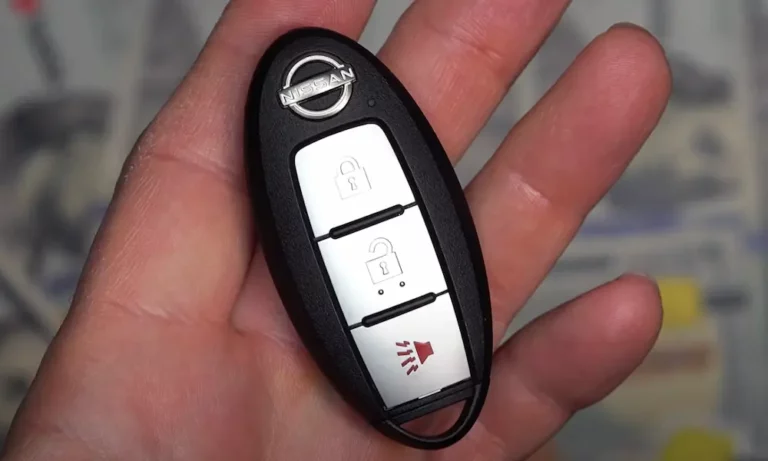
Locked out because your Nissan key fob stopped working? Or maybe you bought a replacement fob and now it’s just a useless plastic brick? The good news — you might not need to drop $500 at the dealership. This guide walks you through exactly how to reprogram a Nissan key fob, from the simple DIY method to the more technical stuff.
First, Figure Out What Type of Nissan Key Fob You Have
Before you touch anything, you need to know what you’re working with. Nissan has used several different key systems over the years, and the reprogramming method depends entirely on your fob type.
| Key Type | Typical Years | Programming Method |
|---|---|---|
| Standard Remote + Blade Key | 1999–2006 | Manual ignition cycle (DIY-friendly) |
| Intelligent Key Gen 1 | 2009–2014 | OBDII tool required |
| Intelligent Key Gen 2 | 2013–2018 | OBDII + 20-digit PIN |
| Modern Smart Key | 2018–present | Advanced OBDII + 22-digit PIN |
Check your owner’s manual or look at the fob itself. If it has a physical key blade tucked inside and a basic lock/unlock button layout, you likely have an older-style remote. If it’s a push-button start vehicle, you’re dealing with an Intelligent Key — and the process is more involved.
How to Reprogram a Nissan Key Fob Without a Tool (2000–2006 Models)
This is the method most people are looking for. If your Nissan was built between 2000 and 2006 — think Altima, Maxima, Pathfinder, or Sentra — you can reprogram the fob using a simple ignition sequence with no tools needed.
What You’ll Need
- Your working car key (just the physical key, not the fob buttons)
- The new or unsynced fob
- About five minutes
Step-by-Step: The Six-Insertion Method
Step 1 — Get settled. Sit in the driver’s seat. Close all doors and lock them using the power lock switch on the door panel. This tells the Body Control Module (BCM) the car is in a secure state.
Step 2 — Insert and remove the key six times. Insert your key into the ignition, then pull it straight back out. Don’t turn it. Do this six times within 10 seconds. Speed matters — the BCM’s internal timer resets if you’re too slow.
Step 3 — Watch for the hazard lights. If the sequence worked, the hazard lights flash twice. That’s your confirmation that programming mode is active. If they don’t flash, try again faster.
Step 4 — Turn the key to ACC. Now insert the key and turn it to the Accessory position (one click before starting the engine).
Step 5 — Press any button on your fob. Do this within five seconds. One hazard light flash means the BCM stored your fob’s ID. Done.
Step 6 — Add more fobs if needed. Most Nissan BCMs store up to four fob IDs. To program a second fob, manually unlock and relock the driver’s door, then press a button on the next fob. Repeat for any additional remotes. All fobs must be programmed in the same session — starting a new session wipes the old ones.
Quick tip: Keep your vehicle battery above 12V during programming. Voltage drops can cause the BCM to reject the process mid-session.
How to Reprogram a Nissan Intelligent Key Fob (Push-Button Start)
If your Nissan has a push-button start, the manual method won’t work. These vehicles use a two-way communication system with antennas spread throughout the car — door handles, center console, luggage area — and the BCM runs a cryptographic handshake to verify each key.
The Quick Resync Trick (2013–2017 Models Only)
If your fob is already registered to the car but acting glitchy, try this first:
- Hold the fob directly against the Start/Stop button
- Press the brake and push the button to start the car
The NATS antenna inside the button uses inductive coupling to read the transponder chip even with a dead battery. This isn’t a full reprogram — but it often restores function without any tools.
Full Reprogramming With an OBDII Tool
For a complete reprogram on push-start vehicles, you’ll need an OBDII programmer. The Autel MaxiIM KM100 is a popular professional option. For a consumer-friendly route, the Simple Key Programmer from Car Keys Express works well on 2004–2018 turn-key ignition vehicles and walks you through the process step by step. You can find it at Amazon.
The basic OBDII workflow looks like this:
- Plug the tool into the OBDII port under the steering wheel
- Let it auto-detect your VIN
- Clear any existing immobilizer fault codes
- Follow the on-screen prompts to register the new key
- Hold the fob against the Start/Stop button when prompted

- COMPATIBILITY: Compatible with FCC ID KR5S180144014, 47 Chip , This Remote Key Fob Replacement for Nissan Altima Maxima Murano Pathfinder 2013 2014 2015

- 💕【Read Carefully Before Ordering】💕Batteries Not Included (CR2032). This is just a blank key that needs to work with Autel MaxiIM tool. Or you can take it to the licensed mechanic or technician. 📢📢We suggest you send us your car VIN# for the compatibility first 📧Autelonline @ outlook . com📧.
The 20-Digit PIN Code: What It Is and Why It Matters
Post-2013 Nissan models added a significant security layer: the 20-digit rolling PIN system. When a diagnostic tool tries to access the BCM’s key-learning mode, the car generates a unique 20-digit “Outcode.” You need a matching “Incode” to proceed.
Here’s the catch — this code expires the moment you disconnect the tool or turn off the ignition. The BCM generates a fresh Outcode every time, so you can’t save it for later.
Professional locksmiths either calculate the Incode from the VIN and Outcode using a PIN calculation service, or they use bypass software to skip the PIN step entirely. The ADS-198SD Nissan PIN Bypass is one tool that handles this automatically.
For newer models like the 2018–2021 Nissan Kicks, Nissan upgraded to a 22-digit PIN system — even tougher to crack without proper equipment.
Before You Reprogram: Check the Hardware First
A fob that seems broken might just need a battery swap or a quick physical fix. Save yourself time and check these first.
Battery Check
Nissan fobs use either a CR2025 or CR2032 coin cell. The CR2032 is 0.7mm thicker. If your fob originally used a CR2025 but the contacts feel loose, swap in a CR2032 — the tighter fit often restores signal.
The Contact Prong Trick
Open the fob casing (usually a small flathead screwdriver in the seam). Look at the metal tabs that press against the battery. If they’re flat or corroded, gently bend them upward and clean them with isopropyl alcohol. Loose contact = weak signal.
What Frequency Does Your Nissan Key Fob Use?
This one trips people up when buying replacement fobs online. North American Nissans use 315 MHz. European models use 433 MHz. Buy the wrong one, and it won’t work — ever — no matter how many times you try to reprogram it.
| Frequency | Market | Key Characteristic |
|---|---|---|
| 315 MHz | USA / Canada | Longer outdoor range |
| 433 MHz | Europe / UK | Better in narrow/urban areas |
Always confirm the frequency before buying a replacement fob. Check the FCC ID printed on your original fob or in your owner’s manual.
How Much Does Nissan Key Fob Reprogramming Cost?
Here’s the honest breakdown:
| Method | Estimated Cost |
|---|---|
| DIY (manual ignition sequence) | $15–$50 (just the fob) |
| Consumer OBDII kit (Simple Key) | $60–$150 |
| Professional locksmith | $250–$450 |
| Nissan dealership | $330–$1,000 |
A locksmith can cost 40–60% less than the dealership because they use universal tools and aftermarket hardware that work just as well. The dealership charges a premium for OEM parts and their proprietary Consult III+ software.
Common Problems When Reprogramming a Nissan Key Fob
Security light stays solid after programming
The BCM detected a transponder but couldn’t verify it. This usually means you’re using the wrong transponder chip type (ID46 vs ID47). Double-check the fob specs match your vehicle.
Hazard lights flashed once but the remote doesn’t work
The BCM stored the ID, but there’s a frequency mismatch — likely a 315MHz vs 433MHz issue. Or the rolling code is out of sync.
“No Key Detected” on the dash
On Intelligent Key models, this points to a failed antenna — usually the one in the console or instrument panel. A dealership or locksmith can run a diagnostic test on each antenna to find the weak one.
Fob works sometimes but not others
Could be interference from a nearby cell tower, or you’re carrying fobs for multiple vehicles. The BCM can enter a temporary lockout mode if it receives competing signals.
Can You Use a Fob Bought Online?
Maybe — but there’s a catch. Many used Nissan Intelligent Keys are “locked” to their previous vehicle. The PCF7952 or PCF7953 transponder chip inside has a Write-Once memory segment. Once it’s programmed, standard tools can’t overwrite it.
To reuse a locked fob, it needs to be “virginized” using a Key Cleaner tool that connects directly to the circuit board. Some services let you mail in your old fob to have it professionally unlocked and paired with a new key blade — a much cheaper alternative to buying a brand-new OEM fob.