Looking for reliable internet on the go? Your GM vehicle might already have what you need. OnStar WiFi offers connectivity options that can keep everyone in your car happy and connected, but understanding the unlimited data options can be confusing. Let’s break down exactly what OnStar WiFi unlimited plans offer, how they work, and whether they’re worth the investment for your specific needs.
What Is OnStar WiFi?
OnStar WiFi transforms your GM vehicle into a mobile hotspot, allowing you to connect up to 7 devices simultaneously to the internet. The service runs on AT&T’s 4G LTE network, providing connectivity for everything from laptops and tablets to gaming consoles.
The WiFi hotspot works whenever your vehicle is in the “Run” or “Accessory” position, and you can access the signal up to about 50 feet from your vehicle – perfect for tailgating, camping, or working from your car.
OnStar WiFi Unlimited Plans: Your Options
Contrary to what some believe, not all OnStar plans include unlimited WiFi data by default. Here’s a breakdown of your options:
| Plan Name | Monthly Price | Data Allowance | Best For |
|---|---|---|---|
| Connected Access (Basic) | Included trial, then standard fees apply | 2 GB/month | Light browsing, occasional email |
| Connect Plus | $25/month | Unlimited data | Regular streaming, work needs |
| OnStar One | $39.99/month | Unlimited data | Heavy users, multiple devices |
| OnStar One Super Cruise | $39.99/month | Unlimited data | Super Cruise users needing connectivity |
| AT&T Prepaid 30-Day Unlimited | $20/month | Unlimited data | Budget-conscious unlimited users |
For those specifically seeking OnStar WiFi unlimited options, the Connect Plus, OnStar One, and AT&T Prepaid plans are your best bets. The Connect Plus plan offers unlimited WiFi data alongside other vehicle connectivity features, while the OnStar One plan bundles in additional safety and security features.
How Much Data Do You Actually Need?
Before jumping into an unlimited plan, consider your typical usage:
- Light usage (1-3 GB/month): Email, social media browsing, occasional map downloads
- Moderate usage (4-15 GB/month): Some video streaming, regular web browsing
- Heavy usage (15+ GB/month): HD video streaming, online gaming, video conferencing
If you’re primarily checking emails and occasionally browsing the web, the basic plan might suffice. However, if you have kids streaming videos on road trips or you work remotely from your vehicle, an unlimited plan makes more sense.
The Truth About “Unlimited” Data
While OnStar advertises unlimited data plans, it’s important to understand what “unlimited” actually means in this context. Like most carriers, these plans may include network management practices after heavy usage.
This means that after consuming large amounts of data (typically above 22-25GB in a billing cycle), your connection might be temporarily slowed during periods of network congestion. You won’t be charged extra, but you might notice reduced speeds.
Setting Up Your OnStar WiFi Unlimited Plan
Getting started with unlimited WiFi in your GM vehicle is straightforward:
- Check compatibility: Most GM vehicles from 2015 onwards have built-in WiFi capability
- Choose your plan: Select from Connect Plus, OnStar One, or the AT&T Prepaid option
- Activate your service: Either through your GM Account online, the myBrand app, or by pressing the blue OnStar button in your vehicle
- Connect your devices: Find your vehicle’s unique hotspot name and password in your vehicle settings or myBrand app
How OnStar WiFi Unlimited Compares to Mobile Hotspots
| Feature | OnStar WiFi Unlimited | Mobile Phone Hotspot | Dedicated Mobile Hotspot |
|---|---|---|---|
| Monthly Cost | $20-$40 | Often included with cell plan | $20-$90 depending on provider |
| Signal Quality | Vehicle-powered antenna | Limited by phone | Dedicated antenna |
| Battery Concerns | Uses vehicle power | Drains phone battery | Separate battery |
| Device Connections | Up to 7 | Typically 5-10 | 10-15 |
| Portability | Limited to near vehicle | Highly portable | Highly portable |
One significant advantage of OnStar WiFi is the stronger antenna built into your vehicle, which often provides better reception than a smartphone hotspot, especially in rural areas. Additionally, since it runs off your vehicle’s power, you don’t have to worry about draining your phone battery.
Real-World Performance of OnStar WiFi Unlimited
According to user reports, OnStar WiFi performance varies based on location and network congestion, much like any cellular service. In good coverage areas, users report download speeds between 5-20 Mbps, sufficient for most online activities including standard-definition streaming.
Some users report:
- Reliable connectivity for work video calls when parked
- The ability to stream Netflix on multiple devices during road trips
- Occasional slowdowns during peak usage times
- Better reception in rural areas compared to smartphones
Maximizing Your OnStar WiFi Experience
To get the most from your OnStar WiFi unlimited plan:
- Position strategically: Park where you have the strongest signal when using WiFi for extended periods
- Manage connected devices: Disconnect devices you’re not actively using
- Schedule large downloads: Update software or download large files during off-peak hours
- Consider a signal booster: For frequent rural travelers, a compatible signal booster can help
Is OnStar WiFi Unlimited Worth It?
The value proposition depends on your specific situation:
Worth it if:
- You frequently travel in areas with limited WiFi access
- Your family streams content during road trips
- You work remotely from your vehicle regularly
- You already subscribe to OnStar services for safety features
Probably not worth it if:
- You rarely drive outside cellular coverage
- Your smartphone plan includes substantial hotspot data
- You only occasionally need internet in your vehicle
- You primarily park in areas with free WiFi
How to Access OnStar WiFi Settings and Monitor Usage
Accessing your hotspot settings and monitoring data usage is simple:
- Use the myBrand app (Chevrolet, GMC, Buick, Cadillac)
- Visit your GM Owner Center account online
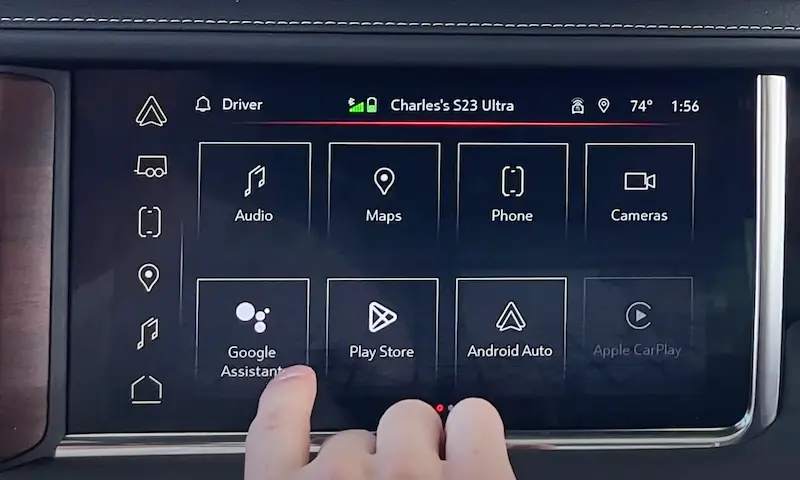
- Navigate to “Settings” or “WiFi Hotspot” in your vehicle’s infotainment system
- Press the blue OnStar button and ask an advisor for assistance
For unlimited plan subscribers, there’s no need to worry about data caps, but you can still monitor connection quality and connected devices.
Alternative Ways to Get Internet in Your Vehicle
If OnStar WiFi unlimited doesn’t seem right for you, consider these alternatives:
- Smartphone hotspot: Use your existing mobile plan’s hotspot allowance
- Dedicated mobile hotspot device: Purchase a separate device with its own data plan
- Public WiFi networks: Utilize free WiFi at restaurants, libraries, and other public locations
- RV-specific internet solutions: For larger vehicles or extended travels
Recent Updates to OnStar WiFi Plans
GM recently restructured their connectivity options with the introduction of the OnStar One plan, which bundles safety features with unlimited data. New 2025-and-newer GM vehicles include basic connectivity with a 2GB monthly data cap, but unlimited plans remain available as upgrades.
The company has also maintained its partnership with AT&T to offer the prepaid unlimited data plan at $20/month, which represents the most affordable unlimited option if you don’t need the additional OnStar safety features.
Using OnStar WiFi Unlimited for Road Trips
For families who love road trips, OnStar WiFi unlimited can be a game-changer:
- Keep kids entertained with streaming services during long drives
- Access real-time navigation and traffic updates
- Find and book accommodations on the go
- Share trip highlights on social media without depleting phone data
- Enable remote work during extended road trips
The consistent connection provided by the vehicle’s exterior antenna often outperforms smartphone hotspots in rural areas along highways, making it particularly valuable for cross-country travelers.
Business Uses for OnStar WiFi Unlimited
For professionals who work from their vehicles, OnStar WiFi unlimited offers several advantages:
- Reliable connection for video conferences from parking lots
- Ability to send large files without searching for coffee shop WiFi
- Consistent connectivity when visiting client sites
- Dedicated connection separate from personal phone usage
- No need to drain your phone battery while working
Many field service technicians, real estate agents, and sales professionals find value in having a dedicated vehicle-based connection that doesn’t impact their smartphone data allowance or battery life.
Making the Final Decision on OnStar WiFi Unlimited
When deciding whether to invest in an OnStar WiFi unlimited plan, consider these questions:
- How often do you need internet in your vehicle?
- How many devices typically need connectivity?
- What type of online activities do you perform in your vehicle?
- Do you already subscribe to other OnStar services?
- How does the cost compare to upgrading your smartphone data plan?
For many, the convenience of having a dedicated connection that doesn’t drain their phone battery and offers potentially better reception makes the $20-40 monthly investment worthwhile. Others might find that their existing smartphone plan provides sufficient hotspot data for occasional needs.
Whatever your decision, understanding the actual capabilities, limitations, and alternatives to OnStar WiFi unlimited ensures you’ll make the choice that best fits your connectivity needs and budget.