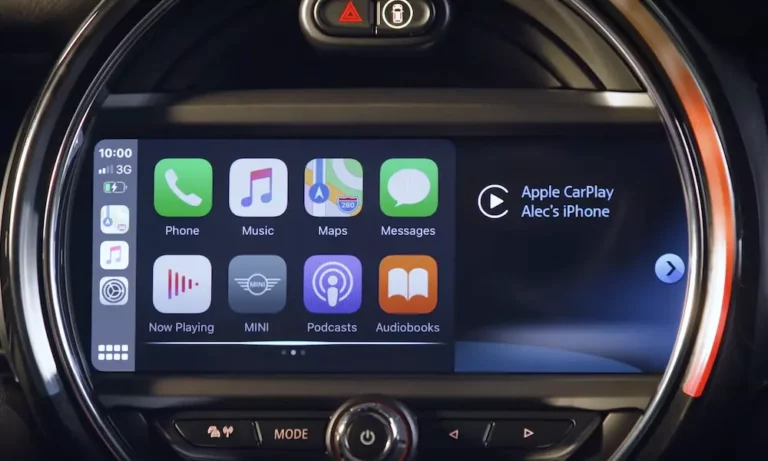
Want Apple CarPlay in your Mini Cooper? You’re looking at different paths depending on what year and model you’re driving. Some owners can activate it with simple coding, while others need hardware add-ons. Here’s what actually works, what it’ll cost you, and how to avoid wasting money on the wrong solution.
Check Your Mini’s Head Unit First
Before you drop cash on anything, you need to know what system you’re working with. Mini uses BMW’s iDrive platform (rebranded as “Mini Connected”), and there are huge differences between versions.
The Quick Visual Test
Look at your screen’s main menu. If you see a horizontal row of tiles (Media, Navigation, Communication), you’ve got NBT Evo ID5 or ID6—the newer stuff that supports native CarPlay. If it’s a vertical list with red highlights when you select items, you’re on older hardware.
Here’s the breakdown:
2007-2013 Models (CCC/CIC): These systems can’t run CarPlay natively. The processors just don’t have the power. You’ll need an aftermarket box.
2013-2015 Models (NBT): Better graphics, faster system, but still no wireless CarPlay hardware built in. Aftermarket solutions only.
2016-2018 Models (NBT Evo ID4/ID5): This is where it gets tricky. Some of these can be activated, but ID4 units only have 2GB of RAM. People flash them to run ID6 software, but the system crashes during long navigation routes. It’s a gamble.
2018+ Models (NBT Evo ID6): If you’ve got the Navigation Professional package, CarPlay is already in there—it just needs activation.
Decode Your VIN
Your VIN tells you exactly what hardware you’ve got:
- S609A = Navigation System Professional (the good stuff)
- 6CP = CarPlay Preparation (you’re ready to go)
- 6NS/6NW = Enhanced Bluetooth/Wireless Charging (means you’ve got the WiFi antenna)
No VIN decoder handy? Check your iDrive menu version number. Anything starting with “NBTevo_N” or later supports fullscreen CarPlay. Earlier versions (H, I, J, K, L, M) need a firmware update first.
The Software Activation Route (2016+ NBT Evo)
If you’ve got a late 2016 or newer Mini with the right hardware, the mini cooper apple carplay upgrade is mostly software.
What You Need
Your car needs a WiFi antenna. Some Minis have the head unit but skipped the antenna to save costs. Without it, your phone has to sit directly on the dashboard to connect—basically useless.
The antenna connects to a port on the back of the head unit. If you’ve got wireless charging or the Tech Package, you’re good. If not, you’ll need to pull the head unit and install the antenna yourself or pay a shop to do it.
Activation Methods
Official Route: Buy the CarPlay license through Mini Connected. It’s pricey (around $300), but it’s legitimate and won’t cause warranty issues.
Coding Route: Services like BimmerTech, Bimmer-Remote, or FlashXCode can activate it remotely for $150-250. They connect via your OBD port and inject the activation code. It’s the same end result, just cheaper.
The Fullscreen Mod
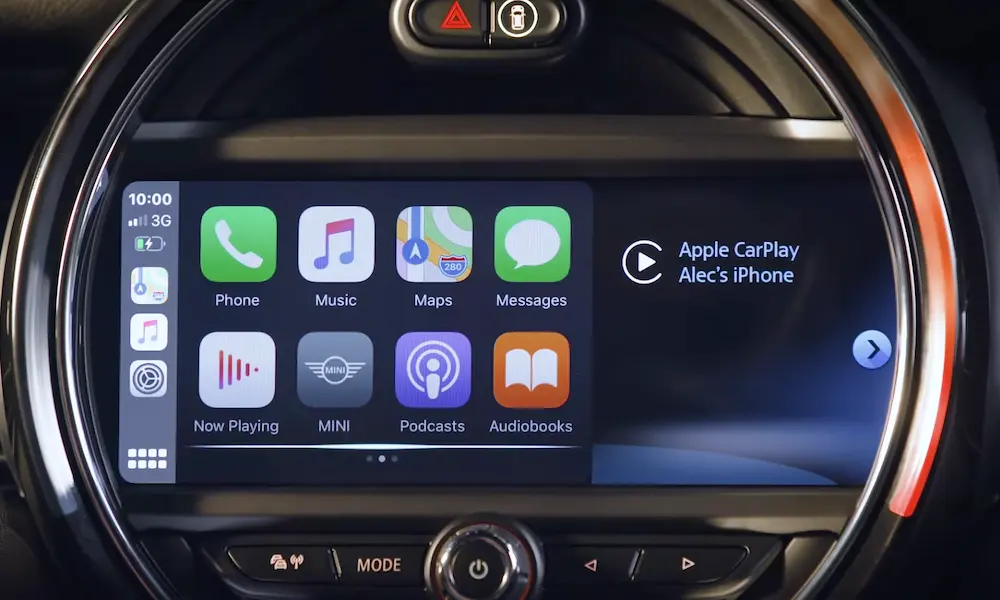
Early CarPlay implementations only used two-thirds of the screen. The right side showed native Mini stuff. You can code it to go fullscreen, but only if your firmware supports it. Older systems need a flash update first, which takes about an hour and requires keeping the battery charged throughout.
Cost breakdown for software activation:
- Coding only: $150-300
- Coding + WiFi antenna install: $400-650
Aftermarket MMI Boxes (Older Models)
For 2007-2015 Minis and early 2016 models without Evo hardware, you need a Multimedia Interface box. It sits between your head unit and screen, hijacking the video signal.
How It Works
The MMI intercepts the display cable. When you hold the Menu button for 3 seconds, it switches from the factory screen to CarPlay. It reads your steering wheel buttons and iDrive controller through the CAN bus, so controls work normally.
The Audio Quality Problem
Here’s the thing nobody tells you upfront: most MMI boxes sound worse than your factory radio. They convert the digital audio from your phone to analog, send it through the AUX input, where your car converts it back to digital. That double conversion kills the sound quality—flatter bass, lower volume, sometimes a hiss.
For most people listening to podcasts or Spotify, it’s fine. But if you’ve got the Harman Kardon system and care about audio, it’s noticeable.
MMI Options
Standard Boxes (Andream, RoadTop, Carlinkit): $200-350. They work, but firmware can be buggy. Some units run hot and smell like burning electronics after extended use. Customer support is basically non-existent.
BimmerTech MMI Prime: $750-950. Same basic hardware as the cheap stuff, but better quality control and actual US-based support. Worth it if you don’t want to troubleshoot weird glitches yourself.
Mr12Volt P2000: $450-550. This is the audiophile option. Instead of using the AUX input, it taps into the MOST fiber optic ring—the digital audio highway in your car. Sound quality matches the factory CD player. Installation is more complex, but if you’ve got Harman Kardon, this is the move.
| MMI Type | Cost | Audio Quality | Installation Complexity |
|---|---|---|---|
| Generic (Andream/RoadTop) | $250-350 | Low/Mid (AUX-based) | Moderate |
| BimmerTech Prime | $750-950 | Low/Mid (AUX-based) | Moderate |
| Mr12Volt P2000 | $450-550 | High (MOST fiber optic) | High |
Installation Reality Check
Don’t let anyone tell you this is a simple plug-and-play job. You’re pulling apart the dashboard, routing cables through tight spaces, and dealing with fragile LED rings around the screen. The MMI box itself generates heat, so it can’t just be stuffed anywhere—it needs airflow or a metal surface to act as a heat sink.
Professional shops charge 2.5-4 hours of labor depending on complexity. That’s $300-600 in most markets.
Total cost for MMI upgrade:
- Budget route: $550-850
- Premium route: $1,050-1,450
- Audiophile route: $850-1,150
Android Head Unit Replacement (R56/R60 Models)
For older R-series Minis (2007-2015), you can replace the entire center instrument cluster with an Android tablet that fits in the speedometer housing.
What You Get
These units run full Android (version 10-12), so you can install any app from the Play Store. YouTube, Netflix, Torque Pro for OBD metrics—it’s a tablet in your dash. CarPlay runs through an emulation app called Zlink or Headunit Reloaded.
The screen resolution is a massive upgrade from the grainy old CCC/CIC displays. We’re talking 1280×720 or 1920×720 IPS panels that make your 2010 Mini look like a 2024 model inside.
The Downsides
Boot time: Unlike factory systems that are instant-on, these take 20-40 seconds to cold boot. There’s a “fast boot” sleep mode, but it’ll drain your battery if the car sits for days.
Integration gaps: They try to replicate factory functions (tire pressure, oil level), but the translation is often wonky. You’ll lose specific Mini chimes—seatbelt warnings, door-open alerts—and get generic electronic beeps instead.
Audio routing: Like standard MMI boxes, these use the AUX input. Same sound quality issues.
Glare: Most units have glossy screens without anti-reflective coatings. Direct sunlight makes them hard to read.
Brand Differences
AvinUSA is the US-based option with actual support and warranty service. Their units are identical to the Chinese direct-ship versions but come with troubleshooting help that’s worth something when Android firmware acts weird.
Generic units from AliExpress save $200-300 but you’re on your own if something breaks.
Total cost for Android replacement:
- Hardware: $500-900
- Labor: $400-750
- Total: $900-1,650
What Works Best for Your Mini
Skip the flowery “it depends on your needs” stuff. Here’s the straight answer:
Got a 2017+ with NBT Evo ID5/ID6? Go software activation. It’s the cheapest, most reliable option. Don’t mess with aftermarket boxes when you’ve got native support waiting.
Got Harman Kardon and older hardware? Spring for the Mr12Volt MOST-bus system. The audio quality difference is real.
Got an R56/R60 from 2007-2015? Android head units give you the biggest visual upgrade. Yeah, there’s boot time and some quirks, but you’re transforming a 15-year-old interior.
Standard F56 with base audio? A quality MMI box (BimmerTech if you want support, Andream if you’re comfortable troubleshooting) hits the sweet spot. The AUX audio is fine for streaming and podcasts.
Installation: DIY or Pro?
The mini cooper apple carplay upgrade installation isn’t like swapping a double-DIN head unit in a Honda. Mini’s circular center instrument is packed tight, with fragile trim pieces and super short wiring harnesses behind the head unit.
What’s Involved
You’re removing the dashboard trim panel above the glovebox (held by friction clips—easy to crack if you’re not careful), detaching the LED ring (connected by a ribbon cable that tears easily), unbolting four Torx T20 screws, and sliding out the head unit while disconnecting the Quadlock connector in about 2 inches of clearance.
For MMI boxes, there’s barely any space behind the head unit. Most installers route the box and wiring down to the passenger footwell or laterally toward the glovebox area.
Microphone placement matters. If you’re not using the factory mic, you need to run wire from the footwell, up the A-pillar (carefully avoiding the airbag deployment path), and across the headliner to the overhead console. Mess this up and callers will hear echo or wind noise.
Shop Selection
European specialists (like VFC Engineering or Midwest Performance Cars in Chicago) have the BMW diagnostic tools needed for firmware updates and coding. They charge $140-180/hour but know these cars inside out.
Car audio shops (like Soundz Good Auto or Showtime Audio) excel at MMI wiring and custom fabrication. Rates run $100-150/hour. They’re great for straightforward installs but may not have access to coding software.
Common Problems After Installation
WiFi Disconnects
Wireless CarPlay runs on 5GHz WiFi Direct. In dense cities, interference from building networks and traffic signals disrupts the connection. Your phone might also try to auto-join public hotspots (Starbucks, Xfinity) and drop CarPlay.
Fix: Turn off “Auto-Join” for public networks in your iPhone settings. Make sure your MMI firmware is current—newer versions have better channel-hopping protocols.
Echo on Calls
Callers hear themselves echoing back. This happens when the mic picks up speaker audio before the echo-cancellation algorithm filters it out.
Fix: Lower the microphone sensitivity in the MMI settings menu. You’ll need to speak louder, but it eliminates the echo.
System Freezes (ID4 Flashed to ID6)
If someone sold you on “flashing” an ID4 unit to run ID6 software, you’re running 4GB software on 2GB hardware. The system crashes during long navigation routes when it runs out of RAM.
Fix: Flash it back to ID4 (losing CarPlay) or replace the head unit. There’s no software patch for physical memory limitations.
Real-World Cost Summary (Chicago Market Example)
| Upgrade Path | Hardware | Labor | Total |
|---|---|---|---|
| Software activation only | $150-300 | $75-150 | $225-450 |
| Software + WiFi antenna | $200-350 | $200-300 | $400-650 |
| Standard MMI (Andream) | $250-350 | $300-500 | $550-850 |
| Premium MMI (BimmerTech) | $750-950 | $300-500 | $1,050-1,450 |
| Mr12Volt (MOST-bus) | $450-550 | $400-600 | $850-1,150 |
| Android replacement | $500-900 | $400-750 | $900-1,650 |
Labor times assume professional installation with proper trim removal tools and testing. Your market rates may vary.
The Bottom Line
The right mini cooper apple carplay upgrade depends entirely on your specific head unit generation, not just the model year. A 2016 Mini could have three different head units depending on build month and options packages.
Run your VIN, check your screen interface, and match it to the right solution. Don’t let a shop sell you an MMI box if you’ve got native hardware waiting to be activated. Don’t try to flash ID4 to ID6 if you want reliable daily driving. And if you’ve invested in Harman Kardon, don’t cheap out with an AUX-based MMI that’ll make it sound like a $12 Bluetooth speaker.
Do it right the first time, and you’ll have seamless smartphone integration that feels factory-installed. Cut corners, and you’ll be dealing with random reboots, terrible audio, or a system that disconnects every time you drive past a coffee shop.