Having a BMW brake pad warning light pop up on your dashboard? You’ll need to reset that brake sensor after changing your pads. It’s not as complicated as you might think – you just need to follow the right steps for your specific BMW model.
What Is a BMW Brake Pad Sensor?
BMW brake pad sensors are clever little devices embedded in your brake pads that monitor wear. Unlike basic wear indicators that simply scrape against the rotor, BMW uses electrical sensors that complete a circuit. When your pad wears down to the danger zone, this circuit breaks, triggering that warning light on your dashboard.
These sensors don’t just detect when your brakes are completely worn out – they’re designed to give you advance warning so you can replace your pads before any damage occurs to your rotors.
Why You Need to Reset the Brake Sensor
After replacing your brake pads, that warning light won’t automatically turn off. Here’s why:
- BMW’s Condition Based Service (CBS) system stores the brake pad warning in memory
- The system needs to be manually reset to recognize the new pads
- Without a reset, your dashboard will continue showing a warning even with brand new pads
- Proper resetting ensures accurate monitoring of your new brake pads
Your BMW’s computer is simply doing its job – it detected worn pads and won’t change its mind until you tell it the situation has been resolved.
Tools Needed for BMW Brake Sensor Reset
Depending on your BMW model, you’ll need some or all of these tools:
| Basic Tools | Advanced Options |
|---|---|
| Key fob | OBD diagnostic scanner |
| Paperclip (for some models) | BMW-specific scan tool |
| Replacement sensors | Laptop with BMW software |
| Basic hand tools | BimmerLink or similar app |
For most E-series BMWs (like the E46, E90, etc.), you can reset using just the buttons on your dashboard. Newer models might require a diagnostic tool.
BMW Brake Sensor Reset: E-Series Models (E46, E90, E92)
Resetting brake sensors on older BMW models is straightforward:
- Sit in the driver’s seat with the door closed
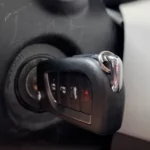
- Insert your key but don’t start the engine
- Turn to position II (where dashboard lights come on)
- Press and hold the odometer reset button (usually on the instrument cluster) until “TEST” appears
- Press the button repeatedly until you see “BRAKE” or “SIA” on the display
- Hold the button again until you see “RESET” or “RESET?”
- Release and press once more to confirm
- Wait for the confirmation display
- Turn the ignition off
This process takes less than a minute once you know the steps. On some E46 models, you might need to navigate using the BC button on the turn signal stalk instead.
F-Series Models Reset Procedure (F30, F10, F25)
For newer F-series BMWs with iDrive systems:
- Turn the ignition to position II without starting the engine
- Access the vehicle’s menu system using the iDrive controller
- Navigate to “Vehicle Settings” or “Vehicle Status”
- Select “Service Requirements” or similar option
- Find “Reset” or “Reset Brake Pad Service”
- Confirm the reset when prompted
- Turn off the ignition and restart the vehicle
Some F-series models might require a short drive (about a mile) after the reset for the system to fully update.
G-Series and iDrive 7.0 System Reset Methods
The newest BMW models with iDrive 7.0 or later often require a more technical approach:
- Turn on the ignition without starting the engine
- Navigate to “Car”/”Vehicle” in the iDrive menu
- Select “Vehicle status”
- Choose “Service requirements”
- Find “Reset” or “Reset brake pad service”
- Follow the on-screen prompts to confirm
For some G-series models, you may need specialized equipment like:
- BMW ISTA diagnostic system
- BimmerLink app with compatible OBD adapter
- Carly or similar BMW-specialized diagnostic tool
These newer systems often have electronic parking brakes that must be properly configured during the reset process.
Using Diagnostic Tools for Complex Resets
When dashboard buttons aren’t enough, diagnostic tools come to the rescue:
- Connect your OBD scanner to the diagnostic port (usually under the dashboard)
- Turn on the ignition without starting the engine
- Navigate to “Service Reset” or “Maintenance” in the scanner menu
- Select “Brake Pad Reset” option
- Follow the prompts to complete the reset
- Disconnect the scanner and restart your vehicle
Popular diagnostic tools include:
- BMW-specific scanners like Foxwell NT510
- BimmerLink app with compatible Bluetooth/WiFi OBD adapters
- Professional systems like ISTA or BMW Scanner
Troubleshooting Common Reset Issues
Reset Not Working?
If your initial reset attempt fails:
- Make sure all doors are closed during the reset
- Verify you’re following the exact sequence for your specific model
- Check that your replacement sensors are properly connected
- Try disconnecting the battery for 15 minutes (this may clear some codes)
- Ensure you’re using the correct buttons or menu options
Warning Light Returns After Reset
This usually indicates:
- The sensor wasn’t properly replaced
- There’s a wiring issue with the new sensor
- You might have a fault in another brake component
- The sensor might not be compatible with your specific model
An easy diagnostic trick for some models: disconnect the brake pad sensor connector and jump the terminals with a paperclip. If the warning disappears, your issue is with the sensor itself.
Brake Sensor Replacement vs. Reset
Sometimes you’ll need to replace the physical sensor along with resetting the system:
- Buy the correct sensor for your BMW model and brake position (front/rear)
- Remove the old sensor connector from the brake caliper
- Install the new sensor into the brake pad and clip it into place
- Reconnect the wiring harness
- Perform the reset procedure for your specific model
Genuine BMW brake pad sensors typically cost between $15-40 per wheel. Aftermarket options exist but may not always trigger the reset properly.
BMW Models That Require Special Reset Procedures
Some BMW models have unique reset requirements:
| Model | Special Considerations |
|---|---|
| X5/X6 with air suspension | May need separate ride height calibration |
| M models with carbon brakes | Different sensor types and reset procedures |
| Hybrid models | May require power system to be in service mode |
| Models with electronic parking brake | Digital service position activation needed |
Always verify the exact procedure for your specific model year and trim level.
Does BMW Brake Sensor Reset Affect Other Systems?
Resetting your brake sensor won’t typically affect other vehicle systems, but it’s worth noting:
- The reset clears only the brake pad warning, not other maintenance items
- Your overall service indicator might still show other needed maintenance
- The reset won’t clear ABS or other brake-related fault codes
- Some BMW models combine multiple service items in their reset menus
Your brake pad reset is isolated to just that specific function in the CBS system.
Maintaining Your BMW Brakes After Reset
After successfully resetting your brake sensors:
- Listen for any unusual sounds during your first few drives
- Check for smooth, consistent braking performance
- Verify the warning light stays off during regular driving
- Consider checking fluid levels if you’ve done a complete brake service
Proper break-in of new pads is also important – avoid hard stops for the first 100-200 miles to allow the pads to seat properly.
When You Should Reset vs. Replace Sensors
Not every brake job requires new sensors:
- If you’re replacing pads before the warning light appears, you often don’t need new sensors
- If the warning light triggered, the sensor wire is broken and needs replacement
- Front and rear sensors operate independently – replace only what’s needed
- Some sensors can be reused if they haven’t been triggered
A good rule of thumb: if your brake warning light was on before replacing the pads, you need new sensors. If you’re doing preventative maintenance, you might be able to reuse them.
Professional Reset vs. DIY: What’s Better?
Weighing your options:
DIY Benefits:
- Save money ($50-150 in service fees)
- Learn about your vehicle’s systems
- Convenient – no appointment needed
Professional Benefits:
- Expertise with complicated systems
- Access to factory diagnostic equipment
- Additional inspection of brake components
- Warranty on the service work
For older E-series BMWs, DIY reset is very straightforward. For newer models with electronic parking brakes or advanced driver assistance systems, professional service might be worth the cost.
BMW Brake Sensor Reset: Common Myths Debunked
Let’s clear up some misconceptions:
-
Myth: Disconnecting the battery will reset the brake sensor warning
Fact: This rarely works on modern BMWs – you need to follow the proper reset procedure -
Myth: You always need new sensors with every brake job
Fact: Sensors only need replacement if they’ve been triggered or damaged -
Myth: Aftermarket brake pads don’t work with BMW sensors
Fact: Quality aftermarket pads work fine with OEM sensors -
Myth: You need dealer equipment to reset sensors
Fact: Many models can be reset with just dashboard controls
Legal and Safety Considerations
A few important points about brake sensor resets:
- Tampering with safety systems could potentially impact insurance coverage
- Some states require functioning warning systems for vehicle inspections
- Properly functioning brake systems are critical for vehicle safety
- Following the manufacturer’s procedures ensures your brakes work as designed
Never try to permanently bypass the warning system – it’s there for your safety.
Conclusion and Next Steps
Resetting your BMW brake sensor isn’t as intimidating as it might seem. By following the specific procedure for your model, you can clear that warning light and get back on the road with confidence in your new brakes.
Remember that different BMW generations require different approaches – from simple button sequences on older models to computerized resets on newer vehicles. When in doubt, consult your owner’s manual or a reputable BMW forum for model-specific guidance.