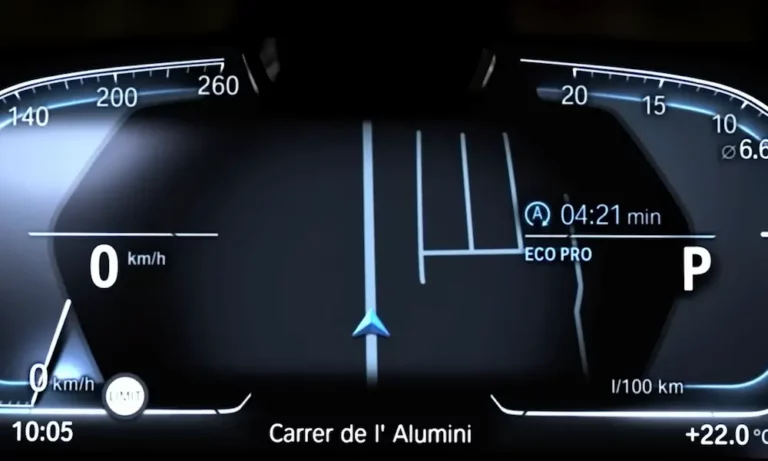
Ever wondered what all the buzz is about regarding BMW’s fancy digital displays? The BMW Live Cockpit Pro is more than just a sleek infotainment system – it’s a complete digital transformation of how you interact with your vehicle. Whether you’re considering a new BMW or trying to master the one in your driveway, this guide breaks down everything you need to know.
What Exactly Is BMW Live Cockpit Pro?
BMW Live Cockpit Pro is a high-end digital dashboard system that combines a 12.3-inch digital instrument display behind the steering wheel with a matching 12.3-inch central Control Display. Running on BMW’s Operating System 7.0 (also known as iDrive 7), it replaces traditional analog gauges with a fully customizable digital experience that adapts to your driving needs.
The system isn’t just about fancy graphics – it’s designed to keep your eyes on the road while providing essential information exactly when you need it. With features like the BMW Intelligent Personal Assistant and gesture control, it represents BMW’s vision for the modern driving experience.
Key Features That Make It Special
Dual High-Resolution Displays
The heart of the Live Cockpit Pro system is its dual-screen setup:
- 12.3-inch digital instrument cluster (behind the steering wheel)
- 12.3-inch central Control Display (in the center console)
Both screens run at 1920×720 pixel resolution, ensuring crisp, clear graphics whether you’re viewing navigation maps or vehicle data. The curved display design creates a seamless visual flow across your dashboard, giving the interior a modern, tech-forward feel.
Intelligent Driving Mode Adaptability
One of the coolest features is how the displays change based on your driving mode:
| Driving Mode | Color Theme | Information Focus |
|---|---|---|
| Comfort Mode | Orange hues | Balanced display with comfort features |
| Sport Mode | Red scheme | Tachometer, performance metrics, g-force |
| Eco Pro Mode | Blue tones | Energy consumption, efficiency data |
The system doesn’t just change colors – it actually prioritizes different information depending on what’s important for each driving scenario. In Sport Mode, you’ll see more performance data, while Eco Pro emphasizes efficiency metrics to help you drive more economically.
Multiple Control Options
BMW gives you multiple ways to interact with the Live Cockpit Pro:
- Touch controls on the central display
- iDrive controller in the center console
- Steering wheel buttons for quick access
- Voice commands via “Hey BMW” personal assistant
- Gesture control for functions like volume adjustment
This flexibility means you can choose the interaction method that feels most natural while driving, keeping distractions to a minimum.
Navigation and Maps: A Major Upgrade
The navigation experience in BMW Live Cockpit Pro is seriously impressive. The system offers:
- Real-time traffic information
- 3D map views with detailed building renderings
- Split-screen capability showing both overview and turn details
- Points of interest with detailed information
- Over-the-air map updates
What makes this truly useful is how navigation instructions appear in multiple places: the central display, the instrument cluster, and even the optional Head-Up Display. This triple-reinforced guidance means you’ll never miss a turn.
Connectivity Options That Keep You Connected
Smartphone Integration
Your smartphone and BMW Live Cockpit Pro work seamlessly together with:
- Apple CarPlay (wireless)
- Android Auto (added in later updates)
- Bluetooth connectivity for calls and audio streaming
The wireless Apple CarPlay integration is particularly convenient – just get in your car and your phone connects automatically, no cables needed. Android users can enjoy similar functionality with Android Auto support.
Apps and Remote Features
The BMW Connected app extends your car’s functionality to your smartphone:
- Remote locking/unlocking
- Climate pre-conditioning
- Vehicle location
- Trip information
- Send destinations to navigation system
Once you’ve experienced being able to pre-cool your car on a hot day from your phone, you’ll wonder how you ever lived without it.
Personalization Options
Custom Display Layouts
You can tailor the instrument cluster to your preferences:
- Choose between different display layouts
- Select which widgets appear in each area
- Save preferences to your driver profile
This means one driver can have a simplified display focused on speed and navigation, while another can have more detailed performance metrics – all automatically switching when different people drive.
Driver Profiles
The system stores complete driver profiles that remember:
- Seat and mirror positions
- Display preferences
- Favorite destinations
- Climate control settings
- Audio preferences
Even better, these profiles can follow you to other BMW vehicles with Live Cockpit Pro if you use your BMW ID to log in.
Voice Control: “Hey BMW” Intelligent Personal Assistant
The BMW Intelligent Personal Assistant goes beyond basic voice commands. You can:
- Control vehicle functions (“Hey BMW, I’m cold”)
- Ask vehicle questions (“How much range do I have left?”)
- Get information (“Find the closest gas station”)
- Set navigation (“Take me home”)
The system uses natural language processing, so you don’t have to memorize specific commands. It learns your preferences over time and can even remember routines like your daily commute.
Integration with Driver Assistance Systems
The Live Cockpit Pro doesn’t just handle entertainment – it’s also the visual interface for BMW’s driver assistance technologies:
- Adaptive cruise control visualization
- Lane keeping assistance warnings
- Parking assistance with 3D surroundings view
- Forward collision warnings
All these safety features are displayed clearly on the digital instrument cluster, helping you understand what the car is “seeing” and how the assistance systems are working.
Updates and Improvements
One of the biggest advantages of the digital cockpit is that it can improve over time:
- Over-the-air software updates add new features
- Map data stays current
- Bug fixes and performance improvements
- New app integration possibilities
Unlike traditional car features that remain static, your BMW’s digital systems can actually gain capabilities throughout your ownership.
Which BMW Models Include Live Cockpit Pro?
The Live Cockpit Pro is available across much of BMW’s lineup, though availability varies by year and trim level:
| Series | Availability |
|---|---|
| 1 Series | Optional on most trims, standard on high-end models |
| 2 Series | Optional, standard on M models |
| 3 Series | Standard on most trims from 2019+ |
| 5 Series | Standard on most trims |
| 7 Series | Standard |
| X Series | Standard on most X3, X5, X6, X7 models |
| i Series | Standard on i4, iX models with evolved versions |
Some models, especially entry-level trims, might come with the more basic Live Cockpit Plus instead. The Pro version is typically standard on higher trims or available as part of a technology package.
How to Get the Most From Your Live Cockpit Pro
Essential Tips for New Users
- Take a tour: Use the built-in tutorials to learn about available features
- Set up your driver profile: Customize displays to your preferences
- Practice gesture controls: Learn the basic movements for volume and calls
- Explore voice commands: Try different phrasings with “Hey BMW”
- Update your software: Make sure you have the latest version installed
Common Settings Worth Changing
- Display brightness (day/night settings)
- Widget arrangement on instrument cluster
- Home screen layout for frequently used apps
- Voice assistant response volume
- Gesture control sensitivity
Comparison with Competitors
How does BMW’s system stack up against the competition?
- Audi Virtual Cockpit: BMW offers better contextual adaptability that changes based on driving mode, though some prefer Audi’s map graphics
- Mercedes MBUX: BMW provides more flexible control options, though Mercedes has stronger voice recognition
- Tesla Interface: BMW maintains more physical controls for critical functions, making it less distracting while driving
According to J.D. Power’s Tech Experience Index, BMW’s system ranks high for intuitiveness while maintaining advanced functionality.
The Evolution of BMW’s Digital Cockpit
The Live Cockpit Pro represents a significant evolution in BMW’s infotainment systems:
- 2001: First iDrive system introduced
- 2012-2018: Gradual digitalization with partial digital displays
- 2018: Full Live Cockpit Pro debut with the G05 X5
- 2021: Curved display introduced in iX electric SUV
- 2023-2024: Upgraded to iDrive 8 and 8.5 in newest models
The newest systems in vehicles like the BMW i4 feature augmented reality navigation and even more advanced displays, showing BMW’s commitment to evolving this technology.
Troubleshooting Common Issues
Even the best technology can have hiccups. Here are solutions to common problems:
- System running slowly: Restart the system by holding the power button for 10 seconds
- Screen glare: Adjust the display angle or brightness in settings
- Voice commands not working: Check microphone settings and ambient noise levels
- Connectivity issues: Ensure your phone’s Bluetooth is on and compatible
- Maps not updating: Connect to WiFi for larger map updates
For persistent issues, BMW dealers can perform diagnostic checks and software updates that aren’t available to end users.
Is the Live Cockpit Pro Worth It?
If you’re deciding whether to add this feature to your BMW purchase, consider:
Pros
- Future-proof technology that receives updates
- Highly customizable to your preferences
- Integrates seamlessly with safety and convenience features
- Impressive visual presentation that enhances the premium feel
Cons
- Learning curve for new users
- More complex than traditional gauges
- Premium feature that adds to vehicle cost
For most drivers who enjoy technology, the Live Cockpit Pro significantly enhances the BMW ownership experience and keeps your vehicle feeling current for years to come.
The Future of BMW Cockpit Technology
BMW continues to evolve its digital cockpit technology. Future developments likely include:
- More augmented reality elements for navigation
- Enhanced AI capabilities for the personal assistant
- Greater personalization through machine learning
- Expanded integration with smart home and wearable devices
As BMW moves toward electrification, expect to see more EV-specific features like charging station finders, battery management tools, and range optimization displays.
BMW’s Live Cockpit Pro isn’t just about flashy screens – it represents the company’s vision for how drivers and vehicles will interact in an increasingly digital automotive future.