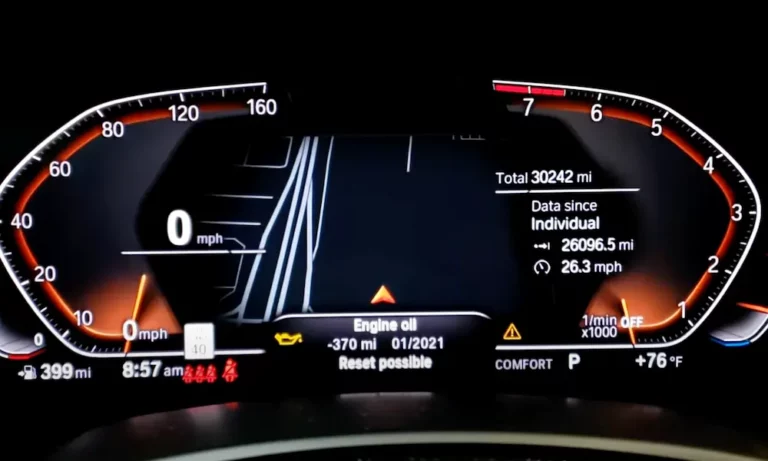
Ever glanced at your dashboard to find that annoying service light staring back at you? You’re not the only BMW owner who’s wondered how to make it disappear after maintenance. Resetting your BMW service light is actually something you can handle yourself—no expensive dealer visit required.
What Are BMW Service Lights?
BMW uses an advanced maintenance monitoring system called Condition Based Service (CBS). This smart system tracks the wear and usage of critical components in your vehicle using sensors and sophisticated calculations.
When your BMW needs attention, the system alerts you with color-coded warnings:
- Green: Everything’s running smoothly
- Yellow: Service needed soon (typically within 800-1,600 km for things like oil changes)
- Red: Service overdue—get this addressed right away
The system monitors everything from engine oil and brake pads to brake fluid and filters, giving you real-time updates on your car’s maintenance needs.
Why Reset Your BMW Service Light?
After servicing your BMW, resetting the service light is crucial for:
- Preventing persistent false warnings
- Ensuring accurate tracking of future maintenance intervals
- Maintaining your vehicle history for resale value
- Avoiding confusion about when services are actually due
Ignoring these resets means your car can’t properly track when the next service is needed, potentially leading to unnecessary maintenance or missed service intervals.
Model-Specific Reset Procedures
G-Series BMW Models (2018-2024)
Includes: G20 3 Series, G29 Z4, G01 X3
Steps to reset:
- Enter Diagnostic Mode
- Engine off
- Press the Start/Stop button 3 times quickly (don’t touch the brake pedal)
- Wait for “Diagnostic Mode Active” message
- Access Service Menu
- Press and hold the trip reset button (on the turn signal stalk) for 10-15 seconds
- Release when the service menu appears
- Reset Service Item
- Use the trip reset button to scroll through options
- When you reach the desired item (like “Engine Oil”), hold the button until “Reset?” appears
- Hold again to confirm
Note: For 2022-2024 X3 models, use the BC button on the left stalk to navigate through the menus instead of the trip reset button.
F-Series BMW Models (2011-2018)
Includes: F30 3 Series, F10 5 Series
Steps to reset:
- Ignition On (Engine Off)
- Press Start/Stop button twice without starting the engine
- Access Service Menu
- Press and hold the odometer reset button (lower-left dashboard)
- Hold until “Service” appears on the display
- Complete Reset Process
- Use the BC button on the stalk to cycle to “Oil Service”
- Hold the BC button until “Reset?” appears
- Hold again to confirm
For brake fluid reset: Follow the same steps but select “Brake Fluid” from the menu instead of “Oil Service.”
E-Series BMW Models (2005-2010)
Includes: E90 3 Series, E60 5 Series
Steps to reset:
- Prepare Ignition
- Insert key and turn to Position 1 (accessory mode)
- Initiate Reset
- Press and hold the odometer reset button for 10 seconds until a warning triangle appears
- Release and press again to cycle through until you see “Oil Reset”
- Confirm Reset
- Hold the button until “Reset?” flashes
- Release and hold again to complete
For iDrive-equipped models: Navigate to “Vehicle Settings” → “Service” → “Reset” using the iDrive controller.
X3 Models (E83: 2006-2010)
Steps to reset:
- Key Position
- Hold the trip reset button while turning the key to Position 1
- Complete Reset
- Wait for “Reset” to display on the screen
- Release and hold the button again until “Reset Successful” appears
How to Reset BMW Service Lights Using iDrive
Many newer BMW models use the iDrive system for service light resets. Here’s how:
- Press the “Menu” button on the iDrive controller
- Select “Vehicle Info” or “Vehicle Status”
- Choose “Service Required” or “Vehicle Status”
- Select the service item you want to reset
- Choose “Reset” and confirm when prompted
This method works for most BMW models with iDrive systems from 2009 onward, including 3 Series, 5 Series, 7 Series, X3, X5, and more.
Common Issues When Resetting BMW Service Lights
“Reset Impossible” Message
If you see this message, it usually means:
- The CBS system detects that servicing was incomplete
- There may be sensor errors or damaged components
- Fault codes need to be cleared first
Solutions:
- Verify that all required service was properly completed
- Check for damaged sensors (especially brake wear sensors)
- Consider using a diagnostic tool to clear fault codes
iDrive System Freezes During Reset
This occasionally happens with iDrive-based resets. If your system freezes:
- Wait 2-3 minutes to see if it resolves itself
- Turn off the ignition completely and restart
- As a last resort, disconnect the battery for 15 minutes to reset the system
Partial Reset (Some Lights Remain On)
Sometimes not all service indicators reset at once. This might mean:
- Different components have separate reset procedures
- Some components may actually need service
- The reset wasn’t completed properly
Double-check your specific model’s requirements and try again, following each step carefully.
How CBS Calculates Service Intervals
Understanding how your BMW determines when service is needed helps you maintain it properly:
| Component | How CBS Calculates Service Needs |
|---|---|
| Engine Oil | Monitors driving style, fuel consumption, and oil quality using conductivity sensors |
| Brake Pads | Uses wear sensors and algorithms based on braking force and mileage |
| Brake Fluid | Time-based (typically 24 months) due to brake fluid’s hygroscopic properties |
| Air Filters | Calculated based on mileage and environmental conditions |
This sophisticated system is why BMWs need proper resetting after servicing—it allows the calculations to start fresh with your newly maintained components.
Important Maintenance Items Tracked by BMW Service Lights
Your BMW’s service light system monitors numerous components. Here are the key ones:
| Service Item | Typical Interval | Reset Required After Service |
|---|---|---|
| Engine Oil | 7,500-15,000 miles | Yes |
| Brake Fluid | 2 years | Yes |
| Brake Pads | Based on wear | Yes |
| Microfilter/Air Filter | 2-4 years | Yes |
| Vehicle Check | 1 year | Yes |
| Spark Plugs | 60,000 miles | Yes |
Legal and Safety Considerations
Before you reset those service lights, keep these important points in mind:
- Resetting service lights without performing the required maintenance may violate emissions regulations in some regions
- Skipping maintenance while resetting indicators could void your warranty
- Some advanced reset procedures (like diesel particulate filter resets) should be left to professionals
- The National Highway Traffic Safety Administration recommends following manufacturer-specified service intervals for safety
Remember: the purpose of resetting service lights is to maintain accurate service tracking after maintenance—not to avoid necessary upkeep.
Tools That Can Help Reset BMW Service Lights
Sometimes button combinations won’t cut it. These tools can help:
- BMW-Specific OBD Scanners ($30-150)
- Plug into your car’s diagnostic port
- Navigate to service reset functions
- Follow on-screen instructions
- Professional Diagnostic Tools ($200+)
- Provide model-specific reset procedures
- Can address multiple service items at once
- Often include additional diagnostic features
- BMW iDrive Controller (built-in)
- Most newer BMWs allow resets through the iDrive interface
- Navigate to vehicle settings and service menus
- Usually the most user-friendly option
Advanced Service Light Reset Tips
For BMW owners comfortable with tech, these advanced tips might help:
- Record Date and Mileage: Before resetting, note when you performed maintenance for your own records
- Battery Disconnect: If conventional reset methods fail, disconnecting the battery for 15+ minutes may force a system refresh (though this isn’t recommended as a first option)
- Multiple Attempts: Some BMW models need 2-3 reset attempts before the light clears
- Wait Between Steps: Give the system a few seconds between button presses when following reset sequences
BMW Service App Options
BMW offers digital service tracking through these official apps:
- BMW Connected App: Connects to your vehicle’s systems and can provide service status updates
- BMW MyBMW App: Newer app that replaced Connected, offering enhanced service tracking features
- BMW Digital Service History: Keeps a permanent record of all services performed by authorized centers
These apps don’t typically reset service lights directly but provide valuable information about what services are needed and when.
When DIY Reset Isn’t Working
If you’ve tried everything and can’t reset your service indicator:
- Verify you’re following the exact procedure for your specific model and year
- Check for any fault codes that might be preventing reset (these require scanning tools)
- Confirm the actual service was completed properly
- As a last resort, consult a BMW specialist or dealer
Remember that newer models with more complex systems sometimes require professional diagnostic equipment for certain resets.