Stuck with a locked Ford radio displaying “CODE” or dealing with SYNC glitches? You’re facing a common issue that happens after battery replacements or electrical issues. Resetting your Ford radio doesn’t have to be complicated, and this guide walks you through every method you’ll need based on your specific Ford radio model.
Why Your Ford Radio Might Need Resetting
Ford radios can lock up or malfunction for several reasons:
- Battery disconnection or replacement
- Electrical system fluctuations
- Software glitches in SYNC systems
- Security lockout after power interruption
- Normal system bugs that need clearing
The good news? Most Ford radio issues can be fixed without a trip to the dealership.
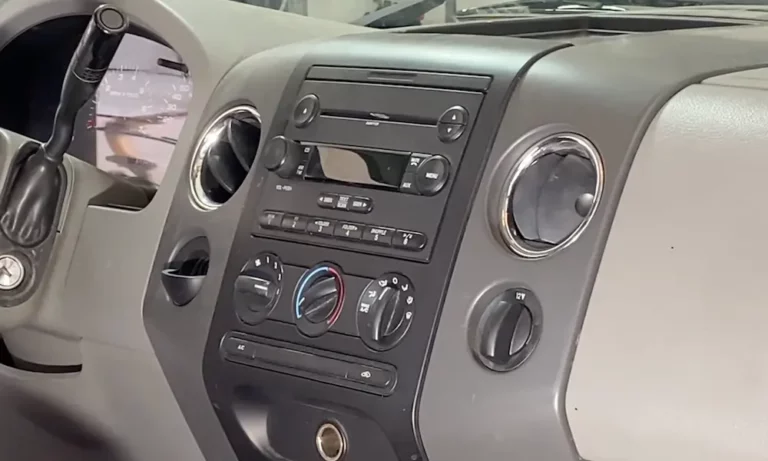
How to Identify Your Ford Radio Type
Before attempting any reset, you need to know which radio system you have:
| Ford Radio Type | Years | Key Features | Reset Complexity |
|---|---|---|---|
| Basic (4500/6000 CD) | Pre-2015 | Button interface, CD player | Simple (code required) |
| SYNC 1 & 2 | 2008-2015 | Voice commands, small screen | Moderate |
| SYNC 3 | 2016+ | Touchscreen, Apple CarPlay/Android Auto | Multiple reset options |
| Sony Premium Audio | Various | “SONY” branding, premium sound | Requires specific codes |
Look at your dashboard interface or check your owner’s manual if you’re unsure which system you have.
Basic Reset Methods for Non-SYNC Ford Radios
Quick Soft Reset (Works for Most Models)
This method should be your first attempt for minor glitches:
- Turn the ignition to the “ON” position
- Press and hold the radio power button and seek forward button (>>|) simultaneously
- Keep holding for 5-10 seconds until the radio screen flashes
- Release the buttons when the system reboots
This soft reset approach typically resolves minor issues without erasing your presets.
Hard Reset via Fuse Removal
For more stubborn problems, try this hard reset method:
- Locate your vehicle’s fuse box (usually under the dashboard or hood)
- Find the radio fuse (typically 20A) and SYNC display fuse (15A)
- Remove these fuses for at least 30 seconds
- Reinstall the fuses and restart your vehicle
Note: This method will erase your radio presets and clock settings.
How to Retrieve and Enter Ford Radio Security Codes
If your radio displays “CODE” followed by blank spaces, you’ll need to input the security code:
Finding Your Radio Serial Number
For 6000 CD and 4500 RDS models:
- With the radio on, press buttons 1 and 6 simultaneously
- The display will cycle through information until it shows the serial number (starts with V or M)
- Write this number down exactly as shown
Alternatively, you can physically remove the radio to find the serial number on the unit’s label.
Generating the Security Code
Once you have the serial number:
- Visit Ford’s official radio code site or contact your dealer
- Enter your serial number (example: V507020)
- The site will generate your unique 4-digit code (example: 8287)
Entering the Code Correctly
To input the code into your Ford radio:
- When the radio displays “CODE _ _ _ _”, use buttons 1-4 to enter each digit
- Press button 1 repeatedly to select the first digit
- Press button 2 repeatedly for the second digit
- Continue with buttons 3 and 4 for the remaining digits
- Press button 5 or SELECT to confirm your code
If entered correctly, you’ll hear a beep and the radio will begin functioning again. If you see “LOCK 10,” hold button 6 to gain three more attempts.
SYNC 3 System Reset Options
Modern Ford vehicles with SYNC 3 (2016+) offer several reset options:
SYNC 3 Soft Reset
For minor glitches without data loss:
- Press and hold the power button and seek up button together
- Keep holding for 5-7 seconds until the screen goes black
- The system will restart automatically
SYNC 3 Master Reset
For complete system restoration:
- Tap the Settings icon on the touchscreen
- Select System
- Scroll to find “Master Reset” option
- Confirm your selection when prompted
- The system will erase all settings and return to factory defaults
This master reset removes all personal settings, paired phones, and navigation favorites.
Model-Specific Reset Procedures
Ford 6000 CD Radio Reset
This popular radio model in older Fords requires:
- Press buttons 1 and 6 simultaneously to display the serial (starts with V or M)
- Get your code using the serial number
- Input digits using buttons 1-4, confirming with button 5
- Press CLOCK afterward to reset the time
Ford 4500 RDS E-O-N Reset
For this classic radio system:
- Press buttons 2 and 6 during startup to view the serial
- Generate your code using the serial number (example: M880020 → code 3703)
- Enter the code using the standard button sequence
- Your radio should unlock and resume normal operation
Ford Sony Premium Audio Units
Sony-branded Ford radios require:
- Hold buttons 1 and 6 to display a prefix and serial (example: SOCD6X8V774074)
- Use only the V-portion (V774074) to generate your code
- Enter the code using the standard digit input method
Troubleshooting Common Ford Radio Problems
Radio Shows “LOCK 13”
This indicates a permanent lockout after too many incorrect code attempts. Your options are:
- Visit a Ford dealership with proof of ownership
- Contact a specialized radio repair service
Radio Clock Frozen or Not Working
Often caused by a failed capacitor:
- Try a hard reset by removing the radio fuse
- If unsuccessful, professional repair may be needed
SYNC System Freezing or Unresponsive
For persistent SYNC issues:
- Perform a master reset as described above
- Check for available software updates for your SYNC system
- If problems continue, the SYNC module might need diagnostics
After Resetting Your Ford Radio
Once your radio is working again, don’t forget to:
- Re-pair your Bluetooth devices
- Reset your favorite stations and audio preferences
- Update the clock and date settings
- Check for any available SYNC updates if applicable
Preventative Measures for Ford Radio Issues
To avoid future radio lockouts:
- Keep your radio code written in a secure location (not in the vehicle)
- Before disconnecting your car battery, connect a memory saver to prevent power loss
- Consider updating your SYNC software regularly if you have a newer system
- Document your radio serial number for quick reference
By following these steps, you can troubleshoot and reset almost any Ford radio system without needing expensive dealer intervention. Whether you’re dealing with a basic security lockout or complex SYNC system issues, these methods provide comprehensive solutions for getting your Ford’s audio system back in working order.