Trying to figure out how much FORScan actually costs? The answer isn’t as simple as a price tag. Between free tiers, paid licences, hardware, and some wild geopolitical drama, there’s a lot to unpack. Stick around — by the end, you’ll know exactly what you need to spend (and what you can skip).
The Short Answer: FORScan Can Cost $0 — Or Around $100
Here’s the thing: FORScan’s core software is free. But “free” depends heavily on what you want to do with it. Advanced features, hardware, and ongoing access all factor into your real total cost. Let’s break it down properly.
FORScan Licence Tiers Explained
FORScan uses a tiered licence structure for its Windows desktop app. Each tier unlocks different capabilities.
The Standard Licence (Free)
The Standard Licence costs nothing. You download FORScan from the official site, and you’re in. For free, you get:
- Read and clear diagnostic trouble codes across all vehicle modules
- Monitor live sensor data streams
- Run basic service resets and self-tests
This completely eliminates the need for a generic code reader if you own a Ford, Lincoln, Mazda, or Mercury. Most routine diagnostics fit comfortably within this free tier.
The Extended Licence — Free Trial Version
This is where it gets interesting. FORScan offers a rolling two-month free trial of its Extended Licence. That unlocks:
- Module initialisation
- Central configuration changes
- As-built data modification
- Firmware flashing (with the right software version)
- Component testing
To get it, you submit your computer’s hardware ID through the official support portal. The licence locks to that specific machine.
Here’s the kicker: you can renew the free trial indefinitely. When two months expire, you generate a new key. Rinse, repeat — no payment required. If you only need a one-time tweak, like disabling auto start/stop or correcting a speedometer after a tyre size change, you’ll likely never need to pay for the software at all.
The developers keep this system intentionally, primarily to help the community. The bi-monthly renewal friction is really only a problem for busy commercial shops.
The Extended Licence — Paid Version
For professional technicians or power users who don’t want the hassle of re-registering every 60 days, the paid annual licence is the way to go. It currently costs $12–$20 USD per year, depending on where you buy it and current exchange rates.
Paying gets you:
- Permanent, uninterrupted access without hardware re-registration
- Priority technical support
- Access to beta software builds (version 2.4.x) needed for firmware flashing
- PATS key programming — exclusively locked to paid users for security reasons
That last point matters. Key programming and keypad learning were recently removed from the free trial tier entirely. If you need to programme new ignition keys, you must buy the paid licence.
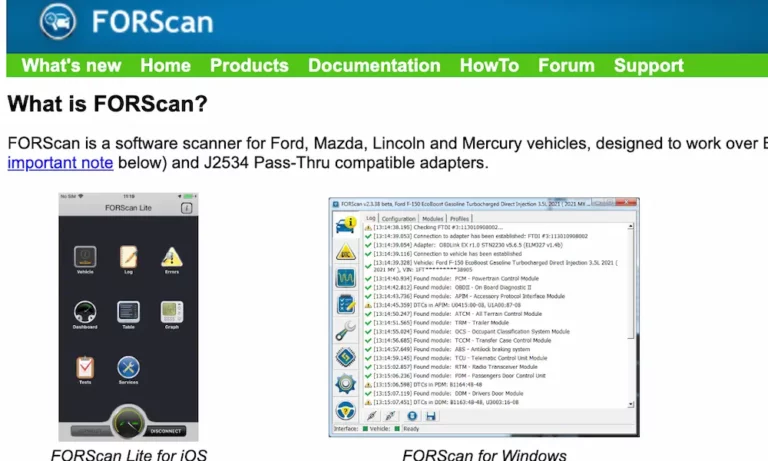
FORScan Mobile Apps (iOS & Android)
FORScan also offers mobile versions called FORScan Lite. These are one-time purchases, not subscriptions:
- iOS (Apple App Store): $6.99–$9.99
- Android (Google Play Store): $5.99–$6.99 historically
Important: buying the mobile app doesn’t unlock the desktop Extended Licence, and vice versa. The mobile app is built for monitoring live data and clearing codes on the go. It can’t do module programming or central configuration edits.
Full Cost Comparison Table
| Version | Licence Type | Cost (USD) | Key Capabilities |
|---|---|---|---|
| Standard Windows | Free | $0 | Read/Clear Codes, Live Data |
| Extended Windows (Trial) | Rolling 2-Month Free | $0 | Advanced Config, Component Testing |
| Extended Windows (Paid) | Annual Subscription | $12–$20 | Firmware Updates, PATS Key Programming |
| FORScan Lite (iOS) | One-Time Purchase | $6.99–$9.99 | Mobile Diagnostics, Code Clearing |
| FORScan Lite (Android) | One-Time Purchase | $5.99–$6.99 | Mobile Diagnostics, Code Clearing |
Why Buying FORScan Got Complicated
This part of the story matters if you’re trying to buy the paid licence right now.
Sanctions and Payment Disruptions
FORScan’s development team is based in a jurisdiction hit hard by international financial sanctions starting in 2022. Here’s how the timeline played out:
- March 2022: All paid licence sales suspended. The development team couldn’t receive international payments. Users had to rely entirely on the free trial.
- April 2022: Alternative payment routing restored sales. Multi-year and lifetime licences were permanently discontinued. Only annual licences remained.
- November 2023: A second wave of payment failures caused another temporary halt.
- December 2024: PayPro Global — the main payment processor — terminated the relationship entirely to comply with updated sanctions. Direct sales from the official site stopped again.
- February 2025: Third-party vendor partnerships launched, restoring the ability to buy licences.
These disruptions also killed off Android app sales temporarily, and the team suspended Android licence sales themselves in December 2025 due to a flood of complaints about counterfeit hardware adapters.
Where to Buy FORScan Now
Two authorised third-party platforms currently handle licence sales for US consumers:
- AKM Software
- IOBD
Note: IOBD charges a ~4% transaction fee, and some US credit cards get flagged for fraud due to international routing. Using PayPal often resolves this. Both platforms are officially authorised by the FORScan team.
Hardware Adapters: The Cost You Can’t Skip
The software is useless without a physical adapter connecting your laptop to your car’s OBD port. This is where most of your real money goes — and where the biggest mistakes happen.
Budget Adapters ($10–$25): Avoid for Programming
Generic ELM327 clone adapters flood Amazon and eBay at rock-bottom prices. They’re tempting. Don’t use them for anything beyond reading basic codes.
Ford vehicles use two separate communication networks: High-Speed CAN and Medium-Speed CAN. Cheap adapters can’t handle the MS-CAN network properly. Even those with a physical toggle switch suffer from data corruption risks during firmware writes. A corrupted module can brick your vehicle — turning a $20 saving into a $1,000+ dealer recovery bill.
Mid-Tier Optimised Adapters ($35–$70): The Smart Buy
These are the adapters the FORScan developers actually recommend. Two stand out:
vLinker FS (USB)
- Automatic HS/MS-CAN switching — no manual toggle
- 8192-byte serial buffer for clean, uninterrupted data transfers
- Supports 3 Mbps baud rate and 18V programming voltage for module flashing
- Typically $35–$60, depending on vendor promotions
OBDLink EX (USB)
- Developed in direct collaboration with the FORScan team
- Automatic network switching built in
- Up to 20x faster data throughput than generic adapters
- 180-day money-back guarantee + 3-year warranty
- Retails consistently at $60–$70
Both are wired USB connections. For any serious programming work, wired is non-negotiable. No wireless signal interference, no dropped packets, no corrupted ECUs.
Premium Wireless Adapters ($35–$140): Convenience Over Power
If you just want live data monitoring on your phone while driving, wireless adapters are fine. But never use them for firmware flashing.
- vLinker MC+ / BM+: $35–$45. Good for mobile app use, moderate reliability
- OBDLink MX+: $100–$140. Top-tier Bluetooth stability, works across iOS and Android, includes battery protection tech. Still not recommended over wired for deep programming.
Hardware Cost Summary Table
| Adapter Class | Example Models | Connection | Cost (USD) | Programming Safety |
|---|---|---|---|---|
| Budget Clone | Modified ELM327 | USB/Basic BT | $10–$25 | Very Low — High brick risk |
| Mid-Tier Optimised | vLinker FS | Wired USB | $35–$60 | Excellent |
| Mid-Tier Premium | OBDLink EX | Wired USB | $60–$70 | Excellent |
| Advanced Wireless | vLinker MC+ / BM+ | Bluetooth LE | $35–$45 | Moderate — avoid for flashing |
| Premium Wireless | OBDLink MX+ | Bluetooth LE | $100–$140 | Good — wired still preferred |
What Computer Do You Need?
FORScan runs on Windows, including Windows 2000 and newer. You don’t need a powerful machine. A basic refurbished laptop running Windows 10 or 11 handles everything fine.
If you already own a Windows laptop, your computing cost is $0. If you’re building a dedicated garage setup, expect to spend $150–$250 on a decent used laptop. Some users mount a Windows tablet in the car for portability — that works too, provided it has a standard USB port for your wired adapter.
What Does FORScan Actually Save You?
Here’s where the maths gets satisfying.
Diagnostic Fees
Dealerships charge $100–$200 just to read fault codes. That’s before any repair work begins. With a free FORScan licence and a $60 adapter, you pull the same codes in your driveway for free.
PATS Key Programming
Replacing a lost Ford key at a dealership runs $150–$350 per key. With FORScan, a paid licence ($20), a compatible blank key ($20), and your adapter ($60) handles the same job for roughly $100 total — and that setup covers you for any future key work too.
Firmware Updates
Dealers charge $150–$250 to flash a module update. FORScan with the paid licence and a quality adapter does it for the cost of the licence and adapter you already own.
Module Replacement
A dealer replacing and programming a Body Control Module can hit $800–$1,500+. A skilled DIYer can source a compatible salvage unit cheaply, then use FORScan to write the original configuration data to it — slashing that bill dramatically.
Comparison Against Commercial Scan Tools
Premium bi-directional scanners from Autel or Launch that match FORScan’s depth for Ford vehicles typically cost $2,000–$4,000, plus annual update fees. FORScan with an OBDLink EX adapter costs under $90 total.
Cost Scenarios at a Glance
| Use Case | Dealership / Retail Cost | FORScan Strategy | Your Cost |
|---|---|---|---|
| Read fault codes | $100–$200 | Free licence + adapter | ~$60 |
| PATS key programming | $150–$350 | Paid licence + adapter + blank key | ~$100 |
| Firmware update | $150–$250 | Paid licence + adapter | ~$80 |
| Module replacement config | $800–$1,500+ | Paid licence + adapter + salvage part | Much less |
| Custom feature modifications | Usually denied | Free trial + adapter | ~$60 |
| Equivalent commercial scanner | $2,000–$4,000+ | Full setup | ~$80–$90 |
The Bottom Line on FORScan Cost
If you own a Ford, Lincoln, Mazda, or Mercury, here’s what you actually need to spend:
- Just reading codes: $0 software + ~$60 for a decent adapter. Done.
- One-time modifications: $0 (use the free trial) + ~$60 adapter.
- Key programming or professional use: ~$20/year for the paid licence + ~$60 for an OBDLink EX or vLinker FS.
The software cost itself is almost irrelevant. The real investment is your adapter — and spending $60 on a quality wired unit is the single best decision you’ll make in this whole setup. Skip the $15 clone. It’s not worth the risk.