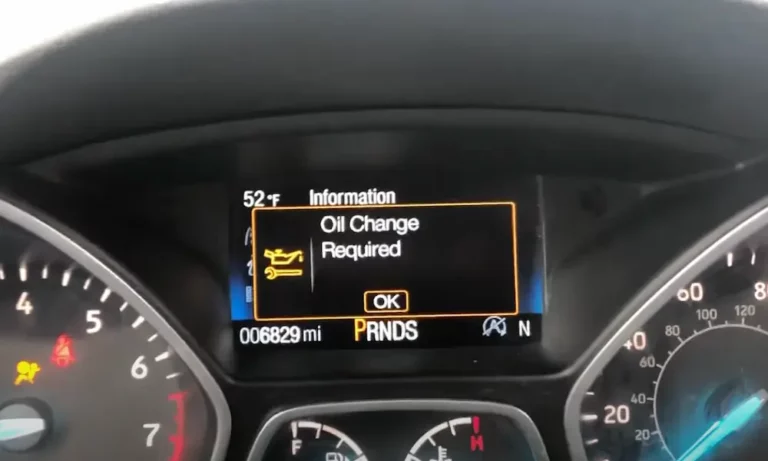
Ever stared at that persistent oil change light on your Ford Escape’s dashboard? It’s like an unwanted houseguest that won’t leave until you take action. Whether you’ve just completed an oil change yourself or had it done professionally, knowing how to reset this indicator is essential for proper maintenance tracking. Let’s dive into the specific methods for each Ford Escape generation.
Why Reset Your Ford Escape’s Oil Change Light?
Your Escape’s oil life monitoring system doesn’t automatically know when you’ve changed the oil. Resetting the light tells the vehicle’s computer that fresh oil has been added, allowing it to accurately track when your next service is due. Skipping this step means dealing with annoying reminders and potentially losing track of your actual maintenance schedule.
Ford Escape Oil Light Reset Methods by Generation
Second Generation (2008-2012): The Button Method
The second-gen Escape uses a straightforward button-based reset system:
- Turn the ignition key to “RUN” position (don’t start the engine)
- Find the SETUP button near your speedometer
- Press it repeatedly until you see “OIL LIFE XXX% HOLD RESET = NEW”
- Hold the RESET button for approximately 2 seconds
- Wait for “OIL LIFE SET TO 100%” confirmation
- Turn off the ignition and restart to verify the light is gone
Some owners report needing to clear other warnings (like tire pressure alerts) before accessing the oil life reset menu. This system is identical for both four-cylinder and V6 models.
Third Generation (2013-2019): The Pedal Dance
Ford got creative with the third generation, introducing a pedal-based reset procedure:
For Traditional Key Ignitions:
- Press both brake and accelerator pedals fully
- Turn key to “ON” position while holding both pedals down
- Watch for “SERVICE OIL RESET IN PROGRESS” message
- Continue holding pedals for about 25 seconds until reset completes
For Push-Button Start Models:
- Press the start button once WITHOUT pressing the brake (to enter accessory mode)
- Fully depress both brake and accelerator pedals simultaneously
- Hold until you see “RESET COMPLETE” on your display
This might feel like a strange dance routine, but it’s the official Ford-approved method for these model years.
Alternative for 2017-2019 Models:
Later third-gen Escapes offer a more intuitive menu-based option:
- Use steering wheel controls to navigate to Settings
- Select Vehicle then Oil Life Reset
- Press and hold the OK button until confirmation appears
Many owners find this digital approach more reliable than the pedal method, particularly in vehicles with sensitive electronic throttle bodies.
Fourth Generation (2020-Present): The Digital Approach
Modern Escapes feature a fully digital instrument cluster with straightforward menus:
- Press the Menu button on your steering wheel
- Navigate to Vehicle Maintenance
- Select Oil Life
- Press and hold OK to complete the reset
The latest SYNC 4 system in newer models tracks detailed oil condition metrics, including viscosity degradation and contamination levels, making timely resets even more important for accurate maintenance scheduling.
For Hybrid Models:
- First disable Ready Mode through the power flow screen
- Perform the standard reset procedure as above
- Verify the reset registers in both EV and ICE drive modes
Troubleshooting Common Reset Issues
When the Reset Fails
If you see “NOT RESET” or “RESET CANCELLED” messages:
- Check Hood Latch – Ensure your hood is fully closed; some models have a safety feature preventing resets with the hood open
- Verify No Active Codes – Diagnostic trouble codes may block reset attempts
- Time Your Pedal Press – For pedal-based resets, maintain continuous pressure for at least 30 seconds
After Battery Disconnection
If your battery was disconnected or died, oil life data might be corrupted. Try:
- Completing a drive cycle (15+ minutes at highway speeds)
- Attempting the manual reset procedure again
- If still unsuccessful, consider visiting a dealership for professional recalibration
| Model Years | Primary Reset Method | Backup Method | Common Issues |
|---|---|---|---|
| 2008-2012 | Instrument cluster buttons | N/A | Other warnings blocking access |
| 2013-2016 | Pedal activation | N/A | Insufficient pedal pressure |
| 2017-2019 | Pedal activation | Menu navigation | Electronic throttle sensitivity |
| 2020+ | Digital menu | N/A | Hood latch sensor detection |
Best Practices for Oil Changes and Resets
For optimal performance of your Ford Escape’s oil monitoring system:
- Reset Immediately After Changes – Complete the reset within 500 miles of your actual oil change
- Use Recommended Oil – Stick with Ford’s specifications (WSS-M2C947-B1) for your model year
- Quality Filters Matter – Use Motorcraft FL-910-S or equivalent filters to ensure proper function
- Document Your Service – Keep records of mileage at each change, even with a functioning monitoring system
How Ford’s Intelligent Oil-Life Monitor Actually Works
Your Escape doesn’t just count miles to determine oil change timing. Ford’s system uses a sophisticated algorithm that considers:
- Engine RPM patterns and duration
- Cold-start frequency
- Extended idling periods
- Temperature variations
- Towing and heavy load detection
The system samples data every half-second to create a cumulative wear index, triggering the maintenance light at 15% remaining oil life. This adaptive approach means your change intervals might vary based on your actual driving patterns.
Understanding Oil Change Intervals for Ford Escape
Ford typically recommends oil changes at every 7,500-10,000 miles under normal conditions, but your Intelligent Oil-Life Monitor may suggest different intervals based on your driving habits:
- Frequent Short Trips – Oil changes likely needed sooner
- Highway Commuters – May extend to full recommended interval
- Towing or Heavy Loads – Significantly reduced intervals
- Extreme Temperatures – More frequent changes required
Always pay attention to both your monitor and the actual condition of your oil (checking color and consistency during regular dipstick checks).
Hybrid Model Considerations
Ford Escape Hybrids have unique considerations since the gasoline engine runs less frequently:
- Oil doesn’t reach optimal temperature as often
- Moisture accumulation can be higher
- Reset procedures remain the same, but pay special attention to the “Ready Mode” steps
The hybrid’s system accounts for these differences in its calculations, but it’s especially important to follow the reset procedure correctly to maintain accuracy.
The Importance of Regular Oil Changes
Beyond just resetting the light, maintaining proper oil change intervals is critical for your Ford Escape’s longevity. Fresh oil provides:
- Reduced engine wear through proper lubrication
- Better fuel efficiency
- Enhanced performance
- Extended engine life
The National Highway Traffic Safety Administration emphasizes that proper maintenance not only improves vehicle safety but also prevents costly repairs.
DIY vs. Professional Oil Changes
While resetting the oil change light is straightforward, deciding whether to change your own oil depends on your comfort level with basic maintenance tasks:
DIY Advantages:
- Cost savings ($25-40 vs $50-80 professionally)
- Complete control over oil and filter quality
- Convenience of your own schedule
Professional Advantages:
- Proper disposal of old oil
- Multi-point inspection during service
- Warranty documentation
Regardless of which route you choose, knowing how to reset the indicator yourself is valuable knowledge for any Ford Escape owner.
Oil Type Recommendations by Model Year
Using the correct oil type ensures your monitoring system works as designed:
- 2008-2011: 5W-20 synthetic blend
- 2012-2019: 5W-20 full synthetic
- 2020-Present: 5W-30 full synthetic
- Hybrids (all years): 0W-20 full synthetic
Always check your owner’s manual for the specific recommendation for your engine type and year.
Tools Needed for DIY Oil Changes and Resets
If you’re handling the entire oil change process yourself, gather these items:
- Correct oil type and quantity (typically 4.5-5.5 quarts)
- Oil filter
- Oil filter wrench
- Drain pan
- Jack and jack stands or ramps
- 15mm socket and ratchet
- Funnel
The reset procedure itself requires no tools—just your fingers and knowledge of the correct button sequence or pedal combination.
Resetting Multiple Service Indicators
Some Ford Escape models display multiple service indicators simultaneously. In most cases, resetting the oil life will not affect other indicators like:
- Tire rotation reminders
- Air filter service alerts
- General maintenance indicators
These must be reset separately through their own procedures, typically found in your owner’s manual.
The Evolution of Ford’s Reset Procedures
Ford’s approach to maintenance resets reflects the evolution of automotive technology:
- Early Models (Pre-2008): Simple mileage-based reminders
- Second Generation: Button-based interface with digital readout
- Third Generation: Pedal activation reflecting computerized integration
- Current Models: Fully integrated digital menu systems
This progression shows how maintenance tracking has become increasingly sophisticated—from simple reminders to adaptive systems that analyze your specific driving patterns.
By following the appropriate reset procedure for your Ford Escape’s model year, you’ll ensure your vehicle’s maintenance monitoring system operates accurately, helping you maintain your engine for maximum performance and longevity.