Ever wondered if you can access HondaLink’s cool features without opening your wallet? You’re looking at your Honda’s dashboard, seeing that HondaLink button, and thinking, “Am I missing out on something I’m already paying for in my car loan?”
Let’s cut through the confusion about what’s free and what costs extra with HondaLink, so you can decide if those premium features are worth your hard-earned cash.
What Is HondaLink?
HondaLink is Honda’s connected car platform that links your smartphone to your vehicle. It creates a digital bridge between you and your Honda through a mobile app, giving you remote access and control over various aspects of your car.
The system works through cellular connectivity built into the car and a companion app on your smartphone. Once paired, you can access vehicle information, control certain functions, and receive important alerts—some for free, and some for a subscription fee.
HondaLink Free Services: What You Get Without Paying
Good news—HondaLink isn’t entirely a paid service. Honda provides two free tiers that never expire and don’t require a credit card:
Basic Package (Always Free)
The Basic Package includes essential features that help with vehicle ownership and maintenance:
- Recall notifications: Get alerts about safety recalls affecting your vehicle
- Service reminders: Automated reminders when your Honda needs maintenance
- Roadside assistance access: Quick connection to help when you’re stranded
- Digital owner’s manuals: Access your car’s manual right from your phone
Link Package (Always Free)
The Link Package builds on the Basic tier with more monitoring capabilities:
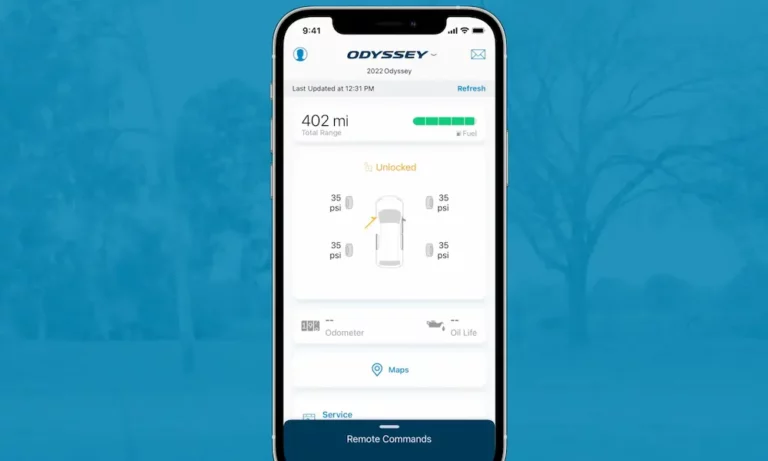
- Vehicle health reports: Check fuel range, oil life, and tire pressure
- Destination sending: Send navigation directions from your phone to your car
- Maintenance minders: Detailed alerts about your car’s service needs
- Bluetooth pairing assistance: Help connecting your devices to your Honda
These free services stay active for your vehicle’s lifetime as long as you maintain the app on your phone. No subscription required—ever.
HondaLink Paid Services: The Premium Features
Beyond the free services, Honda offers three subscription tiers with more advanced features:
Security Package
- Trial period: 3 years free
- Cost after trial: $89-$99 per year
- What you get:
- Automatic collision notification
- Stolen vehicle tracking
- Emergency assistance button
- Remote data wipe for the head unit
Remote Package
- Trial period: 90 days free
- Cost after trial: $110-$129 per year
- What you get:
- Remote engine start
- Remote door lock/unlock
- Vehicle finder
- Geofencing and speed alerts for teen drivers
Concierge Package
- Trial period: 3 months free
- Cost after trial: $260 per year
- What you get:
- Live personal assistance for travel planning
- Restaurant reservations
- Event tickets booking
- Calendar integration
Pricing Comparison Table
| Package | Trial Period | US Annual Cost | Canadian Annual Cost | Key Features |
|---|---|---|---|---|
| Basic | Forever free | $0 | $0 | Recall alerts, manuals |
| Link | Forever free | $0 | $0 | Vehicle status, maintenance |
| Security | 3 years | $89 | $99 | Collision alerts, emergency services |
| Remote | 90 days | $110 | $129 | Remote start, locks, vehicle finder |
| Concierge | 3 months | $260 | $260 | Live assistance, reservations |
Which HondaLink Features Work On My Honda?
Not all Honda models support every HondaLink feature, which is crucial to know before deciding on a subscription. Here’s a quick compatibility breakdown:
- Older models (pre-2018): Limited functionality, mainly basic package features
- 2018-2022 models: Most features supported, but check specific trim levels
- 2023+ models: Full feature support on most trim levels
Some specific limitations to note:
- Remote engine start isn’t available on certain 2019-2022 Pilot Touring/Elite trims
- Alexa integration works only on 2023 and newer models with navigation systems
- Electric models like the Prologue have separate subscription options for battery management
To verify exactly what works on your specific Honda, use Honda’s VIN checker tool on the official website.
Is A HondaLink Subscription Worth It?
The value of HondaLink’s paid features comes down to your personal usage patterns:
When It’s Worth It
- You frequently use remote start in extreme weather
- You often forget where you parked or if you locked your car
- You have teen drivers you want to monitor
- You travel for business and would benefit from concierge services
When It’s Probably Not
- You primarily drive locally in mild weather
- You’re tech-savvy and already use other apps for navigation
- You rarely need to remotely access your vehicle
- You’re on a tight budget and the free features meet your needs
How to Manage HondaLink Subscriptions
If you decide to try the premium features, be aware of how subscriptions are handled:
- Trial activation: Most trials activate automatically when you purchase your Honda
- Payment method: You’ll need to provide a credit card for any trial, which will be charged automatically when the trial ends
- Renewal notices: Honda sends email reminders 30, 15, and 3 days before charging you
- Cancellation: To cancel, contact HondaLink support or your dealer at least 72 hours before renewal
The Cost-Benefit Analysis
When deciding if the paid features are worth it, consider these comparisons:
- Remote start: The $110/year Remote Package is cheaper than the $300+ installation cost of an aftermarket remote starter, plus it offers additional features
- Security features: The Security Package at $89/year provides emergency response that standalone systems can’t match
- Concierge services: The $260/year price might seem steep, but frequent travelers report saving hours on travel arrangements
The Future of HondaLink
Honda has announced several upcoming enhancements that might make subscriptions more valuable:
- Over-the-air updates coming in 2026
- AI-driven predictive maintenance features planned for 2027
- Integration with home energy management systems by 2028
These additions suggest HondaLink will become increasingly integrated with your digital life beyond just your car.
Getting Started With Free HondaLink Features
To access the free HondaLink features, follow these steps:
- Download the HondaLink app from Google Play or the App Store
- Create a HondaLink account
- Follow the prompts to connect your vehicle using your VIN
- Explore the free Basic and Link features
- Try the premium features during the trial periods before deciding on subscriptions
Final Thoughts: Free vs. Paid HondaLink
The basic answer to “Is HondaLink free?” is both yes and no. The essential vehicle management and information features are completely free and always will be. The more advanced remote control, security, and concierge features require a subscription after trial periods end.
The good news is that you can try all the premium features during generous trial periods to determine if they add enough value to your driving experience to justify the cost. Meanwhile, the free features provide solid utility for every Honda owner without opening your wallet.