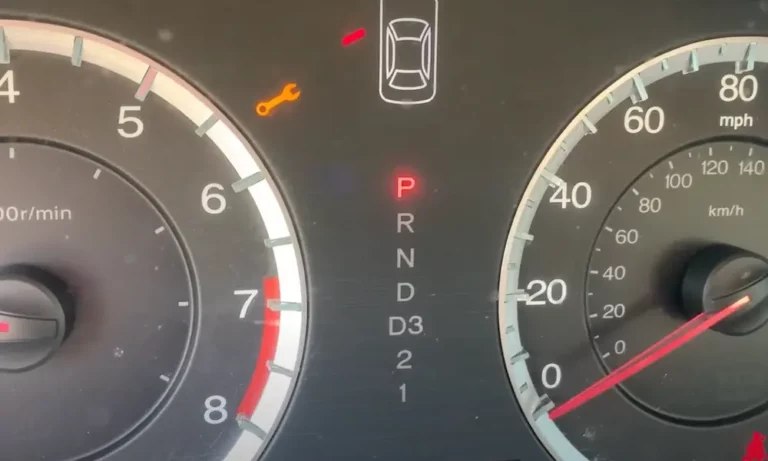
You’re driving along when suddenly an amber light shaped like a wrench appears on your dashboard. Don’t panic! That little wrench isn’t signaling an emergency—it’s your Mazda’s way of saying “hey, I could use some attention.” Let’s break down what this light means, why it matters, and what steps you should take next.
What Is the Mazda Wrench Light?
The wrench light on your Mazda’s dashboard is primarily a maintenance reminder, not a warning of immediate trouble. This amber-colored indicator lights up when your vehicle is due for routine service, typically an oil change or scheduled maintenance.
Unlike the more urgent red warning lights, the wrench light is designed as a helpful nudge rather than an alarm. Think of it as your car’s way of tapping you on the shoulder rather than screaming in your ear.
When Does the Wrench Light Appear?
Your Mazda’s wrench light typically activates in two main scenarios:
Regular Maintenance Due
The light illuminates when your preset maintenance period arrives. Mazda programs these intervals based on time (usually 12 months) or mileage (typically 5,000-7,500 miles), whichever comes first.
This is simply your vehicle’s built-in reminder system telling you it’s time for a check-up, similar to the reminder you get from your dentist.
Oil Change Needed
For many Mazda models, the wrench light specifically indicates when it’s time to replace your engine oil. In diesel Mazda models with SKYACTIV-D 2.2 engines, the computer actually monitors oil condition and activates the light when it detects the oil needs changing.
Special Note for Diesel Owners
If you drive a diesel Mazda and notice the wrench light is flashing rather than steadily illuminated, pay special attention. This indicates water has accumulated in the fuel sedimentor and needs draining—a different issue that requires prompt attention from a professional.
Is It Safe to Drive with the Wrench Light On?
Yes, you can generally continue driving when the wrench light appears, but with some important caveats:
✅ Safe to drive if:
- Your vehicle is running normally
- No other warning lights are illuminated
- Engine temperature is normal
- No unusual noises or performance issues
❌ Not safe to drive if:
- Red warning lights (like oil pressure) are also lit
- Check engine light is flashing
- Vehicle is running poorly
- Engine is overheating
Even when it’s safe to drive, don’t ignore the light indefinitely. Scheduling service soon after the light appears helps maintain your Mazda’s performance and prevents potential issues. Procrastinating on maintenance can lead to reduced fuel economy, diminished engine performance, and increased wear and tear on vital components.
How to Reset the Mazda Wrench Light
After completing the necessary maintenance, you’ll need to reset the light. Here are the two most common methods:
Method 1: Through the Infotainment System (2014-2025 Models)
This is the simplest method for most modern Mazdas:
- Turn on your vehicle’s power without starting the engine (turn key to position 2 or push the start button twice without pressing the brake)
- On your infotainment screen, navigate to:
- Applications
- Vehicle Status Monitor
- Maintenance
- Oil Change
- Select “Reset”
- Confirm by selecting “Yes”
- The wrench light should disappear the next time you start your car
Many owners find this method straightforward and effective for resetting the service indicator.
Method 2: Manual Reset Procedure
If the infotainment method doesn’t work for your model, try this alternative approach:
- Turn your vehicle completely off
- Locate and press the trip meter reset button (typically near your instrument cluster)
- While holding the trip button down, press the start button twice (without your foot on the brake)
- Continue holding the trip button until you see a yellow triangle flash several times (this might take up to 30 seconds)
- Release the trip button once the flashing stops
This method is particularly useful for older models or if you’re having trouble with the infotainment system.
Maintenance Intervals and Why They Matter
Mazda designs their maintenance schedules based on extensive testing and engineering knowledge. The wrench light appears based on:
| Maintenance Trigger | Typical Interval | Notes |
|---|---|---|
| Time | 12 months | Even with low mileage, oil and fluids degrade over time |
| Mileage | 5,000-7,500 miles | Varies by model and driving conditions |
| Oil Condition | Variable | On diesel models with oil quality sensors |
Some Mazda owners report the light appearing earlier than expected, which can happen due to:
- Severe driving conditions (extreme temperatures, stop-and-go traffic)
- Previous service technician forgetting to reset the system
- System sensitivity settings
Why You Shouldn’t Just Reset Without Servicing
It might be tempting to simply reset the light without performing the indicated maintenance, but this is a bad idea for several reasons:
- Skipping oil changes can lead to engine sludge buildup and reduced lubrication
- Missing scheduled maintenance may void parts of your warranty coverage
- Small issues that could be caught during routine service might develop into major problems
- Modern engines rely on proper maintenance to deliver optimum performance and efficiency
Remember that resetting the light without performing maintenance is like unplugging a smoke detector because the battery is low—you’re removing the reminder without addressing the underlying need.
Common Maintenance Items When the Wrench Light Appears
When your Mazda’s wrench light illuminates, these are typically the service items that need attention:
Oil Change Services
The most common trigger for the wrench light is an oil change due. This typically includes:
- Replacing engine oil with the correct viscosity and specification
- Installing a new oil filter
- Inspecting and topping off other fluids
- Performing a basic safety inspection
Comprehensive Maintenance
For annual service reminders, a more thorough inspection might be needed:
- Oil and filter change
- Tire rotation
- Brake inspection
- Air filter check
- Fluid level inspection and top-off
- Battery test
- Multi-point inspection of major systems
Having these services performed by a qualified Mazda technician ensures your vehicle remains in optimal condition and helps preserve its resale value.
DIY vs. Professional Service
While some maintenance tasks can be performed at home by confident DIYers, there are advantages to professional service:
DIY Pros and Cons
Pros:
- Potentially lower cost
- Flexible scheduling
- Personal satisfaction
Cons:
- Limited access to specialized tools
- No warranty on work performed
- Potential for mistakes without proper experience
Professional Service Benefits
- Technicians with model-specific training
- Access to genuine Mazda parts
- Warranty on parts and labor
- Complete service documentation
- Proper disposal of used fluids
- Access to latest technical service bulletins
If you do opt for DIY maintenance, make sure to use the correct oil specification for your specific model and follow proper procedures.
Other Dashboard Lights You Might See with the Wrench
Sometimes the wrench light appears alongside other indicators. Here’s what to watch for:
Check Engine Light
If both the wrench and check engine lights are on, your vehicle likely needs both maintenance and diagnosis of a specific issue. The check engine light indicates the computer has detected a system malfunction that might affect emissions, performance, or fuel economy.
Multiple Warning Lights
If several lights illuminate simultaneously (especially red warnings), this indicates a more serious condition that requires immediate attention. Don’t continue driving if you see multiple red warning indicators.
Maintaining Your Mazda Between Services
Even between scheduled maintenance visits, these simple habits help keep your Mazda running smoothly:
- Check oil level monthly using the dipstick
- Monitor tire pressure regularly
- Listen for unusual noises
- Pay attention to any change in fuel economy
- Address small issues before they become big problems
These proactive steps complement the scheduled maintenance your wrench light reminds you about and help maximize your Mazda’s lifespan.
Beyond the Basic Wrench Light
Mazda’s maintenance reminder system has evolved over the years. In newer models, you may receive more specific information about what service is needed through the vehicle information display. Some vehicles show percent of oil life remaining or provide a countdown of miles until service is due.
Understanding all your dashboard indicators is part of responsible ownership. The Mazda Resource Center offers a comprehensive guide to every light and symbol you might encounter.
The Bottom Line on Your Mazda’s Wrench Light
The wrench light is your Mazda’s way of helping you maintain its health and performance. Rather than seeing it as an annoyance, consider it a helpful reminder from a car that wants to keep running at its best.
By responding promptly to this indicator and keeping up with recommended maintenance, you’ll enjoy better performance, improved fuel economy, and a longer lifespan for your vehicle. A well-maintained Mazda isn’t just more reliable—it’s also more enjoyable to drive and retains more of its value over time.