Is your Nissan refusing to start with a frustrating “Key ID Incorrect” message on the dashboard? You’re dealing with one of the most common issues affecting Nissan vehicles equipped with Intelligent Keys or NATS (Nissan Anti-Theft System). The good news? Most cases have simple fixes you can handle yourself. Let’s dive into why this happens and how to get back on the road quickly.
What Causes the “Key ID Incorrect” Error in Nissans?
When your Nissan displays this error, it means the vehicle’s security system can’t properly recognize your key fob. Your car uses advanced radio frequency communication and encryption to verify that only authorized keys can start the engine.
Here’s what happens in a properly functioning system:
- You approach your vehicle or press the start button
- Your key fob sends a unique encrypted ID signal
- The car’s Body Control Module (BCM) receives and authenticates this signal
- If authenticated, your car starts normally
When this process fails, you’re stuck with the “Key ID Incorrect” message and a car that won’t start.
Most Common Causes of Nissan Key ID Problems
Dead or Weak Key Fob Battery (90% of Cases)
The overwhelming majority of Key ID Incorrect errors come down to one simple thing: a weak or dead battery in your key fob. Nissan key fobs typically use CR2032 or CR2025 3-volt lithium batteries that last 2-4 years under normal use.
You might notice these warning signs before complete failure:
- “Key Battery Low” warnings on your dashboard
- Door handle sensors becoming less responsive
- Need to press buttons multiple times for response
- Decreasing range when locking/unlocking remotely
Radio Frequency Interference
According to Nissan’s Technical Service Bulletin NTB13-107F, RF interference can block proper key authentication. Common culprits include:
- Credit cards with RFID chips stored near your key
- Multiple keys with similar frequencies
- Cell phones and electronic devices
- Metal objects blocking the signal
- RFID-blocking wallets or materials
- Aftermarket alarm systems or radar detectors
Key Programming Issues
Sometimes the problem lies with the key’s programming rather than physical issues:
- A new replacement key that wasn’t properly programmed
- Keys that lost their programming due to system glitches
- The vehicle’s BCM losing stored key data
- NATS lock mode activation after multiple failed attempts
Emergency Start Methods When Facing “Key ID Incorrect”
Before we dive into permanent fixes, here’s how to start your car right now if you’re stuck:
Method 1: Key Fob Touch Method (Works for Most Nissans)
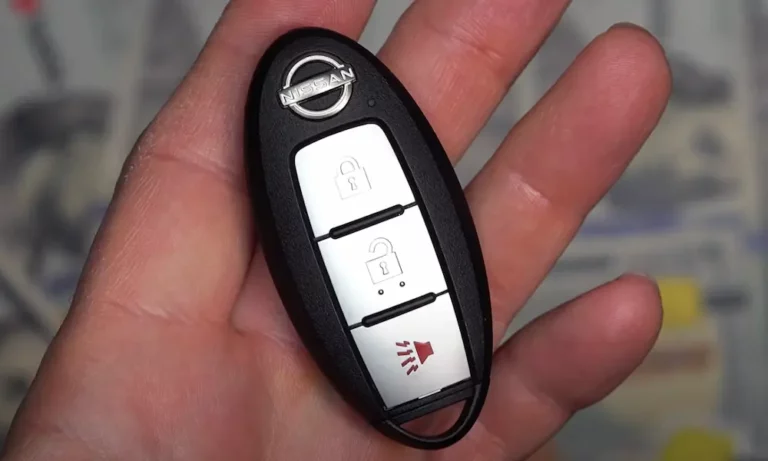
- Remove the mechanical key from your fob by sliding the release latch
- Manually unlock the driver’s door
- Sit in the driver’s seat with all doors closed
- Press and hold the brake pedal
- Touch the Nissan logo end of your key fob directly to the start button
- While maintaining contact, press the start button
This method works even with a completely dead key fob battery because it uses direct contact to read the key’s chip.
Method 2: Key Slot Method (Only on Select Models)
Some Nissan models have a dedicated key fob slot, typically on the steering column’s left side:
- Insert your key fob into this special slot
- Press the brake pedal and push the start button
- The vehicle will read the key’s RFID chip directly
Step-by-Step Solutions for “Key ID Incorrect” Problems
Solution 1: Replace Your Key Fob Battery
Since weak batteries cause about 90% of these errors, start here:
- Remove the mechanical key from your fob
- Find the small groove between the front and back halves
- Use a small flathead screwdriver to gently separate the halves
- Note the battery orientation (positive side typically faces up)
- Install a new CR2032 or CR2025 battery with correct polarity
- Reassemble the key fob and replace the mechanical key
Pro Tips for Battery Replacement:
- Use high-quality name-brand batteries like Maxell, Panasonic, or Duracell
- Some users report success using slightly thicker CR2032 batteries in CR2025 slots for better contact
- Handle batteries by the edges to avoid reducing capacity
- Clean any corrosion on battery contacts with a cotton swab and rubbing alcohol
Solution 2: Eliminate RF Interference
If a fresh battery doesn’t fix the problem, interference might be the culprit:
- Remove all items from your key ring except the Nissan key being tested
- Keep spare keys far away from the vehicle during testing
- Remove electronic devices from your pockets (phones, other key fobs)
- Check for RFID cards in wallets or purses near the key
- Move away from potential interference sources like other vehicles
Solution 3: Perform a NATS Reset Sequence
If interference was causing your problem, perform Nissan’s official NATS reset sequence:
- Leave ignition in ON position for approximately 5 seconds
- Turn ignition to OFF and wait 5-10 seconds
- Repeat steps 1-2 again
- Attempt to start the engine while keeping interfering devices away
- If successful, keep the key separate from other devices permanently
Solution 4: Key Reprogramming
If your key still isn’t recognized after the above steps, it may need reprogramming:
Basic Intelligent Key programming procedure (varies by model):
- Close all doors and turn off all electronics
- Insert and remove the key rapidly from the ignition 6-10 times within 10 seconds
- Watch for hazard lights to flash twice, indicating programming mode
- Turn key to ON position (don’t start engine)
- Press any button on the key fob – hazard lights should flash twice
- Turn ignition off and test key functionality
Important note: Programming procedures vary significantly by model year. Newer vehicles often require professional equipment for proper key programming.
Understanding the Nissan Key Recognition System in Detail
To better troubleshoot your specific issue, it helps to understand how the system works:
Key Components of the Nissan Security System
- Key Fob with Transponder Chip: Contains a unique encrypted ID
- Body Control Module (BCM): The “brain” that stores authorized key data
- Immobilizer Antenna Ring: Usually located around the ignition or start button
- NATS (Nissan Anti-Theft System): The overall security system preventing unauthorized starts
How Authentication Works
The system operates through a complex “challenge-response” mechanism:
- When you press the start button, the BCM sends a “challenge” signal
- Your key receives this signal and generates a mathematically calculated response
- This response includes your key’s unique ID plus the mathematical answer
- The BCM verifies both the ID and the mathematical response
- If both match stored values, the car starts
- If either fails, you get the “Key ID Incorrect” message
This sophisticated security system is why Nissan vehicles have extremely low theft rates but can occasionally frustrate legitimate owners when components fail.
Professional Diagnosis for Persistent Problems
When DIY Methods Aren’t Working
If you’ve tried all the above solutions without success, it’s time for professional help, especially if:
- Multiple keys stop working simultaneously
- The immobilizer light stays constantly illuminated
- You see diagnostic codes P1610, P1614, P1615, or B2191
- There’s physical damage to the key fob or vehicle antenna
What Professional Diagnosis Involves
Technicians typically use:
- Nissan CONSULT-III diagnostic scanner to read specific error codes
- Signal Tech II I-KEY Battery Tester for accurate battery assessment
- Key programming tools for newer vehicles with advanced encryption
- Access to Nissan SDRM (Service Data Record Management) for immobilizer codes
Potential Professional Repairs
More serious issues might require:
- BCM (Body Control Module) replacement for persistent communication errors
- NATS antenna ring replacement if the immobilizer coil is damaged
- Key fob replacement if internal components are damaged
- Immobilizer control unit replacement in rare cases of complete system failure
The Real Cost of Nissan Key ID Issues
DIY Fixes vs. Professional Service
| Solution | Approximate Cost | Time Required | Success Rate |
|---|---|---|---|
| Battery Replacement | $3-10 | 5-10 minutes | 90% |
| RF Interference Elimination | Free | 10-15 minutes | 5% |
| NATS Reset | Free | 5 minutes | 3% |
| DIY Key Programming | Free | 15-30 minutes | 50-70% (model dependent) |
| Dealer Key Programming | $75-150 | 30-60 minutes | 95-100% |
| BCM Replacement | $300-800+ | 1-3 hours | 99% |
Common Mistakes That Make Things Worse
- Using cheap, low-quality batteries that fail prematurely
- Damaging key fob components during battery replacement
- Attempting to reprogram newer models without proper equipment
- Ignoring early warning signs like “Key Battery Low” messages
- Using improper emergency start methods that can damage components
Preventing Future “Key ID Incorrect” Errors
Battery Maintenance
- Replace key fob batteries every 2-3 years proactively
- Keep spare batteries in your vehicle emergency kit
- Note the date when you replace batteries (small sticker inside fob)
- Use only high-quality batteries from reputable manufacturers
RF Interference Prevention
- Use separate key rings for different vehicles
- Store spare keys away from primary keys
- Avoid RFID-blocking materials when carrying keys
- Keep electronic devices separate from keys
System Care
- Test your spare key periodically to ensure proper operation
- Address warning messages immediately to prevent system lockouts
- Have spare keys programmed before you need them
- Keep key fob surfaces clean for proper antenna contact
Specific Models Most Affected by Key ID Incorrect Errors
While all Nissan models with Intelligent Keys can experience this issue, some vehicles report higher frequencies:
Most Commonly Affected Models
- Nissan Altima (2013-2018): Often reports key ID issues related to BCM problems
- Nissan Rogue (2014-2019): Frequently experiences battery-related key errors
- Nissan Murano (2015-2020): Common reports of interference-related problems
- Nissan Maxima (2016-2021): Key programming issues reported more frequently
- Nissan Sentra (2013-2019): Often experiences antenna ring failures
For these models, being proactive about battery replacement and interference prevention is especially important.
Real-World Examples and Solutions
Case Study 1: Persistent Error After Battery Replacement
A 2017 Nissan Rogue owner replaced their key fob battery but still received “Key ID Incorrect” errors. The solution? Their key fob had corrosion on the battery contacts. Cleaning these contacts with rubbing alcohol and a cotton swab fixed the issue instantly.
Case Study 2: Multiple Keys Failing Simultaneously
A 2015 Nissan Altima owner found that both their keys stopped working on the same day. The dealer diagnosed a failed BCM that had lost all key programming data. While expensive ($450 for parts and labor), replacing the BCM and reprogramming both keys resolved the issue permanently.
Case Study 3: Intermittent Key ID Errors
One Nissan Pathfinder owner faced frustrating intermittent “Key ID Incorrect” messages. After weeks of troubleshooting, they discovered their RFID-blocking wallet was interfering with the key when placed in the same pocket. Moving the key to a different pocket eliminated the problem completely.
Key ID Incorrect vs. Similar Nissan Error Messages
Don’t confuse “Key ID Incorrect” with these similar but different errors:
| Error Message | What It Means | Typical Solution |
|---|---|---|
| “Key ID Incorrect” | Key authentication failed | Battery replacement or interference elimination |
| “Key Not Detected” | Car cannot find key within range | Move key closer to start button or center console |
| “Key Battery Low” | Warning before complete battery failure | Replace battery soon |
| “No Key” | No registered key detected within vehicle | Ensure key is inside vehicle |
| “Key System Error” | Broader system failure in key recognition | Requires professional diagnosis |
Understanding which specific error you’re facing helps target the right solution.
Advanced Troubleshooting for Tech-Savvy Owners
For those comfortable with more technical approaches:
Testing Key Signal Strength
- Use your smartphone’s camera to visualize IR emissions
- Point the key at your phone camera while pressing buttons
- A strong, visible purple light indicates good signal strength
- Weak or no visible light suggests battery or transmitter issues
BCM Reset Procedure (Use With Caution)
For persistent issues after trying all other solutions:
- Disconnect the vehicle’s negative battery terminal
- Press the brake pedal for 30 seconds to drain residual power
- Wait 15 minutes (allows capacitors to fully discharge)
- Reconnect the battery terminal
- Attempt to start the vehicle normally
This procedure can sometimes reset the BCM and clear temporary glitches in the key recognition system.
Remember that the overwhelming majority of “Nissan Key ID Incorrect” errors resolve with simple battery replacement. Start there, then work through more complex solutions only if needed. With the right approach, you’ll be back on the road quickly and with minimal frustration.