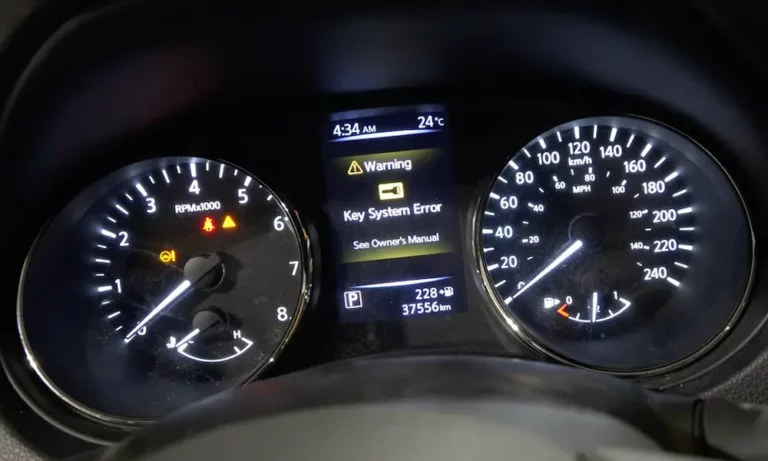
Ever gotten into your Nissan, pressed the start button, and instead of the familiar engine purr, you’re greeted with the dreaded “Key System Error” message? It’s enough to make you late for work and send your blood pressure soaring.
Don’t panic. This common Nissan problem has several straightforward fixes, and you might not even need to call a mechanic. Let’s dive into what causes this frustrating error and how you can get back on the road quickly.
What Is the Nissan Key System Error?
The Nissan Key System Error occurs when your vehicle’s Intelligent Key (I-Key) system fails to recognize or communicate with your key fob. This sophisticated system uses radio frequency communication between your key fob and multiple antennas throughout your vehicle to verify the key’s identity before allowing the engine to start.
When working properly, this keyless technology is convenient. When it fails, you’re left stranded with an error message and an immobilized vehicle.
Common Causes of Nissan Key System Error
Dead or Weak Key Fob Battery
Nearly half (45%) of all Nissan Key System Error cases stem from a simple problem: a dying key fob battery. Unlike traditional key fobs that might last 5-10 years, Nissan’s Intelligent Keys consume power continuously to maintain communication with your vehicle’s antenna system.
Most Nissan key fobs use CR2032 lithium batteries that provide 3 volts when new. As the battery weakens, you’ll first notice intermittent issues where the key works inconsistently before failing completely. Even when the battery has enough juice for locking/unlocking functions, it might lack sufficient strength for the more demanding engine start authentication.
Signs your key fob battery is failing:
- Decreasing range for locking/unlocking
- Need to press buttons multiple times
- Intermittent starting issues
- “Key Battery Low” warnings
Disconnected Trunk Antenna Wire
This surprisingly common issue accounts for about 25% of all Key System Error cases. The problem typically involves a loose or disconnected antenna wire in your vehicle’s trunk area, particularly in models like the Sentra, Altima, and other Nissans where the I-Key antenna is located behind the rear seat fold-down area.
The issue usually occurs after loading heavy items in your trunk, moving furniture, or having tire changes performed, which can inadvertently disconnect the small black connector housing the antenna wiring.
Low Vehicle Battery or Electrical Issues
Approximately 15% of Key System Errors stem from low voltage in your vehicle’s main 12V battery. When the car battery begins failing or drops below optimal voltage levels, it affects the Body Control Module’s (BCM) ability to properly communicate with the I-Key system.
This is particularly problematic after your vehicle has been sitting for extended periods or in cold weather conditions that stress the battery. Additionally, corroded ground connections can create intermittent electrical issues that manifest as Key System Errors.
Body Control Module (BCM) Malfunctions
While less common (about 5% of cases), BCM failures represent some of the most challenging Key System Error scenarios. The BCM serves as the central hub for the I-Key system, managing communication between the key fob, various antennas, and other vehicle systems.
When the BCM malfunctions, it creates persistent error messages that don’t respond to typical troubleshooting methods.
Emergency Start Procedure: Get Moving Now
When you’re stuck with a Key System Error, you need to get going immediately. Fortunately, Nissan built in a backup system that works regardless of the underlying cause:
- Hold your key fob directly against the push-button start switch (look for the key symbol)
- Depress the brake pedal
- Press the start button while keeping the key fob pressed against it
This physical contact allows the vehicle’s NATS (Nissan Anti-Theft System) antenna to read the key’s internal chip through direct proximity, bypassing the normal wireless communication. This method works because the authentication chip inside the key fob doesn’t require battery power to function.
DIY Troubleshooting and Fixes
Replacing Your Key Fob Battery
The quickest and most cost-effective fix is replacing your key fob battery:
- Locate the small release button or slot on your key fob
- Use a small screwdriver or coin to carefully open the fob
- Remove the old CR2032 battery, noting its orientation
- Insert the new battery with the positive (+) side facing up
- Snap the fob closed and test functionality
This simple procedure takes less than five minutes and costs under $5 for a new battery.
Checking the Trunk Antenna Connection
For the common trunk antenna issue:
- Open your trunk
- Look behind or near the rear seat fold-down mechanism
- Find the small black connector box that may be partially disconnected
- Firmly reconnect the connector
- Test your key system
Many Nissan owners report immediate resolution after reconnecting this often-overlooked component.
Testing Your Vehicle’s Battery
If you suspect battery issues:
- Check for corrosion on battery terminals
- Clean terminals if necessary using a mixture of baking soda and water
- Use a multimeter to test battery voltage (should read at least 12.6V when off)
- Consider having your battery professionally tested if it’s more than 3 years old
Low voltage can cause numerous electrical gremlins, including key system errors.
Model-Specific Considerations
| Nissan Model | Common Key System Error Causes | Special Notes |
|---|---|---|
| Sentra (2013-2020) | Trunk antenna wire, Key fob battery | High incidence of trunk wire issues |
| Altima (2013-2020) | Trunk antenna wire, Key fob battery | Similar architecture to Sentra |
| Rogue (2014-2020) | Key fob battery, BCM issues | May require professional diagnosis |
| Pathfinder | BCM-related issues | More complex electrical system |
| Murano | BCM-related issues | Additional electronic features |
| Leaf | 12V battery issues (not main battery) | Unique to electric vehicles |
Advanced Troubleshooting Techniques
Key Fob Reprogramming
If you’ve replaced the battery but still have issues, you might need to reprogram your key fob:
For vehicles with standard ignition:
- Insert key into ignition
- Turn from LOCK to ACC position 6 times rapidly (within 10 seconds)
- The hazard lights will flash twice
- Press any button on the key fob
- Hazard lights flash once to confirm successful programming
For push-button start vehicles:
- Enter your vehicle with all doors closed
- Press and hold the door request switch while touching the key to the start button
- After the security indicator flashes, release the door switch
- Touch the key to the start button again
- Repeat for each key fob you wish to program
BCM Reset Procedure
For minor software glitches:
- Disconnect your vehicle’s negative battery terminal
- Wait 15 minutes for complete system discharge
- Reconnect the battery
- Allow the vehicle to sit for 5 minutes before attempting to start
This resets the BCM and can resolve minor communication issues between system components.
Prevention and Maintenance Tips
To avoid future Key System Errors:
- Replace your key fob battery annually, regardless of apparent condition
- Keep spare CR2032 batteries on hand
- Store key fobs away from electronic devices and extreme temperatures
- Have your vehicle’s battery tested during regular maintenance
- Consider a battery tender if your vehicle sits unused for extended periods
- Keep key fob contact points clean, especially in the battery compartment
- Avoid placing heavy items in the trunk that could disconnect the antenna wire
Professional Repair Costs
If DIY solutions don’t resolve your issue, here’s what to expect for professional repairs:
| Repair Type | Estimated Cost | Notes |
|---|---|---|
| Key fob battery replacement | $20-50 | Parts and labor at dealership |
| Trunk antenna reconnection | $50-100 | Simple diagnosis and repair |
| BCM diagnosis | $150-300 | Specialized diagnostic equipment required |
| BCM replacement | $300-800 | Varies by model, includes programming |
| New key fob programming | $200-400 | For replacement keys |
For most common issues, the success rate of DIY repairs is high. Key fob battery replacement resolves approximately 90% of cases where this is the root cause. Trunk antenna reconnection succeeds in about 85% of applicable cases.
Real-World Experiences From Nissan Owners
“I was getting the Key System Error message in my 2017 Sentra. After checking online, I looked in my trunk and found the disconnected antenna wire. Plugged it back in and the problem was instantly fixed. Saved me a $200 dealer visit!” – Reddit user
“My 2015 Altima wouldn’t start with the Key System Error. Replaced the CR2032 battery in the fob for $3 and it’s worked perfectly ever since. The battery was only 18 months old, so don’t wait for signs of failure.” – Nissan forum member
“After trying everything, turned out my BCM was failing. Cost $650 at the dealer, but they covered part under an extended warranty. Always worth asking about coverage even on older vehicles.” – Nissan Club member
Understanding Your Nissan’s Intelligent Key Technology
The Nissan Intelligent Key system represents advanced automotive security, allowing keyless entry and start. The system relies on:
- A key fob with unique digital identification
- Multiple antennas throughout your vehicle
- The Body Control Module (BCM) as the central processor
- Various sensors to detect key proximity
When functioning properly, the system provides seamless operation by detecting your key fob within about 20 inches of door handles and throughout the interior. The system uses radio frequency communication to verify your key’s unique ID code before allowing access or engine start.
The Technical Side of Key System Problems
Signal interference can cause mysterious intermittent errors that don’t follow typical failure patterns. Common interference sources include:
- Cell phones and electronic devices
- Radio towers or electrical infrastructure
- Parking garages with signal blocking materials
- Other nearby key fobs operating on similar frequencies
To identify interference issues, try using your key system in different locations away from potential interference sources.
Summary: Your Nissan Key System Error Action Plan
- First, try the emergency start procedure: press key fob directly against start button while pressing the brake
- Replace your key fob battery with a fresh CR2032
- Check for the disconnected trunk antenna wire
- Test your vehicle’s 12V battery and clean any corrosion
- Try reprogramming your key fob
- Perform a BCM reset by disconnecting the battery
- If all else fails, seek professional diagnosis
The good news is that nearly 70% of all Nissan Key System Errors can be resolved with simple DIY solutions that cost under $5. By understanding the common causes and solutions, you can save yourself time, money, and the headache of unexpected breakdowns.
Remember to make key fob battery replacement part of your annual maintenance routine, and you’ll likely avoid this frustrating error altogether.