Having trouble with your RV air conditioner? When your Dometic AC unit stops working properly, a simple reset might be all you need to get back to comfortable camping. This guide walks you through everything you need to know about resetting your Dometic RV air conditioner, from basic power cycling to model-specific procedures.
Why Your Dometic RV Air Conditioner Might Need a Reset
Your Dometic AC unit might need a reset for several reasons:
- The unit isn’t responding to thermostat commands
- Cooling cycles seem erratic or inconsistent
- Error codes are displaying on your control panel
- The system shut down after a power fluctuation
- Your thermostat display is frozen or blank
These issues often stem from power fluctuations, software glitches, or communication errors between your thermostat and the rooftop unit. Voltage drops during generator use or interruptions in shore power can disrupt your control board’s programming, making a reset necessary.
Basic Power Cycling Reset for All Dometic AC Models
The simplest reset method works for most Dometic models and should be your first troubleshooting step:
- Turn off your air conditioner using the thermostat or control panel
- Locate your RV’s circuit breaker panel
- Switch off the breaker dedicated to the AC unit
- Wait 30-60 seconds (this allows capacitors to discharge)
- Flip the breaker back on
- Reactivate your thermostat
This basic power cycling method resolves many minor software glitches and recalibrates your system after voltage irregularities. If your AC works after this reset, you’re good to go!
Model-Specific Reset Procedures
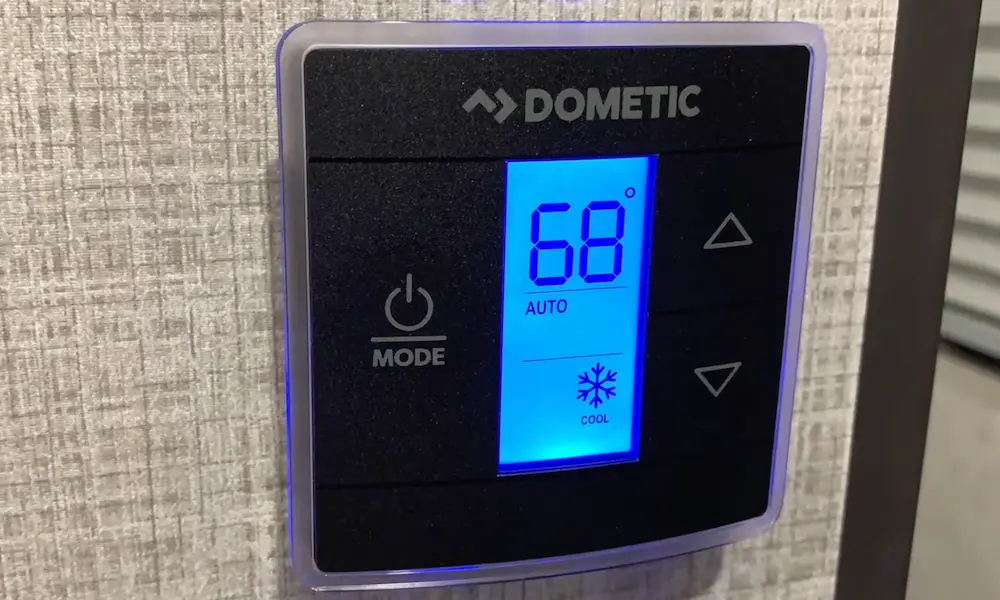
Dometic CCC2 Thermostat Reset
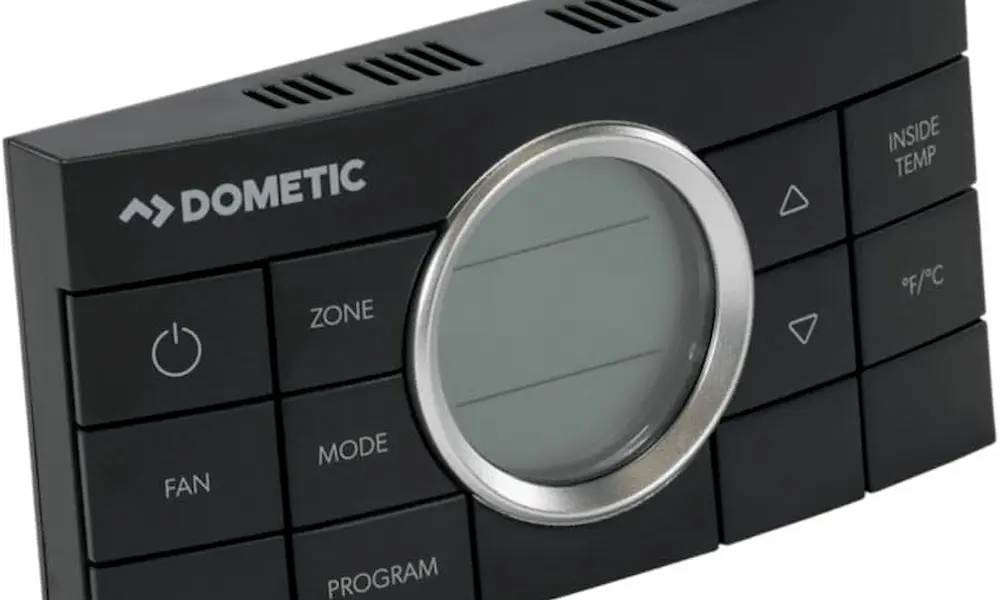
The Comfort Control Center 2 (CCC2) thermostat, commonly used in ducted systems, requires a specific button combination:
- Make sure the thermostat is in OFF mode
- Press and hold the MODE and ZONE buttons simultaneously
- Keep holding until “IniT” appears on the display
- Release the buttons and press ON/OFF to exit setup mode
This CCC2 reset procedure restores factory defaults, which erases custom settings but resolves zone recognition errors and unresponsive controls.
Penguin II and Brisk II Series Reset
For these popular Dometic rooftop units, focus on resetting the thermostat’s communication module:
- Turn off the thermostat
- Hold down the ZONE and MODE buttons while powering the thermostat back on
- Release the buttons when “FF” appears on the screen
This procedure addresses frozen displays and situations where the compressor fails to activate. The Brisk II models particularly benefit from this reset when they show no response.
DuoTherm and Legacy Models
Older DuoTherm systems typically have a physical reset button on the control board:
- Remove the thermostat cover to access internal circuitry
- Locate and press the recessed reset button
- Hold for 5-10 seconds until the display flashes
- Reassemble the thermostat and test operation
This manual reset clears persistent error codes and restores communication with the rooftop unit for these legacy Dometic models.
Common Issues That Persist After Resetting
If your reset doesn’t solve the problem, you might be dealing with more serious issues:
Frozen Evaporator Coils
When your AC cycles on but doesn’t cool properly even after a reset, you might have frozen evaporator coils.
Causes:
- Dirty filters restricting airflow
- Obstructed ducts
- Low voltage causing reduced fan speed
Solution:
Inspect and clean your air filters with mild detergent. Allow any ice to melt completely before restarting your unit. Check for voltage drops below 105V, which can reduce fan speed and lead to freezing.
Faulty Capacitors or Overload Protectors
If your fan runs but the compressor doesn’t start after resetting, you might have capacitor issues.
Signs of capacitor problems:
- Humming sound but no compressor activity
- AC briefly starts then shuts off
- Unit blows air but doesn’t cool
Testing capacitance requires a multimeter; values below 10% of the rated microfarads indicate replacement is needed.
Preventive Maintenance to Avoid Future Resets
Regular maintenance reduces the need for frequent resets and extends your Dometic AC’s lifespan.
Monthly Filter Cleaning
Dometic recommends monthly filter cleaning to prevent dust buildup:
- Turn off the AC unit
- Remove the ceiling assembly or return air grille
- Take out the filter(s)
- Wash with warm water and mild soap
- Allow to dry completely before reinstallation
Clean filters prevent strain on the fan motor and maintain airflow efficiency, according to Dometic’s maintenance guides.
Seasonal Electrical System Inspections
Before heavy-use seasons, check:
- All wiring connections for tightness
- Circuit breakers for proper operation
- Shore power or generator voltage stability (should be 105-130V)
These checks help prevent the power anomalies that often trigger the need for resets.
Detailed AC Reset Troubleshooting Table
| Symptom | First Reset Step | If Problem Persists |
|---|---|---|
| No power to thermostat | Check/reset circuit breaker | Inspect wiring connections |
| Unit won’t cool after reset | Clean filters, check for ice on coils | Test capacitor, check refrigerant |
| Error codes after reset | Perform model-specific reset | Consult Dometic manual for error code meanings |
| Fan works but no cooling | Reset and wait 3-5 minutes for compressor | Test run capacitor or check compressor |
| Thermostat unresponsive | Remove batteries (if applicable) for 30 seconds | Perform model-specific reset procedure |
Advanced Reset Techniques for Persistent Issues
When standard resets don’t work, try these advanced approaches:
Thermostat Calibration
Sometimes the thermostat needs recalibration after a reset:
- Turn the system off
- Press and hold UP, DOWN, and MODE buttons simultaneously
- When the display changes, use UP/DOWN to adjust the temperature offset
- Press MODE to save and exit
This calibration helps if your AC runs but doesn’t maintain the desired temperature after a reset.
Control Board Memory Clear
For digital systems with persistent memory issues:
- Disconnect the RV from shore power
- Turn off the generator if running
- Locate the house batteries and disconnect them
- Wait 10-15 minutes for complete system discharge
- Reconnect batteries, restore power, and test AC
This complete power drain method clears all volatile memory and often resolves stubborn software issues.
Software Updates for Newer Dometic Models
Newer Dometic systems like the AirCommand series occasionally receive firmware updates to address bugs:
- Visit Dometic’s support portal
- Check for updates for your specific model
- Follow their procedure for updating firmware
- Recalibrate the thermostat after any update
After software updates, perform a complete reset to ensure all new settings take effect properly.
When a Reset Won’t Fix Your Dometic AC
Some issues require professional intervention rather than resets:
- Refrigerant leaks (warm air despite compressor running)
- Compressor mechanical failure (unusual noises, no cooling)
- Control board damage (from power surges or water intrusion)
- Significant damage to condenser or evaporator coils
For these problems, accessing the Dometic service manuals can help identify when it’s time to call an RV HVAC specialist.
Optimizing AC Performance After a Reset
After successfully resetting your Dometic AC, optimize its performance:
- Park in shade when possible to reduce heat load
- Use window coverings during hot days
- Run your AC at a consistent temperature rather than turning it on and off
- Consider a soft start device if you have power issues at campgrounds
- Set your fan to AUTO rather than ON for better humidity control
These practices help maintain comfort while reducing the strain that can lead to future reset needs.
By understanding these reset procedures and maintenance tips, you’ll keep your Dometic RV air conditioner running smoothly throughout your travels, ensuring comfortable adventures no matter the weather outside.