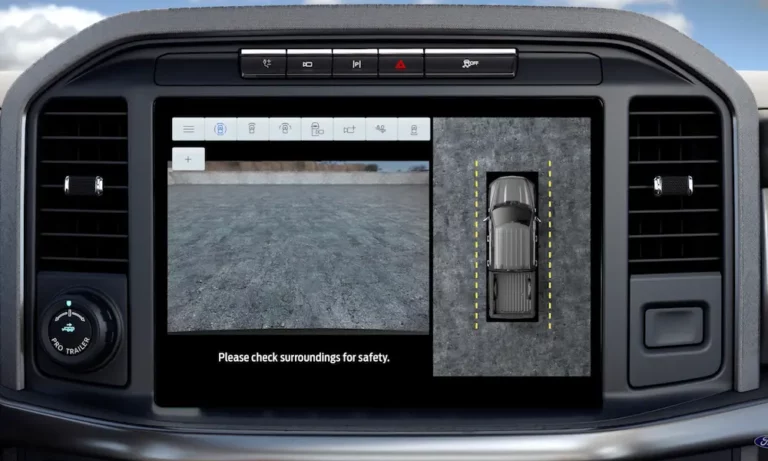
Having your Ford backup camera suddenly stop working can be frustrating and potentially dangerous. After all, these cameras aren’t just convenience features—they’re critical safety tools that help prevent accidents. If you’ve found yourself staring at a blank screen, blue display, or distorted image when shifting into reverse, you’re not alone.
This guide walks you through the most common reasons your Ford backup camera might be failing and provides practical solutions to get it working again. From simple DIY fixes to understanding when it’s time to visit a professional, I’ve got you covered.
Most Common Ford Backup Camera Problems
When your Ford backup camera fails, it typically shows one of these symptoms:
- Blank or blue screen when shifting into reverse
- “No signal to rear-view camera detected” message
- Distorted or warped images with wavy patterns
- Cloudy or foggy display that severely limits visibility
- Intermittent functionality that eventually becomes permanent
These issues affect various Ford models, including F-150, Explorer, Edge, Expedition, and others. While some vehicles might experience occasional glitches, others suffer from persistent problems requiring more extensive repairs.
What Causes Ford Backup Camera Failures?
1. Electrical Connection Issues
Loose, dirty, or corroded connectors are frequent culprits. These connections can be disrupted at various points:
- At the camera unit itself
- Under the dashboard
- At intermediate junction points along the wiring harness
Many Ford owners have resolved their camera problems simply by cleaning and reconnecting these electrical connections.
2. Hardware Failures
Physical components can fail for several reasons:
- Camera unit malfunction due to manufacturing defects
- Water intrusion damaging internal electronics or clouding the lens
- Physical damage from accidents or environmental factors
- Component failure within the camera itself
3. Electrical System Problems
Your vehicle’s electrical system supports the camera functionality:
- Blown fuses are a common and easily fixable issue
- Voltage fluctuations can cause intermittent camera problems
- Ground wire issues might prevent proper electrical flow
4. Software and Firmware Issues
As vehicles become more technologically advanced, software problems become more common:
- Outdated firmware in the camera system
- SYNC system glitches affecting display functionality
- Corrupted software requiring reset or update
DIY Troubleshooting Steps for Ford Backup Camera
Before heading to the dealership, try these DIY troubleshooting steps:
1. Check the Camera Lens
Start with the simplest solution:
- Inspect the camera lens for dirt, mud, snow, or debris
- Clean the lens gently with a soft, damp cloth
- Check for condensation or water inside the lens
2. Inspect and Clean Electrical Connections
Electrical connections often cause intermittent failures:
- Locate and examine visible wiring connections
- Look for signs of damage, looseness, or corrosion
- Disconnect and reconnect plugs to ensure proper seating
- Apply dielectric grease to connections to prevent future corrosion
For example, some 2016 F-250 owners have fixed their blue screen issues by reconnecting a plug located underneath the dashboard above the parking brake.
3. Check and Replace Fuses
A blown fuse is often the culprit behind a completely non-functional camera:
- Locate your vehicle’s fuse box (check your owner’s manual for exact location)
- Find the backup camera fuse (in Ford Edge, it’s fuse #23, a 15-amp blue fuse)
- Inspect the fuse visually or test with a multimeter
- Replace if necessary with the correct amperage fuse
4. Perform a System Reset
Software glitches can often be resolved with a system reset:
Soft Reset:
- Turn off your vehicle completely
- Wait 2-3 minutes
- Restart the vehicle and test the camera
Hard Reset:
- Disconnect the negative terminal on your car battery
- Wait 15 minutes
- Reconnect the terminal
- Start the vehicle and test the camera
5. Update Your SYNC System
Outdated software might cause camera display issues:
- Check for available updates for your Ford SYNC system
- Follow manufacturer instructions for updating your specific infotainment system
Ford Backup Camera Recalls: Is Your Vehicle Affected?
Ford has issued several recalls related to backup camera issues:
February 2023 Recall
Ford recalled nearly 73,000 vehicles with faulty rearview cameras that displayed blank screens or distorted images. Affected models included:
- 2021 Ford Expedition
- 2021-2022 Super Duty models (F-250, F-350, F-450, F-550, F-600)
- 2020-2022 Lincoln Corsair
Ford Maverick Camera Issues
The Ford Maverick truck line also experienced backup camera problems, particularly in XL and XLT models equipped with Ford’s basic “Connected Audio” system. The issue reportedly stems from inadequate hardware that can’t properly process the camera feed.
To check if your vehicle is affected by a recall:
- Visit Ford’s recall page
- Enter your Vehicle Identification Number (VIN)
- Review any active recalls for your vehicle
When to Seek Professional Diagnosis
While many backup camera issues can be resolved with DIY fixes, some situations require professional help:
Visit a Ford Dealership When:
- Your vehicle is under warranty or part of a recall
- DIY troubleshooting hasn’t resolved the issue
- You suspect a hardware failure requiring component replacement
- There are multiple electrical issues beyond just the camera
What to Expect at the Dealership
Ford dealerships have specialized diagnostic equipment and access to technical service bulletins specifically for your model:
- They’ll perform a comprehensive system diagnostic
- Technicians can check for recall eligibility
- They have access to Ford-specific replacement parts
- They can properly calibrate new cameras if needed
Independent Repair Shop Option
If your Ford is out of warranty, independent shops might offer more affordable repair options:
- Costs typically range from $100-$400 for parts alone
- Labor charges vary depending on the specific repair needed
- Some shops specialize in automotive electronics
Preventing Future Backup Camera Problems
Keep your Ford backup camera functioning properly with these preventative measures:
Regular Maintenance Tips
- Clean the camera lens regularly – especially after driving in muddy or snowy conditions
- Inspect visible wiring during routine vehicle maintenance
- Protect connections from moisture – particularly important in harsh winter climates
- Apply dielectric grease to external connections in vehicles exposed to salt or water
- Keep your SYNC system updated with the latest software
Long-Term Protection
- Consider applying a water-repellent treatment to the camera lens area
- Park in covered areas when possible to reduce environmental exposure
- If you frequently drive in harsh conditions, schedule regular electrical system inspections
Understanding Your Backup Camera System
Knowing how your Ford backup camera system works can help you troubleshoot more effectively:
Basic Components
- Camera unit – mounted near your license plate or tailgate handle
- Wiring harness – connects the camera to your vehicle’s electrical system
- Display unit – typically your infotainment screen or rearview mirror
- Control module – processes the camera signal for display
Integration with Other Systems
Your backup camera works in conjunction with:
- Reverse gear sensor
- Infotainment/SYNC system
- Parking aid sensors (on equipped models)
- Vehicle electrical system
Backup Camera Maintenance Tools
Having these items on hand can help with basic maintenance and troubleshooting:
- Soft microfiber cloths for lens cleaning
- Electrical contact cleaner
- Dielectric grease
- Basic multimeter
- Trim removal tools (for accessing connections)
- Automotive fuse assortment
Final Thoughts
A non-functioning backup camera isn’t just an inconvenience—it’s a safety issue. By understanding the common causes and solutions for Ford backup camera problems, you can often restore functionality without expensive repairs.
For persistent issues, don’t hesitate to utilize Ford’s recall services or seek professional diagnosis. The investment in proper repair is worth it for the safety benefits these cameras provide.
Have you experienced problems with your Ford backup camera? What solutions worked for you? Share your experiences in the comments below!