Your Nissan key fob is acting up — sluggish response, range dropping, or a dashboard warning flashing “Low Key Battery.” Good news: you don’t need a dealer visit or a mechanic. Replacing the battery yourself takes about two minutes and costs less than $5. This guide covers every Nissan fob type, the exact battery you need, and what to do if it still doesn’t work after the swap.
What Battery Does Your Nissan Key Fob Need?
Before you buy anything, you need to know which battery fits your specific fob. Nissan uses two coin cell batteries — the CR2025 and the CR2032. They look almost identical, but they’re not interchangeable.
| Battery | Diameter | Thickness | Voltage |
|---|---|---|---|
| CR2025 | 20mm | 2.5mm | 3V |
| CR2032 | 20mm | 3.2mm | 3V |
The CR2032 holds more charge because it’s slightly thicker. Forcing one into a slot designed for a CR2025 can crack the housing or snap the battery clips. Always check your current battery before heading to the store.
Here’s a quick reference by model:
| Nissan Model | Year Range | Battery |
|---|---|---|
| Altima | 2007–2024 | CR2032 |
| Rogue | 2008–2018 | CR2032 |
| Rogue | 2019–2024 | CR2025 |
| Leaf | 2011–2024 | CR2025 |
| Maxima | 2009–2021 | CR2032 |
| Sentra | 2000–2006 | CR2025 |
| Frontier | 2005–2024 | CR2032 |
| Pathfinder | 2013–2021 | CR2025 or CR2032 |
Not on this list? Open the fob, look at the old battery — the type is etched right on it.
Which Type of Nissan Key Fob Do You Have?
Nissan has used three main fob designs over the years. The replacement steps differ for each one.
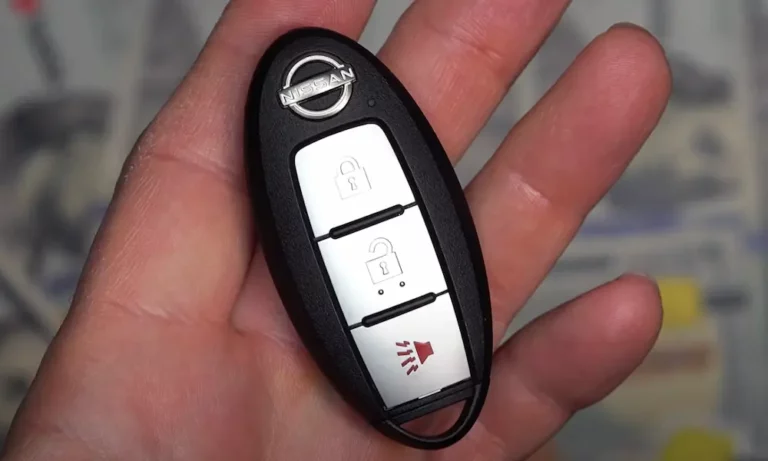
Oval Intelligent Key — This is the modern teardrop-shaped fob used on most Nissan vehicles from 2007 onward. It supports push-button start and passive entry.
Integrated Key-Head — The remote buttons are built into the handle of a physical ignition key. Common on Frontier, Xterra, and older Rogue models.
Separate Rectangular Remote — A standalone fob used on older Nissan vehicles from the late 1990s to mid-2000s. The ignition key is completely separate.
How to Replace the Battery in a Nissan Intelligent Key
This is the most common fob type. You’ll find it on the Altima, Rogue, Maxima, Leaf, and most modern Nissan models.
What you need: A small flathead screwdriver, a thin cloth, and a new CR2032 or CR2025 battery.
Step 1: Remove the Hidden Mechanical Key
Flip the fob over and look for a small release button or sliding latch. Slide it and pull out the metal key. This reveals the prying notches inside the key slot that let you open the housing.
Step 2: Open the Fob
Wrap your screwdriver tip in cloth to protect the plastic. Insert it into one of the small notches inside the key cavity. Use a gentle twisting motion — don’t pry like a lever. Work around the seam, popping each clip one at a time. Forcing it in one spot will crack the plastic.
Step 3: Remove the Old Battery
The fob splits into two halves. You’ll see the battery sitting in the back half. Here’s the critical part:
In oval Intelligent Keys, the positive side faces DOWN. That means the side with the “+” symbol faces into the plastic shell, away from you. Take a photo before you remove it so you don’t second-guess yourself.
Lift the battery out carefully. Don’t touch the metal contacts on the circuit board — oils from your fingers can corrode them over time.
Step 4: Install the New Battery
Hold the new battery by its edges. Press it firmly into the slot with the positive side facing down, just like the old one sat. You should feel it click or sit flush in the holder.
Step 5: Snap It Back Together
Align both halves and squeeze them together until you hear a series of clicks. Reinsert the metal key until it locks. Test the lock and unlock buttons from a few feet away from your car.
How to Replace the Battery in an Integrated Key-Head Fob
This style is common on the Frontier, Xterra, and older Rogue models where buttons are part of the key handle.
Check the rear of the key head for a small Phillips screw. Remove it if present. If there’s no screw, look for a notch near the base of the metal blade and use a flathead screwdriver to twist the housing open.
The big difference here: the positive side faces UP in most key-head designs. The “+” is visible when you install the battery. This is the opposite of the Intelligent Key, which trips up a lot of people.
Here’s a quick orientation guide to keep straight:
| Fob Style | Positive Side | Common Models |
|---|---|---|
| Oval Intelligent Key | Facing DOWN | Altima, Rogue, Leaf, Maxima |
| Integrated Key Head | Facing UP | Frontier, Xterra, Sentra |
| Separate Rectangular | Facing DOWN | Legacy Altima, Maxima |
How to Replace the Battery in an Older Rectangular Fob
Older Nissan vehicles from the late 1990s and early 2000s used a standalone rectangular remote. These are simple to open — just insert a small flathead screwdriver into the notch at the base and twist to separate the two halves.
These remotes almost always use a CR2025, and like the Intelligent Key, the positive side faces down. One thing to watch: the rubber button pads inside these older fobs can degrade over years of use, becoming sticky or stiff. If the buttons feel wrong after a battery swap, the pads may need cleaning or replacement.
Battery Still Dead? Here’s Why
You replaced the battery correctly and the fob still won’t work. Don’t panic — this happens. Here’s what to check.
Wrong battery orientation — This is the most common mistake. Double-check the positive side placement for your specific fob type using the table above.
Dirty contact points — Oxidation builds up on the metal terminals over time, blocking current flow. Swipe the battery terminals and the circuit board contacts with a cotton swab dipped in 70%+ isopropyl alcohol. If the oxidation looks stubborn, a pencil eraser can polish the metal contacts clean. Blow out any eraser dust before reassembling.
Battery corrosion — If you see white crusty powder inside the battery holder, a previous battery leaked. Mix a tiny amount of baking soda with distilled water into a paste, dab it on the metal terminals, then wipe clean immediately. Let it dry completely before installing a new battery.
Weak loose terminals — The metal clips holding the battery may have lost tension, especially in older fobs. Gently bend them slightly upward with a small tool to increase the grip on the battery.
The fob is out of sync with your car — If the fob was pressed many times out of range, or the battery died completely, the rolling code between the fob and your car’s computer can drift out of alignment. That’s covered in the next section.
Weak car battery — A dying 12-volt vehicle battery causes the receiver module to behave erratically. If your car cranks slowly or interior lights look dim, your key fob problems might be a symptom of a failing car battery, not the fob.
How to Resync Your Nissan Key Fob After a Battery Change
If the fob is unresponsive after a correct battery installation, it may need to be resynchronized. For vehicles with a physical ignition key:
- Sit inside and close all doors
- Lock the doors using the driver’s door switch
- Insert your key and turn it from “Lock” to “On” and back to “Lock” six times within ten seconds
- The hazard lights will flash twice — that’s your signal the car entered programming mode
- Turn the key to “Acc” and press any button on the fob
- The hazard lights will flash again to confirm it’s synced
If that doesn’t work, try this variation:
- Sit inside with doors locked
- Insert and remove the key from the ignition six times quickly
- Watch for the interior lights or hazard lights to flash
- Insert the key and turn to “On”
- Press the “Unlock” button once — the car should confirm with a light flash
What to Do If Your Key Fob Battery Is Completely Dead
Nissan builds in multiple backup options for exactly this situation.
Get into the car: Extract the hidden metal key from your fob. Use it in the driver’s door lock cylinder. If you don’t see a keyhole, check the underside of the door handle for a small slot — pop the cover off to reveal the hidden cylinder. Note that the alarm may sound; it’ll stop once you start the car.
Start the car with a dead fob: Hold the key fob directly against the Start/Stop button and press it using the fob itself. There’s an RFID chip inside that doesn’t need battery power — the button acts as a short-range reader. Some older models have a small key port slot in the lower dashboard. Insert the fob there for inductive power, then start normally.
Don’t Toss That Old Battery in the Trash
Lithium coin cells contain chemicals that are hazardous in landfills. Most hardware stores, electronics retailers, and auto parts shops accept dead batteries for recycling at no charge. Keep a small container in your garage for dead cells and drop them off on your next trip to the store. It takes thirty seconds and keeps lithium out of the ground.
Maintenance Tips to Extend Your Fob’s Life
A few simple habits keep your fob working reliably for years:
- Replace the battery every 2–3 years — don’t wait for it to fail completely
- Clean the contacts during every battery swap — a quick wipe with isopropyl alcohol takes ten seconds
- Keep your spare key fob charged — test it monthly so you’re not locked out when the primary dies
- Inspect the housing quarterly — a small crack in the plastic can let moisture reach the circuit board
- Grip batteries by their edges — skin oils on the flat contact surfaces speed up corrosion
Learning how to replace a Nissan key fob battery is one of those tiny skills that saves you a lot of frustration. You skip the dealer appointment, you don’t pay $5 in labor for a $3 fix, and you know exactly what to do when it happens again. Keep a spare CR2032 and CR2025 in your glove box — future you will appreciate it.