Is your Lexus audio system frozen, glitchy, or just not working right? You’re about to discover exactly how to get it back on track without a costly trip to the dealership. By the end of this guide, you’ll have all the tools to diagnose and fix your system regardless of your Lexus model.
Why Your Lexus Audio System Might Need Resetting
Lexus vehicles come equipped with sophisticated infotainment systems that occasionally need a reset to resolve:
- Frozen or unresponsive touchscreens
- Bluetooth connection problems
- Radio stations not working properly
- System crashes or slow performance
- Apps not functioning correctly
These issues don’t mean there’s something seriously wrong with your vehicle. Just like your smartphone or computer, electronic systems sometimes need a reboot.
Quick Soft Reset Method (Try This First)
For most minor glitches, a soft reset will do the trick without erasing your saved settings:
- Make sure your vehicle is turned on (in accessory mode or running)
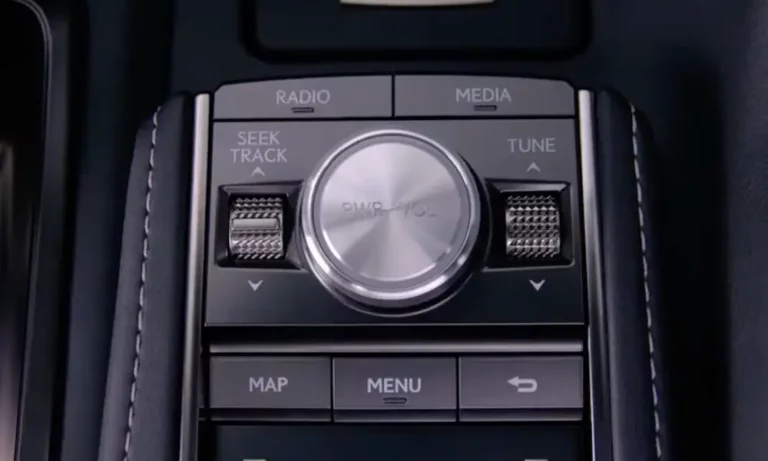
- Locate the power/volume knob on your audio system
- Press and hold this knob for 5-7 seconds
- Release when the screen goes blank
- Wait for the system to restart (usually takes about 30 seconds)
This method works on most newer Lexus models (2015 and later) and resolves approximately 70% of common audio system issues without losing your stored preferences.
Model-Specific Reset Methods
Different Lexus models may have slightly different reset procedures:
Newer Models (2020 and Later)
For Lexus models with touchscreens like the NX, RX, ES, and IS:
- Press the “MENU” button
- Select “Setup” on the touchscreen
- Go to “General”
- Choose “System”
- Select “System Reset”
Your system will restart automatically. This process typically takes about 2-3 minutes to complete.
Older Models (Pre-2015)
For older Lexus models without touchscreens:
- Press and hold the “PWR” or power button for 10 seconds
- If that doesn’t work, try pressing “AUDIO” and “TUNE/SCROLL” buttons simultaneously for 10 seconds
These legacy systems often require different approaches than newer touchscreen interfaces.
Resetting Bluetooth Connectivity
Bluetooth connection problems are common but usually easy to fix:
- Delete your Lexus from your phone’s Bluetooth devices list
- On your Lexus system, go to “Setup” > “Bluetooth” > “Registered Devices”
- Find your device and select “Delete”
- Restart both your phone and the Lexus audio system
- Pair your devices again from scratch
For persistent Bluetooth issues, make sure your phone’s operating system is updated. Spotty connections are often resolved by completing a fresh pairing process.
Hard Reset Methods for Serious Issues
If soft resets don’t solve your problem, these more drastic measures might:
Battery Disconnection Method
This is the nuclear option that resets all electronic modules but will erase saved settings:
- Turn off your vehicle completely
- Open the hood and locate the battery
- Disconnect the NEGATIVE terminal (black cap, marked with a “-” symbol)
- Wait 5-10 minutes to ensure all electronic memory is cleared
- Reconnect the terminal securely
- Start the vehicle and allow 5 minutes for the system to reboot
After a battery disconnection, you may need to enter a security code for older models. This code is typically found in your owner’s manual or glove compartment.
Fuse Replacement Check
If your audio system has completely failed, check the relevant fuses:
- Locate the fuse box (typically under the dashboard on the driver’s side or in the engine bay)
- Check your owner’s manual for the “AMP” or “AUDIO” fuse location
- Remove the fuse using the provided plastic tweezers
- Inspect for any breaks in the metal strip
- Replace with a new fuse of identical amperage if needed
The audio system in models like the LS 460 uses a 30A “AMP” fuse, and replacing this often restores functionality without software resets.
Fixing Specific Audio Problems
Radio Station List Problems
If your radio isn’t showing stations or saving presets:
- Press the “MENU” button
- Select “Audio”
- Choose “Station List”
- Select “Refresh” to initiate a new scan
This process forces the system to reload available channels and restore preset functionality.
Navigation System Freezes
For navigation-related glitches:
- Press and hold both the “MAP” and “MENU” buttons simultaneously for 10 seconds
- Wait for the system to restart
- If unsuccessful, try the battery disconnection method
Navigation systems sometimes require specific reset sequences different from the main audio components.
Erasing Personal Data Before Selling Your Lexus
Planning to sell your Lexus? Don’t forget to wipe your personal information:
- Go to “Setup” from the main menu
- Select “General”
- Choose “Delete Personal Data”
- Confirm deletion when prompted
This will erase Bluetooth pairings, navigation history, and driver profiles. Also remember to unlink your vehicle from the Lexus Link app by selecting “Settings” > “Delete Car.”
Software Updates: Keeping Your System Current
Outdated software can cause various issues. Check if your system needs an update:
- Connect your Lexus to Wi-Fi via the onboard hotspot
- Go to “Setup” > “General” > “System Updates”
- Select “Check for Updates”
Lexus periodically releases over-the-air updates to fix bugs and enhance features. Updates are typically installed automatically or manually through the settings menu.
Diagnostic Troubleshooting Table
| Issue | First Solution | Advanced Solution |
|---|---|---|
| Frozen screen | Soft reset (power button hold) | Battery disconnection |
| No audio | Check volume/mute settings | Check and replace “AMP” fuse |
| Bluetooth won’t connect | Delete and re-pair device | Update phone and system software |
| Radio stations missing | Refresh station list | Soft reset audio system |
| Navigation errors | Map button + Menu button hold | Software update or hard reset |
| System repeatedly crashes | Software update check | Dealership diagnostic scan |
When Professional Help Becomes Necessary
While most issues can be resolved with the methods above, some problems require dealer assistance:
- System gets stuck in a reboot loop even after battery disconnection
- Audio system shows error codes that persist after resetting
- Physical damage to screens or controls
- Problems that emerged immediately after a software update
Lexus dealerships have access to specialized Techstream diagnostic tools that can identify and fix complex system issues that DIY methods can’t address.
Hybrid and Electric Vehicle Considerations
If you own a Lexus hybrid model like the NX Hybrid:
- Avoid prolonged battery disconnection as this may affect hybrid battery calibration
- When performing resets, ensure the vehicle is in “READY” mode, not just accessory mode
- After any reset, allow the vehicle to run for 5-10 minutes before driving to ensure all systems properly initialize
Hybrid models integrate audio controls with energy management systems, so they require special handling during troubleshooting.
Anti-Theft System Awareness
After performing a hard reset or battery disconnection, you may encounter anti-theft protection:
- The system may request a security code before functioning
- This code is typically provided in your owner’s documentation
- If you’ve lost the code, contact a Lexus dealership with your VIN
- Newer models (post-2018) typically don’t require security codes after resets
This security feature protects your vehicle but can be frustrating if you don’t have the proper documentation.
Preventing Audio System Problems
To avoid future issues with your Lexus audio system:
- Keep software updated regularly
- Avoid extreme temperature exposure when possible
- Don’t force updates or shut off the vehicle during system updates
- Regularly delete unnecessary stored data and old device pairings
- Use only manufacturer-recommended accessories and charging cables
Preventative maintenance helps keep your infotainment system running smoothly for years to come.
Preserving Your Settings
Before performing any reset that might erase your settings:
- Take photos of your favorite radio presets
- Note your audio settings (bass, treble, balance)
- Write down paired Bluetooth devices
- Screenshot any custom display configurations
This simple preparation makes it much easier to restore your preferences after completing a reset.
By following this comprehensive guide, you should be able to resolve most issues with your Lexus audio system. Remember to start with the simplest solutions first before moving to more drastic measures. Your luxury driving experience deserves a properly functioning infotainment system!