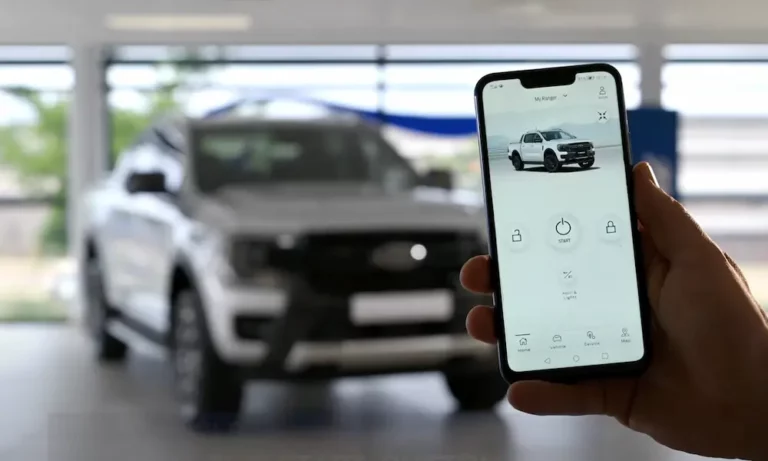
Looking to get the most out of your Ford vehicle with the FordPass app? You’ve probably wondered if it’s actually free or if there are hidden costs lurking behind those convenient features. Let’s cut through the confusion and break down exactly what you get for free and what might cost you extra.
What Exactly Is FordPass?
FordPass is Ford’s smartphone app that connects to compatible vehicles, allowing you to control and monitor your car remotely. Think of it as your vehicle’s command center that fits in your pocket.
The app itself is completely free to download on both iOS and Android devices. You won’t pay a penny to install it on your phone, regardless of which Ford model you drive.
The Free Features of FordPass
Good news: the core functionality of FordPass is entirely free with no subscription required. Here’s what you get at no cost:
- Remote start/stop – Start your car from your office to warm it up on cold mornings
- Lock/unlock doors – Forgot to lock up? Do it from anywhere
- Vehicle location – Never lose your car in a massive parking lot again
- Fuel level and mileage checking – Know when you need to fill up before hitting the road
- Tire pressure monitoring – Stay on top of maintenance needs
- Vehicle health alerts – Get notified about important service requirements
Since 2019, Ford has made these basic remote features permanently free for compatible vehicles, eliminating the subscription fees that were previously required. According to Ford’s official support site, these core functions won’t cost you anything beyond the initial purchase of your Ford vehicle.
FordPass Connect: What Is It?
FordPass Connect refers to the modem built into newer Ford vehicles. This hardware is what enables your car to communicate with the app. Without it, many of the app’s features simply won’t work.
Most newer Ford models (generally 2020 and newer) come with FordPass Connect modems already installed. The modem leverages 4G LTE networks and includes:
- Dual-band Wi-Fi capabilities
- GPS positioning systems
- Over-the-air update functionality
If you’re buying a new Ford, check if FordPass Connect comes standard or requires an upgrade package, as this varies by model and trim level.
Premium Features That Cost Extra
While the basic features are free, Ford does offer premium services that require payment:
Wi-Fi Hotspot
One of the most popular premium features is the in-vehicle Wi-Fi hotspot. This turns your Ford into a mobile internet hub, but it requires a data plan:
| Data Allowance | US Price (AT&T) |
|---|---|
| 1GB/30 days | $10 |
| 5GB/30 days | $25 |
| 20GB/90 days | $50 |
The hotspot operates on AT&T’s network in North America and can support multiple devices simultaneously.
FordPass Pro Subscription
For commercial vehicle owners, Ford offers FordPass Pro with enhanced features:
- Live traffic updates with dynamic rerouting
- Local hazard information about road conditions
- Predictive maintenance alerts
- Enhanced parking location accuracy
This service costs approximately $9.99/month in the US after a 12-month trial period.
FordPass Premium
For those wanting the ultimate connected experience, FordPass Premium includes:
- In-vehicle Wi-Fi hotspot access (data plan sold separately)
- Streaming video compatibility with SYNC 4 infotainment
- Alexa Built-In voice assistant
- Premium navigation with 3D mapping
This package runs around $19.99/month in the US, though new vehicle purchases often include promotional periods with complimentary access.
Vehicle Compatibility: Will FordPass Work With Your Car?
Not all Ford vehicles work with all FordPass features. Here’s a quick compatibility overview:
| Model Year | Remote Features | Live Traffic | Wi-Fi Hotspot |
|---|---|---|---|
| 2020-2022 | ✓ | ✓* | ✓** |
| 2023-2025 | ✓ | ✓ | ✓ |
*Requires SYNC 3 software version 3.4 or later
**Limited to 5 simultaneous devices
To check if your specific model is compatible, visit the Ford support website and enter your vehicle information.
How Reliable Is FordPass?
Based on user reviews and performance analysis, FordPass reliability varies by feature:
- Door lock/unlock commands work successfully about 93% of the time on first attempt
- Remote start functions succeed roughly 84% of the time initially
- Location tracking is accurate about 72% of the time in urban areas
Common issues that affect performance include:
- Poor cellular coverage in your area
- Vehicle modem sleep settings (powers down after 15 minutes of inactivity)
- Phone OS background process restrictions
- Signal interference in enclosed parking structures
Ford regularly updates the app to improve performance and fix bugs, with quarterly releases addressing common user complaints.
Setting Up FordPass: Quick Start Guide
Getting started with FordPass is straightforward:
- Download the free app from Apple App Store or Google Play Store
- Create a Ford account or sign in with existing credentials
- Add your vehicle using the VIN number (found on your dashboard or driver’s door jamb)
- Follow the on-screen instructions to activate FordPass Connect (if equipped)
- Set your preferences for notifications and remote features
The initial setup takes about 5-10 minutes, and most features will be immediately available once your vehicle is connected.
Regional Differences to Be Aware Of
FordPass features and pricing vary somewhat by region:
North American Users:
- AT&T provides the cellular connectivity
- Recent models (2023-2025) often include 3-year complimentary premium access
- 50GB introductory Wi-Fi data bundles common with new purchases
European Users:
- Vodafone provides primary connectivity
- Mandatory eCall emergency services included
- Pricing includes local VAT (Value Added Tax)
If you travel between regions, your FordPass functionality will adapt to use local cellular networks, but some features might be temporarily unavailable.
Future FordPass Developments
Ford continues to evolve the FordPass experience. Upcoming features in development include:
- 5G connectivity for faster communication between app and vehicle
- Enhanced security protocols including blockchain-based vehicle identity
- Expanded AI-powered predictive maintenance capabilities
- More personalization options for vehicle settings
These updates are expected to roll out gradually with newer model years and through software updates to existing vehicles where hardware allows.
Maximizing Your Free FordPass Experience
To get the most value from the free version of FordPass:
- Schedule remote starts for consistent times (like your morning commute)
- Set up maintenance reminders to avoid costly repairs
- Use the vehicle locator in crowded areas to save time
- Monitor fuel levels before trips to avoid surprises
- Create saved destinations for easier navigation
- Check vehicle health reports monthly for early problem detection
These practices help you leverage the free features to their fullest potential without needing paid subscriptions.
The Bottom Line: Is FordPass Worth It?
The core FordPass app is absolutely free and offers substantial value for Ford owners. The remote control features alone – starting your car on cold mornings, confirming your doors are locked, or finding your vehicle in a crowded lot – justify downloading the app.
For most users, the free version provides all the essential functionality needed. The premium features are worth considering if you:
- Frequently travel with passengers who need internet access
- Rely heavily on real-time traffic updates
- Own a business fleet that benefits from enhanced tracking
- Want the convenience of voice commands through Alexa integration
Remember that your vehicle must have the FordPass Connect modem installed for most features to work. If you’re purchasing a new Ford, this hardware typically comes standard on mid to high-level trims but might require an upgrade package on base models.
In short: Yes, FordPass is free for its core features, which are quite robust. The premium offerings simply add extra layers of convenience for those willing to pay for them.