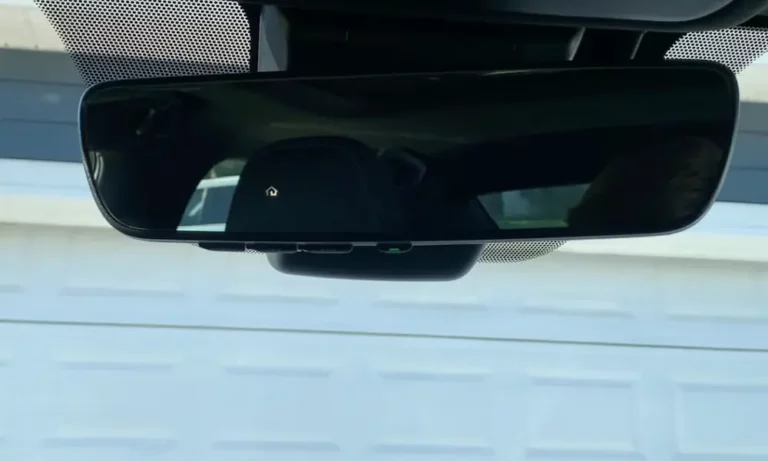
Is your Lexus garage door opener suddenly refusing to cooperate? You press the button and… nothing happens. It’s frustrating when technology that should make life easier becomes another headache instead. But don’t worry – most Lexus HomeLink issues have straightforward solutions you can tackle yourself.
Common Reasons Your Lexus Garage Door Opener Isn’t Working
Dead Remote Battery
The simplest explanation is often the right one. If your handheld remote control works inconsistently (or not at all) when trying to program your Lexus HomeLink system, check its battery first.
“Weak remote batteries often cause intermittent failures, as the pairing process demands higher power than routine operation,” notes HomeLink support. Try replacing the batteries and positioning the remote 1-3 inches from the HomeLink buttons when programming.
Incomplete Programming Process
Many Lexus owners struggle with programming errors rather than actual system malfunctions. The programming procedure must be followed exactly:
- Clear existing codes first by pressing and holding the two outer HomeLink buttons for 20-45 seconds until the indicator light changes from slow to rapid flashing
- Hold your garage door remote 1-3 inches from the HomeLink buttons during programming
- For rolling-code systems, press the “learn” button on your garage door motor
- Return to your vehicle and press the HomeLink button three times within 30 seconds
As explained in this helpful video guide, skipping any of these steps virtually guarantees programming failure.
Compatibility Issues
Modern garage door openers use encrypted rolling-code technology that older Lexus HomeLink systems struggle to communicate with. This is especially common in vehicles manufactured before 2016.
For example, a Lexus forum user reported: “I’ve tried everything to program my 2012 ES350 with my Liftmaster gate, but it just won’t work consistently.”
The solution? A compatibility bridge device that costs about $35-40 and plugs into a garage outlet. These devices (like the Liftmaster 893MAX) act as translators between older HomeLink systems and newer openers.
Blown Fuse
The HomeLink system in your Lexus shares electrical connections with other vehicle systems. In most models, it uses a 7.5A “DOME” fuse that also controls interior lighting.
To check if this is your problem:
- Locate your vehicle’s interior fuse box (often in the passenger-side kick panel)
- Find the DOME fuse (in the 2016-2022 RX350, it’s in the F31 slot)
- Check if it’s blown and replace if necessary
A Reddit user discovered this issue when installing a radar detector: “I accidentally tripped the 10A ECU-IG1 fuse while installing a radar detector, disabling both HomeLink and key fob functionality.”
Signal Interference Problems
Metal Obstructions
Your garage’s construction can significantly impact HomeLink performance. Aluminum garage doors, metal reinforcement, and even certain building materials can block or reflect the radio signals needed for operation.
Users report erratic operation when approaching aluminum-clad garage doors, as the metal surface reflects signals away from the opener’s antenna. Try these fixes:
- Straighten your garage door opener’s antenna (it’s usually hanging down from the motor unit)
- Install a signal repeater like the Genie 3071-R
- Position yourself closer to the garage when pressing the HomeLink button
Electronic Interference
Other electronic devices can disrupt your HomeLink signals:
- LED lighting
- WiFi routers
- Smart home devices
- Other radio-frequency equipment
Try temporarily turning off nearby electronics to see if your HomeLink performance improves. If it does, you’ll need to relocate either the interfering device or your garage door opener’s antenna.
Programming Your Lexus HomeLink System Correctly
The most common reason for HomeLink failure is incorrect programming. Follow this step-by-step guide:
Step 1: Clear Previous Programming
- Start your Lexus
- Press and hold the two outer HomeLink buttons simultaneously
- Keep holding for 20-45 seconds until the indicator light changes from slow to rapid flashing
- Release the buttons – all previous codes are now erased
Step 2: Program Your New Code
- Hold your garage remote 1-3 inches from the HomeLink buttons
- Press and hold both the HomeLink button you want to program AND the garage remote button
- Hold until the HomeLink indicator light changes from slow to rapid blinking
- Test the HomeLink button – if it works, you’re done!
Step 3: For Rolling-Code Openers (Most Modern Systems)
- Locate the “Learn” or “Smart” button on your garage door opener motor unit (usually purple, yellow, or red)
- Press this button – you’ll have about 30 seconds to complete the next step
- Return to your vehicle and press the programmed HomeLink button three times
- Your HomeLink system should now be synchronized
Failing to fully erase prior configurations—a common oversight—prevents successful reprogramming.
Compatibility Solutions for Newer Garage Door Systems
If you’ve confirmed your Lexus HomeLink system is incompatible with your newer garage door opener, you have options:
Use a Compatibility Bridge
For about $35-40, you can purchase a compatibility bridge that enables communication between older HomeLink systems and newer openers:
- Liftmaster 893MAX for Liftmaster/Chamberlain systems
- HomeLink Repeater for Genie and other brands
These devices plug into a standard outlet in your garage and translate signals between your car and garage door opener.
External Receiver Option
Some garage door manufacturers offer external receivers that can be programmed with your HomeLink system and then connected directly to your garage door opener’s terminals. This bypasses compatibility issues entirely.
Electrical Issues with Your Lexus HomeLink System
Blown Fuse Location and Replacement
The HomeLink system in Lexus models shares a 7.5A “DOME” fuse with interior lighting and vanity mirrors. Here’s how to check it:
| Lexus Model | Fuse Location | Fuse Type/Size | Also Controls |
|---|---|---|---|
| 2016-2022 RX350 | Passenger-side kick panel (F31) | 7.5A DOME | Interior lights, vanity mirrors |
| 2006 SC430 | Engine compartment | 15A “D/C Cut” | Multiple systems |
| 2019+ ES | Driver-side dash panel | 10A “ECU-IG1” | Key fob, HomeLink |
Even if a fuse doesn’t appear blown visually, it may still be faulty. Testing with a multimeter is recommended for confirmation.
Circuit Overload Warnings
Be cautious when adding aftermarket accessories like dashcams or radar detectors. Aftermarket accessories wired via mirror taps risk overloading the HomeLink circuit.
Always verify current draw specifications before splicing into mirror power lines.
Hardware Failures in Older Models
In some cases, particularly with older Lexus models, the HomeLink module itself might be faulty. For example, in the 2001–2010 SC430, water damage to the overhead console could damage the transceiver’s circuitry, requiring replacement of the entire module.
Signs of hardware failure include:
- Complete non-response from all HomeLink buttons
- Buttons that work inconsistently regardless of programming attempts
- Indicator lights that don’t illuminate or function abnormally
If you suspect hardware failure, a Lexus dealership can use their Techstream diagnostic tools to test signal output and module integrity. Depending on your vehicle’s age, replacement might be the best option.
Software and Firmware Updates
Post-2015 Lexus models (including the 2022 NX) support over-the-air HomeLink updates via the Lexus Interface app. If you have an older model with outdated firmware, you might need a dealership visit to refresh the transceiver’s codebase.
Firmware updates can resolve various bugs, including the frustrating “rapid blink” error during programming that many owners report.
Professional Diagnosis Tools
If you’ve tried everything and still can’t get your Lexus garage door opener working, it might be time for professional diagnostic testing:
- Lexus dealerships use Techstream diagnostic software that can pinpoint HomeLink issues
- Third-party OBD-II scanners like BlueDriver can perform basic RF signal checks
- Professional garage door installers often have signal strength meters to identify interference problems
Don’t hesitate to seek professional help for persistent issues—sometimes the problem might be complex and require specialized tools to diagnose properly.
Preventing Future HomeLink Problems
To keep your Lexus garage door opener working reliably:
- Replace the batteries in your handheld remotes annually
- Avoid placing metal objects near your HomeLink buttons or garage door opener
- Keep your garage door opener’s firmware updated (check manufacturer websites)
- Clean the contacts on your HomeLink buttons occasionally with electronics cleaner
- Check your vehicle’s fuses whenever you install new accessories
Taking these simple preventive steps can save you from future HomeLink headaches.
Remember, most Lexus garage door opener issues stem from programming errors, compatibility problems, or simple electrical issues. With the troubleshooting steps above, you should be able to get your system working again without an expensive trip to the dealership.