Is your Nissan Altima giving you the cold shoulder when you press your key fob buttons? Nothing’s more frustrating than standing in a parking lot repeatedly clicking a remote that won’t respond. Whether you’re late for work or juggling groceries, a non-functioning key fob turns a simple task into a major headache. Let’s get you back in control with some practical solutions you can try right now.
What Causes Nissan Altima Remote Key Failures?
When you press those buttons and nothing happens, several culprits might be to blame:
Dead or Weak Battery
The most common reason your Nissan Altima key fob stops working is simply battery depletion. These tiny CR2032 batteries typically last 2-3 years before needing replacement. Signs of a dying battery include:
- Decreased range (having to stand closer to the car)
- Intermittent operation (works sometimes but not always)
- Complete failure of all remote functions
Physical Damage to the Key Fob
Keys take a beating. They get dropped, crushed in pockets, and sometimes accidentally take swimming lessons. Physical damage that can cause failure includes:
- Cracked circuit boards
- Broken solder points
- Water damage to internal components
- Worn or damaged buttons
Vehicle Battery Issues
Your car’s systems need proper power to receive and process key fob signals. A weak vehicle battery might still start your car but fail to power the key receiver properly.
Signal Interference
Sometimes the problem isn’t with your key or car at all. Common sources of signal interference include:
- Other electronic devices nearby
- Being too close to powerful radio transmitters
- Tall buildings in urban environments
- Another Nissan with similar frequency nearby
Programming Loss
Key fobs can occasionally “forget” their programming after battery replacement or due to electronic glitches, requiring reprogramming to sync with your vehicle.
How to Replace Your Nissan Altima Key Fob Battery
The fastest fix is usually a fresh battery. Here’s how to replace it yourself:
Tools You’ll Need
- New CR2032 3V lithium battery
- Small flathead screwdriver
- Clean, dry workspace
Step-by-Step Battery Replacement
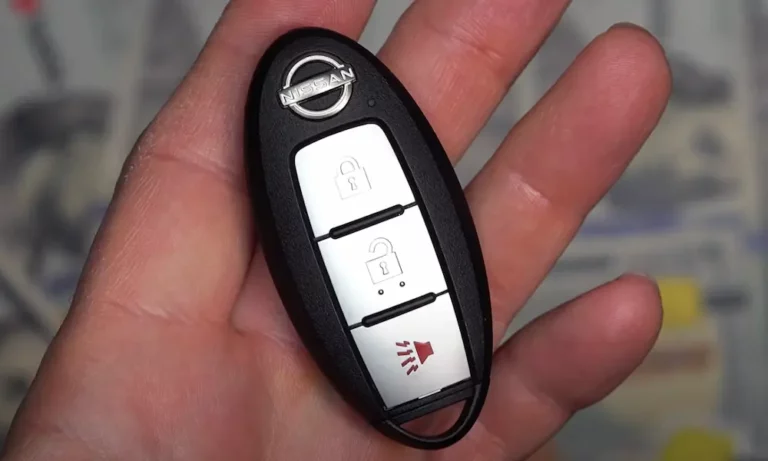
- Locate the small release button on your key fob and slide out the emergency mechanical key.
- With the emergency key removed, find the small notch along the edge of the fob.
- Carefully insert your flathead screwdriver into the notch and gently twist to separate the two halves of the key fob. Some models may have multiple seams.
- Once open, locate the circular battery (CR2032) and note its orientation (usually + side down).
- Use your screwdriver to carefully pry out the old battery.
- Insert the new battery in the same orientation as the old one, making sure it sits flat and secure in its housing.
- Before snapping the fob back together, check that all internal components are properly seated.
- Align the two halves of the key fob and press firmly until you hear them click together.
- Reinsert the emergency key and test your fob by pressing the lock/unlock buttons.
Common Battery Replacement Mistakes
- Installing the battery upside down
- Forcing components together and breaking internal parts
- Using the wrong battery type (always use CR2032)
- Not fully seating the battery in its housing
How to Reset Your Nissan Altima Key Fob
If a fresh battery doesn’t solve the problem, try resetting the key fob:
Basic Reset Method
- Enter your vehicle and close all doors.
- Insert your key into the ignition (or place it nearby for push-button start models).
- Rapidly cycle the ignition from OFF to ON position (without starting the engine) 6 times within 10 seconds.
- Your hazard lights should flash twice, indicating you’ve entered programming mode.
- Press any button on your key fob within 1 minute.
- The hazard lights will flash again to confirm successful programming.
Alternative Programming Method
For newer Altima models with push-button start:
- Make sure all doors are closed and the vehicle is off.
- Press and hold both the LOCK and UNLOCK buttons simultaneously for approximately 15 seconds.
- Release both buttons, then quickly press LOCK once.
- Press UNLOCK once immediately after.
- Test the key fob functions to see if it’s been successfully reset.
How to Start Your Nissan Altima with a Dead Key Fob
Even with a completely dead key fob, you can still start and drive your Altima:
For Push-Button Start Models
- Locate the key fob port (a small slot usually near the steering column or in the center console).
- If your model doesn’t have a dedicated port, hold the key fob directly against the start button.
- While holding the fob in position, press the brake pedal and push the start button normally.
- The car should detect the key’s internal chip even without battery power.
For Traditional Key Models
- Use the emergency mechanical key that slides out from your fob.
- Insert this key into the door lock to manually unlock your vehicle.
- Once inside, insert the entire key fob into the ignition slot and start normally.
Diagnosing Internal Key Fob Issues
If battery replacement and resets don’t work, you might have internal damage:
Checking for Broken Contacts
- Open your key fob using the steps above.
- Inspect for bent or corroded contact points where the buttons press against the circuit board.
- Look for any loose components or broken solder joints.
- Check for water damage indicators (usually greenish corrosion).
Button Contact Repair
- If buttons feel mushy or unresponsive, remove the rubber button pad.
- Clean the conductive pads on the underside of the buttons with isopropyl alcohol.
- Use a pencil eraser to gently clean the corresponding contact points on the circuit board.
- Reassemble and test the buttons for improved response.
Key Fob Range Issues: When It Only Works Up Close
Sometimes your key works, but only when you’re standing right next to your Altima:
Range Improvement Tips
- Replace the battery with a fresh, high-quality one (cheap batteries may work but with reduced range).
- Hold the key fob up high, ideally at shoulder level when pressing the buttons.
- Stand close to your Altima and slowly back away while testing to determine maximum range.
- Point the key toward your car and press the button firmly (don’t just tap it).
Testing for Interference
- Try your key in different locations away from other electronic devices.
- Move away from large metal objects or buildings that might block signals.
- If range improves in certain locations, interference is likely the issue.
Vehicle-Side Troubleshooting
Sometimes the problem isn’t with your key but with your Altima’s receiving systems:
Vehicle Battery Check
- Test your car’s 12-volt battery using a multimeter or battery tester.
- A reading below 12.4 volts suggests your battery needs charging or replacement.
- Even slightly weak batteries can affect keyless entry systems while still starting the engine.
Checking Fuses
- Locate your Altima’s fuse box (check your owner’s manual for the exact location).
- Find the fuse labeled for the keyless entry system (often called “BCM” or “Door Lock”).
- Inspect the fuse for any breaks in the metal filament.
- Replace any blown fuses with ones of identical amperage.
| System Component | Fuse Location | Typical Fuse Amperage |
|---|---|---|
| Body Control Module | Interior fuse box | 10A or 15A |
| Door Lock System | Interior fuse box | 20A |
| Keyless Receiver | Interior fuse box | 7.5A |
| Push-Button Start | Interior fuse box | 10A |
When DIY Isn’t Enough: Professional Solutions
If you’ve tried everything and your key still refuses to work, it’s time for professional help:
Dealership Services
Nissan dealerships can:
- Diagnose complex electronic issues beyond DIY capability
- Replace damaged internal circuitry in your key fob
- Program new key fobs to your specific vehicle
- Update your car’s receiver module if necessary
Mobile Locksmith Options
Professional automotive locksmiths often offer:
- Lower prices than dealerships
- Convenient mobile service at your location
- Ability to program most Nissan keys without dealer equipment
- Emergency assistance for lockouts or complete key failures
Replacement Cost Expectations
| Service | Typical Cost Range |
|---|---|
| Key Fob Battery Replacement | $5-$10 (DIY) |
| Key Fob Programming (existing fob) | $50-$100 |
| Complete Key Fob Replacement | $150-$300 |
| Emergency Locksmith Service | $75-$150 plus parts |
Preventative Maintenance for Your Nissan Key
Keep your key fob working longer with these preventative measures:
Protecting Your Key Fob
- Use a silicone key cover to protect against drops and moisture.
- Avoid exposing your key to extreme temperatures (don’t leave it in a hot car).
- Keep your key away from magnets, which can interfere with electronic components.
- Replace batteries proactively every 2 years, even if it’s still working.
Signs It’s Time for a Battery Change
Don’t wait for complete failure. Replace your battery when you notice:
- Having to press buttons multiple times
- Decreased operating range
- Inconsistent operation
- Dashboard “key not detected” warnings
Frequently Asked Models with Remote Key Issues
While all Nissan Altima models can experience key fob problems, some generations are more prone to specific issues:
2007-2012 Altima
These models often develop worn button contacts that require internal cleaning or replacement. The battery replacement process is straightforward but requires careful handling of the plastic tabs.
2013-2018 Altima
Push-button start models in this generation sometimes experience issues with the key detection system. The fob design changed to a more streamlined shape, and battery replacement requires more careful separation of the case.
2019-Present Altima
The newest generation uses more advanced Intelligent Key technology with improved range but may require dealer programming when problems occur. These models have the most sophisticated anti-theft features, making DIY key programming more challenging.
Tech Evolution: Nissan’s Key Systems Through the Years
The Nissan Altima has seen several evolutions in its key technology:
Traditional Keys (Pre-2007)
Earlier Altima models used basic transponder keys with separate remote fobs for locking/unlocking.
Intelligent Key System (2007+)
Introduced the ability to keep the key in your pocket while locking/unlocking doors via door handle buttons and starting the engine with a push button.
Enhanced Security (2013+)
Added rolling code technology that changes the key’s digital signature with each use, preventing code grabbing by potential thieves.
Smart Features (2019+)
Newest models include features like:
- Remote engine start from extended distances
- Automatic door unlocking on approach
- Customizable driver settings linked to specific key fobs
- Smartphone app integration for some functions
By understanding the common issues and solutions for your Nissan Altima remote key problems, you can save time, money, and frustration. Most key fob issues can be resolved with simple DIY fixes, but don’t hesitate to seek professional help for more complex problems.