Your Nissan key fob stopped working, and now you’re standing in a parking lot looking confused. Before you call a dealer and hand over $500, read this. Most causes are cheap and easy to fix yourself — and a few surprises on this list could save you from an expensive mistake.
Start Here: The Dead Battery Check
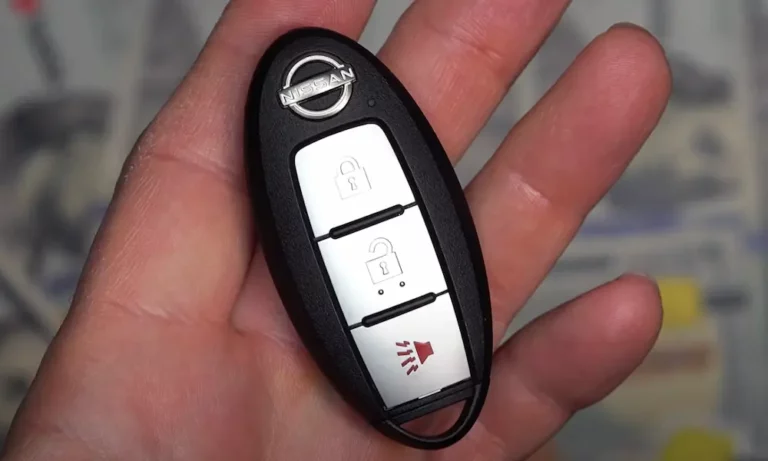
The most common reason a Nissan key fob not working is a dead or dying coin cell battery. Nissan fobs run on either a CR2025 or CR2032 battery, and both cost under $5 at any pharmacy or hardware store.
Here’s a quick way to tell if your battery’s dying before it fully quits:
- You need to stand right next to the door for it to work
- You see an intermittent “Key ID Incorrect” message on your dashboard
- The fob works fine indoors but struggles outside in the cold
Cold weather is a sneaky culprit here. Low temperatures reduce battery voltage temporarily, which can drop it below the threshold the fob needs to transmit. A brand-new CR2032 delivers about 225 mAh, compared to just 165 mAh for a CR2025 — so if your fob takes a CR2025, check whether the housing has room for the slightly thicker CR2032. Many do, and it’ll last longer.
| Battery Type | Voltage | Capacity | Thickness |
|---|---|---|---|
| CR2025 | 3.0V | ~165 mAh | 2.5 mm |
| CR2032 | 3.0V | ~225 mAh | 3.2 mm |
Your Car’s 12V Battery Matters Too
Here’s one most people miss: your car’s own battery can make the Nissan key fob not working problem appear out of nowhere.
The Intelligent Key system’s antennas and receivers run off your car’s 12V battery. When that battery drops below roughly 12.0–12.2 volts, the Body Control Module (BCM) starts rationing power. The key detection system gets weaker, and suddenly your fob seems dead — even if it’s fine.
Watch for these signs:
- “No Key Detected” warnings on cold mornings
- The problem goes away after driving for a while (battery recharges)
- You haven’t driven the car in several days
Nissan Leaf owners get hit especially hard here. Even with a full charge on the high-voltage traction battery, a failing 12V accessory battery will lock you out completely. The car looks fine but won’t enter “Ready” mode.
Interference: The Invisible Problem
Sometimes the fob is fine, the car battery is fine, and the Nissan key fob still not working. That’s when radio frequency interference (RFI) becomes the suspect.
Nissan’s Intelligent Key system transmits at 315 MHz or 433 MHz depending on your model and region. Plenty of everyday items broadcast noise at similar frequencies. Nissan even issued Technical Service Bulletin NTB13-107G specifically to address this issue.
Common interference sources:
- Your phone in the same pocket as your fob
- Cheap USB chargers plugged into your car’s accessory ports
- Aftermarket dash cameras and GPS units
- Parking near cell towers, airports, or power lines
- Metallic window tint (it acts like a signal cage)
- RFID-blocking pouches or metal-heavy bags
The fix is straightforward: unplug the USB charger, move your phone to a different pocket, and try again. If the fob works instantly, you found your culprit.
| RFI Diagnostic Check | Why It Matters |
|---|---|
| Unplug USB chargers | Cheap chargers emit noise that drowns out fob signals |
| Separate phone from fob | Phones attenuate the UHF signal at close range |
| Check your parking location | Cell towers and power lines saturate the 315/433 MHz band |
| Remove RFID-blocking items | Blocks signal from reaching interior antennas |
| Check for metallic window tint | Can create a partial Faraday cage effect |
The Physical Fob: Buttons and Battery Contacts
If batteries and interference aren’t the problem, look at the fob itself. Key fobs take a beating — dropped on concrete, tossed around in bags, soaked in rain.
Worn button pads: Nissan fobs use rubber membranes with small conductive carbon pads underneath. Those carbon pads wear down over time, especially on the unlock button (the most-pressed one). When you’re pressing harder than usual to get a response, that’s the carbon layer wearing thin. A quick fix: clean the PCB with 99% isopropyl alcohol. Some people carefully apply a small piece of aluminum foil to the pad to restore conductivity — it sounds odd, but it actually works.
Corroded battery contacts: The spring-loaded metal prongs that hold your battery can lose tension or oxidize over time. If the fob works when you press hard on the battery but not otherwise, gently pry the prongs upward slightly to increase contact pressure. That tiny fix can bring a “dead” fob back to life.
Your Nissan Key Fob Not Working After Signal Loss? Re-Sync It
Key fobs use a rolling security code that changes with each use. If you pressed the fob buttons repeatedly while far from the car, it may have fallen out of sync with the BCM.
This doesn’t mean you need a new key. It means you need to re-establish the communication link. For many Nissan models with a traditional ignition slot, here’s the manual re-sync sequence:
- Get in the car and manually lock all doors with the power lock switch
- Insert and remove the key from the ignition at least six times within 10 seconds — your hazard lights will flash twice if it worked
- Insert the key and turn it to the “ACC” (Accessory) position
- Press any button on the fob — hazard lights flash again to confirm sync
- To add more fobs, manually lock and unlock the doors, then press a button on the next fob
For push-button start Nissans, the re-sync process is different. Hold the interior lock button for five seconds, then press unlock within the set timeframe. This re-establishes an existing key’s communication — it won’t program a brand new fob, but it handles sync issues without any tools.
If Your Fob Battery Is Completely Dead: Emergency Start
A fully dead fob battery doesn’t mean you’re stranded. Nissan built a backup system into every push-button model.
For 2013–2024 models: Hold your fob directly against the Start/Stop button and press it. An inductive coil behind the button powers the fob’s passive transponder just enough to authenticate — no battery needed.
For 2007–2012 models: There’s a physical key slot near the steering column. Insert your fob into the slot and turn the ignition. It reads the fob inductively, same principle.
Either way, your first step is the hidden mechanical key blade inside the fob itself. Slide it out and use it to unlock the driver’s door manually.
| Model Generation | Emergency Start Method | Where to Find It |
|---|---|---|
| 2007–2012 Altima | Fob Slot / Port | Left of steering column |
| 2013–2024 Altima | Fob to Start Button | On the Start/Stop button |
| 2014–2024 Rogue | Fob to Start Button | On the Start/Stop button |
| Nissan Leaf | Fob to Start Button | On the Start/Stop button |
The 2014–2018 Rogue Problem You Need to Know About
If you drive a 2014–2018 Nissan Rogue, pay close attention to this section.
These specific vehicles have a BCM that can permanently fail — get “bricked” — during key programming. This isn’t a technician error. It’s a firmware flaw. When a diagnostic tool attempts to pull the security PIN from the BCM, the module can enter an infinite loop or suffer an EEPROM write failure. The result: a car that won’t start, won’t communicate with scan tools, and needs a full BCM replacement costing over $2,000.
Reputable locksmiths are aware of this risk and require customers to sign a liability waiver before attempting any programming. If someone says they’ll program a key for your 2014–2018 Rogue without mentioning this risk, that’s a red flag.
| BCM Risk Level | Affected Part Numbers (Partial) | What to Do |
|---|---|---|
| High Risk | 284B1-4BA0A, 4BA1A, 4BA2A | Dealer only; sign waiver first |
| Moderate Risk | 284B1-4BA3A, 4BA5A | Use stable power supply during programming |
| Lower Risk | 284B1-4BA6A and later | Standard programming precautions apply |
Dealer vs. Locksmith: What It Actually Costs
A new Nissan Intelligent Key isn’t cheap, but there’s a significant price gap between your two main options.
| Service | Dealership | Automotive Locksmith |
|---|---|---|
| Key Fob (OEM or Refurb) | $150–$400 | $100–$250 |
| Programming Fee | $100–$150 | $50–$100 |
| Emergency Key Cut | $30–$60 | Included |
| Towing (if needed) | $100–$200 | $0 (mobile service) |
| Total Estimate | $380–$800 | $150–$400 |
A qualified automotive locksmith uses professional tools like the Autel MaxiIM or Smart Pro that fully interface with Nissan’s NATS system. They can see exactly how many keys are registered to your car and wipe lost keys from the system — a critical security step if a fob was stolen. The dealership uses the proprietary Nissan Consult-III Plus, but for most standard key work, the results are functionally identical.
Diagnostic Trouble Codes Worth Knowing
If you have an OBD2 scanner, these are the codes that point directly to Intelligent Key system failures. According to Nissan’s own NHTSA-filed technical service bulletin, the most common codes are:
- B2191 — BCM can’t authenticate the fob signal
- B2192 — Communication failure between BCM and ECU
- B2562 — Low voltage (points to a weak 12V car battery)
B2562 is the fastest to resolve. Jump the battery or replace it, clear the code, and test the fob again. If B2191 or B2192 persist after a battery fix, you’re looking at either a corrupted rolling code, an RFI issue, or a BCM problem that needs professional attention.
Quick Troubleshooting Checklist
Before spending any money, run through this list in order:
- ✅ Replace the fob battery (CR2025 or CR2032)
- ✅ Test the car’s 12V battery voltage (should be above 12.2V)
- ✅ Unplug all USB chargers and aftermarket accessories
- ✅ Move your phone away from the fob and try again
- ✅ Inspect battery contacts and gently bend prongs upward if loose
- ✅ Try the manual re-sync sequence for your model
- ✅ Test the emergency start (fob against Start button)
- ✅ Check for OBD2 codes with a scanner
- ✅ If it’s a 2014–2018 Rogue, proceed carefully with any programming
Most Nissan key fob problems land somewhere in the first three steps. The fix costs less than $10 and takes under five minutes. The trickier issues — BCM faults, hardware damage, and rolling code corruption — do sometimes need a professional, but you’ll go in knowing exactly what’s wrong and what it should cost.