Your Ford key fob stopped working, and you’re not sure if it needs a new battery or a trip to the dealer. Good news — it’s almost always the battery, and you can fix it yourself in under five minutes. This guide covers every Ford fob type, the right battery for each one, and what to do if swapping the battery doesn’t solve it. Stick around to the end.
First, Figure Out Which Ford Key Fob You Have
Before you buy a battery, you need to know your fob type. Ford uses three main remote key designs, and each one opens differently and takes a different battery.
Here’s how to tell them apart:
- Integrated Keyhead Transmitter — The metal blade is permanently attached to the plastic head. No retractable blade, no flip mechanism. Common on base-trim F-150s and Transit vans.
- Flip Key — The blade folds into the fob body. Press a button and the blade springs out. Common on the Escape, Focus, and F-150 XLT.
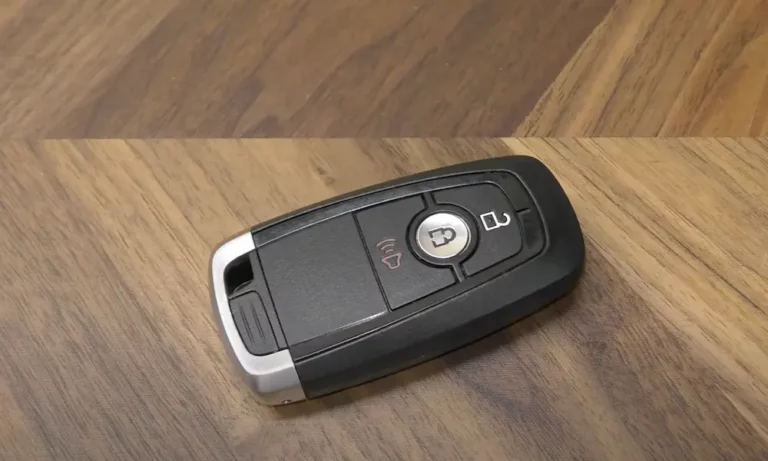
- Intelligent Access Key (Smart Key) — No visible blade at all. It’s hidden inside. You’ll find this on the Explorer Limited, F-150 Platinum, Mustang, and most push-button-start models from 2015 onward.
| Remote Type | Blade Style | Common Models |
|---|---|---|
| Integrated Keyhead | Fixed, permanent | F-150 XL, Transit, Fiesta S |
| Flip Key | Folds in/out | Escape, Focus, F-150 XLT |
| Intelligent Access | Hidden emergency blade | Explorer, F-150 Platinum, Mustang |
Got your fob type? Great. Now let’s get the right battery.
Which Battery Does Your Ford Key Fob Need?
Ford remote keys use three-volt lithium coin batteries. The numbers on each battery describe its size — diameter and thickness. Getting the wrong one means your fob either won’t close properly or won’t make good contact with the terminals.
| Battery | Diameter | Thickness | Best For |
|---|---|---|---|
| CR2025 | 20mm | 2.5mm | Slim smart keys (teardrop shape, 2013–2017) |
| CR2032 | 20mm | 3.2mm | Flip keys, traditional remotes |
| CR2450 | 24.5mm | 5mm | Modern 5-button smart keys (2018–2024) |
A CR2025 in a CR2032 slot is too thin — it’ll lose contact with the terminals and give you intermittent failures. A CR2450 forced into the wrong housing can crack the plastic clips entirely.
Brand matters too. Stick with Duracell or Energizer. Generic batteries often have unstable voltage, which causes the fob to cut out before the battery is actually dead.
What You’ll Need Before You Start
Gather these tools first — it’ll save you from scratching your fob or snapping a clip:
- Small flathead screwdriver (1.4–2.4mm works best)
- Plastic trim pry tool — optional but recommended to avoid scratching the casing
- Clean lint-free cloth or gloves — don’t touch the new battery with bare fingers
That last point isn’t just fussiness. The oils on your skin leave a film on the battery surface that can reduce conductivity and speed up corrosion on the terminals.
One more thing: if you open the fob and see a greasy residue on the circuit board or terminals, don’t wipe it off. That’s an engineered lubricant that prevents oxidation. Leave it alone.
How to Replace the Battery in a Smart Key (2017–2024 Models)
This is the 5-button Intelligent Access fob used in the F-150, Explorer, and Expedition. It takes a CR2450 battery, positive side facing up.
Step-by-step:
- Find the small sliding release button on the back or side of the fob.
- Slide it and pull out the hidden emergency metal key blade.
- Look inside the cavity where the blade was stored — you’ll see a small slot or notch.
- Insert the tip of the emergency key (or a small flathead) into that slot and twist gently.
- Work slowly around the seam to release the two halves. The clips are tight and can be brittle in cold weather.
- Pop out the old CR2450 using the edge of your screwdriver.
- Install the new battery with the positive (+) side facing up — that’s the side with the model number printed on it.
- Snap the case back together and re-insert the emergency key.
How to Replace the Battery in a Flip Key or Integrated Transmitter
These two styles are still in millions of Ford vehicles — Fusion, older Escapes, F-150 XLT, and Focus. Both take a CR2032 battery, positive side up.
For the Flip Key:
- Press the release button to extend the blade.
- Look in the recess where the blade normally sits — there’s a small notch or tab.
- Insert a flathead tool and pry upward to pop the battery cover.
- Swap the CR2032, positive side up, and snap the cover back.
For the Integrated Keyhead Transmitter:
- Find the seam along the side of the plastic key head or the slot near the keyring.
- Insert a wide flathead and twist to separate the two halves.
- Check the metal battery contacts — years of use can bend them flat. If they’re not springy, gently bend them back so they make firm contact with the new battery.
- Install the CR2032 positive side up and snap the case shut.
The Teardrop Fob: A Special Case
The teardrop-shaped smart key used on the 2013–2017 Fusion, Mustang, and Edge is unique — it uses two CR2025 batteries stacked together.
Installation order matters here:
- Place the first battery in with the positive side facing down.
- Place the thin plastic insulator on top of it.
- Place the second battery on top with the positive side facing up.
Miss that insulator or put both batteries facing the same direction, and the fob won’t work — and you risk a short circuit that permanently damages the transmitter.
Does Replacing the Battery Reset Your Programming?
Usually, no. Ford’s Body Control Module (BCM) keeps your key’s digital signature stored even when the fob has no power. A simple battery swap doesn’t wipe the pairing.
But if your battery died slowly over time, the fob may have sent corrupted signals that the car eventually rejected. That’s called desynchronization, and it needs a quick fix.
Re-syncing a Traditional Key Fob (Flip or Integrated)
Use this 8-cycle ignition protocol if your buttons don’t respond after a battery swap:
| Step | Action | Why It Works |
|---|---|---|
| 1 | Close all doors | Gets BCM into ready state |
| 2 | Open driver’s door | Starts the entry sequence |
| 3 | Press UNLOCK on door panel | Confirms lock system is live |
| 4 | Cycle ignition OFF → RUN 8x fast | Triggers key learning mode |
| 5 | Watch for door locks to cycle | Confirms you’re in programming mode |
| 6 | Press any fob button | Sends new rolling code to BCM |
| 7 | Repeat for other remotes | Syncs all keys at once |
| 8 | Turn ignition OFF | Saves settings and exits mode |
Complete all 8 cycles within 10 seconds. If the locks don’t cycle at step 5, you went too slow — start over.
Re-syncing an Intelligent Access Key
Push-button-start Fords use an inductive backup slot instead of an ignition cylinder. Place the fob in that slot and start the car normally — it automatically re-syncs the remote functions with the vehicle’s computer.
My Fob Still Doesn’t Work — Now What?
If a fresh battery and re-sync don’t fix things, one of these is likely the culprit:
Worn-out buttons: The micro-switches inside your fob are rated for thousands of presses, but solder joints can crack from drops over time. A sign: the panic button works but the unlock button doesn’t. If the LED doesn’t flash when you press a specific button, that switch has likely failed.
Radio frequency interference: Ford remotes broadcast on 315MHz — a busy spectrum. Aftermarket security systems, smart home hubs, and even some LED shop lights can block the fob’s signal. If your remote works in a parking lot but fails in your garage, look for nearby electronics causing interference.
Dirty terminals: Lint and dust accumulate in the battery compartment and can create an insulating layer between the battery and the contacts. Clean the terminals with a small amount of high-purity isopropyl alcohol on a cotton swab. Make sure the contacts are slightly sprung so they press firmly against the battery.
Your Ford Fob Is Dead and You’re Stuck — Here’s the Fix
Every Ford Intelligent Access key has a passive transponder chip inside it. That chip doesn’t need a battery — the car powers it inductively through the backup slot.
When your dash shows “No Key Detected,” find your model’s backup slot and place the fob there:
| Ford Model | Backup Slot Location |
|---|---|
| F-150 / Super Duty | Under rubber mat in front cup holder or center console |
| Explorer | Bottom of rear cup holder or inside center console bin |
| Fusion / MKZ | Center console near the USB ports |
| Mustang | Bottom of center console cup holder |
| Escape / Bronco Sport | Center console or base of steering column |
| Expedition | Front cup holder under removable liner |
| Transit / Transit Connect | Cup holder or dashboard depression |
Place the fob in the slot — buttons typically facing up — press the brake firmly and hit START. The car reads the chip directly and starts normally. You’re not stranded — just need a new battery when you get home.
One Thing That Silently Drains Your Battery
Here’s something most people don’t know: keeping your key fob within 10 yards of your parked car causes constant back-and-forth signaling between the fob and the car. Both sides keep waking up, expecting you to walk over. This “parasitic signaling” drains the fob battery and can even drain your car’s main battery over time.
Store your keys at least 30 yards from your parked car. This lets both systems enter a deep sleep state and gets you significantly more life from each battery.
Ford remote key batteries typically last one to three years. Smart keys drain faster because they’re always listening for the car. When you’re done, drop the old battery at an automotive retailer — most states prohibit lithium cells in household trash, and most auto parts stores take them for free.