Your Lexus key fob is acting up. Doors won’t unlock from across the parking lot. The push-button start ignores you. Sound familiar? A dead battery is usually the culprit — and fixing it takes about three minutes. This guide covers every Lexus key type, the exact battery you need, and what to do when a fresh battery still doesn’t fix things.
First, Figure Out Which Lexus Key You Have
Not all Lexus keys work the same way. Before you buy a battery, identify your key type.
| Key Type | What It Looks Like | Typical Models |
|---|---|---|
| Integrated Fob | Chunky plastic head on metal key | 1998–2009 GS, RX, ES |
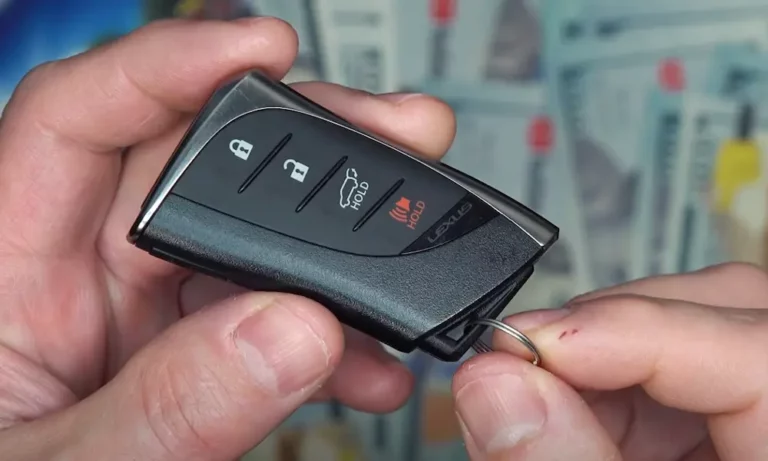
| Smart Access Fob | Separate pocket remote, no attached key | 2010–present NX, RX, IS |
| Smart Card / Wallet Key | Thin, credit-card size | LS, LX, select IS trims |
Each type takes a different battery and opens differently. Getting this wrong wastes time and money.
Which Battery Does Your Lexus Key Need?
Lexus officially lists battery sizes by model. Here’s a quick reference:
| Battery | Voltage | Lexus Application |
|---|---|---|
| CR1616 | 3V | Early SC430, GS300 |
| CR1632 | 3V | GX460, LS460, late RX models |
| CR2016 | 3V | Early RX350, LFA |
| CR2032 | 3V | Modern ES, NX, RX, IS (2014–present) |
| CR2412 | 3V | Smart Card / Wallet Key only |
The CR2032 fits most modern Lexus key fobs. It costs between $2 and $8 at any pharmacy, hardware store, or online. Stick with brands like Panasonic or Energizer — cheaper aftermarket batteries often have inconsistent voltage and can fail within weeks.
Signs Your Lexus Key Battery Is Dying
Don’t wait until the fob stops working entirely. These signs mean the battery is fading:
- Shrinking range — You used to unlock from 30 feet away. Now you’re pressing the button with your nose on the window.
- Dashboard warning — Post-2010 Lexus models show a “Key Battery Low” message on the Multi-Information Display.
- Dim LED — Press any button. The red LED should flash brightly. A flicker or no light means the voltage has dropped.
- Audible chimes — Some models beep when you switch off the ignition to warn you about a weak key.
Catch it early. A completely dead key creates more hassle than a timely $5 battery swap.
How to Replace a Lexus Smart Access Fob Battery
This covers most Lexus models from 2010 onward. You’ll need a new CR2032 battery and a small flathead screwdriver (or just the key blade itself).
Step 1: Pull Out the Emergency Key Blade
Flip the fob over and find the small release latch — it’s usually labeled “PUSH” or has a sliding icon. Press it and pull the metal key blade out. Set the blade aside — you’ll use it in the next step.
Step 2: Open the Fob Casing
Look inside the slot where the key blade lived. You’ll see a small notch or groove in the plastic frame. Insert the tip of the key blade into that notch and twist gently. The two halves of the casing will separate. Wrap the blade tip in a piece of tape first if you want to protect the plastic from scratches.
Step 3: Swap the Battery
Inside, you’ll find a small plastic module (sometimes clear, sometimes black) holding the circuit board and battery. Lift it out carefully. Use a fingernail or non-conductive toothpick to pop the old battery out of its clips. Insert the new CR2032 with the positive (+) side facing up — that’s the flat side with the engraved model number printed on it.
Step 4: Snap It Back Together
Drop the module back in, then press the two case halves together starting from the top. Work toward the bottom until you hear a clear “click.” Slide the key blade back in until it locks.
Press any button. If the red LED flashes brightly, you’re done.
How to Replace a Lexus Smart Card Battery
The Wallet Key needs a CR2412 — a thinner, rarer battery than the CR2032. Handle it carefully. The components inside are tiny.
- Find the emergency key blade release on the card’s edge and pull the blade out.
- Use a fingernail or small screwdriver to slide the battery tray out from the card’s body.
- Remove the old CR2412 and check the polarity markings on the tray frame.
- Insert the new battery with the positive (+) side oriented exactly as the tray markings show.
- Slide the tray fully back into the card, then reinsert the emergency key to lock it in place.
A misaligned battery in the Smart Card can prevent the tray from sliding in — or cause a short. Take your time with orientation.
The Fob Still Doesn’t Work After a Battery Change?
Fresh battery in, but the key still acts dead? Two things might be going on.
Clean the Battery Contacts
Open the fob again. Look at the small metal “finger” contacts that touch the battery. White powder or a greenish film means oxidation. Dip a cotton swab in 90%+ isopropyl alcohol and scrub the contacts gently. This dissolves the corrosion without damaging the circuit board. If the metal fingers look flat and lifeless, nudge them up about half a millimeter with a toothpick to restore contact pressure.
Resync the Fob to Your Vehicle
If the battery sat dead for a long time, the key and your car’s Body Control Module may have lost sync. This YouTube walkthrough covers the resync steps in detail.
For older Lexus models (roughly 1998–2009), you can try a manual “door cycle” sequence without any special tools:
| Stage | What You Do | What Happens |
|---|---|---|
| Start | Close all doors, open driver’s door | System enters ready state |
| Step 1 | Insert and remove key from ignition twice | Security light may blink |
| Step 2 | Cycle door locks 5 times | Handshake begins |
| Step 3 | Close and reopen driver’s door | State transition |
| Step 4 | Cycle door locks 5 times again | Confirmation signal |
| Step 5 | Insert key, turn ON then OFF | ECU enters programming mode |
| Finish | Remove key | Door locks cycle automatically |
Once the locks cycle on their own, hold LOCK and UNLOCK on your fob for 1.5 seconds, then press LOCK once more. The car will cycle its locks to confirm the code was accepted.
What If the Battery Is Completely Dead Right Now?
You’re in a parking lot. The fob is dead. Here’s what to do:
- Use the emergency key blade to manually unlock the driver’s door.
- Get in and press the brake pedal firmly.
- Hold the fob (Lexus logo facing the button) directly against the ENGINE START/STOP button.
- The button’s built-in antenna powers the fob’s transponder chip wirelessly — no battery needed for this.
- When the dashboard shows the key icon or the button glows green, press it to start.
This works because Lexus engineers built in an electromagnetic induction fail-safe. The car’s electrical system powers the key chip just long enough to authenticate.
Make Your Lexus Key Battery Last Longer
A few habits can double your battery’s lifespan.
Activate Battery-Saving Mode:
- Hold the LOCK button.
- While still holding LOCK, press UNLOCK twice.
- The LED flashes four times — battery-saving mode is on.
In this mode, Smart Access is disabled. The car won’t unlock when you grab the handle, and push-button start won’t detect the key passively. Just press any button to wake the fob back up. This is great for spare keys or cars you don’t drive every day.
Keep the Fob Away From Electronics:
Induction cookers, wireless chargers, laptops, and televisions can trigger the fob’s receiver and keep it in an “awake” state, draining the battery faster. Store the key at least three feet from these devices.
Check the Silicone Gasket:
Every Lexus Smart Key has a silicone gasket running around the inside edge of the casing. It keeps moisture out. During a battery change, this gasket can slip out of its groove. If it’s not perfectly seated, water can reach the circuit board. Before snapping the case shut, inspect the gasket carefully and press it back into its channel if it’s moved.
What’s This Costing You?
| Option | Typical Cost | Notes |
|---|---|---|
| DIY battery only | $2–$8 | CR2032 or CR1632 from any store |
| Dealership battery swap | $20–$100 | May include diagnostic + fob cleaning |
| Replacement key (lost/damaged) | $200–$500+ | Requires programming at dealership |
The math is obvious. A DIY battery replacement takes three minutes and saves you up to $90. If the key shell is cracked but the circuit board works fine, you can buy a replacement shell for under $10 and transfer your original PCB — no reprogramming needed.
Replacing your Lexus key battery is one of the easiest car maintenance tasks you’ll ever do. Get the right battery, pop open the fob carefully, check the contacts, and you’re back in business — no dealership trip required.