Ever seen that brake warning light pop up on your BMW dashboard? Don’t panic. Resetting your BMW brake light is something you can handle yourself with a bit of guidance. Whether you’ve just replaced your brake pads or you’re trying to clear a stubborn warning light, I’ll walk you through the exact steps you need to follow for your specific BMW model.
Why BMW Brake Warning Lights Appear
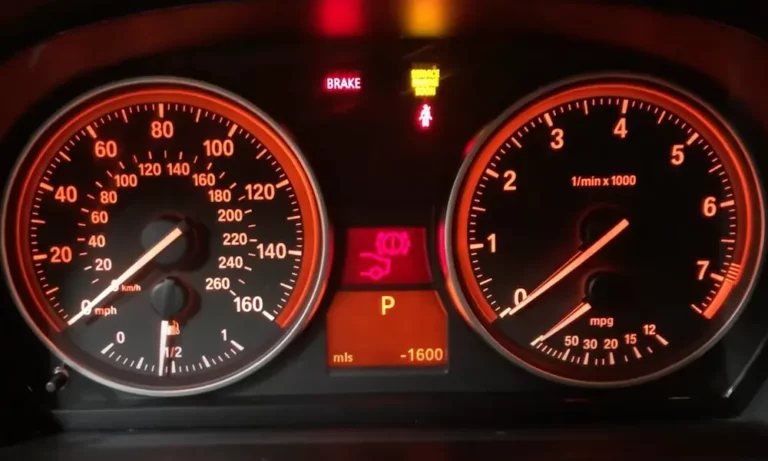
BMW’s sophisticated maintenance system monitors your brake pad wear through sensors that trigger warning lights when it’s time for replacement. These warnings appear as:
- Yellow brake pad warning (indicating service will be needed soon)
- Red brake warning light (indicating immediate attention required)
- “Brake Pad Wear” message on your iDrive display
These alerts are part of BMW’s Condition Based Service system that keeps track of when components need maintenance or replacement.
Pre-Reset Essentials: What You Need to Know
Before attempting any reset procedure, you must:
- Complete the actual brake service (replace worn pads)
- Replace the brake wear sensors (critical step!)
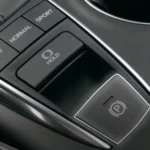
- Make sure the electronic parking brake is disengaged
- Disable Auto Hold function if your vehicle has it
Skipping these steps is the main reason why reset attempts fail. The brake wear sensor must be replaced when changing pads since it’s a one-time use component designed to break when pads wear to a certain thickness.
How to Reset Brake Light on BMW: Older Models (Pre-2019)
E90/E92/E93 Series (3 Series 2006-2011)
- Insert your key and press the start button twice (without your foot on the brake)
- Wait for all warning messages to clear from the display
- Press and hold the odometer reset button (the small black button in your instrument cluster)
- Hold for 5-10 seconds until the service menu appears
- Use the BC button on your turn signal stalk to navigate to “Brake Fluid” or “Front Brakes” or “Rear Brakes” (whichever needs resetting)
- Press and hold the BC button until “Reset?” appears
- Press and hold the BC button again until you see a small clock icon
- When the clock disappears, your reset is complete
- Turn the car off and restart to confirm the reset worked
This method works for most E-series BMWs including the popular E90 3 Series.
F Series Models (2011-2019)
For F10 5 Series, F30 3 Series, and similar F-chassis BMWs:
- Press the start button twice (without pressing brake)
- Wait for check control messages to disappear
- Press and hold the trip odometer reset button until the service menu appears (yellow service icon)
- Use the BC button on the turn signal stalk to navigate to the brake service item
- Press and hold the BC button until “Reset?” appears
- Release and press the BC button again, holding until a clock graphic appears
- Release when the reset is successful
This process works on most F-series vehicles including the F30 3 Series.
How to Reset Brake Light on BMW: Newer Models (2019+)
G-Series Models with iDrive 7
G20 3 Series, G30 5 Series, and other newer BMWs have a slightly different procedure:
- Make sure the parking brake is OFF and Auto Hold is disabled
- Get in the car, close the door, put on your seatbelt
- Press the start/stop button three times rapidly (without foot on brake)
- You’ll see “Diagnostic Mode Active” displayed
- Press the BC (Board Computer) button on the turn signal stalk
- Press and hold the BC button for approximately 15-20 seconds
- When the service reset menu appears, release the button
- Find the brake service item using the BC button
- When highlighted, press and hold the BC button until “Reset?” appears
- Press and hold again until a progress bar appears
- Wait for “Reset Successful” message
The G20 forum users confirm this method works well when all pre-conditions are met.
Latest Models with iDrive 8
For the newest BMWs with iDrive 8 (2023+ models):
- Ensure parking brake is released and Auto Hold is off
- Press the start button three times quickly
- Press the menu button on the turn signal stalk to enter the reset menu
- Navigate to “Service Required”
- Select “Brake Fluid” or “Brake Pads” as needed
- Press and hold the BC button to confirm the reset
- Wait for confirmation message
This process works for the latest G-chassis BMWs with iDrive 8.
Comprehensive Brake Reset Table by BMW Series
| BMW Series | Model Years | Reset Method | Special Notes |
|---|---|---|---|
| E90/E92/E93 | 2006-2011 | Odometer reset button + BC button | Look for yellow service icon |
| F30/F32/F33 | 2012-2019 | Odometer reset button + BC button | Must press start button twice |
| G20/G22 | 2019+ | Triple press start + long BC button hold | Requires diagnostic mode |
| G30/G31 | 2017+ | Triple press start + long BC button hold | Ensure e-brake is OFF |
| X3/X4 (G01/G02) | 2018+ | Triple press start + long BC button hold | Special menu navigation required |
| X5/X7 (G05/G07) | 2019+ | Triple press start + long BC button hold | Must disable Auto Hold |
| M models | Various | Same as base series | May require longer button press |
Troubleshooting Failed Reset Attempts
“Reset Unsuccessful” Messages
If your reset attempts fail, check these common issues:
- Parking brake engaged: The electronic parking brake must be completely OFF during reset. As confirmed by G05 owners, this is a frequent cause of failed resets.
- Auto Hold enabled: This feature must be disabled before attempting a reset on vehicles equipped with it.
- Incorrect sensor installation: The brake wear sensors must make proper contact. If improperly installed, the reset won’t work.
- Non-OEM sensors: Some aftermarket brake wear sensors don’t communicate properly with BMW’s systems. Using genuine BMW parts yields better results.
- Incomplete break-in period: Sometimes new brakes need a short driving period before the reset will take. Try driving for 5-10 minutes and attempt the reset again.
Using OBD Tools for BMW Brake Light Reset
When manual methods fail, an OBD2 scanner with BMW-specific software can be your next option:
- Basic Code Readers: Inexpensive OBD2 scanners ($20-50) typically CAN’T reset BMW brake service lights.
- BMW-Specific Scanners: Mid-range scanners with BMW software ($100-300) often can reset service lights including brake warnings.
- Professional Options: Tools like BimmerLink or Carly for BMW ($150-200 including adapter) can reset virtually all BMW service indicators.
According to Reddit discussions, these tools provide a more straightforward reset process than the manual methods, especially for newer vehicles.
Common Questions About BMW Brake Light Reset
Can I reset the brake light without replacing the brake pads?
You can attempt to reset the light, but it’s not recommended. The warning exists for safety reasons, and if your pads are worn below specifications, you should replace them immediately. BMW’s brake monitoring system is designed to ensure proper braking performance.
Do I need to replace the brake wear sensors?
Yes! This is critical. The brake pad sensors are designed to break once the pad wears to a certain point. Once broken, they must be replaced along with the pads. Attempting to reset without replacing a triggered sensor will usually fail, as demonstrated in this video.
Why does my brake warning light keep returning after reset?
If the warning returns shortly after reset, you likely have:
- A faulty new brake wear sensor
- Improperly installed sensor
- Another brake system issue like low brake fluid
- Actual brake pad wear below specifications
Can the dealer reset my brake light for free?
Most BMW dealerships will reset your brake light as part of their brake service, but many charge a diagnostic fee if you’ve had the work done elsewhere. According to BMW forums, fees range from $50-150 for this service.
BMW Brake Maintenance Best Practices
For the most reliable brake light reset experience:
- Use genuine parts: BMW OEM brake pads and sensors communicate best with your vehicle’s systems.
- Replace sensors with pads: Always replace the brake wear sensors when replacing pads – they’re one-time use components.
- Check for other issues: Look for low brake fluid or other brake problems that might trigger warnings.
- Follow proper break-in: New brake pads work best when properly bedded in – avoid hard stops for the first 100-200 miles.
- Document service: Keep records of your brake service dates and mileage for future reference.
Following these best practices ensures your BMW brake monitoring system works as designed, keeping you safe while avoiding unnecessary warning lights.
Video Tutorials for Visual Learners
If you’re more of a visual learner, these step-by-step video tutorials demonstrate the reset process for specific BMW models:
- For E90/E92/E93 Series: YouTube brake reset tutorial
- For F30 Series: F30 brake light reset guide
- For G30 5 Series: G30 brake service reset
- For X5 G05: BMW X5 brake light reset
These videos provide visual confirmation of the exact buttons and menu screens you’ll encounter during the reset process.
By following this comprehensive guide, you’ll be able to successfully reset your BMW brake light after proper maintenance. Remember that these warning systems exist for your safety – always address the underlying brake condition before attempting any resets.