Your car alarm is blasting. Your neighbors are staring. Your key fob is dead. Sound familiar? This guide walks you through every proven method to stop a car alarm without a key — fast. Stick around to the end, because one of these fixes will almost certainly solve your exact situation.
Why Your Car Alarm Goes Off Without Warning
Before you start yanking wires, it helps to know why this is happening.
Most modern alarms trigger for one of these reasons:
- Dead key fob battery — the most common culprit by far
- Weak car battery — low voltage confuses the security module
- Faulty door or hood sensor — a worn switch sends a false “intrusion” signal
- Too many keys on your keyring — seriously, this causes signal interference between transponder chips
- Failed security control module — Honda Ridgeline owners from 2017–2019 know this pain well; Honda’s own technical service bulletin confirmed that internal module hardware failures caused phantom alarm triggers on those vehicles
Understanding the root cause helps you pick the right fix instead of guessing.
Method 1: Use the Physical Key in Your Door Lock
This is your first move — it’s fast, free, and works on most vehicles.
Here’s the thing most people forget: even keyless cars have a physical lock cylinder on the driver’s door. On newer models, a plastic cover sometimes hides it. Pop that cover off and you’ll find the keyway underneath.
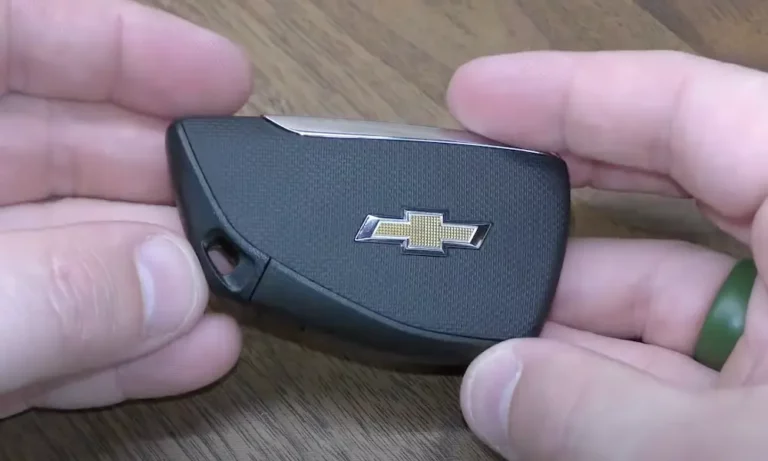
Your key fob also hides a physical blade inside it. Look for a small sliding release button on the back of the fob and pull the blade out.
Here’s what to do:
- Insert the physical key blade into the driver’s door lock
- Turn it to the unlock position
- Hold it there for 2–3 seconds
That sustained turn activates a microswitch inside the door latch. That microswitch sends a signal directly to your Body Control Module confirming a legitimate entry — and the alarm shuts off.
If it’s still screaming, try this sequence: turn the key toward the front of the car twice, then toward the rear twice. This rapid lock-unlock pattern forces the security logic to reset.
Once you’re inside, insert the key in the ignition and turn it to the ON position immediately. This fully syncs the modules and stops the alarm from rearming itself.
Method 2: Enter Your PIN Code (If Your Car Has One)
Some factory security systems — and most aftermarket alarms — include a hidden Valet button and a PIN override.
This button is usually a small push-button tucked beneath the dashboard or near the steering column. The PIN is typically 2–4 digits you set when you bought the car.
To use it:
- Turn the ignition to ON
- Press the Valet button the number of times matching your first digit
- Turn the ignition OFF, then back ON to confirm
- Repeat for each remaining digit
No PIN memorized? Check your original alarm paperwork or the glove box — installers often tuck a small card in there.
Method 3: The 30-Minute Ignition Relearn (GM Passlock Systems)
If you drive a GM vehicle — Chevy, GMC, Buick, Cadillac — and your security light is flashing, your Passlock system may have lost its programmed voltage reading after a battery issue.
This fix takes 30 minutes, but it works.
The GM Passlock relearn procedure works like this:
- Insert your key and turn the ignition to ON (don’t crank the engine)
- Watch the security light — it’ll stay on
- Wait exactly 10 minutes until the security light turns off
- Turn the ignition completely OFF
- Wait 10 seconds
- Repeat steps 1–5 two more times (three cycles total)
After three cycles, your Body Control Module relearns the sensor’s correct voltage and stores it permanently.
Critical warning: Don’t open a door, let the battery drop, or remove the key during those 10-minute windows. Any interruption resets the entire 30-minute process back to zero.
Method 4: Bypass the Aftermarket Alarm’s Valet Switch
If your car has an aftermarket system — Viper, Avital, Python — the process is different. These systems operate as standalone modules spliced into your factory wiring. Turning your key in the door does nothing for them.
You need the Valet switch.
Installers usually hide it in one of these spots:
- Under the lower dashboard panel
- Along the driver’s kick panel
- Inside or near the fuse box
To use it:
- Get inside the car (yes, the alarm will scream)
- Insert your key and turn ignition to ON
- Within 10 seconds, press and release the Valet button once
The siren stops, the starter relay re-engages, and a solid LED confirms the system is in standby mode.
No Valet Switch? Here’s the Workaround
Sometimes installers skip mounting the switch. If that’s your situation, locate the alarm’s central control module under the dash — it’s usually a small black box wrapped in electrical tape.
Look for the blue connector port on the module. That’s the universal Valet switch input across all Directed Electronics brands (Viper, Avital, Python).
Using a paperclip or short piece of copper wire, briefly bridge the two metal terminals inside that port. That closes the circuit and mimics a button press — instant override, no switch needed.
Method 5: Pull the Alarm Fuse
Still going? Pull the fuse.
This is precise, targeted, and won’t scramble the rest of your car’s electronics.
Check two places for your fuse boxes:
- Engine bay — usually near the battery
- Interior cabin — beneath the steering column or behind the glove box
Consult your owner’s manual or read the diagram printed inside the fuse box lid. Look for fuses labeled “Alarm,” “Security,” or “Horn.”
Use needle-nose pliers or a plastic fuse puller to extract the specific fuse. The alarm stops immediately. Your radio, engine, and everything else keeps running normally.
Store that fuse safely. Don’t reinstall it until you’ve fixed the underlying issue.
Method 6: Disconnect the Battery (Last Resort)
This works every time — but it comes with real consequences. Use it only when nothing else does.
How to do it safely:
- Put on eye protection and insulated gloves
- Open the hood and locate the battery
- Grab a 10mm wrench
- Target the negative terminal (marked with a minus sign, usually has a black cover)
- Turn counter-clockwise to loosen the nut
- Wiggle the cable clamp off the post and keep it away from the battery
- Wait at least 60 seconds before reconnecting
Always remove the negative terminal first. If you accidentally touch a wrench on the positive terminal to the car’s metal frame, you’ll create a short circuit — and potentially start a fire.
The Hidden Cost of Disconnecting Your Battery
Here’s what the internet usually leaves out: disconnecting your battery wipes your car’s OBD-II readiness monitors.
These monitors are internal self-tests your car’s computer runs continuously on your emissions systems — catalytic converter, oxygen sensors, EVAP system, and more. States like Ohio and New York require most monitors to show “Ready” before your car passes emissions testing. California is even stricter — newer gas vehicles may only get one incomplete monitor allowed.
After disconnecting your battery, you’ll need to complete a full OBD-II drive cycle to reset these monitors. That means:
| Monitor | What It Tests | How to Trigger It |
|---|---|---|
| Catalytic Converter | Exhaust scrubbing efficiency | Steady highway driving at 55–65 mph for 10+ minutes |
| Oxygen Sensors | Fuel mixture accuracy | Mixed acceleration and brake-free deceleration |
| EVAP System | Fuel vapor leaks | Cold start; fuel tank between 35–85% full |
| EGR System | NOx emission reduction | Stop-and-go driving with multiple idle periods |
The EVAP monitor is the trickiest — it won’t even initiate if your fuel tank is below 35% or above 85%. So before you disconnect anything, know what you’re signing up for.
OEM vs. Aftermarket Alarms: Key Differences at a Glance
Not sure what type of system you have? This comparison helps.
| Feature | Factory (OEM) System | Aftermarket (Viper, Avital, etc.) |
|---|---|---|
| How it’s built in | Integrated into BCM/ECM from factory | Spliced in as a standalone module |
| How it stops the engine | Software commands cut fuel delivery | Physical relay interrupts starter circuit |
| Manual override method | Door lock cylinder or ignition cycling | Valet button or direct module bridging |
| Environmental adaptation | Fixed factory sensors | Nuisance Prevention Circuitry reduces false triggers |
| Response to key in door | Usually works | Doesn’t work — needs separate bypass |
The Legal Side: Your Alarm Is Someone Else’s Nightmare
A car alarm that won’t stop isn’t just annoying — it can be illegal.
Under federal FMVSS 114 regulations, every vehicle must have a key-locking system that prevents unauthorized startup. That’s the legal backbone behind every immobilizer on the road.
But state and local noise ordinances govern what your alarm sounds like to everyone else. Most cities cap continuous alarm sounding at 3–5 minutes before it becomes a violation. In Alexandria, Virginia, for example, daytime commercial zones allow 65 decibels — but nighttime residential limits drop to 60 decibels. A car alarm regularly hits 100+ decibels.
Fines for a malfunctioning alarm typically start around $100 for a first offense and climb to $500 or more for repeat incidents. In extreme cases, authorities can legally tow your vehicle to silence it.
Fix it fast. Your neighbors will thank you, and so will your wallet.
If Your Key Fob Just Needs a New Battery
Before assuming the worst, try this: most key fobs use a CR2032 coin battery available at any drugstore for under $5. Pop the fob open with a coin, swap the battery, and test it.
If the fob works again, every fix above becomes unnecessary. It’s always worth trying the simple thing first.