Your one-year trial just expired, and now your key fob won’t start the car. Sound familiar? Toyota Remote Connect cost more than most owners expected — and the pricing structure is a lot more complicated than the dealership let on. Here’s exactly what you’re paying for, what you lose if you don’t, and whether it’s worth it.
What Is Toyota Remote Connect?
Toyota Remote Connect lets you control your vehicle from your phone. Lock and unlock doors, start the engine, check vehicle status, activate hazard lights, and track location — all from the Toyota App.
Sounds simple. The billing structure? Not so much.
Your model year determines everything. Pre-2023 models get a straightforward, standalone subscription. Newer models get bundled into packages alongside streaming music and cloud navigation — whether you want those extras or not.
Toyota Remote Connect Cost by Model Year
Here’s the clearest breakdown of what you’ll pay based on your vehicle’s generation:
| System Generation | Model Years | Standalone Option | Monthly Cost | Annual Billing |
|---|---|---|---|---|
| Legacy System | 2022 and earlier | ✅ Available | $8/month | ✅ $80/year |
| Next-Gen System | 2023 and newer | ❌ Not available | $15–$25/month | ❌ Not available |
If you drive a 2022 or older Toyota, you’re in a better spot. Eight dollars per month (or eighty dollars annually) gets you Remote Connect on its own. You don’t have to buy navigation or streaming to get remote start.
Drivers on the 2023+ platform don’t get that option. You’re picking a bundle.
The 3 Bundle Plans for 2023+ Toyotas
On the next-generation Toyota Audio Multimedia system, Remote Connect comes bundled into one of three monthly packages:
| Package | What’s Included | Monthly Price |
|---|---|---|
| Music Lover | Remote Connect + Apple Music & Amazon Music streaming via the car’s cellular connection | $15/month |
| Go Anywhere | Remote Connect + Cloud Navigation, live Destination Assist agents, Intelligent Assistant voice control | $15/month |
| Premium | Remote Connect + everything in Music Lover AND Go Anywhere | $25/month |
Wi-Fi Connect — an AT&T-powered in-car hotspot for up to five devices — is an add-on available on any plan for an extra $25/month.
The bottom line: on a new Toyota, you’re spending at least $15/month just to keep remote start working. That’s $180 per year, minimum. And the annual discount that older owners got? Gone on newer platforms.
The Key Fob Problem Nobody Warns You About
Here’s the part that genuinely catches people off guard.
On Toyotas from 2018 onward, your physical key fob doesn’t operate independently. Pressing the lock button twice and holding it on the third press — that classic remote start sequence — routes through Toyota’s telematics system. The car checks for an active subscription before it does anything.
When your Remote Connect trial ends, the key fob loses remote start too. Not just the app. The fob.
You’ll still lock and unlock doors. But that’s it.
The app-based remote start works anywhere with cellular coverage. The fob only works within roughly 80 feet of the vehicle. Either way, both require an active subscription to start the engine.
A few things must be true before remote start works via either method:
- All doors must be locked
- Hood and trunk must be fully closed
- No key fob left inside the cabin
- Manual transmission vehicles can’t use remote start at all (safety restriction), though they can still use other Remote Connect features
How Long Is the Free Trial?
Trial lengths vary by service, trim level, and model year. Here’s what to expect:
| Service | Trial Length | Notes |
|---|---|---|
| Safety Connect | Up to 10 years | Cellular network dependent |
| Service Connect | Up to 10 years | Cellular network dependent |
| Remote Connect | 1 year | 3 years on bZ4X |
| Drive Connect | 1 year | 3 years on bZ4X |
| Wi-Fi Hotspot | 30 days or 3GB data | Whichever comes first |
| Integrated Streaming | 1 month | — |
One important catch: lower trims like L and LE on some models don’t get a complimentary Remote Connect trial at all. You pay from day one. Higher trims — SE, XSE, Limited, Platinum — get the standard 12-month trial.
Also worth knowing: trials are tied to the VIN. If you buy a used Toyota, you inherit whatever trial time remains. You can’t add trial years after the original sale. Once it’s gone, you’re on a paid plan.
How to Activate Remote Connect
Setting up is straightforward. Here’s how it works:
- Download the Toyota App from the App Store or Google Play
- Create or log into your Toyota account
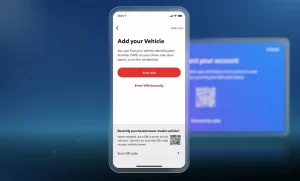
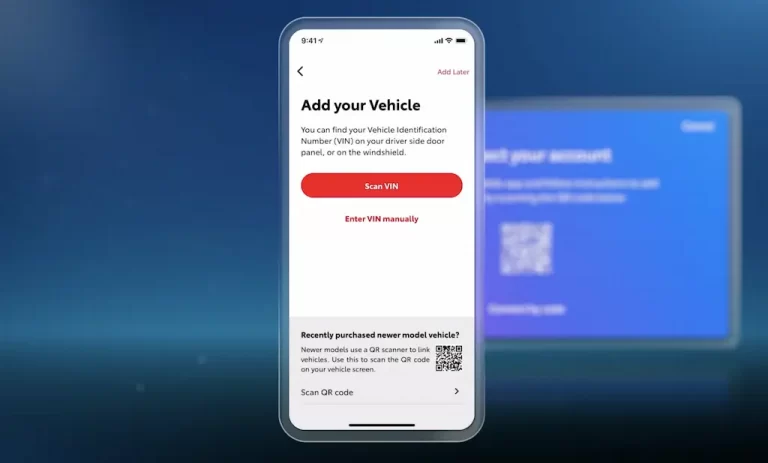
- Add your vehicle using the 17-character VIN from your dashboard or door frame
- Enroll in the trial when the app prompts you — this starts the pairing process
- Get the 6-digit authorization code sent to your email or phone
- Sit inside the car, power on the multimedia screen, navigate to Apps → Authorization, enter the code, and confirm
That last step is what most people miss. You must enter the code inside the vehicle to link your app to the car’s Data Communication Module.
How to Cancel Remote Connect
You’ve got a few ways to cancel:
Through the Toyota App:
Tap your vehicle image → Subscriptions → Cancel → Cancel All Subscriptions. Note: you can’t cancel individual trials this way. Canceling via the app terminates all active trials at once.
By phone:
Call the Toyota Brand Engagement Center at 1-800-331-4331. A rep can cancel billing, remove your vehicle, or delete your account entirely.
Via the SOS button:
Press the red SOS button on the overhead console. The live agent who answers can process an immediate opt-out from connected services.
Via privacy settings:
In the Toyota App, go to privacy settings and decline the Connected Services Master Data Consent. This cuts off data transmission right away.
Removing Someone Else’s Remote Access
In situations like divorce or repossession, Toyota has a specific legal process called Disconnect Remote Vehicle Access. You can’t do this through the app.
Call 1-800-331-4331 and provide legal documentation — a certified title in your name, a dissolution decree, a court order, or a restraining order. Toyota reviews it and within two business days, they terminate all previous users’ remote access so you can start fresh.
Is Toyota Remote Connect Worth the Cost?
That depends on how long you plan to keep the car — and whether you care about the extras bundled in.
The aftermarket math is compelling. A quality aftermarket remote start system runs $300–$700 installed, with zero monthly fees. At $15/month on Toyota’s plan, you hit break-even in under two years. For anyone keeping their Toyota five years or more, an aftermarket kit almost always wins financially.
How does Toyota stack up against competitors?
- Tesla includes remote climate, lock/unlock, vehicle location, and charging schedules free for eight years. Their $10/month premium plan covers in-car Wi-Fi and streaming — not basic remote access.
- Subaru Starlink runs $99/year or $10/month, with remote start available as a security add-on — making Toyota’s $15–$25/month one of the pricier options in mainstream automotive.
The Privacy Trade-Off Worth Knowing
Keeping Remote Connect active means your car’s Data Communication Module runs continuously. It captures and transmits GPS location, speed, acceleration, braking force, and seatbelt data back to Toyota’s servers.
Industry research shows this data gets shared with third-party analytics firms and insurance databases like LexisNexis — which can push your auto insurance premium up based on your driving behavior. There’s also exposure to data breaches and legal subpoenas.
The only full opt-out is requesting a shutdown of the Data Communication Module entirely. But that kills everything — SiriusXM, navigation, the app, and key fob remote start. You’re choosing between convenience and privacy, with no middle ground.
One More Risk: Network Sunsets
Your “up to 10 years” Safety Connect and Service Connect trials come with a hidden asterisk. Toyota explicitly labels these as 4G network dependent. When carriers retire LTE infrastructure for newer standards — exactly like what happened to 3G devices across 2017 and older Toyota models — Toyota has no obligation to upgrade your hardware.
Your remote start, vehicle tracking, and automatic emergency alerts are all tied to the life of the cellular towers supporting your car’s modem. When that network retires, the features go with it — paid subscription or not.
Plan your long-term Toyota ownership with that clock in mind.