Is your Acura key fob giving you trouble? There’s nothing more frustrating than pressing those buttons and getting zero response from your vehicle. Whether you’re dealing with an intermittent issue or a completely dead fob, you’ve got options beyond a costly dealership visit. Let’s dive into the most common reasons your Acura key fob isn’t working and the solutions you can try right now.
The Most Common Culprit: Battery Problems
When your Acura key fob isn’t working, a dead or weak battery is usually to blame. Acura key fobs typically use CR2032 lithium batteries, which generally last 1-2 years depending on usage.
Signs your key fob battery is failing:
- You need to press buttons multiple times
- The fob only works at very close range
- The LED light on the fob is dim or doesn’t light up
- Your car displays “key battery low” warnings
How to Replace Your Acura Key Fob Battery
Replacing the battery is straightforward and takes less than five minutes:
- Slide the small lever on the back of your fob and pull out the emergency key
- Use the metal key (or a small flathead screwdriver) to carefully pry open the fob where the key was stored
- Remove the old CR2032 battery and note its orientation
- Insert the new battery with the “+” side facing up
- Press the fob halves back together until you hear two clicks
- Reinsert the emergency key
After replacing the battery, test the fob by pressing the lock or unlock button. If it works, you’ll see the LED flash and your car should respond.
Battery Contact Issues
Sometimes the problem isn’t the battery itself but the connection between the battery and the fob’s contacts.
Check and Clean the Contacts
The side contact prong inside your key fob can lose tension over time, creating an unreliable connection with the battery. To fix this:
- Open your key fob as described above
- Examine the metal contacts for:
- Corrosion (greenish buildup)
- Dirt or lint
- Bent or flattened contact prongs
If the contacts look dirty, clean them with a cotton swab lightly dampened with isopropyl alcohol. For weak contact prongs, gently bend the side contact outward slightly to restore proper tension against the battery edge.
Water Damage
Though Acura key fobs have some water resistance, they’re not waterproof. If your fob got wet, you may need to dry it out:
- Open the fob immediately
- Remove the battery
- Pat everything dry with a paper towel
- Leave the components separated in a dry place for 24 hours
- Reassemble and test
For severe water exposure, you might need a replacement fob as internal circuits may be permanently damaged.
Programming Issues
Sometimes your key fob stops communicating with your car due to desynchronization or programming problems.
Reprogramming Options for Different Acura Models
For Older Models with Key Ignition:
- Insert your key in the ignition
- Turn to the ON position (don’t start the engine)
- Within 4 seconds, press any button on your key fob
- Turn the key to OFF
- Repeat steps 1-4 two more times (three cycles total)
- On the final cycle, after pressing the fob button, listen for the door locks to cycle – this confirms successful programming
- For additional remotes, press the lock button on each fob within 10 seconds of the final confirmation
For Push-Button Start Models:
Unfortunately, most newer Acura models with push-button start cannot be reprogrammed without dealer equipment. If battery replacement doesn’t fix your issue, you’ll likely need to visit an Acura service center.
Emergency Starting When Your Fob Is Dead
If your fob’s battery dies completely but you need to drive your car:
- Remove the emergency key from the fob and manually unlock your door
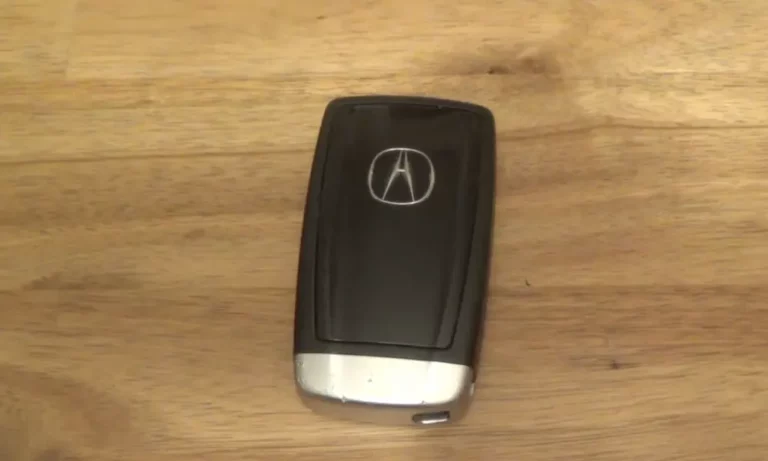
- Once inside, press and hold the back side (logo side) of your key fob directly against the Engine Start/Stop button
- While holding the fob against the button, press it as you normally would (with your foot on the brake)
- The car will recognize the embedded chip in the fob and start even with a dead battery
This method works because the chip in your key fob doesn’t need battery power to function when it’s very close to the start button.
Physical Damage
Key fobs take a beating – they’re dropped, sat on, and sometimes even run through the washing machine. If your fob has physical damage, it might affect functionality.
Signs of physical damage:
- Cracked case
- Loose or sticky buttons
- Internal components visible or rattling
- Battery compartment won’t close properly
For severely damaged fobs, replacement is often the only solution. You can get a new fob from your Acura dealer or sometimes find less expensive aftermarket options that will need professional programming.
Signal Interference
Modern life is full of wireless signals that can occasionally interfere with your key fob:
- Other key fobs nearby
- Strong radio transmitters
- Cell phone towers
- Electronic devices in your home or office
If your fob works inconsistently, try moving to a different location away from potential interference sources before concluding the fob itself is faulty.
Range Issues
Has your fob’s range suddenly decreased? This could indicate:
- A weakening battery (even if not completely dead)
- Environmental interference
- Deteriorating internal components
Testing Range Problems
To determine if your fob’s range has decreased:
- Replace the battery with a fresh, high-quality CR2032
- Stand at various distances from your vehicle
- Note the maximum distance at which the fob reliably works
Normal range for most Acura key fobs is approximately 30-60 feet in open areas. If your range is significantly less than this after replacing the battery, there may be an internal component issue.
Vehicle-Side Problems
Sometimes the issue isn’t with the fob but with your vehicle’s receiver system.
Signs of vehicle receiver problems:
- Multiple fobs stop working simultaneously
- Fob works intermittently regardless of battery condition
- Vehicle displays “No Remote Detected” errors even with functioning fobs
For vehicle-side issues, diagnostics with specialized equipment is usually required. This is when a visit to your Acura dealer or a qualified automotive locksmith becomes necessary.
Button Wear
The rubber buttons inside your key fob can wear out over time, especially the most frequently used ones (like unlock). If pressing certain buttons feels different or requires more force, the internal contact pad might be worn.
To check for button wear:
- Open the key fob
- Examine the rubber button pad for any signs of wear, cracks, or flattening
- Look at the circuit board contact points where the buttons press
Unfortunately, worn buttons usually mean you’ll need a new key fob or at least a replacement button pad if available.
Temperature Sensitivity
Extreme temperatures can affect key fob performance. In very cold weather, battery output naturally decreases, which may cause your fob to work inconsistently.
If your fob isn’t working in cold weather:
- Warm the fob in your hands for a few minutes
- Try again once it’s warmer
- Consider keeping your fob in an inner pocket close to your body in cold weather
When to Replace Your Key Fob
Consider replacing your Acura key fob when:
- It shows physical damage affecting functionality
- Multiple repair attempts have failed
- Internal electronic components have failed
- The cost of repairs approaches replacement cost
Replacement Options
- Acura Dealership: Most expensive but guarantees compatibility and includes programming
- Automotive Locksmith: Often 30-50% cheaper than dealers with similar expertise
- DIY with Aftermarket Fob: Lowest cost but requires proper programming, which may still need professional help for newer models
Preventive Maintenance for Your Acura Key Fob
To extend your key fob’s life:
- Replace the battery annually before it fails completely
- Keep the fob in a protective case
- Avoid exposure to extreme temperatures
- Don’t get it wet
- Handle it gently to prevent drops and impacts
By following these tips and troubleshooting steps, you’ll be able to resolve most Acura key fob issues without an expensive trip to the dealership. For newer push-button start models, however, professional programming services may be unavoidable for certain problems.
Remember that a working key fob isn’t just about convenience—it’s an essential security component of your Acura. Taking good care of it saves both money and frustration in the long run.